Community listing page, reviews here may not be monitored by the author.
Packed Packs


Pack resource and data packs into profiles with multiple selection, drag and drop, and extended mouse and keyboard controls.

Community voices
Reviews
No reviews yet. Be the first to review this project!
Get it on
Available Platforms
Compatibility
Supported Environments
Runs entirely on the client. Works on vanilla servers.
About
Project Details
For authors
Embed Badge
If you're the author of this project, you can embed a live badge anywhere that supports HTML or Markdown. It updates automatically whenever ratings change.
Use HTML for any page that supports it, or Markdown for README files and Markdown-based descriptions.
Identifiers
Platform IDs
About
Description
📦 Packed Packs
Pack resource and data packs into profiles with multiple selection, drag and drop, and extended mouse and keyboard controls.
✨ Features
- Save and load custom profiles.
- Select multiple packs at once.
- Drag and drop selection between columns.
- Context Menus.
- Additional Folders.
- Folder Packs.
- Search by title.
- Filter out incompatible packs.
- Sort alphabetically or by last updated.
- Mouse and keyboard controls.
- Configuration.
- Developer Mode.
- Java API
- Explicit compatibility with certain mods.
- History (undo and redo).
📂 Additional Folders
- Add extra folders for pack discovery.
- Configure in
config/packed_packs.jsonby adding paths under theadditionalFoldersarray insideresourcepacksordatapacks. - If the array doesn’t exist, create it manually or open and close the Packed Packs screen to update the config.
- Paths can be absolute or relative to the game directory.
- Correctly added folders appear as a context menu option under Open Pack Folder.
- Requires game restart to apply.
📂📦 Folder Packs
- Any folder in the root pack directory containing packs, without a
pack.mcmeta, will be treated as a folder pack. - Folder packs behave like regular packs and can be moved between rows and columns to toggle multiple packs at once.
- They can be opened to view and reorder their contents. The order is saved to
packed_packs.folderpack.jsonin the folder root. - Add a
pack.pngat the folder root to set a custom icon.
🖱️ Mouse Controls
- Open Context Menu — right click
- Select range — hold
Shiftand click - Add/remove from selection — hold
Ctrland click - Transfer single entry quickly — double click
- Undo — click backwards side button
- Redo — click forwards side button
⌨️ Keyboard Controls
- Navigate entries —
↑|↓ - Navigate out of entries —
Tab - Transfer selection —
Space|Enter - Select range —
Shift+↑/↓ - Select all —
Ctrl+A - Move selection —
Ctrl/Alt+↑/↓ - Undo —
Ctrl+Z - Redo —
Ctrl+Shift+Z|Ctrl+Y - Open folder pack —
Enter - Close folder pack —
Escape - Delete file —
Delete - Rename file —
Ctrl+R|F2(if not bound to screenshot) - Open file —
Ctrl+Enter - Show in file manager —
Alt+Shift+R - Toggle profiles sidebar —
Ctrl+` - Switch between default and no profile —
F1 - Refresh packs —
F5 - Focus search bar — type any character
⚙️ Configuration
- Apply resource packs automatically on close.
- Replace the default resourcepack & datapack screens.
- Remove the red background on incompatible packs.
- Remember the last viewed profile when reopening the screen.
🚀 Developer Mode
- Toggle developer mode — `Ctrl` + `Shift` + `I` | `F12`
- Additional options will appear in the context menu when in developer mode.
- Preferences: Toggle the visibility of certain widgets.
- Lock Profiles: Locked profiles cannot be deleted, renamed, or modified.
- Override Pack Properties:
- Overrides are configured per profile and apply only to that profile unless set as default.
- Override the required property of packs. Also allows disabling required packs.
- Override the position property of packs. Also allows moving fixed packs.
- Hide packs.
- Default Profiles:
- Overrides from the default profile are enabled globally for all profiles and even without one, including the original screen.
- Enabled packs under the default profile are automatically marked as compatible.
- Default profiles load automatically in the following cases:
- Resource Packs: when the `options.txt`, or in newer versions the `config/packed_packs/__version.json`, is missing..
- Users that updated from before the `_version.json` file was added may only load the default profile when the `options.txt` is missing. This can be configured in the right-click context menu of the default profile.
- Data Packs: when creating a new world.
- Resource Packs: when the `options.txt`, or in newer versions the `config/packed_packs/__version.json`, is missing..
- Pack Aliases: Add aliases to Pack IDs
- Designed to help modpack devs migrate resource/data packs when updates are needed without affecting the user's configured pack selection and order.
- Only used if the pack is selected but doesn't exist. Matching starts from the top of the alias map and resolves to the first match, see the
config.meta.jsonfile. - Supports regex (must be prefixed with
regex:), the text color will change in the Edit Aliases dialog if done correctly. - Exact matches always take priority over regex matches, regardless of their position in the alias map (e.g., a pack ID of
file/test-v1.2will always match"file/test-v1.2": "file/test-v1.4"over"regex:file\\/test-v\\d*": "file/test-v2"). - Aliases can also map to a regex value (must be prefixed with
regex:), which will attempt to match with any available pack. This can only be done from theconfig.meta.jsonfile. - Aliases are never cleared automatically, even if it points to a pack that no longer exists. They are only removed manually from the in-game GUI or the config file.
- It is generally not recommended to use on data packs as it could break worlds. Test thoroughly.
♨️ Java API
The Java API, designed as an optional dependency, allows mods to extend functionality or add compatibility with Packed Packs. This includes subscribing to various events and registering custom preferences to add configurable widgets at certain positions of the screen.
You can find example implementations in the testmod, and in the compat package of the **main** source set.
You may also view the javadocs from the source code.
Visit the wiki page for more details.
🔗 Compatibility
Explicit compatibility is added for:
- Resourcify
- Respackopts
- VTDownloader
- Entity Texture Features
- Polytone
Submit an issue if the above mods have become incompatible. Make sure to verify that the correct mod version is used for the target minecraft version, and if the issue only occurs with Packed Packs installed.
Note: Compatibility for the above mods were added before the Java API was made. It would be better for other mods to make use of the Java API instead for better long term compatibility. If the above mods make enough breaking changes, it may have to be dropped.
LTS versions: 1.21.1, 1.21.11, 26.1, 26.2
📦 Packed Packs
Pack resource and data packs into profiles with multiple selection, drag and drop, and extended mouse and keyboard controls.
✨ Features
- Save and load custom profiles.
- Select multiple packs at once.
- Drag and drop selection between columns.
- Right click context menu for file operations and other options.
- Search by pack title.
- Sort packs alphabetically or by date updated.
- Filter out incompatible packs.
📂 Additional Folders
- Add extra folders for pack discovery.
- Configure in
config/packed_packs/config.jsonby adding paths under theadditionalFoldersarray insideresourcepacksordatapacks. - If the array doesn’t exist, create it manually or open and close the Packed Packs screen to update the config.
- Paths can be absolute or relative to the game directory.
- Correctly added folders appear as a context menu option under Open Pack Folder.
- Requires game restart to apply.
📂📦 Folder Packs
- Any folder without a
pack.mcmetawill be treated as a folder pack. - Add a
pack.pngat the folder root to set a custom icon. - Folders can be nested.
- They can be opened to view and reorder their contents. The order is saved to
packed_packs.folderpack.jsonin the folder root. - Folder packs can be locked to make them behave like regular packs which can be moved between rows and columns.
These are also known as
modules.- Children cannot be moved outside locked folder packs. Locking a folder pack will automatically recall its children.
- Locked folder packs will also lock all descendants that are folders.
- Newly discovered folders can be made locked by default from the options menu.
- Built-in packs can be added inside folder packs when specified in
packed_packs.folderpack.json.- Example:
{ "module": false, "packIds": [ "continuity:default", "examplenamespace:examplepath" ] } - Note: This can only be done outside the Packed Packs screen as the
packed_packs.folderpack.jsonfile is only loaded once on enter to prevent overwriting unsaved state.
- Example:
🖱️ Mouse Controls
| Open Context Menu | right click |
| Select range | hold Shift and click |
| Add/remove from selection | hold Ctrl and click |
| Quick transfer | double click |
| Undo | click backwards side button |
| Redo | click forwards side button |
⌨️ Keyboard Controls
| Navigate entries | ↑, ↓ |
| Navigate out of entries | Tab |
| Transfer selection | Space, Enter |
| Select range | Shift + ↑ / ↓ |
| Select all | Ctrl + A |
| Move selection | Ctrl / Alt + ↑ / ↓ |
| Undo | Ctrl + Z |
| Redo | Ctrl + Shift + Z, Ctrl + Y |
| Open folder pack | Enter |
| Close folder pack | Escape |
| Delete file | Delete |
| Rename file | Ctrl + R, F2 (if not bound to screenshot) |
| Open file | Ctrl + Enter |
| Show in file manager | Alt + Shift + R |
| Toggle profiles sidebar | Ctrl + ` |
| Switch between default and no profile | F1 |
| Refresh packs | F5 |
| Focus search bar | Ctrl + F, Ctrl + K |
⚙️ Configuration
- Apply resource packs automatically on close.
- Replace the default resourcepack & datapack screens.
- Remove the red background on incompatible packs.
- Make folder packs locked by default.
- Remember the last viewed profile when reopening the screen.
🚀 Developer Mode
- Toggle developer mode — Ctrl + Shift + I | F12
- Additional options will appear in the context menu when in developer mode.
- Preferences: Toggle the visibility of certain widgets.
- Lock Profiles: Locked profiles cannot be deleted, renamed, or modified.
- Override Pack Properties:
- Overrides are configured per profile and apply only to that profile unless set as default.
- Override the required property of packs. Also allows disabling required packs.
- Override the position property of packs. Also allows moving fixed packs.
- Hide packs.
- Default Profiles:
- Overrides from the default profile are enabled globally for all profiles and even without one, including the original screen.
- Enabled packs under the default profile are automatically marked as compatible.
- Default profiles load automatically in the following cases:
- Resource Packs: when the
options.txtor theconfig/packed_packs/__version.json, is missing. - Data Packs: when creating a new world.
- Resource Packs: when the
- Copy to Clipboard: Copy the select pack's ID.
- Pack Aliases: Add aliases to Pack IDs
- Designed to help modpack devs migrate resource/data packs when updates are needed without affecting the user's configured pack selection and order.
- Only used if the pack is selected but doesn't exist. Matching starts from the top of the alias map
and resolves to the first match, see the
config.meta.jsonfile. - Supports regex (must be prefixed with
regex:), the text color will change in the Edit Aliases dialog if done correctly. - Aliases can also map to a regex value (must be prefixed with
regex:), which will attempt to match with any available pack. This can only be done from theconfig.meta.jsonfile. - Exact matches always take priority over regex matches, regardless of their position in the alias map (e.g., a pack
ID of
file/test-v1.2will always match"file/test-v1.2": "file/test-v1.4"over"regex:file\\/test-v\\d*": "file/test-v2"). - Aliases are never cleared automatically, even if it points to a pack that no longer exists. They are only removed manually from the in-game GUI or the config file.
- It is generally not recommended to use on data packs as it could break worlds. Test thoroughly.
♨️ Java API
The Java API, designed as an optional dependency, allows mods to extend functionality or add compatibility with Packed Packs. This includes subscribing to various events and registering custom preferences to add configurable widgets at certain positions of the screen.
You can find example implementations in the testmod, and in the compat package of the main source set.
You may also view the javadocs from the source code.
Visit the wiki page for more details.
🔗 Compatibility
Explicit compatibility is added for:
- Resourcify
- Respackopts
- VTDownloader
- Entity Texture Features
- Polytone
Submit an issue if the above mods have become incompatible. Make sure to verify that the correct mod version is used for the target minecraft version, and if the issue only occurs with Packed Packs installed.
Note: Compatibility for the above mods were added before the Java API was made. It would be better for other mods to make use of the Java API instead for better long term compatibility. If the above mods make enough breaking changes, it may have to be dropped.
LTS versions: 1.21.1, 1.21.11, 26.1, 26.2, 26.3
Screenshots
Gallery
-
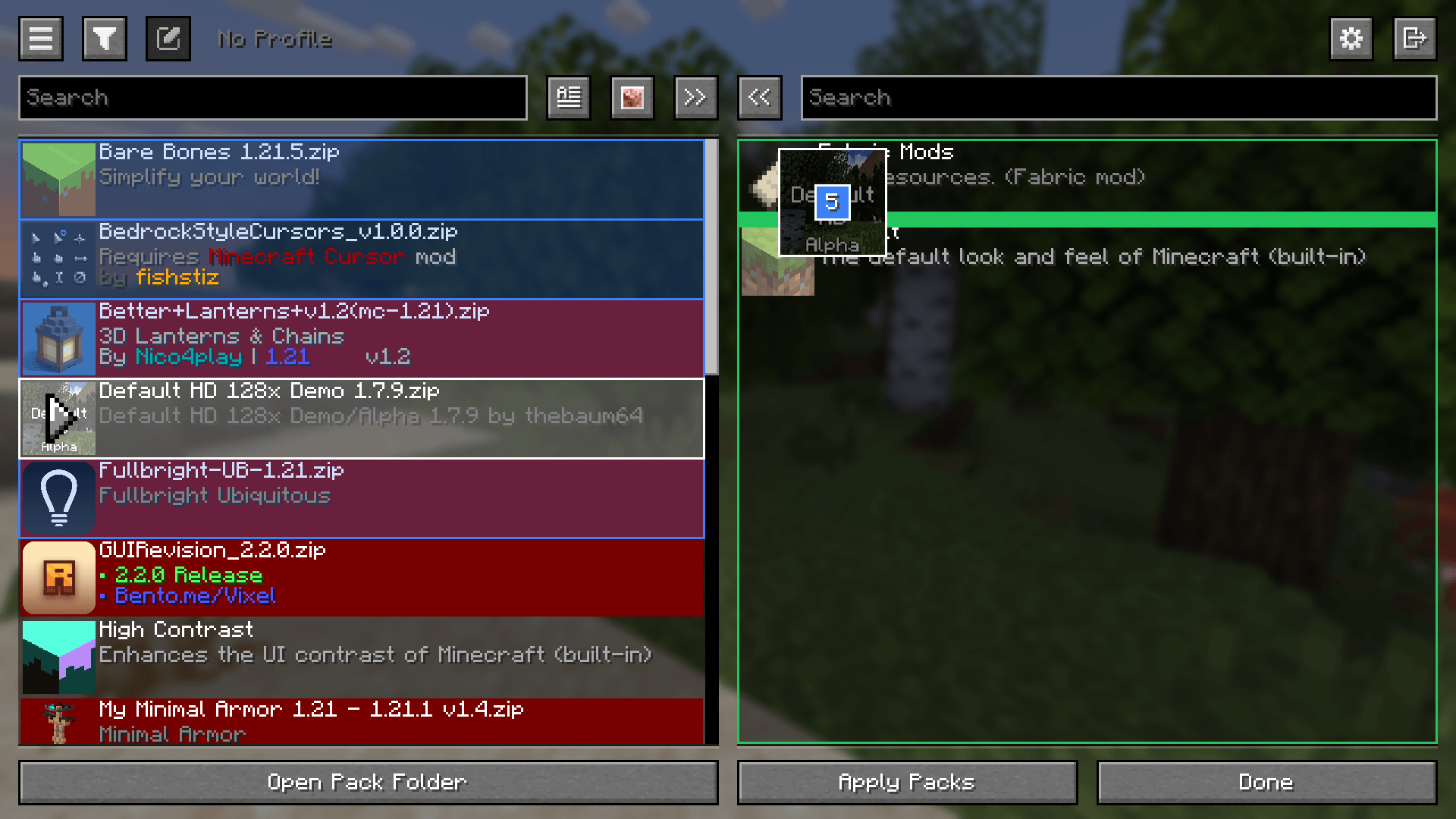 Packed Packs Screen Dragging and dropping multiple packs
 -
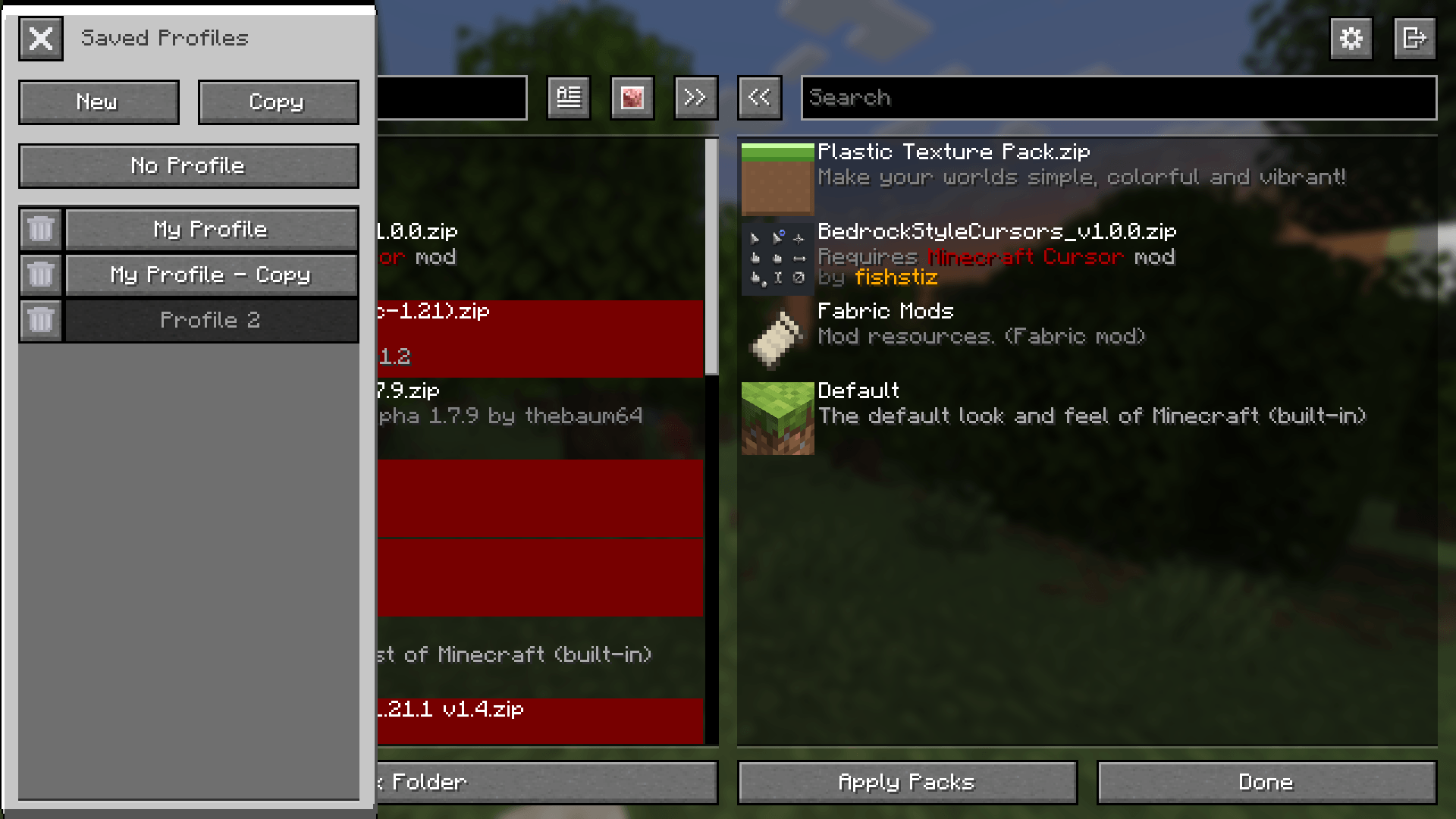 Saved Profiles
 -
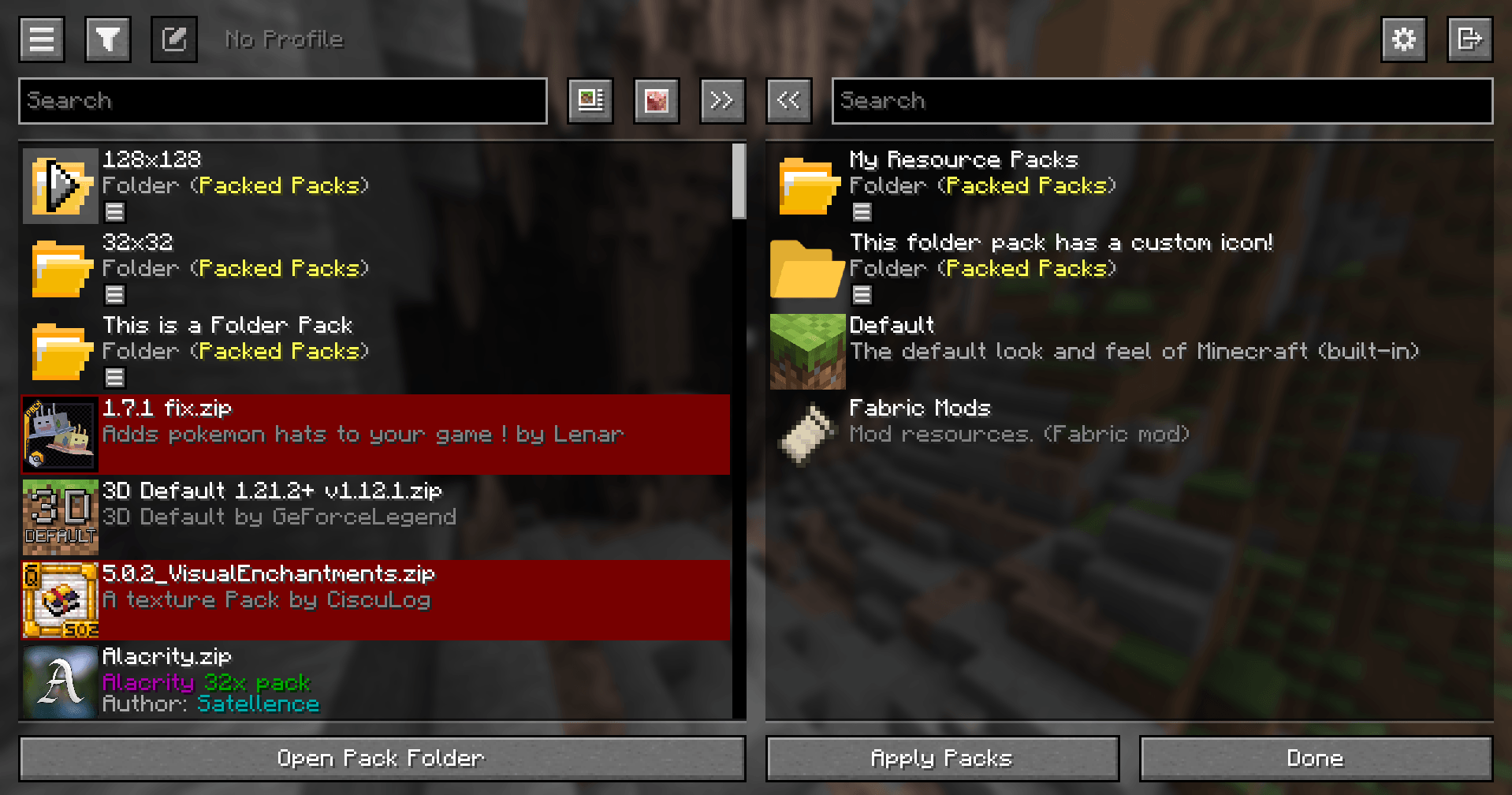 Folder Packs
 -
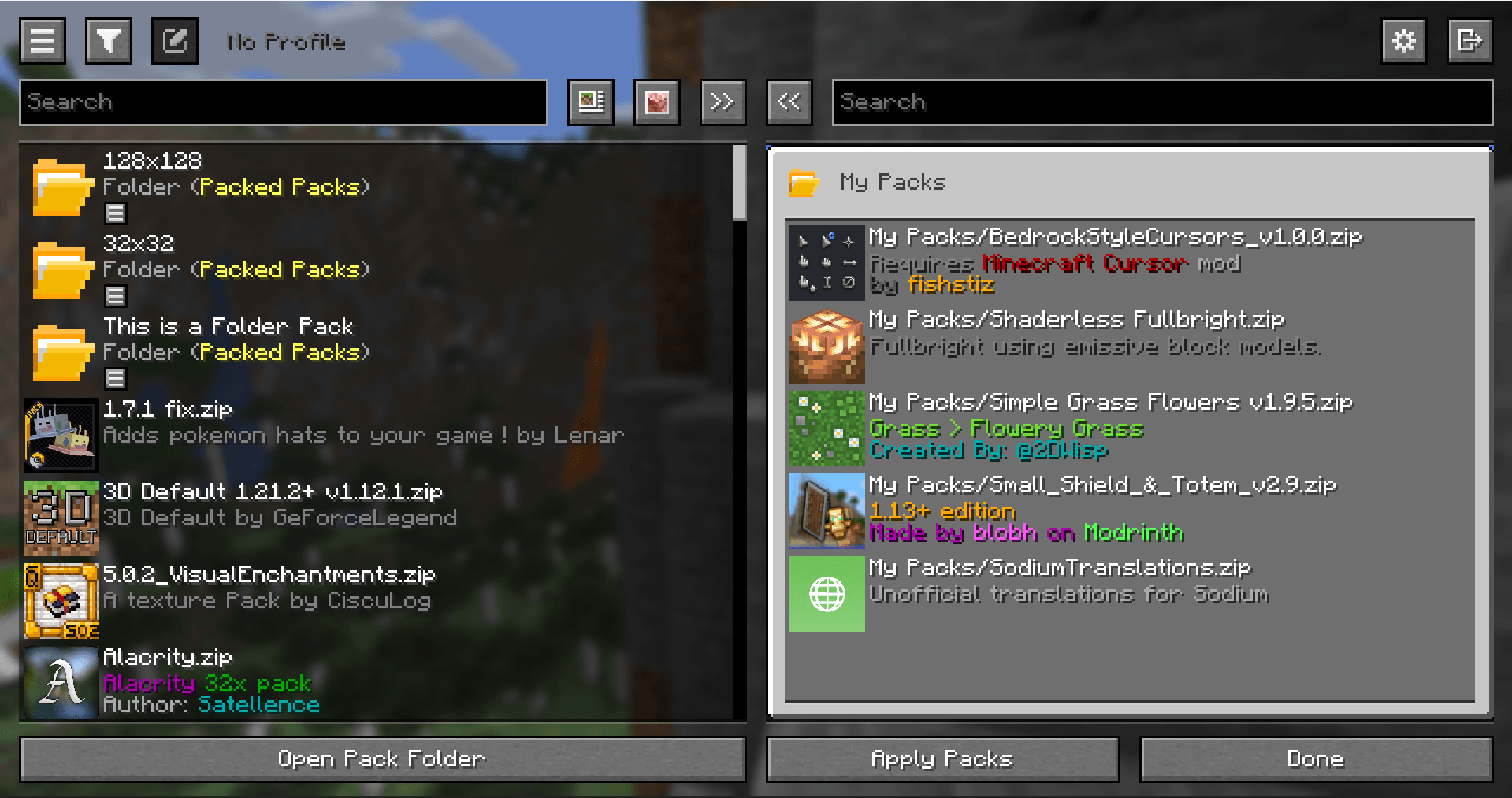 Folder Pack View
 -
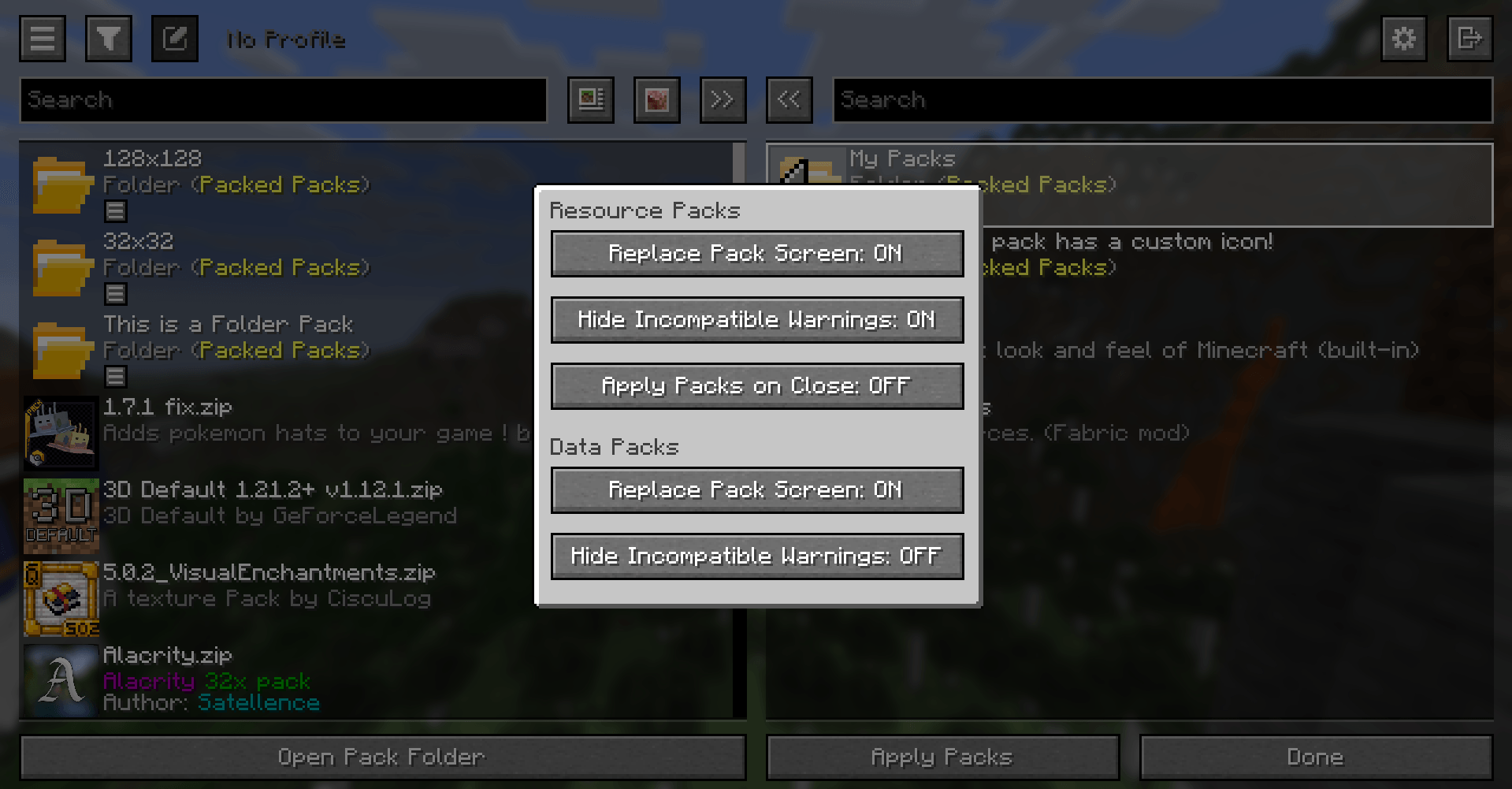 Configuration
 -
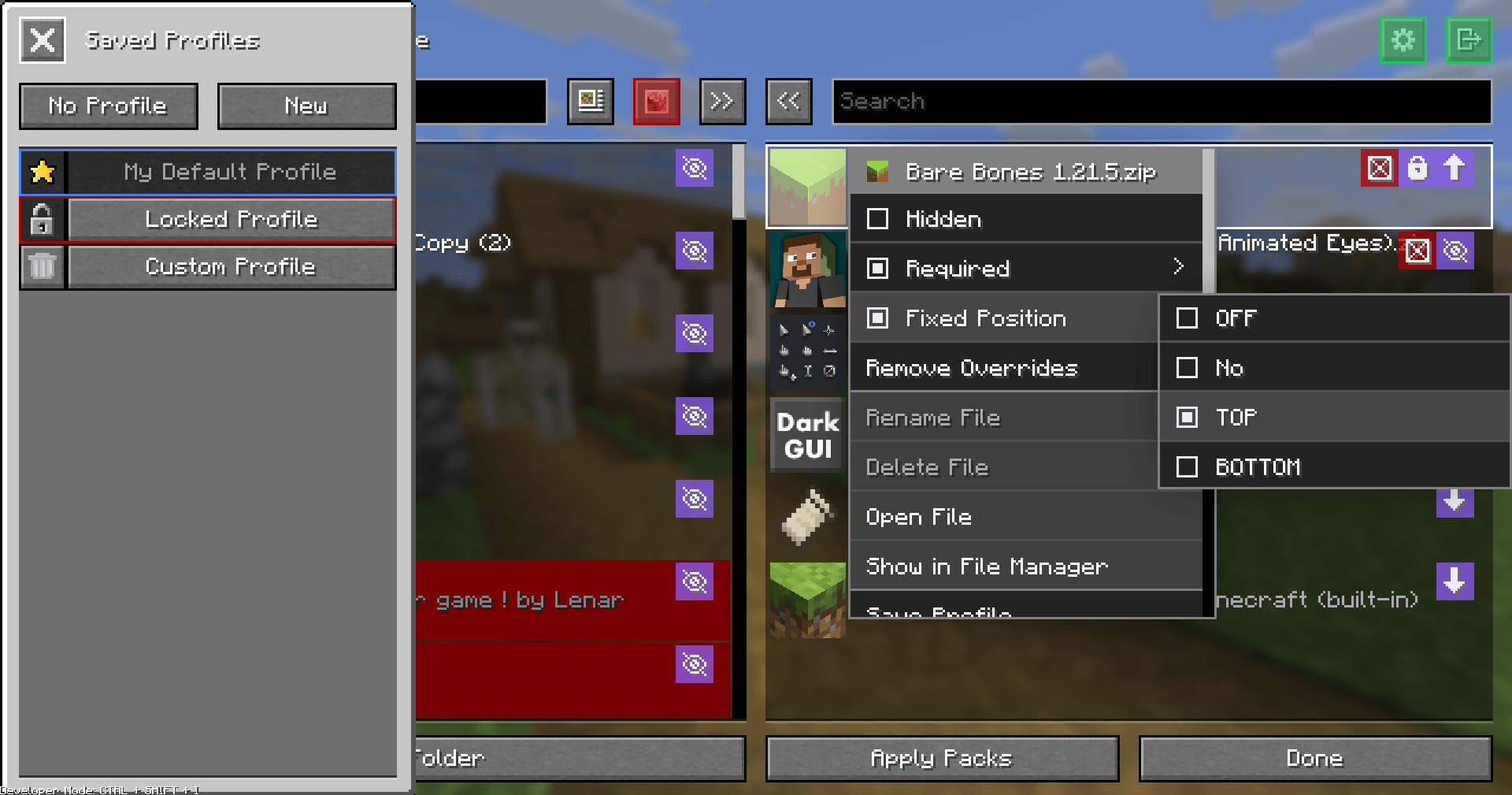 Developer Mode
-
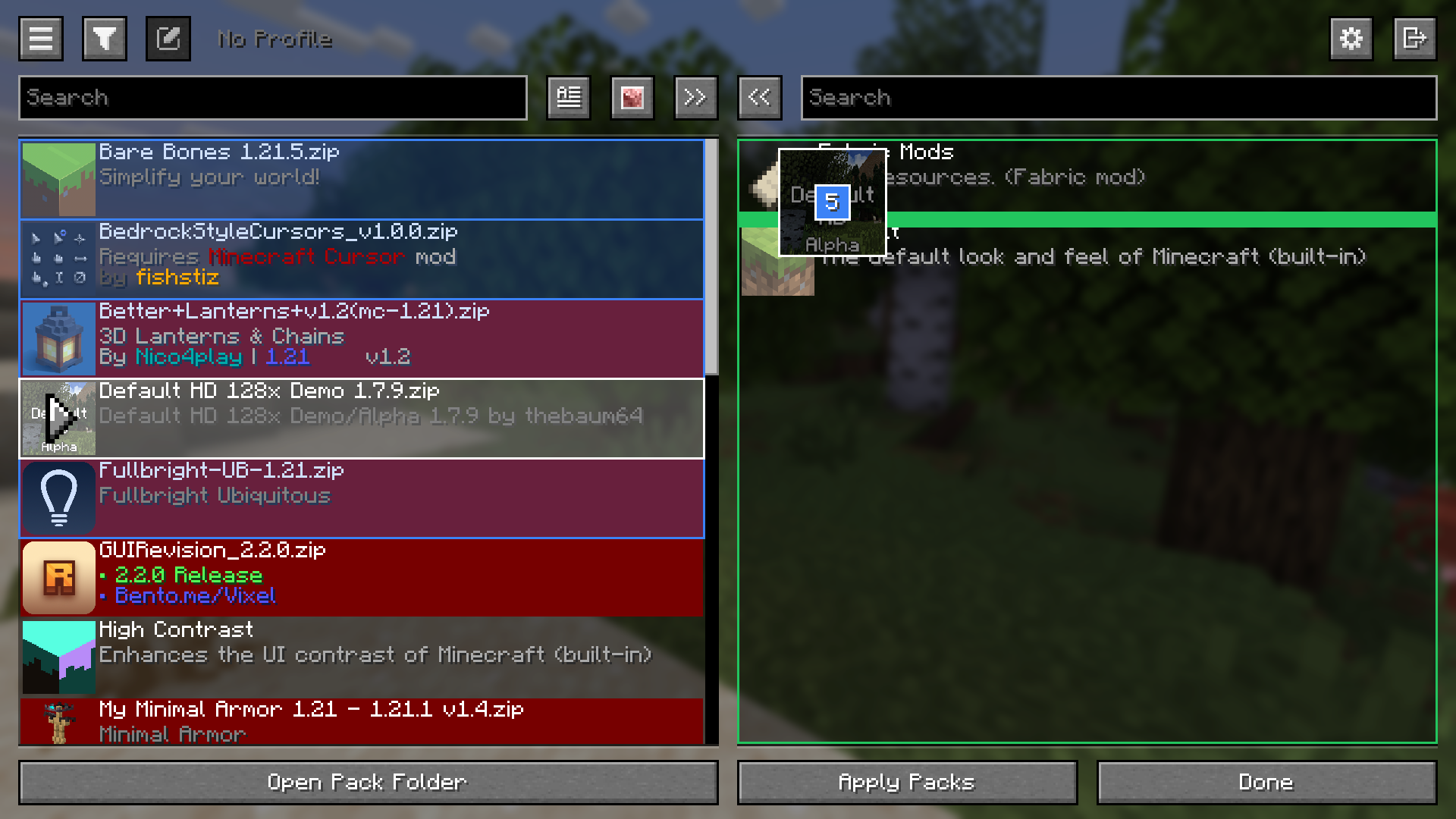 Packed Packs Screen Dragging and dropping multiple packs
 -
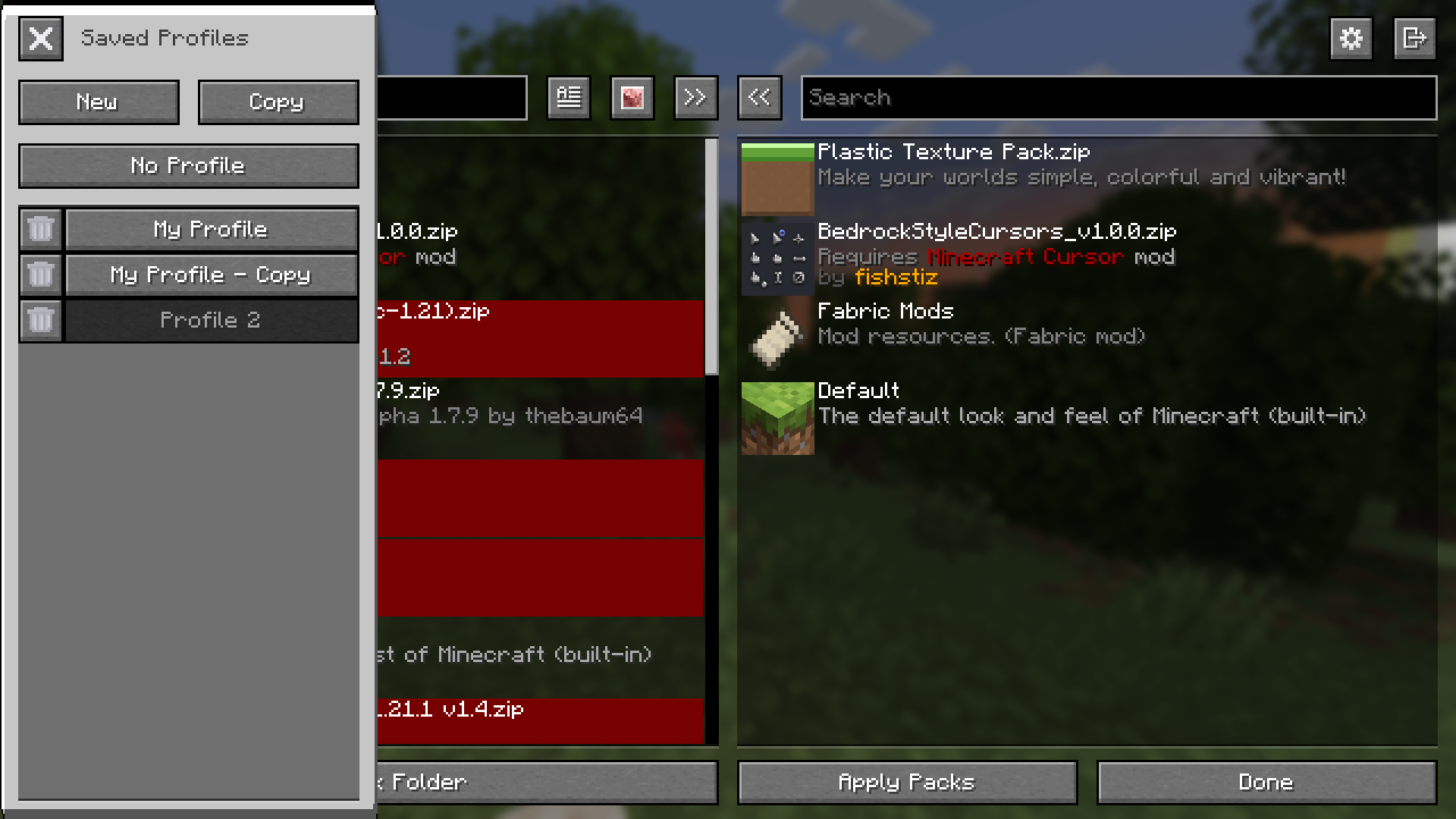 Saved Profiles
 -
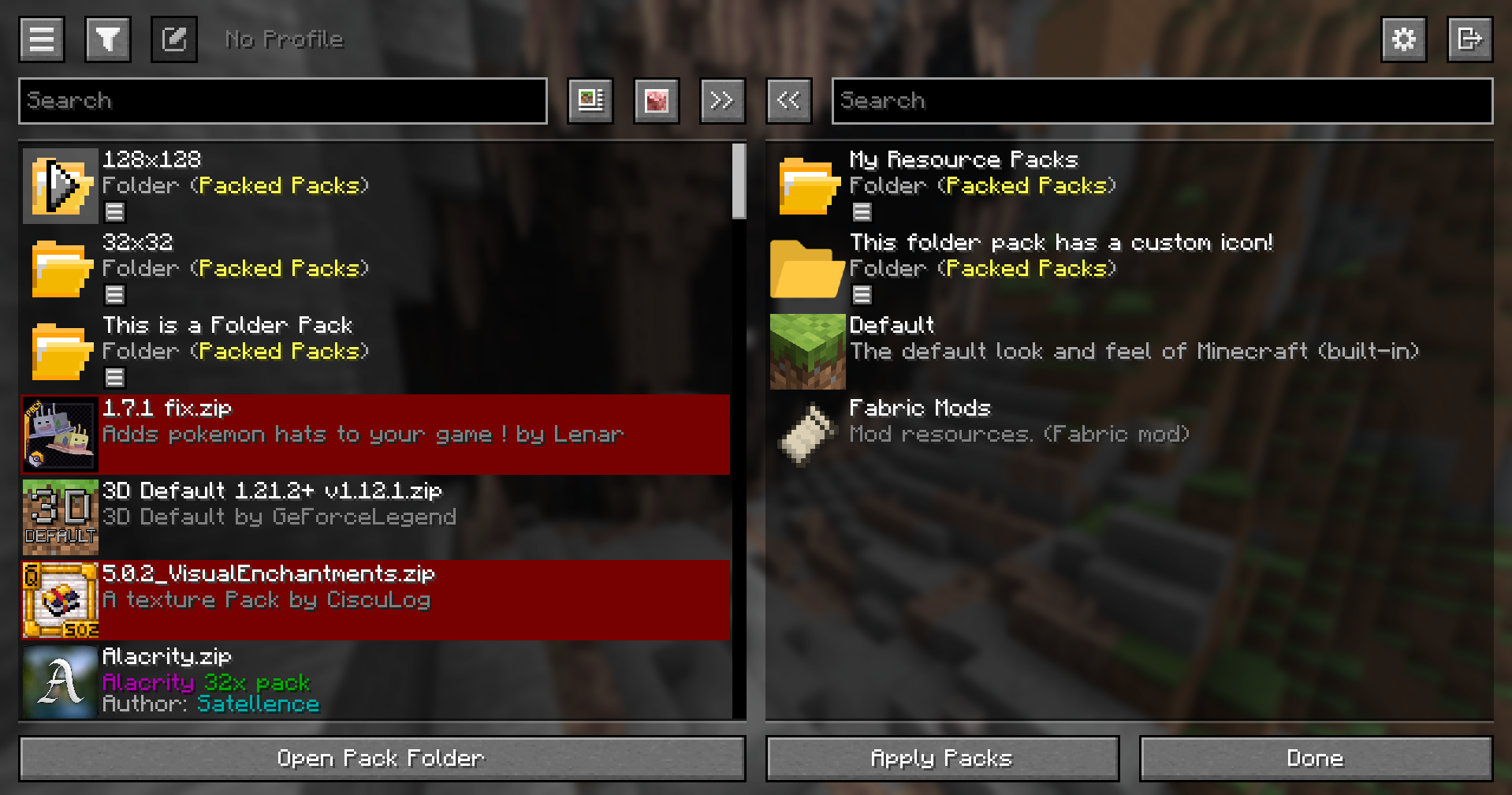 Folder Packs
 -
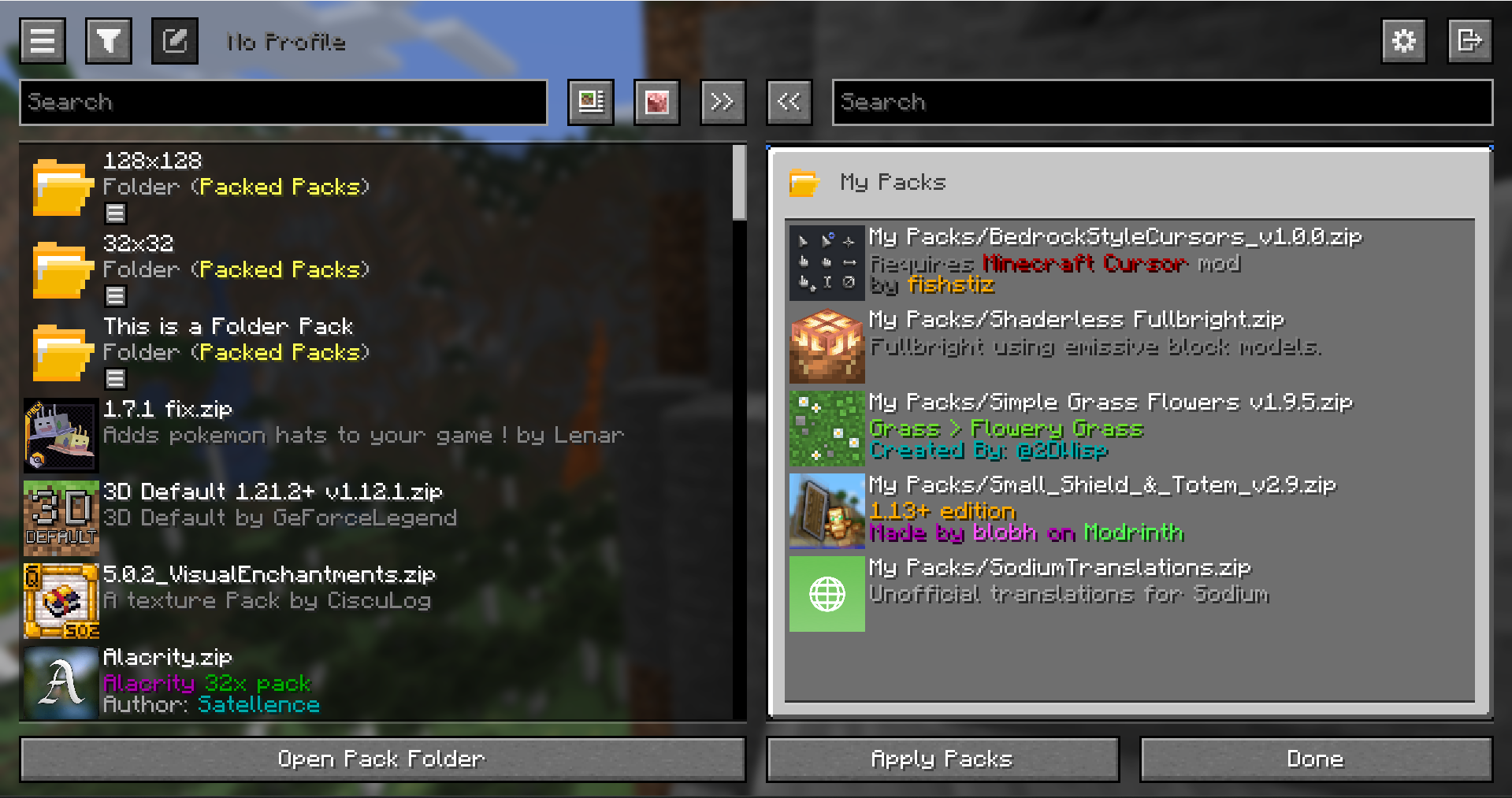 Folder Pack View
 -
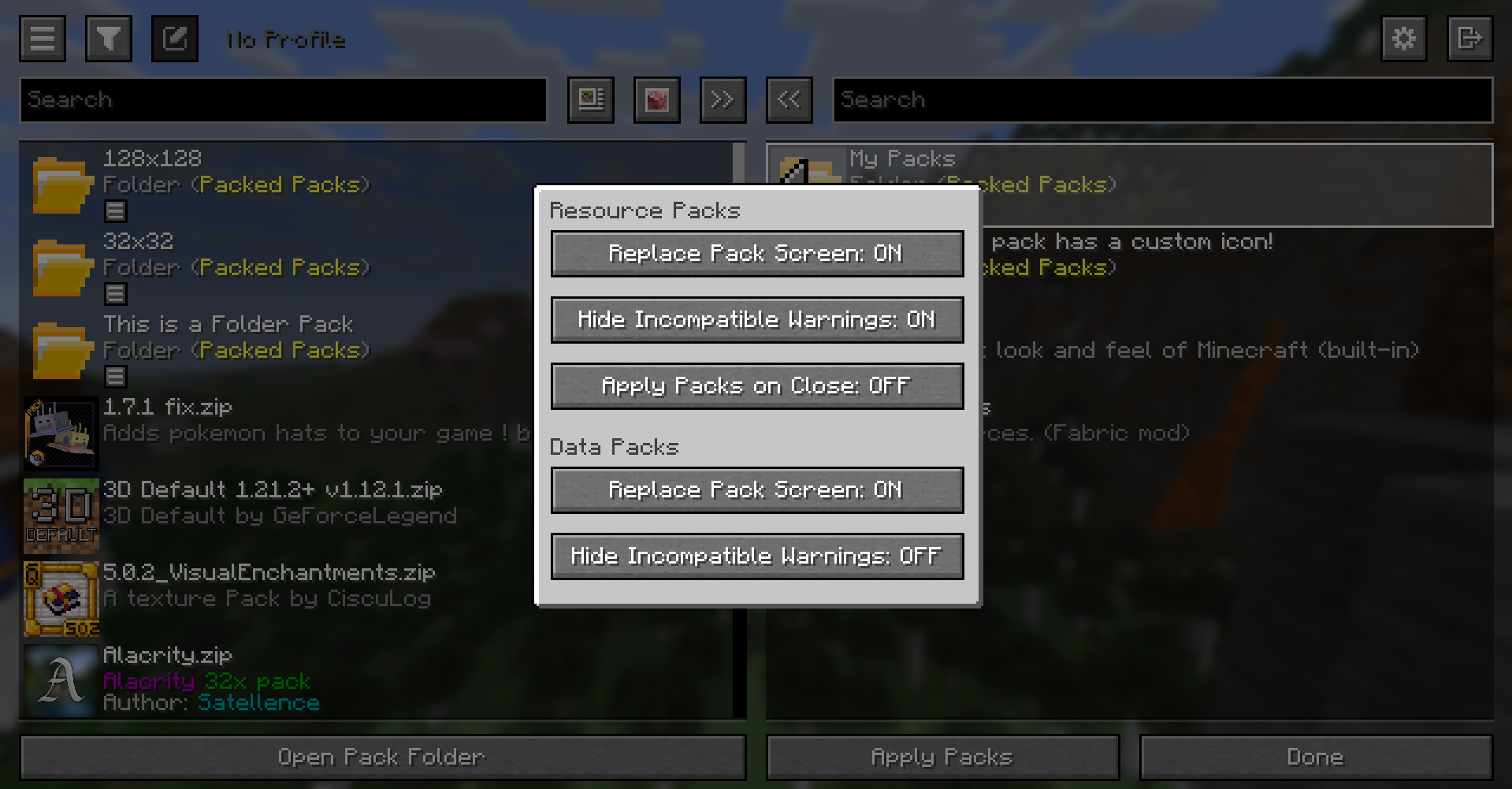 Configuration
 -
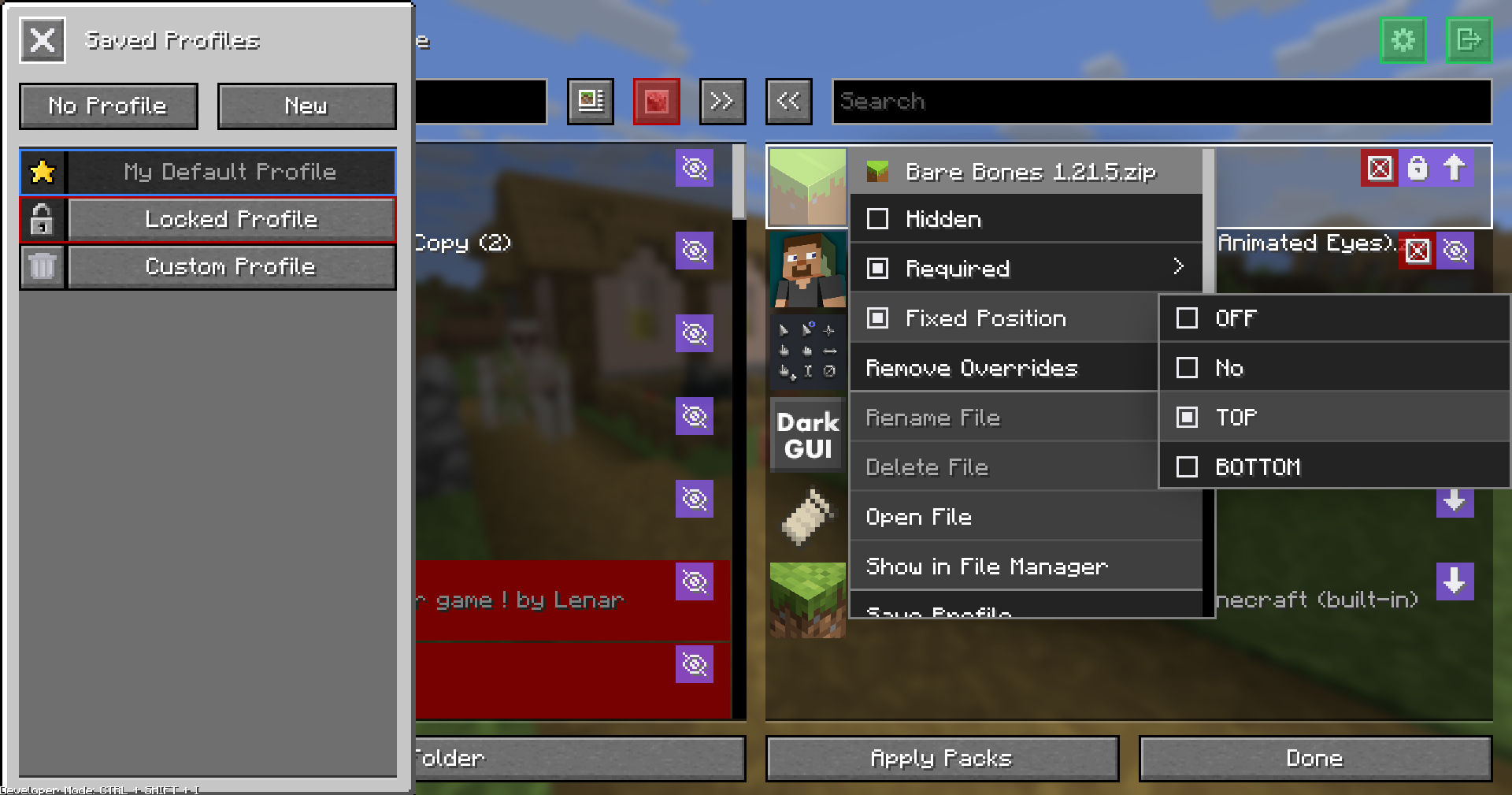 Developer Mode
Versions
Files
Relations
Project Relations
More like this
Similar Mods
Suggestions use data such as tags, dependencies, dependents, descriptions, titles, and more to rank how much they overlap with this mod.
On ModDex
Community snapshot
By the numbers
Statistics
 (opens in a new tab)
Get it on
Available Platforms
On ModDex
Community snapshot
By the numbers