
Community listing page, reviews may not be monitored by the author.
Pepsi's Item Name Recolorer


No reviews yet
Colorize and format your item's custom name.

Community voices
Reviews
No reviews yet. Be the first to review this project!
Get it on
Available Platforms
Compatibility
Supported Environments
Runs entirely on the server. Also works in singleplayer.
About
Project Details
For authors
Embed Badge
If you're the author of this project, you can embed a live badge anywhere that supports HTML or Markdown. It updates automatically whenever ratings change.
Use HTML for any page that supports it, or Markdown for README files and Markdown-based descriptions.
Identifiers
Platform IDs
Resources
External Links
About
Description
Features
- Recolor any item's name with any dye
- Apply custom RGB Hex coloring
- Apply Bold, Italics, Underline, Strikethrough, and Obfuscation
How recoloring works
Very simple. Place a cauldron, and fill it with water to any level
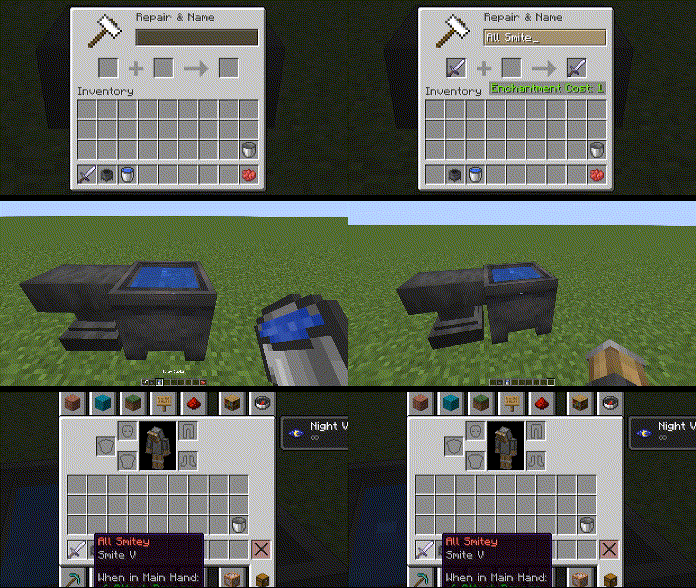
Any item you want to change MUST be renamed hrough the anvil first. You can add a space at the end to maintain its current/default name.
Once you've renamed your item with an anvil, toss it right into the cauldron filled with water
Now it's time to select a color and/or format
Say you wanted a red item name; you'd then toss red dye into the same cauldron, wait a few seconds and your item's custom name should be red. Note that when you give the item a dye in the cauldron, it will reset all formatting (removes bold, italics, underline, etc.). So be sure to set the color first!
Blue dye gives you blue, white dye gives you white, etc.
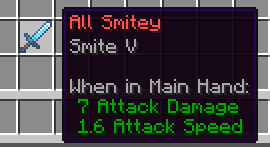
How reformatting works
Same thing with coloring. Toss the item and its format item in a cauldron of water.
Here's a list of possible formats and their corresponding item.
- Bold: Ink Sac
- Italics: Stick
- Underline: String
- Strikethrough: Feather
- Text Obfuscate: Glow Ink Sac
Again, setting the color of an item will reset all formatting to default. Color first, formats second.
You can apply multiple formats, including all of them at once.
Here's an example:
Custom RGB (Hex codes)
Let's say you want a fully red item name, the hex code for full red is FF 00 00.
Grab any paper item and rename it in the anvil as #FF0000.
You must have it start with # and no spacing. Finally, throw it in the cauldron with your item as if it were a dye and you can then get custom colors on your item.
See my other mods
Features
- Recolor any item's name with any dye
- Apply custom RGB Hex coloring
- Apply Bold, Italics, Underline, Strikethrough, and Obfuscation
How recoloring works
Very simple. Place a cauldron, and fill it with water to any level
Any item you want to change MUST be renamed hrough the anvil first. You can add a space at the end to maintain its current/default name.
Once you've renamed your item with an anvil, toss it right into the cauldron filled with water
Now it's time to select a color and/or format
Say you wanted a red item name; you'd then toss red dye into the same cauldron, wait a few seconds and your item's custom name should be red. Note that when you give the item a dye in the cauldron, it will reset all formatting (removes bold, italics, underline, etc.). So be sure to set the color first!
Blue dye gives you blue, white dye gives you white, etc.
How reformatting works
Same thing with coloring. Toss the item and its format item in a cauldron of water.
Here's a list of possible formats and their corresponding item.
- Bold: Ink Sac
- Italics: Stick
- Underline: String
- Strikethrough: Feather
- Text Obfuscate: Glow Ink Sac
Again, setting the color of an item will reset all formatting to default. Color first, formats second.
You can apply multiple formats, including all of them at once.
Here's an example:
Custom RGB (Hex codes)
Let's say you want a fully red item name, the hex code for full red is FF 00 00.
Grab any paper item and rename it in the anvil as #FF0000.
You must have it start with # and no spacing. Finally, throw it in the cauldron with your item as if it were a dye and you can then get custom colors on your item.
See my other mods
Screenshots
Gallery
-
Using the red dye
-
Example
Versions
Files
Relations
Project Relations
More like this
Similar Mods
Suggestions use data such as tags, dependencies, dependents, descriptions, titles, and more to rank how much they overlap with this mod.
On ModDex
Community snapshot
By the numbers
Statistics
 (opens in a new tab)
Get it on
Available Platforms
On ModDex
Community snapshot
By the numbers
Statistics
Resources