
Community listing page, reviews here may not be monitored by the author.
Performance Booster


No reviews yet
A Fabric mod for Minecraft 1.21.10 that adds a toggleable performance stats HUD and optional performance tweaks.
Community voices
Reviews
No reviews yet. Be the first to review this project!
Get it on
Available Platforms
Compatibility
Supported Environments
Runs entirely on the client. Works on vanilla servers.
About
Project Details
For authors
Embed Badge
If you're the author of this project, you can embed a live badge anywhere that supports HTML or Markdown. It updates automatically whenever ratings change.
Use HTML for any page that supports it, or Markdown for README files and Markdown-based descriptions.
Identifiers
Platform IDs
About
Description
Perf Boost
A Fabric mod for Minecraft 1.21.10 that adds a toggleable performance stats HUD and optional performance tweaks.
Features
- Stats HUD — Overlay in the top-right showing:
- FPS and frame time
- RAM usage
- Entity and chunk counts (in-world)
- Ping (multiplayer)
- CPU usage (when available)
- CPU temperature (when available)
- Performance mode — Optional tweaks (e.g. particle limits) when enabled.
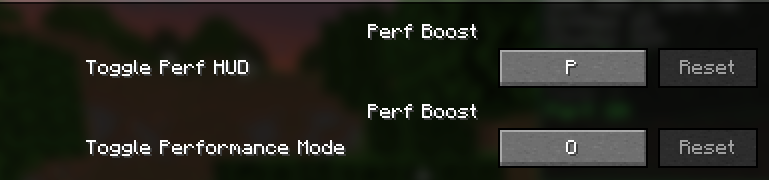
- Keybinds (rebindable in Options → Controls → Key Binds, under Perf Boost):
- Toggle Perf HUD — Default:
P - Toggle Performance Mode — Default:
O
- Toggle Perf HUD — Default:
Screenshots
Performance HUD (press P to toggle)

Keybinds in Settings

License
MIT
What this mod does
Perf Boost adds a stats HUD in the top-right (toggle with P) showing FPS, frame time, RAM usage, entity and chunk counts, ping in multiplayer, and CPU usage/temperature when available. It also adds performance mode (toggle with O): when enabled, the mod temporarily lowers your graphics settings to improve FPS, and restores them when you turn it off.
What performance mode changes
When you turn performance mode on, the mod temporarily applies:
- Graphics → Fast | Particles → Minimal (and caps active particles at 2,000) | Render distance → 8 chunks | Simulation distance → 6 chunks | Entity distance scaling → 0.5 | Ambient occlusion → off | Entity shadows → off | Biome blend → 0
When you turn it off, your previous settings are restored. Nothing is written to your options file; it only affects the current session.
Why use it
- See FPS and system stats at a glance without leaving the game.
- Get a quick FPS boost in busy areas (e.g. lots of entities or particles) by pressing O; turn it off when you leave.
- Keybinds (P and O by default) are rebindable under Perf Boost in Options → Controls.
Performance HUD (press P to toggle)
Keybinds in Settings
Screenshots
Gallery
-
 HUD
HUD -
 Settings
Versions
Files
Relations
Project Relations
More like this
Similar Mods
Suggestions use data such as tags, dependencies, dependents, descriptions, titles, and more to rank how much they overlap with this mod.
On ModDex
Community snapshot
By the numbers
Statistics
Want to reach Minecraft players?
We're looking for a server hosting partner to feature here and other parts of the site. Interested? Send us a message!
Get in touchGet it on
Available Platforms
On ModDex
Community snapshot
By the numbers