Community listing page, reviews here may not be monitored by the author.
Pick Block Pro


No reviews yet
An advanced client side Block, Entity, Component, NBT, Tool and ID picker (Fabric)
Community voices
Reviews
No reviews yet. Be the first to review this project!
Get it on
Available Platforms
Compatibility
Supported Environments
Runs entirely on the client. Works on vanilla servers.
About
Project Details
For authors
Embed Badge
If you're the author of this project, you can embed a live badge anywhere that supports HTML or Markdown. It updates automatically whenever ratings change.
Use HTML for any page that supports it, or Markdown for README files and Markdown-based descriptions.
Identifiers
Platform IDs
About
Description
Pick Block Pro
Pick Block: Get the block/item of what you're looking at in creative or switch to that block/item in survival.
This mod is an advanced version of this and adds a lot of extra features (see below)
Important:
This mod replaces the default Pick Block, however the ID and Tool picker use their own keybindings.
Features
Most things below are configurable in the config settings using the config file or Mod Menu
- In survival the block picker will now also search through item-containers like shulkers that are inside your inventory
- Holding ALT while Block picking will add BlockState data as NBT to the block/item
(stacks with CTRL for BlockEntity data) - Holding CTRL while Entity picking will add Entity data as NBT to the item
- Copies mob data and adds it to the spawn egg
- Copies armor stands with all their data
- Copies item frames including the framed item
- Copies painting variant - Pick block extra things:
- Pick fire and get a flint & steel (1.16+)
- Pick the sun or moon and get a light block (1.17+)
Cycle through the light levels by picking the sun or moon while holding the light block
- Pick a player and get the head of that player
- Pick mob spawners
- Pick fluids and get a bucket of the fluid - Or even decide yourself which item (including nbt data) you get from a block when pick blocking
- Extended Pick Block range, decide how far the picker should be able to reach
- Lock inventory slots to prevent the picker from switching or replacing the item in that slot
- Use the Tool Picker and get the best available tool to break the block or kill the entity
- Copy ID's of hotbar blocks/items directly into your chat, for easy WorldEdit command creation
(Use CTRL + 0 through 9 while your chat is open, 0 is for the off hand slot) - Pick ID's of blocks in the world with the ID Picker and copy them directly to your clipboard
Detailed explanation
Block Picking with item-containers (shulkers / bundles)
When picking a block in survival the mod will first search through all the items in your inventory. If it can't find the item, it'll search containers like shulkers and bundles that are inside the inventory. If found, the mod will move the container with the highest amount of that item to the player's main hand. This should work with all item-containers that work in the same way as the shulker or bundle do.
Hold ALT for block state copying:
You might already know it's possible to hold CTRL while block picking to copy block-entity data, such as player skulls and banners with patterns. This mod allows on top of that to also copy block-state data when holding ALT, this includes for example if a campfire/candle is lit or not and also the rotation of blocks like stairs. (There are many more things you can copy with this, see wiki link for the full list)
This feature was inspired by the Pick-BlockState mod by Minenash.
Hold CTRL for entity data copying:
Just like how you can pick block-entity data, now you can also pick entity data. This will for example copy most data of the mob and put it inside the spawn egg as NBT data. This will also work for things like armor stands, item frames (copying what's inside of them) and paintings (copying the exact variant of the painting).
Extended pick block range:
By default Minecraft only allows to pick blocks that are within reaching distance. This mod however allows to pick blocks at a distance of 100 blocks away and this can even be set way higher (or lower) if so desired. No need anymore to fly all the way over to a block you'd like to pick.
Lock inventory slots:
By default Minecraft will first fill in all empty slots in the hotbar when using pick block, however once the hotbar is completely full it'll replace the item in your current selected slot. This item might actually be something you'd prefer to keep. This mod lets you lock any slots you'd like in the config settings. When locked, this mod will still place an item inside that slot if it's empty. However once an item/block is located in a locked slot, this mod will skip that slot (keeping the item/block safe) and use the next available slot instead.
Tool Picking:
When using the Tool Picker this mod will provide you with the best tool for the job. In creative you'll get a fully enchanted tool (configurable), but in survival it'll go through your inventory and search for the best tool instead. If it's able to find a suitable tool it'll switch it to your current selected slot.
Hotbar block/item ID copy
Copy the ID's of blocks/items from your hotbar directly in the chat when it's open. Making it a lot easier and faster to create WE commands. Especially great for making brushes with a lot of different blocks. Hold CTRL + 0 through 9 while your chat is open, 0 is for the off hand slot.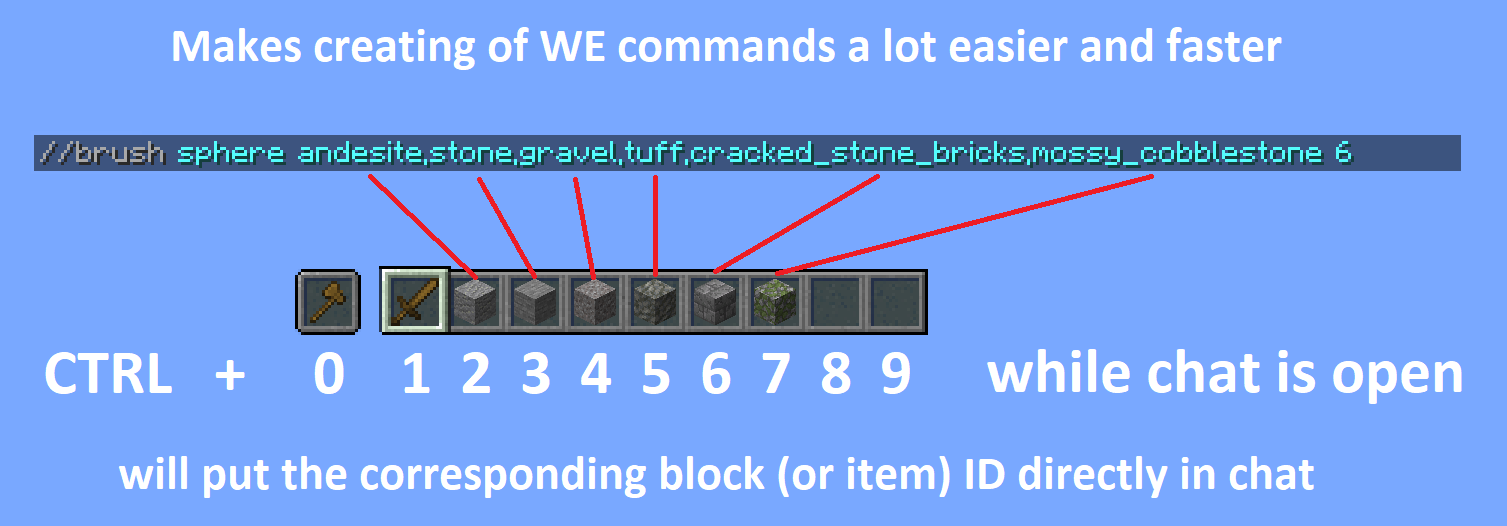
Pick ID's:
Ever wrote a WE command using block ID's with a lot of properties? This mod will make that a lot easier by allowing you to pick the ID including properties of the block you're looking at directly into your clipboard. Once picked you can then paste this ID when writing out your command.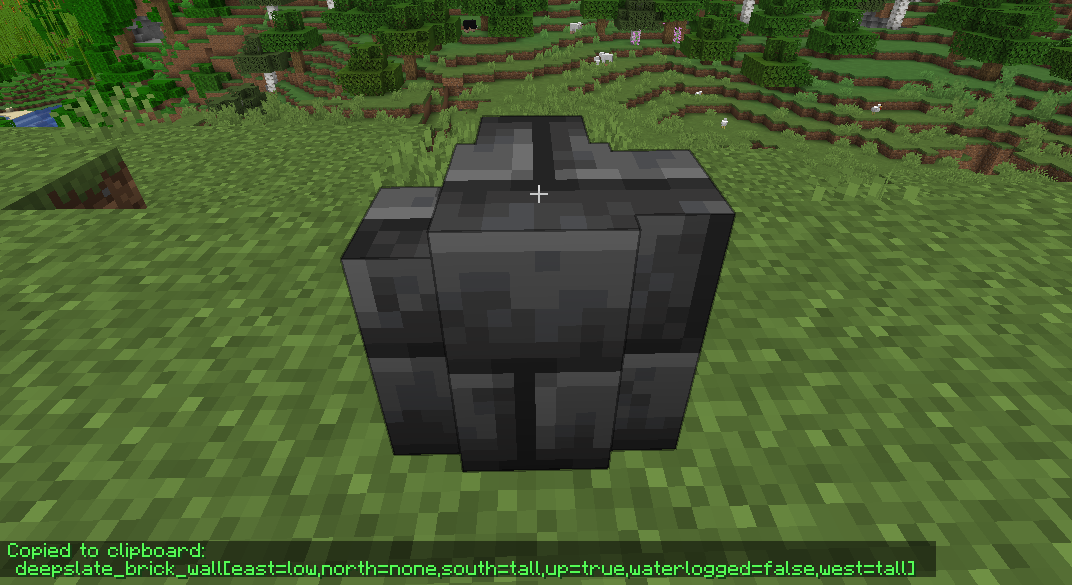
Dependencies
From 1.19 onwards this mod no longer includes Cloth Config
Required:
- Fabric API
- Cloth Config API (Is needed to make the config work)
Optional:
- Mod Menu (This mod allows you to edit the configs in game)
Older Versions:
1.16 - 1.18
Required:
- Fabric API (0.31.0 or later)
Optional:
Already included/embedded:
1.14 - 1.15
Required:
- Fabric API (0.14.0 or later)
Optional:
Already included/embedded:
Please let me know if you experience any issues or have any suggestions


Pick Block Pro
Pick Block: Get the block/item of what you're looking at in creative or switch to that block/item in survival.
This mod is an advanced version of this and adds a lot of extra features (see below)
Important:
This mod replaces the default Pick Block, however the ID and Tool picker use their own keybindings.
Features
Most things below are configurable in the config settings using the config file or Mod Menu
- In survival the block picker will now also search through item-containers like shulkers that are inside your inventory
- Holding ALT while picking will add block-state data as NBT to the block/item
(stacks with CTRL for block-entity data) - Holding CTRL while Entity picking will add entity data as NBT to the item:
- Copies mob data and adds it to the spawn egg
- Copies armor stands with their items and pose
- Copies item frames including the framed item
- Copies painting variants
- Pick block extra things:
- Pick fire and get a flint & steel (1.16+)
- Pick the sun or moon and get a light block (1.17+)
Cycle through the light levels by picking the sun or moon while holding the light block - Pick a player and get the head of that player
- Pick falling blocks
- Pick fluids and get a bucket of the fluid (disabled by default)
- Or even decide yourself which item you get from a block or entity when using pick block
- Extended Pick Block range, decide how far the picker should be able to reach
- Lock inventory slots to prevent the picker from switching or replacing the item in that slot
- Use the Tool Picker and get the best available tool to break the block or kill the entity
- Copy ID's of hotbar blocks/items directly into your chat, for easy WorldEdit command creation
(Use CTRL + 0 through 9 while your chat is open, 0 is for the off hand slot) - Pick ID's of blocks in the world with the ID Picker and copy them directly to your clipboard
Detailed explanations
Block Picking with item-containers (shulkers / bundles)
When picking a block in survival the mod will first search through all the items in your inventory. If it can't find the item, it'll search containers like shulkers and bundles that are inside the inventory. If found, the mod will move the container with the highest amount of that item to the player's main hand. This should work with all item-containers that work in the same way as the shulker or bundle do.
Hold ALT for block state copying
You might already know it's possible to hold CTRL while block picking to copy block-entity data, such as player skulls and banners with patterns. This mod allows on top of that to also copy block-state data when holding ALT, this includes for example if a campfire/candle is lit or not and also the rotation of blocks like stairs. (There are many more things you can copy with this, see wiki link for the full list)
This feature was inspired by the Pick-BlockState mod by Minenash.
Hold CTRL for entity data copying
Just like how you can pick block-entity data, now you can also pick entity data. This will for example copy most data of the mob and put it inside the spawn egg as NBT data. This will also work for things like armor stands, item frames (copying what's inside of them) and paintings (copying the exact variant of the painting).
Extended pick block range
By default Minecraft only allows to pick blocks that are within reaching distance (3 blocks). This mod however allows to pick blocks at a distance of 100 blocks away and this can even be set way higher (or lower) if so desired. No need anymore to fly all the way over to a block you'd like to pick.
Configure which item you should get from a block/entity
Pick Block Pro comes with an overrides.json config file. Within this file you can configure which item you should get when picking a block or entity. This also has full support for NBT data.
The file already includes some overrides for blocks and entities that didn't have any pick stack.
The overrides can be reloaded in game with the command: /pbp reload
Default overrides:
{
    "Block to ItemStack": {
        "minecraft:fire": "minecraft:flint_and_steel",
        "minecraft:soul_fire": "minecraft:flint_and_steel",
        "minecraft:frosted_ice": "minecraft:ice"
    },
    "Entity to ItemStack": {
        "minecraft:tnt": "minecraft:tnt",
        "minecraft:fireball": "minecraft:fire_charge",
        "minecraft:wither": "minecraft:wither_spawn_egg",
        "minecraft:ender_dragon": "minecraft:ender_dragon_spawn_egg",
        "minecraft:giant": "minecraft:zombie_spawn_egg{EntityTag:{id:giant,CustomName:''},display:{Name:'{\"text\":\"Giant Spawn Egg\",\"color\":\"light_purple\",\"italic\":\"false\"}'}}",
        "minecraft:illusioner": "minecraft:evoker_spawn_egg{EntityTag:{id:illusioner,CustomName:''},display:{Name:'{\"text\":\"Illusioner Spawn Egg\",\"color\":\"light_purple\",\"italic\":\"false\"}'}}"
    }
}
Lock inventory slots
By default Minecraft will first fill in all empty slots in the hotbar when using pick block, however once the hotbar is completely full it'll replace the item in your current selected slot. This item might actually be something you'd prefer to keep. This mod lets you lock any slots you'd like in the config settings. When locked, this mod will still place an item inside that slot if it's empty. However once an item/block is located in a locked slot, this mod will skip that slot (keeping the item/block safe) and use the next available slot instead.
Tool Picking
When using the Tool Picker this mod will provide you with the best tool for the job. In creative you'll get a fully enchanted tool (configurable), but in survival it'll go through your inventory and search for the best tool instead. If it's able to find a suitable tool it'll switch it to your current selected slot.
Hotbar block/item ID copy
Copy the ID's of blocks/items from your hotbar directly in the chat when it's open. Making it a lot easier and faster to create WE commands. Especially great for making brushes with a lot of different blocks. Hold CTRL + 0 through 9 while your chat is open, 0 is for the off hand slot.
Pick ID's
Ever wrote a WE command using block ID's with a lot of properties? This mod will make that a lot easier by allowing you to pick the ID including properties of the block you're looking at directly into your clipboard. Once picked you can then paste this ID when writing out your command.
When using the ID picker it's also possible to copy (block)entity data to the clipboard by holding CTRL.
Versions & Dependencies
1.19+
Required:
Fabric API
Cloth Config API (Is needed to make the config work)
Optional:
Mod Menu (This mod allows you to edit the configs in game)
1.16 - 1.18
Required:
Fabric API (0.31.0 or later)
Optional:
Mod Menu (This mod allows you to edit the configs in game)
Already included/embedded:
Cloth Config API (Is needed to make the config work)
1.14 - 1.15
Required:
Fabric API (0.14.0 or later)
Optional:
Mod Menu (This mod allows you to edit the configs in game)
Already included/embedded:
Auto Config Updated API (Is needed to make the config work)
Cloth Config API (Required for Auto Config)
Screenshots
Gallery
-
ID Picker Example of how the ID picker works
-
Hotbar ID Picker Copy ID's of hotbar slot blocks/items directly into your chat
Versions
Files
Relations
Project Relations
More like this
Similar Mods
Suggestions use data such as tags, dependencies, dependents, descriptions, titles, and more to rank how much they overlap with this mod.
On ModDex
Community snapshot
By the numbers
Statistics
Want to reach Minecraft players?
We're looking for a server hosting partner to feature here and other parts of the site. Interested? Send us a message!
Get in touchGet it on
Available Platforms
On ModDex
Community snapshot
By the numbers