Community listing page, reviews here may not be monitored by the author.
PlayerHighlighter


No reviews yet
Highlights players with a glowing outline and a HUD target icon.
Community voices
Reviews
No reviews yet. Be the first to review this project!
Get it on
Available Platforms
Compatibility
Supported Environments
Runs entirely on the client. Works on vanilla servers.
About
Project Details
For authors
Embed Badge
If you're the author of this project, you can embed a live badge anywhere that supports HTML or Markdown. It updates automatically whenever ratings change.
Use HTML for any page that supports it, or Markdown for README files and Markdown-based descriptions.
Identifiers
Platform IDs
Resources
External Links
About
Description
Languages
Player Highlighter
A client-side Fabric mod that improves player awareness with glowing outlines, on-screen target icons, and a nearby-player information HUD.
Overview
Player Highlighter makes other players easier to locate and track without requiring any server-side installation.
The mod provides three visual features:
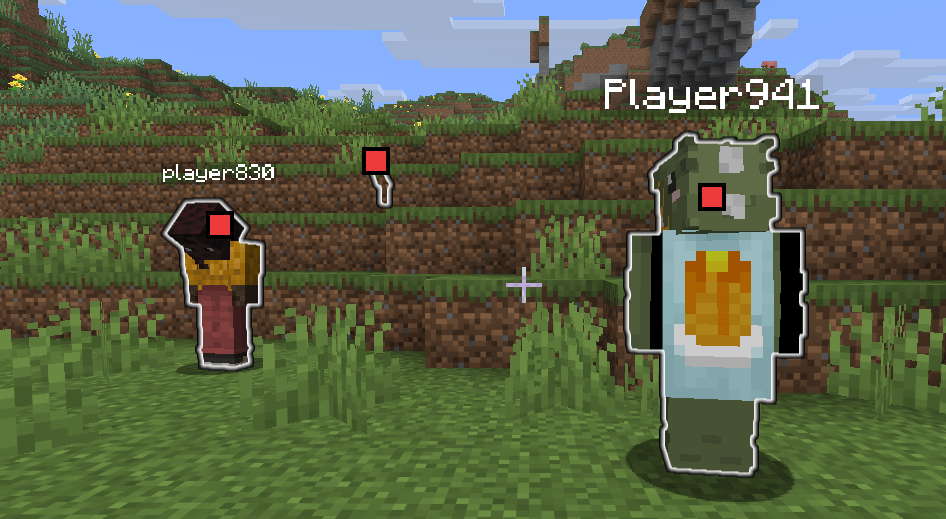
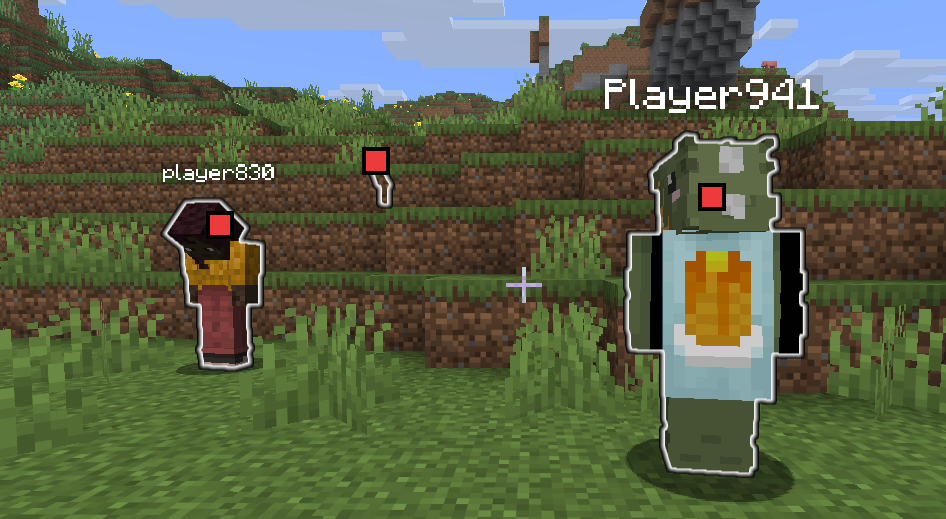
- A glowing outline around other players
- Small target icons displayed over visible players
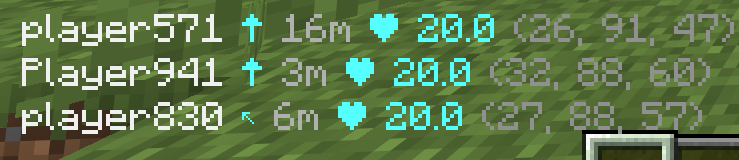
- A HUD list showing nearby player information
Glowing outlines and target icons appear while the configured hold key is pressed or while keep mode is enabled. The player information HUD remains available independently.
All features are handled entirely on the client.
Key Features
- Highlights other players with a glowing outline
- Displays target icons over players currently visible on screen
- Shows nearby player information in a HUD
- Shows player name, relative direction, distance, health, and coordinates
- Supports a hold key for temporary highlighting
- Supports toggleable keep mode for persistent highlighting
- Supports a client command for showing or hiding the player information HUD
Highlight Controls
Highlighting is active when either of the following conditions is met:
- The highlight hold key is pressed Default key: TAB
- Keep mode is enabled Default toggle key: I
When highlighting is active:
- Other players receive a glowing outline
- Visible players receive a small target icon at their projected screen position
When neither condition is active, the glowing outlines and target icons disappear immediately.
Player Information HUD
The HUD displays nearby players in the bottom-left corner of the screen.
Example:
Player867 ↑ 11m ❤ 20.0 (123, 64, -456)Field descriptions:
Player867— Player name↑— Direction relative to the current camera facing11m— Horizontal distance on the XZ plane❤ 20.0— Current health(123, 64, -456)— World coordinates
Multiple players are listed vertically.
The direction indicator can use the following arrows:
↑ ↗ → ↘ ↓ ↙ ← ↖The HUD is hidden when Minecraft's GUI is hidden.
HUD visibility can also be controlled with the client command:
/playerhighlighter hud on
/playerhighlighter hud off
/playerhighlighter hud toggle
/playerhighlighter hud status
Command behavior:
/playerhighlighter hud onshows the Player Information HUD/playerhighlighter hud offhides the Player Information HUD/playerhighlighter hud toggleswitches the HUD between shown and hidden/playerhighlighter hud statusshows the current HUD state
Target Icons
While highlighting is active, a small target icon is rendered over each visible player.
Icons are displayed only when the player:
- Is in front of the camera
- Can be projected onto the current screen
- Is within the visible screen boundaries
- Is not the current camera entity
Players behind the camera or outside the screen are not assigned an icon.
Glowing Outline
Other players are rendered using an outline similar to Minecraft's vanilla Glowing effect.
Behavior:
- Only player entities are affected
- The local player is excluded
- Mobs and other entities are not affected
- The outline follows vanilla outline rendering rules
- Team-based outline colors may still apply where supported
- No real status effect is added to the player
Supported Versions
- Minecraft 26.3
- Fabric Loader 0.19.5+
- Fabric API 0.160.5+
- Java 25
License
MIT
Languages
Player Highlighter
A client-side Fabric mod that improves player awareness with glowing outlines, on-screen target icons, and a nearby-player information HUD.
Overview
Player Highlighter makes other players easier to locate and track without requiring any server-side installation.
The mod provides three visual features:
- A glowing outline around other players
- Small target icons displayed over visible players
- A HUD list showing nearby player information
Glowing outlines and target icons appear while the configured hold key is pressed or while keep mode is enabled. The player information HUD remains available independently.
All features are handled entirely on the client.
Key Features
- Highlights other players with a glowing outline
- Displays target icons over players currently visible on screen
- Shows nearby player information in a HUD
- Shows player name, relative direction, distance, health, and coordinates
- Supports a hold key for temporary highlighting
- Supports toggleable keep mode for persistent highlighting
- Supports a client command for showing or hiding the player information HUD
Highlight Controls
Highlighting is active when either of the following conditions is met:
- The highlight hold key is pressed Default key: TAB
- Keep mode is enabled Default toggle key: I
When highlighting is active:
- Other players receive a glowing outline
- Visible players receive a small target icon at their projected screen position
When neither condition is active, the glowing outlines and target icons disappear immediately.
Player Information HUD
The HUD displays nearby players in the bottom-left corner of the screen.
Example:
Player867 ↑ 11m ❤ 20.0 (123, 64, -456)
Field descriptions:
Player867— Player name↑— Direction relative to the current camera facing11m— Horizontal distance on the XZ plane❤ 20.0— Current health(123, 64, -456)— World coordinates
Multiple players are listed vertically.
The direction indicator can use the following arrows:
↑ ↗ → ↘ ↓ ↙ ← ↖
The HUD is hidden when Minecraft's GUI is hidden.
HUD visibility can also be controlled with the client command:
/playerhighlighter hud on
/playerhighlighter hud off
/playerhighlighter hud toggle
/playerhighlighter hud status
Command behavior:
/playerhighlighter hud onshows the Player Information HUD/playerhighlighter hud offhides the Player Information HUD/playerhighlighter hud toggleswitches the HUD between shown and hidden/playerhighlighter hud statusshows the current HUD state
Target Icons
While highlighting is active, a small target icon is rendered over each visible player.
Icons are displayed only when the player:
- Is in front of the camera
- Can be projected onto the current screen
- Is within the visible screen boundaries
- Is not the current camera entity
Players behind the camera or outside the screen are not assigned an icon.
Glowing Outline
Other players are rendered using an outline similar to Minecraft's vanilla Glowing effect.
Behavior:
- Only player entities are affected
- The local player is excluded
- Mobs and other entities are not affected
- The outline follows vanilla outline rendering rules
- Team-based outline colors may still apply where supported
- No real status effect is added to the player
Supported Versions
- Minecraft 26.3
- Fabric Loader 0.19.5+
- Fabric API 0.160.5+
- Java 25
License
MIT
Screenshots
Gallery
-
 Highlights Players
 -
 Player Radar
-
 Highlights Players
 -
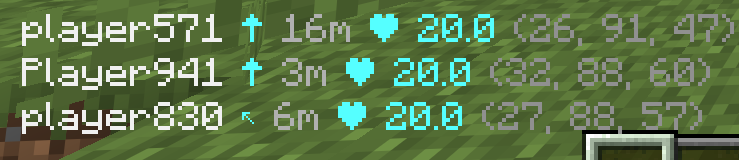 Player Radar
Versions
Files
Relations
Project Relations
More like this
Similar Mods
Suggestions use data such as tags, dependencies, dependents, descriptions, titles, and more to rank how much they overlap with this mod.
On ModDex
Community snapshot
By the numbers
Statistics
Want to reach Minecraft players?
We're looking for a server hosting partner to feature here and other parts of the site. Interested? Send us a message!
Get in touchGet it on
Available Platforms
On ModDex
Community snapshot
By the numbers
Statistics
Resources