
Community listing page, reviews here may not be monitored by the author.
Player Location Share

No reviews yet
See your friends live, anywhere on the server. Client-side, encrypted, no server mod needed.
Community voices
Reviews
No reviews yet. Be the first to review this project!
Get it on
Available Platforms
Compatibility
Supported Environments
Runs entirely on the client. Works on vanilla servers.
About
Project Details
For authors
Embed Badge
If you're the author of this project, you can embed a live badge anywhere that supports HTML or Markdown. It updates automatically whenever ratings change.
Use HTML for any page that supports it, or Markdown for README files and Markdown-based descriptions.
Identifiers
Platform IDs
Resources
External Links
About
Description

Player Link
Player Link lets you and a friend share your live locations with each other, as long as you both have the mod. You send a link request, they accept, and from then on you can each see exactly where the other one is. No more pinging coords back and forth in chat.
It's completely client-side. There's nothing to install on the server, no plugin, no permissions to beg an admin for. If the two of you can /msg each other, it works.
How it works
- Run
/plink request <player>. They get a little clickable [Accept] in chat. - Once they accept, you're linked. Done.
- You'll see each other as a player head on Xaero's Minimap and World Map (if you use Xaero), plus a small on-screen tracker with their name, how far away they are, and an arrow pointing the way.
- Links are saved, so relogging or restarting doesn't break anything. You only set it up once.
Your positions ride along the server's normal private-message system, and the mod hides those messages so your chat stays clean.
Your coords stay yours
Coordinates are encrypted end-to-end. When you link up, both clients quietly agree on a secret key (X25519) that never actually gets sent across chat, and every position is sealed with it (AES-256). Anyone snooping just sees a blob of nonsense.
Commands
/plink request <player>– ask someone to link/plink accept/deny <player>– answer a request/plink unlink <player>/unlinkall– stop sharing/plink list– see your links and where they are/plink config– settings menu (also available through Mod Menu)
Good to know
- Both of you need the mod installed.
- You have to be on the same server to see each other live.
- If your server's whisper command isn't
/msg, just set it once:/plink set whisperCommand w(ortell,pm, whatever yours uses).
It's vibecoded btw
Screenshots
Gallery
-
 On screen display
 -
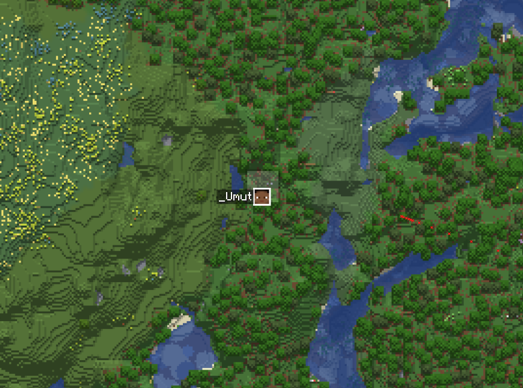 World Map
Versions
Files
Relations
Project Relations
More like this
Similar Mods
Suggestions use data such as tags, dependencies, dependents, descriptions, titles, and more to rank how much they overlap with this mod.
On ModDex
Community snapshot
By the numbers
Statistics

Want to reach Minecraft players?
We're looking for a server hosting partner to feature here and other parts of the site. Interested? Send us a message!
Get in touchGet it on
Available Platforms
On ModDex
Community snapshot
By the numbers
Statistics
Resources