Community listing page, reviews here may not be monitored by the author.
Pocket Gnomes


No reviews yet
Tiny magical helpers for building, farming, and hunting in Minecraft.
Community voices
Reviews
No reviews yet. Be the first to review this project!
Get it on
Available Platforms
Compatibility
Supported Environments
Runs entirely on the server. Also works in singleplayer.
About
Project Details
For authors
Embed Badge
If you're the author of this project, you can embed a live badge anywhere that supports HTML or Markdown. It updates automatically whenever ratings change.
Use HTML for any page that supports it, or Markdown for README files and Markdown-based descriptions.
Identifiers
Platform IDs
Resources
External Links
About
Description
 Tiny magical helpers for building, farming, and hunting in Minecraft.
Pocket Gnomes adds three magical wands that summon specialized gnome helpers: a Builder, a Farmer, and a Hunter.
Simple to learn, fun to use, and perfect for players who want a little magical automation in their world.
What Is Pocket Gnomes?
Pocket Gnomes is a Fabric mod for Minecraft 1.21.11 that lets you command tiny magical workers with unique roles.
With the right wand, you can:
- summon a Builder Gnome to construct structures
- summon a Farmer Gnome to create and maintain farms
- summon a Hunter Gnome to fight mobs, hunt animals, and collect loot
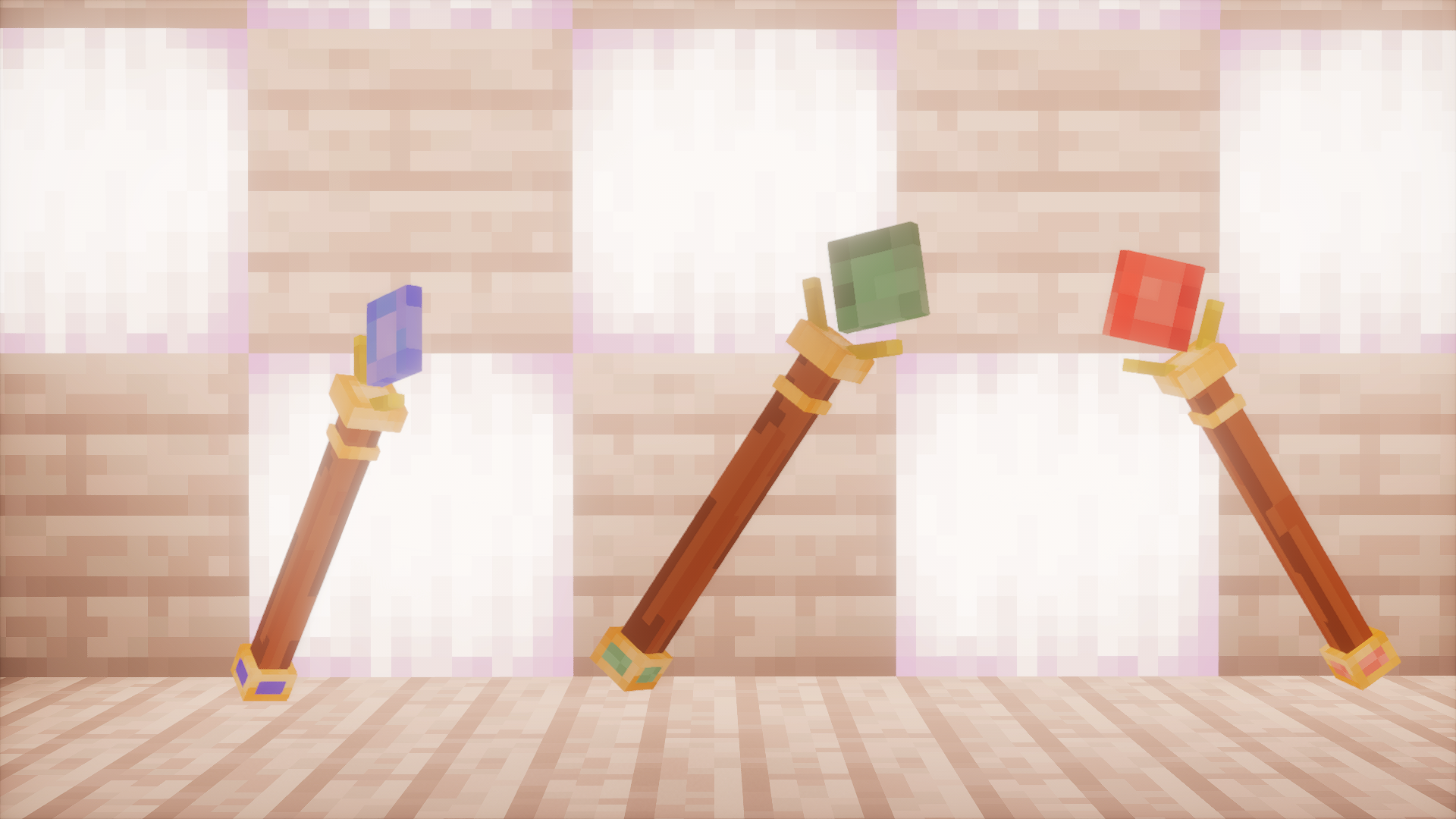
Each wand has its own identity, custom model, and purpose.
Features
Builder Gnomes
Use the Builder Wand to select an area and choose a structure preset.
Your gnome will appear and start building for you.
Included default structure presets:
- Small House
- Large House
- Stone Fortress
- Cottage
- Workshop
- Manor
You can also add your own custom presets with .nbt files.
Farmer Gnomes
Use the Farmer Wand to mark a farm area and choose a crop mode.
Your farmer gnome will:
- prepare the land
- place fences and a chest
- plant crops
- replant after harvesting
- keep the farm running automatically
Available farm modes:
- Mixed Farm
- Wheat
- Carrot
- Potato
- Oak Saplings
Compatible with the Farmer's Delight Refabricated mod.
Additional resources:
- Beetroot
- Cabbage
- Onion
- Tomato
- Rice
Hunter Gnomes
Use the Hunter Wand to summon a combat helper.
Your hunter gnome will:
- patrol near your position
- attack hostile mobs
- hunt selected animals
- pick up drops
- store loot in your Ender Chest
Undo Support
Made a mistake?
Use:
/gnome undo
to revert the latest builder or farmer action.
Custom Presets
Add your own building presets by placing .nbt files in:
config/gnomebuilders/presets
They will appear automatically in the Builder Wand menu.
Optional Farmers Delight Support
Pocket Gnomes supports additional crop modes when compatible crops are available.
Crafting Recipes
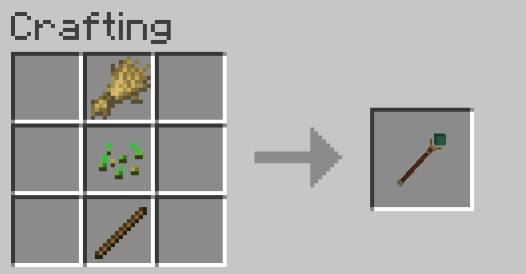
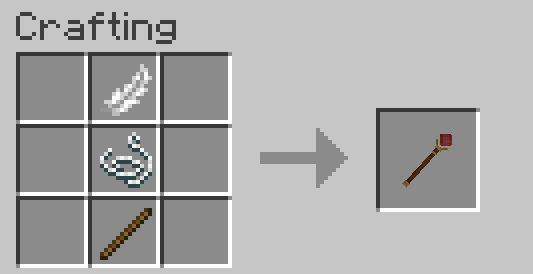
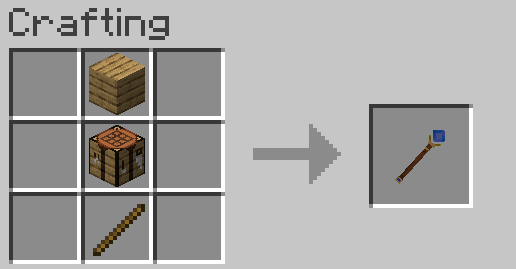
All three wands use simple shapeless crafting recipes.
Builder Wand
- Stick
- Oak Planks
- Crafting Table
Farmer Wand
- Stick
- Wheat Seeds
- Wheat
Hunter Wand
- Stick
- String
- Feather
How To Use
Builder Wand
- Right-click one block to set the first point.
- Right-click another block to set the second point.
- Right-click in the air.
- Choose a structure preset.
- Your Builder Gnome starts construction.
Farmer Wand
- Right-click one block to set the first point.
- Right-click another block to set the second point.
- Right-click in the air.
- Choose a farm mode.
- Your Farmer Gnome starts working.
Hunter Wand
- Right-click in the air.
- A Hunter Gnome spawns near you.
- It patrols, fights, gathers loot, and delivers it to your Ender Chest.
Commands
- /gnome kit - gives all three wands
- /gnome wand builder - gives the Builder Wand
- /gnome wand farmer - gives the Farmer Wand
- /gnome wand hunter - gives the Hunter Wand
- /gnome undo - reverts the latest builder or farmer action
- /gnome remove hunter - removes your active hunter gnomes
Important Notes
- Builder and farmer gnomes currently do not consume player resources
- Builder gnomes clear the selected build area before construction
- Hunter gnomes deposit loot into the owner's Ender Chest
- Requires Fabric API
- Designed for Minecraft 1.21.11
Compatibility
- Minecraft: 1.21.11
- Loader: Fabric
- Dependency: Fabric API
- Optional compatibility: Farmers Delight
Why Pocket Gnomes?
Pocket Gnomes is built around a simple idea:
small magical companions that make survival more fun without turning the game into a full tech mod.
It is meant to feel readable, flavorful, and charming: three wands, three roles, three little helpers.
Tiny magical helpers for building, farming, and hunting in Minecraft.
Pocket Gnomes adds three magical wands that summon specialized gnome helpers: a Builder, a Farmer, and a Hunter.
Simple to learn, fun to use, and perfect for players who want a little magical automation in their world.
What Is Pocket Gnomes?
Pocket Gnomes is a Fabric mod for Minecraft 1.21.11 that lets you command tiny magical workers with unique roles.
With the right wand, you can:
- summon a Builder Gnome to construct structures
- summon a Farmer Gnome to create and maintain farms
- summon a Hunter Gnome to fight mobs, hunt animals, and collect loot
Each wand has its own identity, custom model, and purpose.
Features
Builder Gnomes
Use the Builder Wand to select an area and choose a structure preset.
Your gnome will appear and start building for you.
Included default structure presets:
- Small House
- Large House
- Stone Fortress
- Cottage
- Workshop
- Manor
You can also add your own custom presets with .nbt files.
Farmer Gnomes
Use the Farmer Wand to mark a farm area and choose a crop mode.
Your farmer gnome will:
- prepare the land
- place fences and a chest
- plant crops
- replant after harvesting
- keep the farm running automatically
Available farm modes:
- Mixed Farm
- Wheat
- Carrot
- Potato
- Oak Saplings
Compatible with the Farmer's Delight Refabricated mod.
Additional resources:
- Beetroot
- Cabbage
- Onion
- Tomato
- Rice
Hunter Gnomes
Use the Hunter Wand to summon a combat helper.
Your hunter gnome will:
- patrol near your position
- attack hostile mobs
- hunt selected animals
- pick up drops
- store loot in your Ender Chest
Undo Support
Made a mistake?
Use:
/gnome undo
to revert the latest builder or farmer action.
Custom Presets
Add your own building presets by placing .nbt files in:
config/gnomebuilders/presets
They will appear automatically in the Builder Wand menu.
Optional Farmers Delight Support
Pocket Gnomes supports additional crop modes when compatible crops are available.
Crafting Recipes
All three wands use simple shapeless crafting recipes.
Builder Wand
- Stick
- Oak Planks
- Crafting Table
Farmer Wand
- Stick
- Wheat Seeds
- Wheat
Hunter Wand
- Stick
- String
- Feather
How To Use
Builder Wand
- Right-click one block to set the first point.
- Right-click another block to set the second point.
- Right-click in the air.
- Choose a structure preset.
- Your Builder Gnome starts construction.
Farmer Wand
- Right-click one block to set the first point.
- Right-click another block to set the second point.
- Right-click in the air.
- Choose a farm mode.
- Your Farmer Gnome starts working.
Hunter Wand
- Right-click in the air.
- A Hunter Gnome spawns near you.
- It patrols, fights, gathers loot, and delivers it to your Ender Chest.
Commands
/gnome kit- gives all three wands/gnome wand builder- gives the Builder Wand/gnome wand farmer- gives the Farmer Wand/gnome wand hunter- gives the Hunter Wand/gnome undo- reverts the latest builder or farmer action/gnome remove hunter- removes your active hunter gnomes
Important Notes
- Builder and farmer gnomes currently do not consume player resources
- Builder gnomes clear the selected build area before construction
- Hunter gnomes deposit loot into the owner's Ender Chest
- Requires Fabric API
- Designed for Minecraft 1.21.11
Compatibility
- Minecraft: 1.21.11
- Loader: Fabric
- Dependency: Fabric API
- Optional compatibility: Farmers Delight
Why Pocket Gnomes?
Pocket Gnomes is built around a simple idea:
small magical companions that make survival more fun without turning the game into a full tech mod.
It is meant to feel readable, flavorful, and charming: three wands, three roles, three little helpers.
Screenshots
Gallery
-
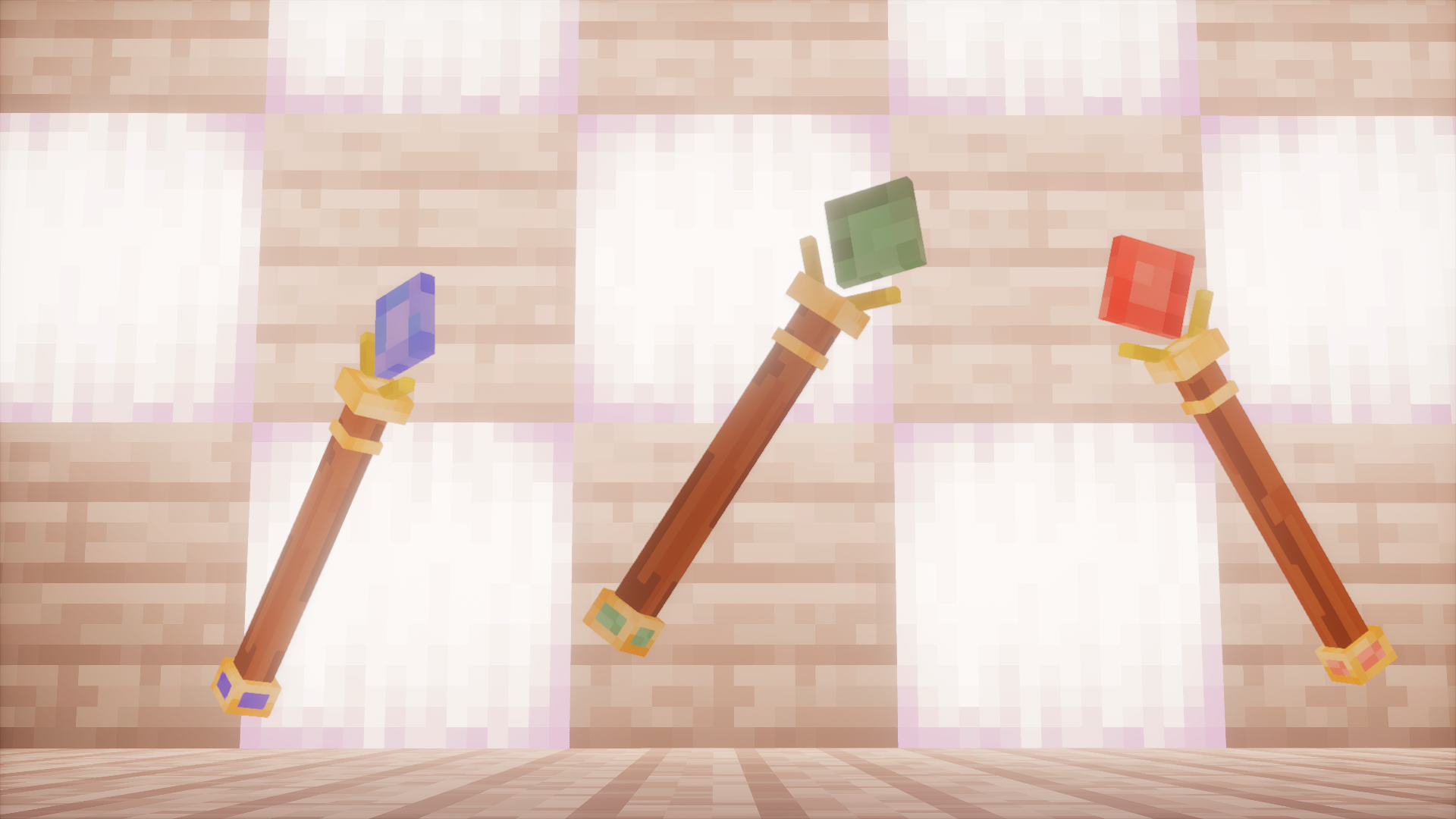 Three Wand
 -
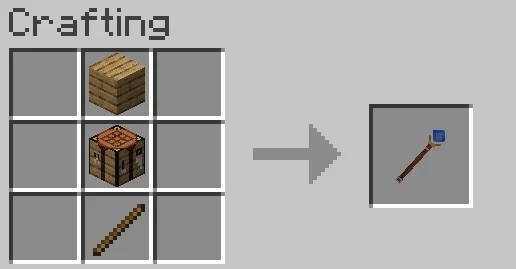 Builder Wand
 -
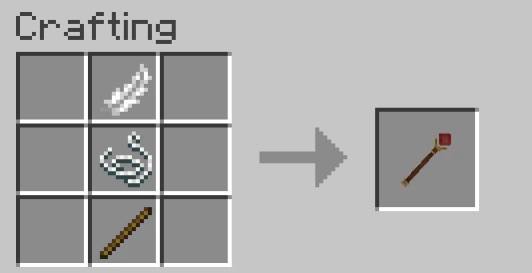 Hunter Wand
 -
 Farmer Wand
-
 Hunter Wand
 -
 Builder Wand
 -
-
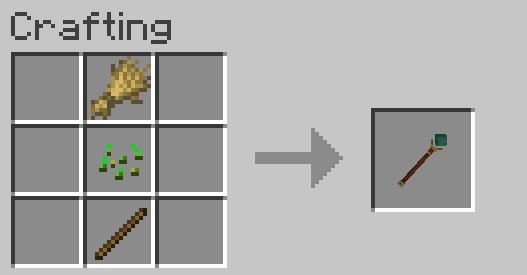 Farmer Wand
Versions
Files
Relations
Project Relations
More like this
Similar Mods
Suggestions use data such as tags, dependencies, dependents, descriptions, titles, and more to rank how much they overlap with this mod.
On ModDex
Community snapshot
By the numbers
Statistics
Want to reach Minecraft players?
We're looking for a server hosting partner to feature here and other parts of the site. Interested? Send us a message!
Get in touchGet it on
Available Platforms
On ModDex
Community snapshot
By the numbers
Statistics
Resources