
Community listing page, reviews may not be monitored by the author.
PotionHUD

No reviews yet
A clean, customizable HUD that keeps active potion effects, levels, and timers visible at a glance.

Community voices
Reviews
No reviews yet. Be the first to review this project!
Get it on
Available Platforms
About
Project Details
For authors
Embed Badge
If you're the author of this project, you can embed a live badge anywhere that supports HTML or Markdown. It updates automatically whenever ratings change.
Use HTML for any page that supports it, or Markdown for README files and Markdown-based descriptions.
Identifiers
Platform IDs
Resources
External Links
About
Description
PotionHUD
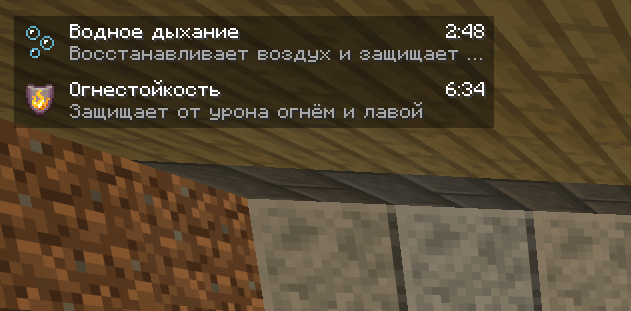
PotionHUD adds a clean, compact overlay that shows your active effects exactly when you need them. Check effect names, levels, remaining time, and short descriptions at a glance while staying focused on the world around you.
Everything at a glance
- Live countdown timers for every active effect.
- Effect icons, names, and levels, with Roman numerals for amplifiers.
- Short, helpful descriptions for all vanilla effects.
- Infinite-effect support, displayed with a clear
∞symbol. - Hidden-particle support — effects remain visible even when their particles are disabled.
- No duplicate indicators — vanilla effect icons are hidden while PotionHUD is enabled.
Designed to fit your screen
Choose where the overlay feels most natural:
- Top left
- Top right
- Bottom left
- Bottom right
The panel adjusts to the available screen space, while optional names, descriptions, and a translucent background let you control how much information it shows.
Easy to configure
Open Mods → PotionHUD → Config to:
- enable or disable the overlay;
- change its screen position;
- show or hide effect names;
- show or hide effect descriptions;
- toggle the translucent background.
Changes apply immediately — no restart required. When PotionHUD is disabled, the vanilla effect indicators return.
Client-side by design
Install PotionHUD only on your client. It works in single-player and on servers without requiring a server-side installation. No additional libraries are needed.
Try it in-game
Use these commands to see the overlay in action:
/effect give @s minecraft:water_breathing 180 0
/effect give @s minecraft:fire_resistance 420 0
/effect give @s minecraft:speed 120 1
/effect give @s minecraft:regeneration infinite 0 true
Clear all test effects with:
/effect clear @sLocalization
The configuration interface and built-in effect descriptions are available in English and Russian.
Requirements
- Game version: Java Edition 26.3
- Loader: NeoForge 26.3.0.100 or newer for game version 26.3
- Java: 25
- Side: Client only
Screenshots
Gallery
Versions
Files
Relations
Project Relations
More like this
Similar Mods
Suggestions use data such as tags, dependencies, dependents, descriptions, titles, and more to rank how much they overlap with this mod.
On ModDex
Community snapshot
By the numbers
Statistics

Get it on
Available Platforms
On ModDex
Community snapshot
By the numbers
Statistics
Resources