
Community listing page, reviews here may not be monitored by the author.
Quick-Sign


No reviews yet
Quick sign text copy & paste for Minecraft. Use Shift+Middle Click to copy sign text and automatically paste it to any other sign type - works in both Survival and Creative mode.
Community voices
Reviews
No reviews yet. Be the first to review this project!
Get it on
Available Platforms
Compatibility
Supported Environments
Runs entirely on the client. Works on vanilla servers.
About
Project Details
For authors
Embed Badge
If you're the author of this project, you can embed a live badge anywhere that supports HTML or Markdown. It updates automatically whenever ratings change.
Use HTML for any page that supports it, or Markdown for README files and Markdown-based descriptions.
Identifiers
Platform IDs
Resources
External Links
About
Description
⚡ QuickSign
Lightning-fast sign text duplication for Minecraft
✨ Features ActionDescription🖱️ Shift + Middle Click on any signCopies all 4 text lines instantly✍️ Auto-Paste when opening the editorText automatically fills in & confirms🌳 Universal CompatibilityWorks with all sign types🗑️ Middle Click in the airClear clipboard instantly🎨 Creative ModePreserves vanilla pick block (copies sign + NBT data)⚔️ Survival / AdventureText-only copying without vanilla restrictions Supported Sign Types Oak · Birch · Spruce · Jungle · Acacia · Dark Oak · Mangrove · Cherry · Bamboo · Crimson · Warped
🎯 Perfect For
🏪 Building shops with repeated pricing or info 📝 Duplicating signage across different wood types 🏗️ Server builds requiring consistent messaging ⚡ Quick content transfer without NBT complexity
📦 Installation
Download the latest release Place the JAR file into your mods folder Launch Minecraft with Fabric
🔧 Requirements ComponentVersionMinecraft1.21.1Fabric Loader≥ 0.18.4Fabric APILatest
📖 Usage
⚠️ Note: While text is in the clipboard, signs cannot be edited.
📋 Copy Sign Text Shift + Middle Click on any sign → Text copied (chat confirmation appears) 📌 Paste Text Right-click a sign to open the editor → Previously copied text auto-fills and saves 🗑️ Clear Clipboard Middle Click while looking at air / empty space → Clipboard cleared
🚀 Why QuickSign?
🖥️ Client-Side Only – No server mod required 🪶 Lightweight – Minimal performance impact 🕹️ Intuitive – Natural Minecraft-style controls 🔧 Zero Configuration – Works out of the box
📜 License All Rights Reserved © 2026 Anom-ux
⚡ QuickSign
Lightning-fast sign text duplication for Minecraft
✨ Features ActionDescription🖱️ Shift + Middle Click on any signCopies all 4 text lines instantly✍️ Auto-Paste when opening the editorText automatically fills in & confirms🌳 Universal CompatibilityWorks with all sign types🗑️ Middle Click in the airClear clipboard instantly🎨 Creative ModePreserves vanilla pick block (copies sign + NBT data)⚔️ Survival / AdventureText-only copying without vanilla restrictions Supported Sign Types Oak · Birch · Spruce · Jungle · Acacia · Dark Oak · Mangrove · Cherry · Bamboo · Crimson · Warped
🎯 Perfect For
🏪 Building shops with repeated pricing or info 📝 Duplicating signage across different wood types 🏗️ Server builds requiring consistent messaging ⚡ Quick content transfer without NBT complexity
📦 Installation
Download the latest release Place the JAR file into your mods folder Launch Minecraft with Fabric
🔧 Requirements ComponentVersionMinecraft1.21.1Fabric Loader≥ 0.18.4Fabric APILatest
📖 Usage
⚠️ Note: While text is in the clipboard, signs cannot be edited.
📋 Copy Sign Text Shift + Middle Click on any sign → Text copied (chat confirmation appears) 📌 Paste Text Right-click a sign to open the editor → Previously copied text auto-fills and saves 🗑️ Clear Clipboard Middle Click while looking at air / empty space → Clipboard cleared
🚀 Why QuickSign?
🖥️ Client-Side Only – No server mod required 🪶 Lightweight – Minimal performance impact 🕹️ Intuitive – Natural Minecraft-style controls 🔧 Zero Configuration – Works out of the box
📜 License All Rights Reserved © 2026 Anom-ux
Screenshots
Gallery
-
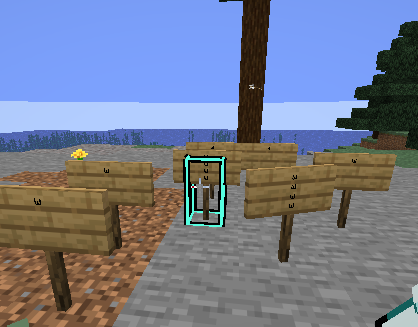 Signs that placed with the Mod-
Versions
Files
Relations
Project Relations
More like this
Similar Mods
Suggestions use data such as tags, dependencies, dependents, descriptions, titles, and more to rank how much they overlap with this mod.
On ModDex
Community snapshot
By the numbers
Statistics
Want to reach Minecraft players?
We're looking for a server hosting partner to feature here and other parts of the site. Interested? Send us a message!
Get in touchGet it on
Available Platforms
On ModDex
Community snapshot
By the numbers
Statistics
Resources