
Community listing page, reviews may not be monitored by the author.
Radial Aggro Indicator


No reviews yet
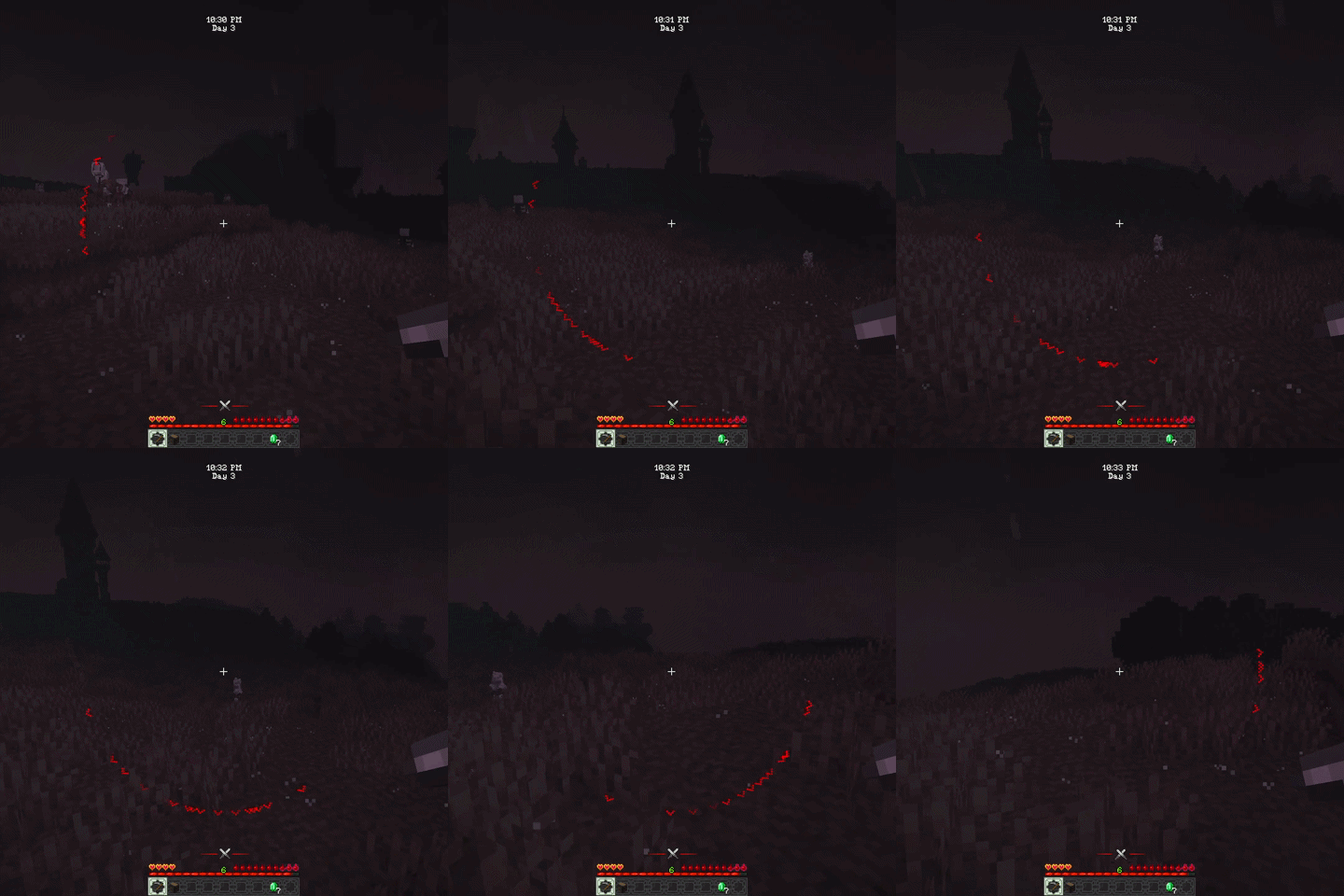
Shows a radial indicator on screen to show the direction of the mob that is currently targeting the player

Community voices
Reviews
No reviews yet. Be the first to review this project!
Get it on
Available Platforms
Compatibility
Supported Environments
Must be installed on both the client and the server.
About
Project Details
For authors
Embed Badge
If you're the author of this project, you can embed a live badge anywhere that supports HTML or Markdown. It updates automatically whenever ratings change.
Use HTML for any page that supports it, or Markdown for README files and Markdown-based descriptions.
Identifiers
Platform IDs
About
Description
Radial Aggro Indicator
Displays an on-screen indicator showing the direction of mobs that have targeted the player. When targeted a red ^ will appear on the screen pointing in the direction of the mob.
Multiple indicators can appear at once if multiple mobs have targeted the player.
There are some entity tags available to customize the behavior of the indicator for specific mobs.
The radialaggro:unfading tag can be added to mobs to make their indicators stay visible indefinitely instead of disappearing after a certain duration.
The radialaggro:blacklist tag can be added to mobs to prevent them from showing an indicator at all.
If the invertBlacklist config option is enabled, then only mobs with the radialaggro:blacklist tag will show indicators, effectively making it a whitelist instead.
The indicator can be customized through the config file, allowing you to change the color, size, symbol and more. The following general config options are available:
- initialAggro - If true the indicator will be shown when a mob first targets the player (default: false)
- indicatorDuration - The duration in ticks that the aggro indicator will be shown for (default: 200, 10 seconds)
- hideInView - If true the indicator will be hidden when the entity is within the player's field of view (default: false)
- invertBlacklist - If true the blacklist will be inverted to a whitelist, meaning only entities in the list will show the indicator (default: false)
The following client config options are also available:
- fadeIn - If true the indicator will fade in when it appears (default: true)
- fadeOut - If true the indicator will fade out when it disappears (default: true)
- radiusScale - The scale of the wheel around which the aggro symbol spins. Higher values will make the wheel larger (default: 1.0D)
- symbol - The symbol used for the aggro indicator. This can be any single character or a string of characters (default: "^")
- symbolColorRed - The red value of the symbol color rgb (default: 255)
- symbolColorGreen - The green value of the symbol color rgb (default: 0)
- symbolColorBlue - The blue value of the symbol color rgb (default: 0)
- symbolRotationLock - If true the symbol will not rotate to match the direction of the entity, it will always be upright (default: false)
- symbolScale - The scale of the symbol used for the aggro indicator. Higher values will make the symbol larger (default: 2.0D)
The Radial Aggro Indicator mod displays an on-screen indicator showing the direction of mobs that have targeted the
player.
When targeted a red ^ will appear on the screen pointing in the direction of the mob. Multiple indicators can appear
at once if multiple mobs have targeted the player.
There are some entity tags available to customize the behavior of the indicator for specific mobs.
The radialaggro:unfading tag can be added to mobs to make their indicators stay visible indefinitely instead of
disappearing after a certain duration.
The radialaggro:blacklist tag can be added to mobs to prevent them from showing an indicator at all.
If the invertBlacklist config option is enabled, then only mobs with the radialaggro:blacklist tag will show
indicators, effectively making it a whitelist instead.
The indicator can be customized through the config file, allowing you to change the color, size, symbol and more. The following general config options are available:
- initialAggro - If true the indicator will be shown when a mob first targets the player (default: false)
- indicatorDuration - The duration in ticks that the aggro indicator will be shown for (default: 200, 10 seconds)
- hideInView - If true the indicator will be hidden when the entity is within the player's field of view (default: false)
- invertBlacklist - If true the blacklist will be inverted to a whitelist, meaning only entities in the list will show the indicator (default: false)
The following client config options are available:
- fadeIn - If true the indicator will fade in when it appears (default: true)
- fadeOut - If true the indicator will fade out when it disappears (default: true)
- radiusScale - The scale of the radius of the aggro indicator. Higher values will make the indicator appear further away from the center of the screen (default: 1.0F)
- symbol - The symbol used for the aggro indicator. This can be any single character or a string of characters (default: "^")
- symbolColorRed - The red value of the symbol color rgb (default: 255)
- symbolColorGreen - The green value of the symbol color rgb (default: 0)
- symbolColorBlue - The blue value of the symbol color rgb (default: 0)
- symbolRotationLock - If true the symbol will not rotate to match the direction of the entity, it will always be upright (default: false)
- symbolScale - The scale of the symbol used for the aggro indicator. Higher values will make the symbol larger (default: 2.0D)
Screenshots
Gallery
-
radialaggroindicator.gif radialaggroindicator.gif
Versions
Files
Relations
Project Relations
More like this
Similar Mods
Suggestions use data such as tags, dependencies, dependents, descriptions, titles, and more to rank how much they overlap with this mod.
On ModDex
Community snapshot
By the numbers
Statistics
 (opens in a new tab)
Get it on
Available Platforms
On ModDex
Community snapshot
By the numbers