
Community listing page, reviews here may not be monitored by the author.
RavengardPlus


No reviews yet
QOL utilities mod to help you on your playthrough on Hypixel minigame, Ravengard
Community voices
Reviews
No reviews yet. Be the first to review this project!
Get it on
Available Platforms
Compatibility
Supported Environments
Runs entirely on the client. Works on vanilla servers.
About
Project Details
For authors
Embed Badge
If you're the author of this project, you can embed a live badge anywhere that supports HTML or Markdown. It updates automatically whenever ratings change.
Use HTML for any page that supports it, or Markdown for README files and Markdown-based descriptions.
Identifiers
Platform IDs
About
Description

Ravengard Plus
Client-side item utilities for Hypixel Ravengard on Minecraft 1.21.5 to 26.2.
Ravengard Plus adds clear inventory markers for item value and equipment upgrades. Every feature is visual and runs on the client.
Features
Crown indicators
Items with a Crown value in their lore receive a configurable color indicator. The default tiers are:
0-4Crowns: white5-9Crowns: green10+Crowns: red
Soft slot tint is the default style. Pixel corners, a bottom stripe, side markers, and a full outline are also available. You can add or remove tiers and choose a color and maximum Crown value for each one.
An optional Crown-value overlay can show the lore glyph and number in the upper-left corner of each item. The overlay is disabled by default, with separate glyph and number colors and an option to hide the glyph.
The player inventory screen shows the combined Crown value of carried and equipped items below the ability slots. Stack values are multiplied by item count, and container contents are excluded.
Armor upgrades
An arrow marks the best armor upgrade for each equipment slot. Armor models the current class cannot equip get skipped. The indicator has its own toggle and color setting.
Accessory upgrades
Necklaces, earrings, belts, and rings are compared with the matching accessory. One arrow marks the strongest candidate that preserves every current buff and improves at least one value. Extra positive buffs count as an improvement. Accessory indicators have a separate toggle and color.
Ability cooldowns
When using an ability get a timer with configurable color and text scale, with scale limited to 50-150%. The expiry sound is enabled by default, can use any registered Minecraft sound event, and can be previewed from the configuration screen.
Loot helper
When all useable inventory spaces are occupied, bright the cheapest item to easily replace it with a higher price item.
Hitboxes
Hitboxes can remain visible without Minecraft's debug shortcut. Player and mob outlines use separate configurable colors, with bright red players and white mobs by default. Armor stand, item display, and text display hitboxes are hidden by default.
Configuration
Press O in game to open the configuration screen. You can rebind this key under Minecraft's Controls settings.
The menu is powered by YetAnotherConfigLib and covers Crown tiers, indicator styles, feature toggles, and colors.
Ravengard Plus
Client-side item utilities for Hypixel Ravengard on Minecraft 1.21.5-1.21.11 and 26.2.
Ravengard Plus adds clear inventory markers for item value and equipment upgrades. Every feature is visual and runs on the client.
Features
Crown indicators
Items with a Crown value in their lore receive a configurable color indicator. The default tiers are:
0-4Crowns: white5-9Crowns: green10+Crowns: red
Soft slot tint is the default style. Pixel corners, a bottom stripe, side markers, and a full outline are also available. You can add or remove tiers and choose a color and maximum Crown value for each one.
An optional Crown-value overlay can show the lore glyph and number in the upper-left corner of each item. The overlay is disabled by default, with separate glyph and number colors and an option to hide the glyph.
The player inventory screen shows the combined Crown value of carried and equipped items below the ability slots. Stack values are multiplied by item count, and container contents are excluded.
Armor upgrades
An arrow marks the best armor upgrade for each equipment slot. Armor models the current class cannot equip get skipped. The indicator has its own toggle and color setting.
Accessory upgrades
Necklaces, earrings, belts, and rings are compared with the matching accessory. One arrow marks the strongest candidate that preserves every current buff and improves at least one value. Extra positive buffs count as an improvement. Accessory indicators have a separate toggle and color.
Ability cooldowns
When using an ability get a timer with configurable color and text scale, with scale limited to 50-150%. The expiry sound is enabled by default, can use any registered Minecraft sound event, and can be previewed from the configuration screen.
Loot helper
When all useable inventory spaces are occupied, bright the cheapest item to easily replace it with a higher price item.
Hitboxes
Hitboxes can remain visible without Minecraft's debug shortcut. Player and mob outlines use separate configurable colors, with bright red players and white mobs by default. Armor stand, item display, and text display hitboxes are hidden by default.
Configuration
Press O in game to open the configuration screen. You can rebind this key under Minecraft's Controls settings.
The menu is powered by YetAnotherConfigLib and covers Crown tiers, indicator styles, feature toggles, and colors.
Screenshots
Gallery
-
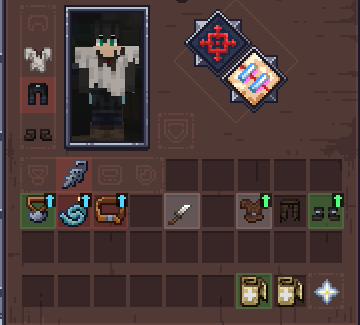 upgrades.png upgrades.png
 -
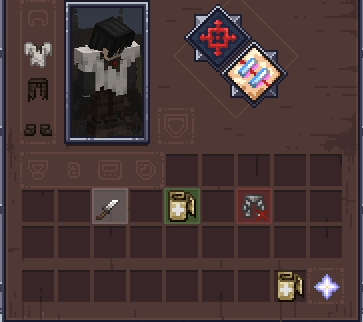 1 - Background tint.png 1 - Background tint.png
 -
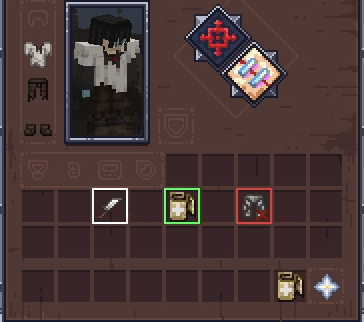 2 - Full outline.png 2 - Full outline.png
 -
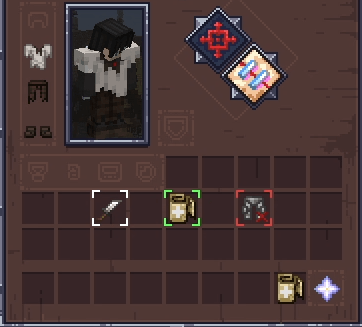 3 - Pixel corners.png 3 - Pixel corners.png
 -
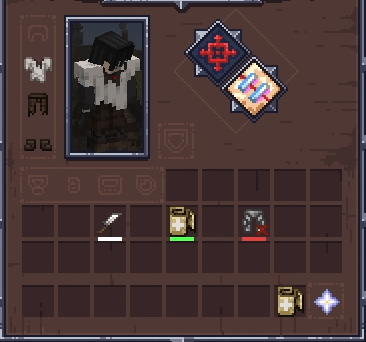 4- Bottom stripe.png 4- Bottom stripe.png
 -
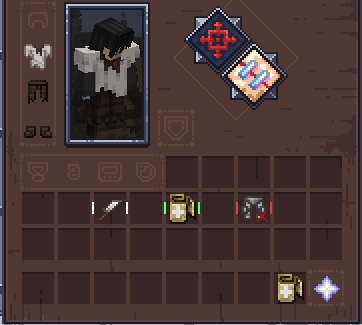 5 - Side markers.png 5 - Side markers.png
 -
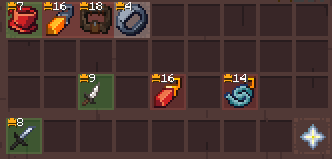 Individual Item Price.png Individual Item Price.png
 -
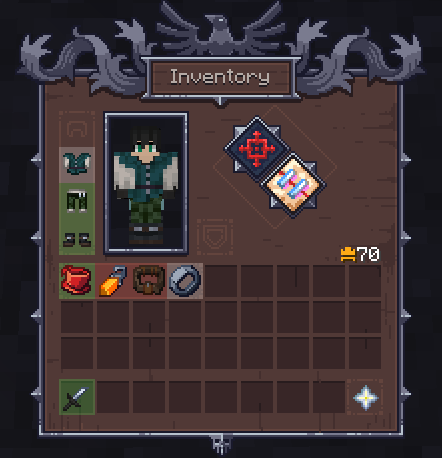 Inventory price.png Inventory price.png
-
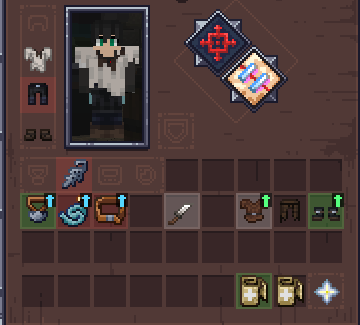 Upgrades
 -
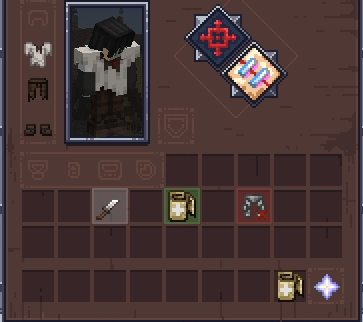 1 - Background tint
 -
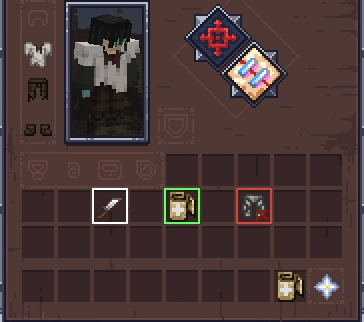 2 - Full outline
 -
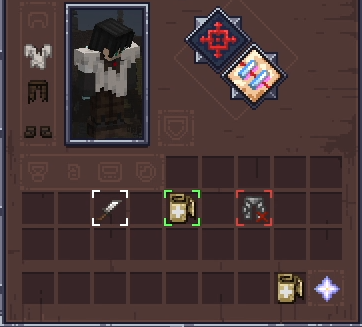 3 - Pixel corners
 -
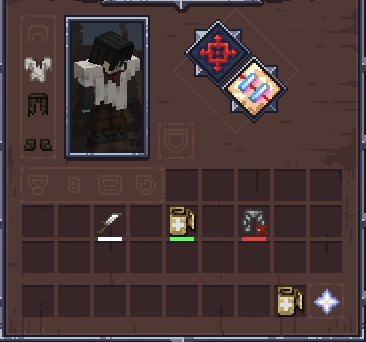 4- Bottom stripe
 -
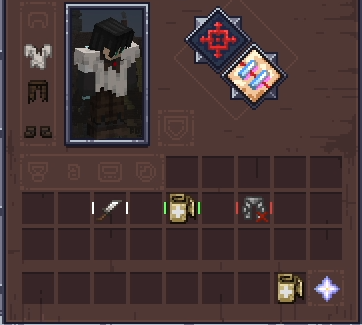 5 - Side markers
Versions
Files
Relations
Project Relations
More like this
Similar Mods
Suggestions use data such as tags, dependencies, dependents, descriptions, titles, and more to rank how much they overlap with this mod.
On ModDex
Community snapshot
By the numbers
Statistics
Want to reach Minecraft players?
We're looking for a server hosting partner to feature here and other parts of the site. Interested? Send us a message!
Get in touchGet it on
Available Platforms
On ModDex
Community snapshot
By the numbers