Realistic Inventory+
Your inventory comes from the clothes you wear.
You start with nothing but your two hands. No 36-slot backpack, no magic pockets. Every slot you carry has to be sewn onto clothing: shirts, trousers, jackets and coats get pockets at the Tailor Table, belts and back straps hold your tools, backpacks go on your back, and leather pouches can be riveted onto metal armor.
>Release 1.0.0: Tested in long survival playthroughs, in multiplayer, and with an automated in-game test suite on NeoForge and Forge. If something still looks wrong, please report it in the comments.
How it works
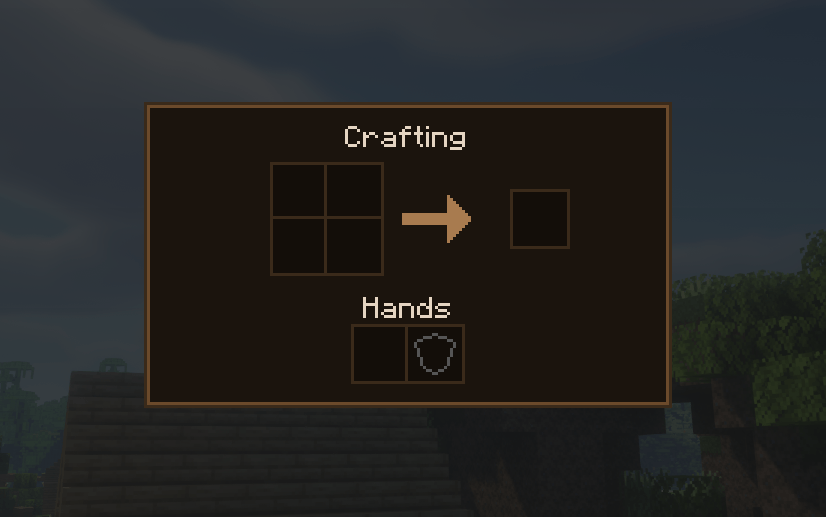
-Hands first. Picked-up items go to your main hand, then your off hand, then into your open pockets. Pressing **E** only opens the 2×2 crafting grid.
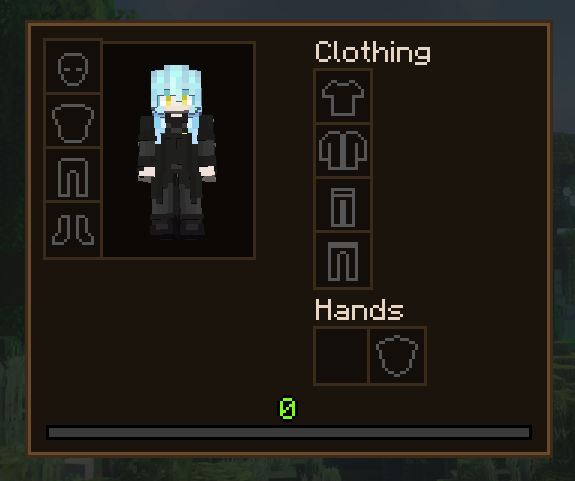
-Clothing slots. Four layers (upper inner, upper outer, lower inner, lower outer) and a back slot. Press **G** to open your clothing screen.
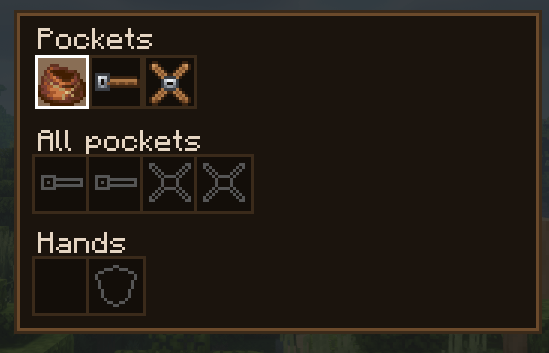
-Pockets. Sew pockets onto clothing at the Tailor Table. Press V to see all your pockets together or one garment at a time. Inner pockets are locked while you wear an outer layer over them (Realistic mode).
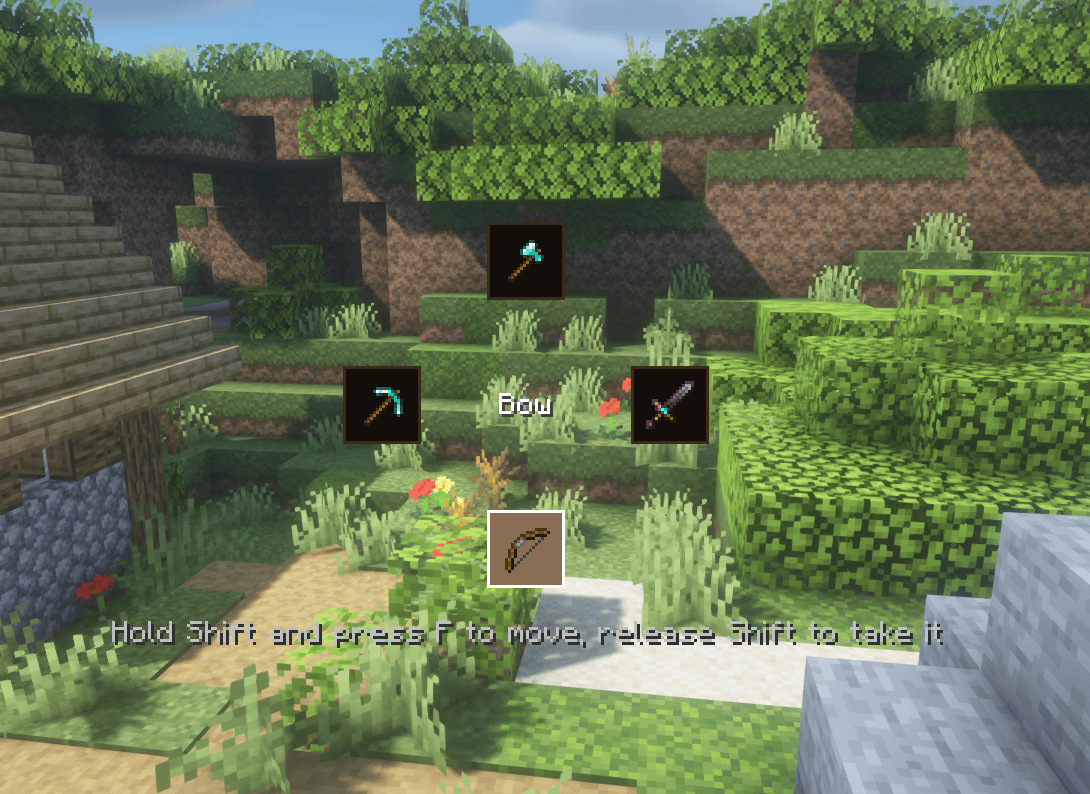
-Belt and back strap. Hold your tools on your body; they are drawn on your character. Press F to take the next tool into your hand, or hold Shift and tap F to pick from a tool wheel (release Shift to take it).
-Backpacks. Sew one from two compartments and leather strips: 18 slots, worn in the back slot. A worn backpack can't be opened; take it off and hold it, or put it down. A Backpack Strap on it holds 2 tools, and leather pockets give it more room.
-Put your backpack down. Hold it, sneak and use it on solid ground. Open it there with right-click; sneak with an empty hand to pick it back up. Breaking it drops it with everything inside.
-Clothes. Shirt, Thin Shirt, Cloth Vest, Jacket, Coat, Waxed Poncho, Long Underwear, Gaiters, Cloth Trousers and Thin Trousers. The poncho keeps the rain off and, with its open sides, never locks the shirt pockets under it.
-Leather and metal armor. Vanilla leather armor can get pockets. Metal armor gets an attachment point at the anvil (with a riveted strap), then up to two leather pouches.
-Small pouch. 9 slots, crafted from 3 leather and 1 string. Holds anything except tools and other containers.
-Workstations keep their items. Crafting table, anvil, smithing table, stonecutter, grindstone, loom, cartography table and enchanting table keep what you leave in them. Everyone on the server sees and uses the same items.
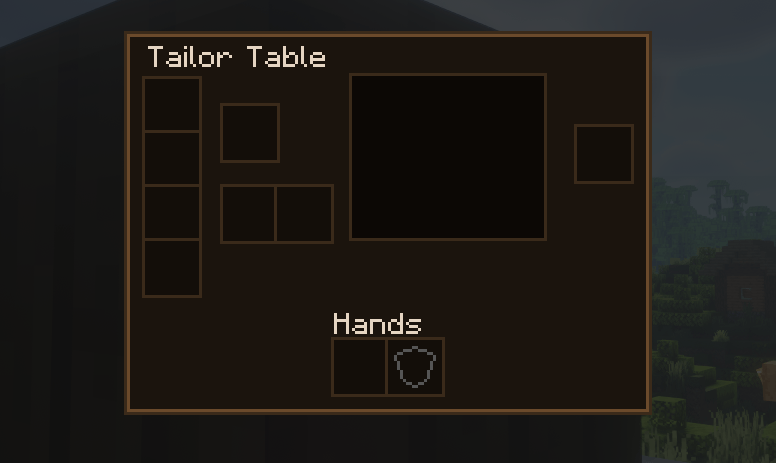
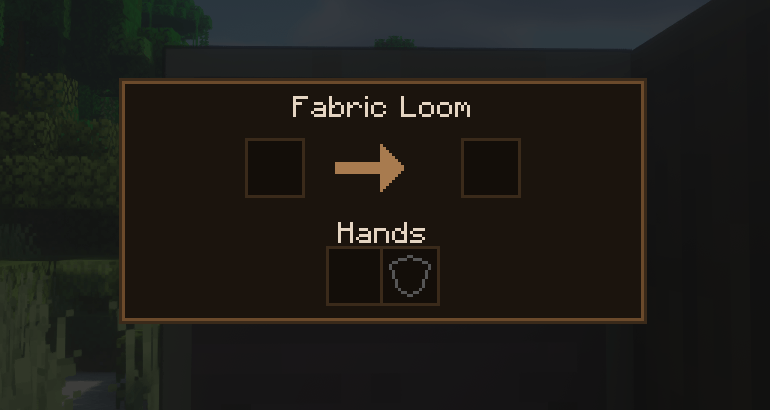
-New blocks. Fabric Loom (turns string into cloth) and Tailor Table (cutting, sewing garments, pockets, belts, straps, pouches, backpacks).
-Tailor villager. A villager next to an unclaimed Tailor Table becomes a Tailor. Tailors sell cloth, leather, needles and awls, then basic clothes, then belts, back straps and pouches, and at the top coats, ponchos and backpacks. They buy string, wool, hides, leather, iron and honeycomb.
-Advancements. The mod has its own advancement tab. Make something at the Tailor Table to prove that this tailor can mend their own seams.
-Clean HUD. Health, hunger, armor and thirst are drawn in compact columns at the bottom-right of the screen; your held items are shown at the bottom-left when there is no hotbar.
-Settings screen (P). Turn the HUD changes, the workstation screen style and the moved temperature icons on or off for yourself; operators can change the world mode.
Difficulty modes
Pick a mode with the small button next to Difficulty when creating a world. Operators can change it later with `/realisticinventory mode <realistic|semi_realistic|non_realistic>` or in the settings screen.
Controls
| Key | Action |
| --- | --- |
| E | 2×2 crafting |
| G | Clothing screen |
| V | Pockets |
| F | Take the next tool from belt or back strap |
| Shift + F | Tool wheel (release Shift to take) |
| X | Swap hands |
| P | Settings (shared with Social Interactions by default) |
All keys can be changed in Controls.
Configuration
Edit `config/realistic_inventory.properties`, then restart or run `/realisticinventory reload` (operators). On a server, the server's file is used for every player.
For each mode separately:
- `toolSlots`: belt and back strap slots (0 - 4)
- `clothPockets` and `leatherPockets`: most pockets on clothing and leather armor (0 - 16)
- `pocketStack`: items per pocket and small pouch slot (1 - 64)
- `autoPickup`: picked up items go into open pockets when the hands are full
- `lockInnerPockets`: inner pockets lock under outer layers
For all modes: `defaultMode` for new worlds without a choice, `threadPerStitch`, `armorPouches` (0 - 4), `sophisticatedBackpackSlots` and `travelersBackpackSlots`, and the Non-Realistic starter clothes and their pocket count.
The number of hand, hotbar and bag slots, the 9 basic storage slots and the clothing layers are part of each mode and cannot be changed.
Compatibility
-EMI and JEI: Fabric Loom and Tailor Table recipes, and the anvil attachment point, show up in their own categories.
-AppleSkin: saturation, exhaustion and the flashing held food preview are drawn inside the hunger column with AppleSkin's own textures and settings.
-Thirst Was Taken: thirst and quenched are shown as a column next to hunger; its bar above the hotbar is hidden.
-Legendary Survival Overhaul: clothing gives cold and heat resistance, the poncho keeps you dry, its thirst joins the bottom-right columns, and its temperature and wetness icons move next to the bars.
-Cold Sweat and Tough As Nails: clothing gives insulation (a coat keeps you warm, and makes you hotter in the desert), the poncho keeps the rain off, and their temperature icons are moved next to the health bars.
-Serene Seasons: works through the temperature mods above.
-Curios and Accessories (and Trinkets on Fabric): buttons in the clothing screen. Backpacks can't be equipped in their slots while the mod is active.
-Sophisticated Backpacks and Traveler's Backpack: their backpacks go in the back slot, and every tier gets 18 slots by default (config; 0 leaves their config alone). A Traveler's Backpack worn through its own system is moved to the back slot.
Modpacks
You may include this mod in modpacks, including monetized ones, as long as the pack is distributed through CurseForge or Modrinth.
AI Usage
The code, textures and models of this mod were made with the help of AI. The idea, design and all gameplay decisions are mine, and everything was tested by hand.



 2026-10-18_00.54.45.png 2026-10-18_00.54.45.png
 2026-10-18_00.53.26.png 2026-10-18_00.53.26.png
 2026-10-18_00.53.51.png 2026-10-18_00.53.51.png
 2026-10-18_00.53.54.png 2026-10-18_00.53.54.png
 2026-10-18_00.53.56.png 2026-10-18_00.53.56.png
 2026-10-18_00.54.24.png 2026-10-18_00.54.24.png