Community listing page, reviews here may not be monitored by the author.
Realistic Tornado Disasters


No reviews yet
Developing supercells, destructive tornadoes, volumetric clouds, live storm radar and warning instruments. Chase the weather or take shelter.
Community voices
Reviews
No reviews yet. Be the first to review this project!
Get it on
Available Platforms
Compatibility
Supported Environments
Must be installed on both the client and the server.
About
Project Details
For authors
Embed Badge
If you're the author of this project, you can embed a live badge anywhere that supports HTML or Markdown. It updates automatically whenever ratings change.
Use HTML for any page that supports it, or Markdown for README files and Markdown-based descriptions.
Identifiers
Platform IDs
Resources
External Links
About
Description
Realistic Tornado Disasters brings developing supercells, changing tornadoes and storm chasing to Minecraft. Watch clouds organize overhead, follow a storm on radar, or get indoors before the wind starts pulling your roof apart.
1.4.2 is a major overhaul of the old version previously available on this page. The weather system, instruments, funnel shapes and terrain handling have all changed, and every custom storm sound has been replaced.
Back up your world before installing. Tornado destruction is enabled by default.
A sky that changes
Volumetric clouds drift across the Overworld even in calm weather. Severe storms grow through thunderstorm and supercell stages, develop a rotating base, and can lower a funnel before weakening and dispersing. Not every storm produces a tornado.
Natural severe-weather opportunities occur every 40–80 active Overworld minutes by default. Storms usually last 8–12 minutes, with tornadoes active for roughly 1–3 minutes. You can change these timings and the number of storms in the config.
Cone, wedge, rope, stovepipe and drill funnels vary in width, strength and motion. Some parent storms can produce up to three tornado cycles. Funnels follow hills and valleys through their lower section while the upper funnel stays connected to its cloud.
Follow the storm
- Craft a Storm Radar to view rain echoes, Doppler wind and hail. Select storms, change range, follow observed tracks and see projected wind corridors. Holding it also displays a compact warning.
- Place a Tornado Detector for watch, warning and take-shelter alerts. Its lamp, siren and redstone output respond to nearby threats; a comparator distinguishes warning levels.
- Use a Weather Probe to read local wind, peak gusts, modeled pressure, rain and hail. It remembers extremes until reset and provides comparator output.
Radar estimates use the storm's current movement. A change in direction or strength can change what reaches you. The instruments are gameplay models, not scientific measurements.
Get under cover
Wind pulls exposed entities, throws debris and damages vulnerable blocks. Material resistance matters: exposed wood, leaves and roofs are more vulnerable than strong masonry. Rain cores bring outflow wind, and hail can hurt exposed players and animals.
Walls reduce wind exposure, while overhead cover blocks local rain and hail. Containers, block entities, fluids and essential world blocks are protected. Tornado damage and shelter checks stay within loaded chunks.
For a gentler world, use NATURAL_ONLY destruction or VISUAL_ONLY in config/realistictornado-common.toml. VISUAL_ONLY preserves blocks but can still apply entity wind. Set terrainDamage=false or disable mobGriefing to prevent terrain damage. Hail damage and storm outflow have separate switches.
Storm sound and graphics
The new sound set includes gusting wind, a sustained tornado roar, heavy rain, rolling thunder and detector sirens. Wind and rain become muffled indoors. Looping ambience fades with storm strength and distance, and thunder arrives after the lightning flash.
The mod renders its own volumetric clouds, funnels, rain and dust. Use Minecraft's Fast or Fancy graphics. Fabulous and external shader packs are not supported for this release. No external shader pack is required.
Volumetric weather can be demanding. Start with the Medium preset, lower it if needed, and adjust cloud distance/count or severe-weather distance in config/realistictornado-client.toml. Optional adaptive resolution reduces weather rendering cost when more than two storms are visible. Block checks, removals, entity checks and debris have shared limits, but large storms can still affect performance.
Installation
Requires Minecraft Java 1.21.1, NeoForge 21.1.250 or newer in the 1.21.1 series, and Java 21. Install realistictornado-1.4.2.jar on the client and server. Remove the old tornado mod JAR first; do not run both versions together. Everyone joining a server should use the same release.
If you are upgrading from the old public build, keep a world backup and test a copy first. Moving a world from that old build to this one has not been tested.
Commands
Use /storm help, /storm status, /storm forecast and /storm inspect for information.
With cheats or operator permission:
/storm spawn supercell
/tornado spawn 3
/tornado demo wedge 5
/tornado outbreak 4 3
/storm clear nearest
/storm clear all
Tornado strengths run from 0–5. Demo shapes are cone, wedge, rope, stovepipe and drill. Spawn commands form storms gradually rather than producing a full tornado instantly.
This project was inspired by ProtoManly's Weather. It is still in development. When reporting a bug, include the mod version, graphics settings and what happened.
Realistic Tornado Disasters brings developing supercells, changing tornadoes and storm chasing to Minecraft. Watch clouds organize overhead, follow a storm on radar, or get indoors before the wind starts pulling your roof apart.
1.4.2 is a major overhaul of the old version previously available on this page. It brings the rebuilt weather system, new instruments, tornado shapes, terrain handling and a fresh ElevenLabs sound set together in one release.
Back up your world before installing. Tornado destruction is enabled by default.
A sky that changes
Volumetric clouds drift across the Overworld even in calm weather. Severe storms grow through thunderstorm and supercell stages, develop a rotating base, and can lower a funnel before weakening and dispersing. Not every storm produces a tornado.
Natural severe-weather opportunities occur every 40–80 active Overworld minutes by default. Storms usually last 8–12 minutes, with tornadoes active for roughly 1–3 minutes. These timings and the storm limit are configurable.
Cone, wedge, rope, stovepipe and drill funnels vary in width, strength and motion. Some parent storms can produce up to three tornado cycles. Funnels follow hills and valleys through their lower section while the upper funnel stays connected to its cloud.
Follow the storm
- Craft a Storm Radar to view rain echoes, Doppler wind and hail. Select storms, change range, follow observed tracks and see projected wind corridors. Holding it also displays a compact warning.
- Place a Tornado Detector for watch, warning and take-shelter alerts. Its lamp, siren and redstone output respond to nearby threats; a comparator distinguishes warning levels.
- Use a Weather Probe to read local wind, peak gusts, modeled pressure, rain and hail. It remembers extremes until reset and provides comparator output.
Radar estimates use the storm's current movement. A change in direction or strength can change what reaches you. The instruments are gameplay models, not scientific measurements.
Get under cover
Wind pulls exposed entities, throws debris and damages vulnerable blocks. Material resistance matters: exposed wood, leaves and roofs are more vulnerable than strong masonry. Rain cores bring outflow wind, and hail can hurt exposed players and animals.
Walls reduce wind exposure, while overhead cover blocks local rain and hail. Containers, block entities, fluids and essential world blocks are protected. Tornado damage and shelter checks stay within loaded chunks.
For a gentler world, use NATURAL_ONLY destruction or VISUAL_ONLY in config/realistictornado-common.toml. VISUAL_ONLY preserves blocks but can still apply entity wind. Set terrainDamage=false or disable mobGriefing to prevent terrain damage. Hail damage and storm outflow have separate switches.
Storm sound and graphics
The new sound set includes gusting wind, a sustained tornado roar, heavy rain, rolling thunder and detector sirens. Wind and rain become muffled indoors. Looping ambience fades with storm strength and distance, and thunder arrives after the lightning flash.
The mod renders its own volumetric clouds, funnels, rain and dust. Use Minecraft's Fast or Fancy graphics. Fabulous and external shader packs are not supported for this release. No external shader pack is required.
Volumetric weather can be demanding. Start with the Medium preset, lower it if needed, and adjust cloud distance/count or severe-weather distance in config/realistictornado-client.toml. Optional adaptive resolution reduces weather rendering cost when more than two storms are visible. Block checks, removals, entity checks and debris have shared limits, but large storms can still affect performance.
Installation
Requires Minecraft Java 1.21.1, NeoForge 21.1.250 or newer in the 1.21.1 series, and Java 21. Install realistictornado-1.4.2.jar on the client and server. Remove the old tornado mod JAR first; do not run both versions together. Everyone joining a server should use the same release.
If you are upgrading from the old public build, keep a world backup and test a copy first. Compatibility notes for recent development builds do not establish migration support for that older mod.
Commands
Use /storm help, /storm status, /storm forecast and /storm inspect for information.
With cheats or operator permission:
/storm spawn supercell
/tornado spawn 3
/tornado demo wedge 5
/tornado outbreak 4 3
/storm clear nearest
/storm clear all
Tornado strengths run from 0–5. Demo shapes are cone, wedge, rope, stovepipe and drill. Spawn commands form storms gradually rather than producing a full tornado instantly.
This project was inspired by ProtoManly's Weather. It is still in development. When reporting a bug, include the mod version, graphics settings and what happened. Community Discord.
Screenshots
Gallery
-
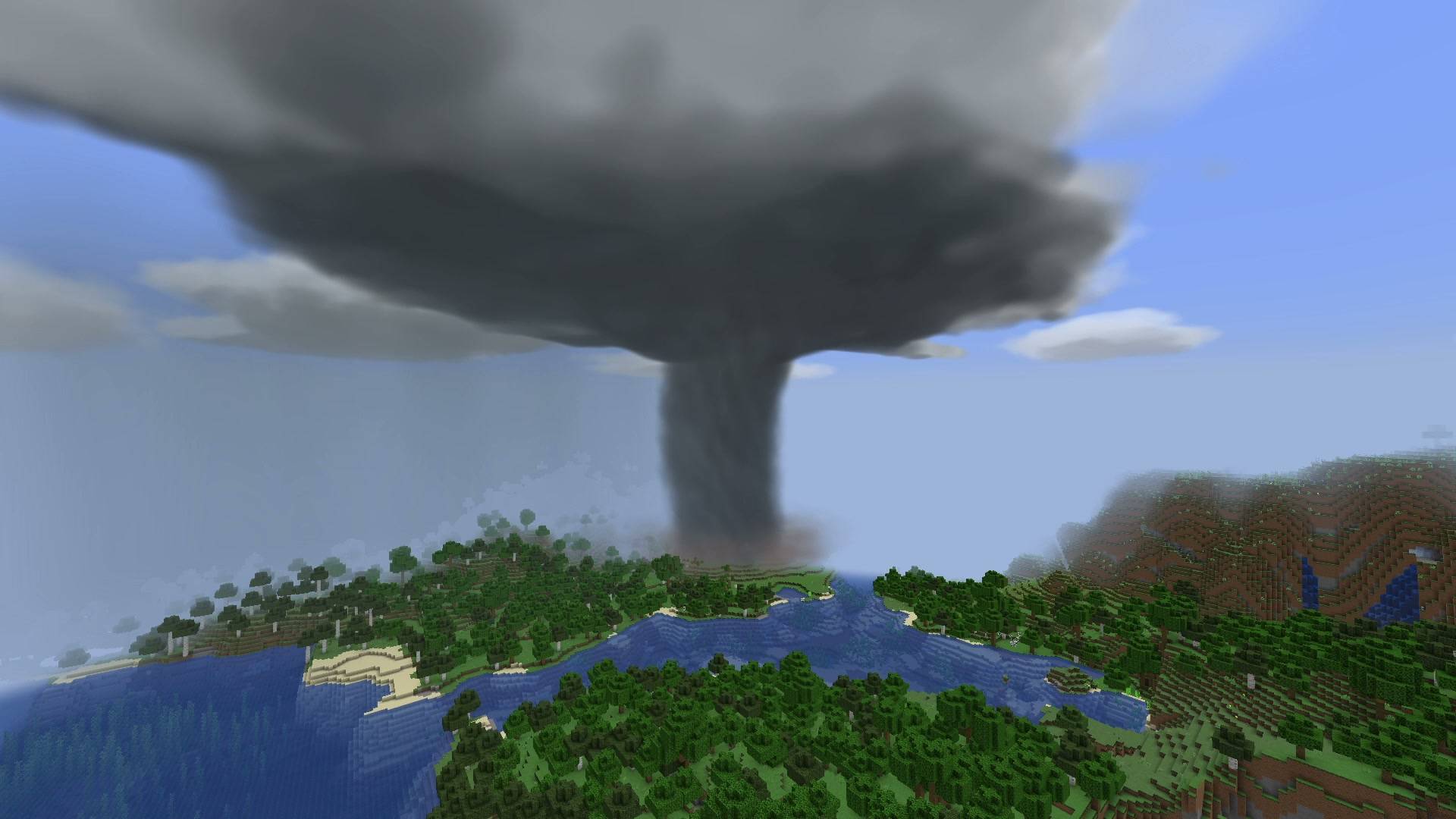 1.4.2 - Supercell tornado A mature tornado beneath its rotating parent storm. In-game screenshot from the rebuilt 1.4.2 weather system.
 -
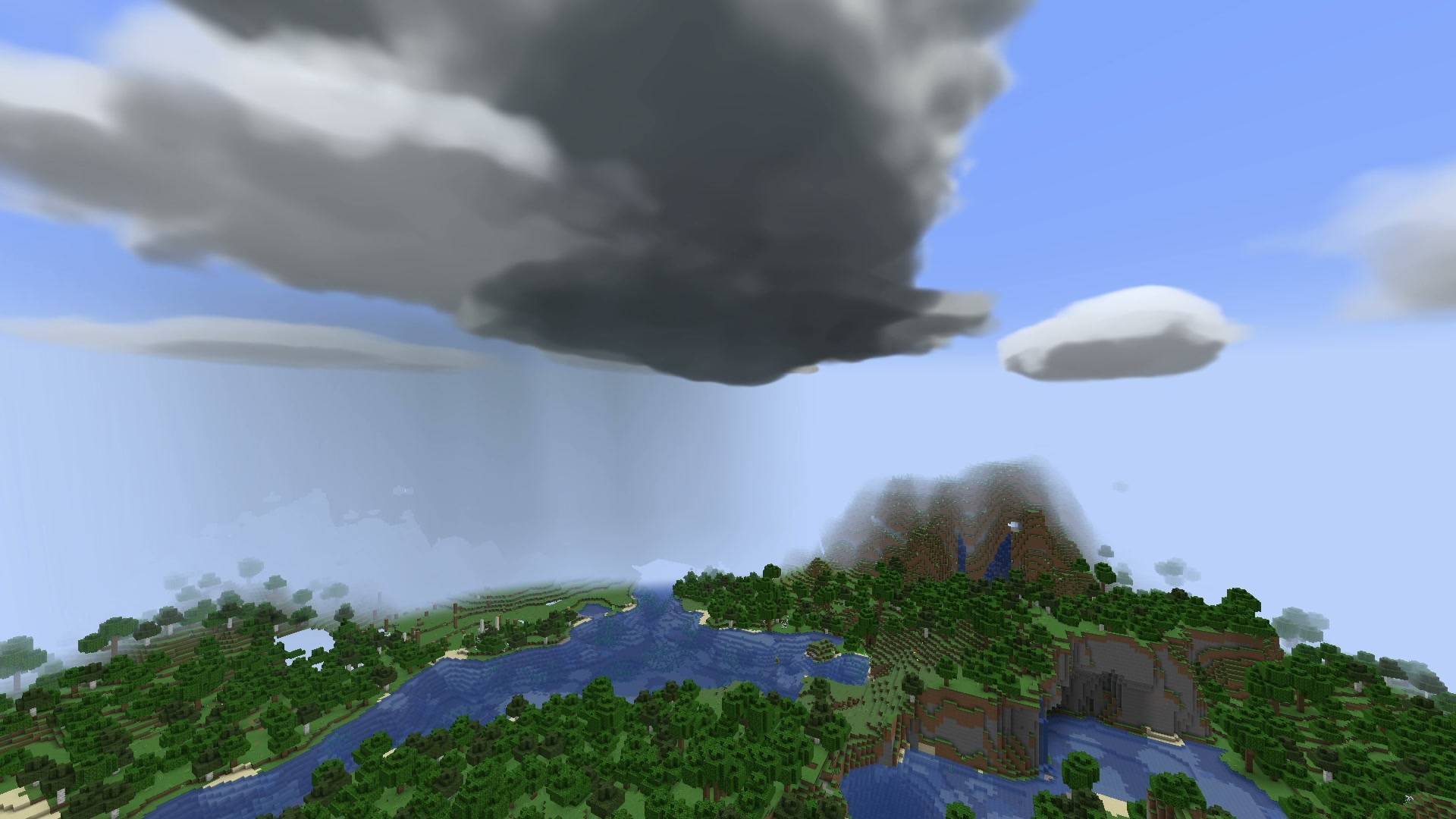 1.4.2 - Developing supercell Volumetric storm clouds organize before the funnel descends. In-game screenshot from 1.4.2.
 -
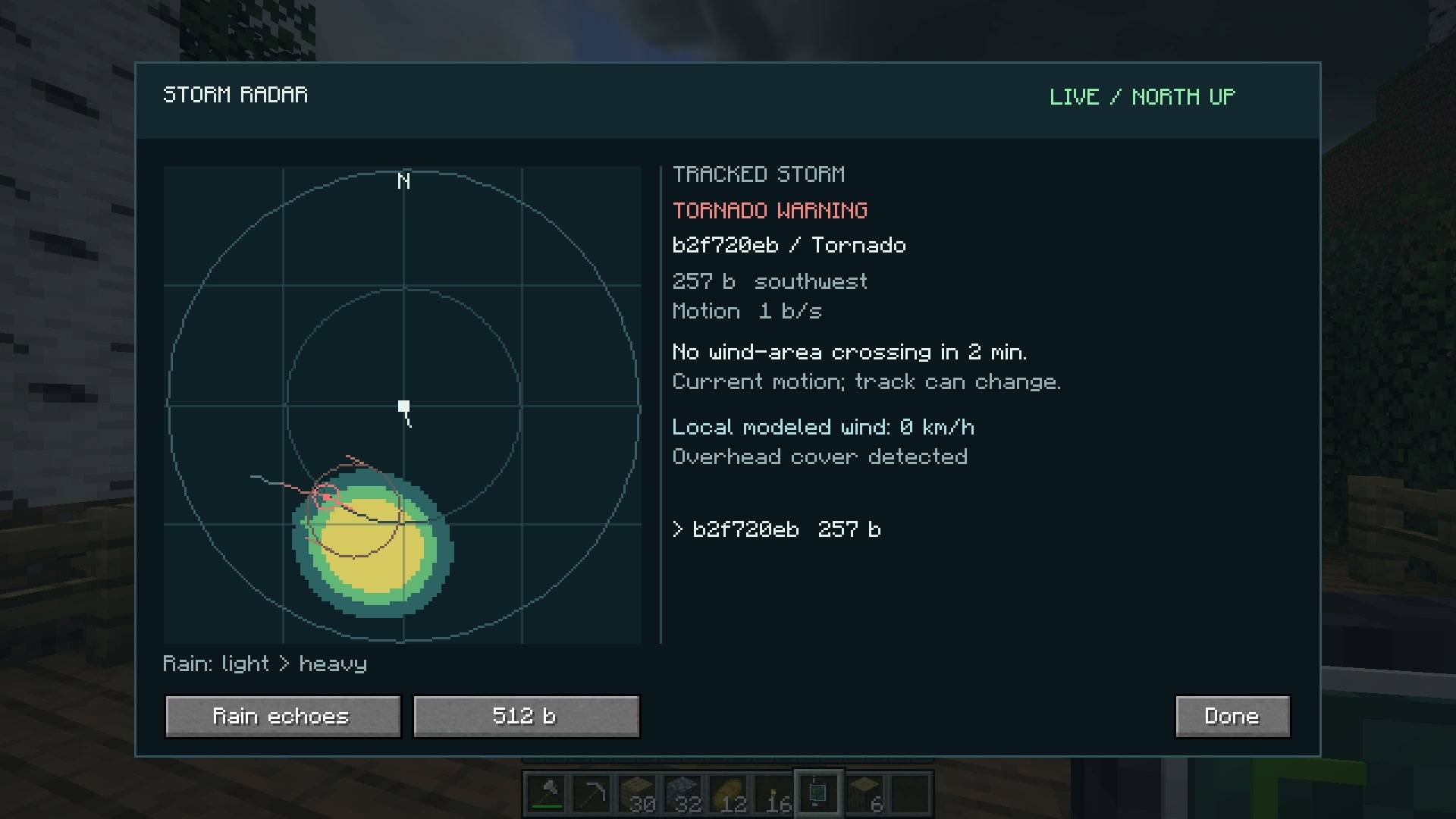 1.4.2 - Storm Radar Track a nearby tornado with rain echoes, observed motion and a projected wind corridor. The radar also has Doppler and hail views.
 -
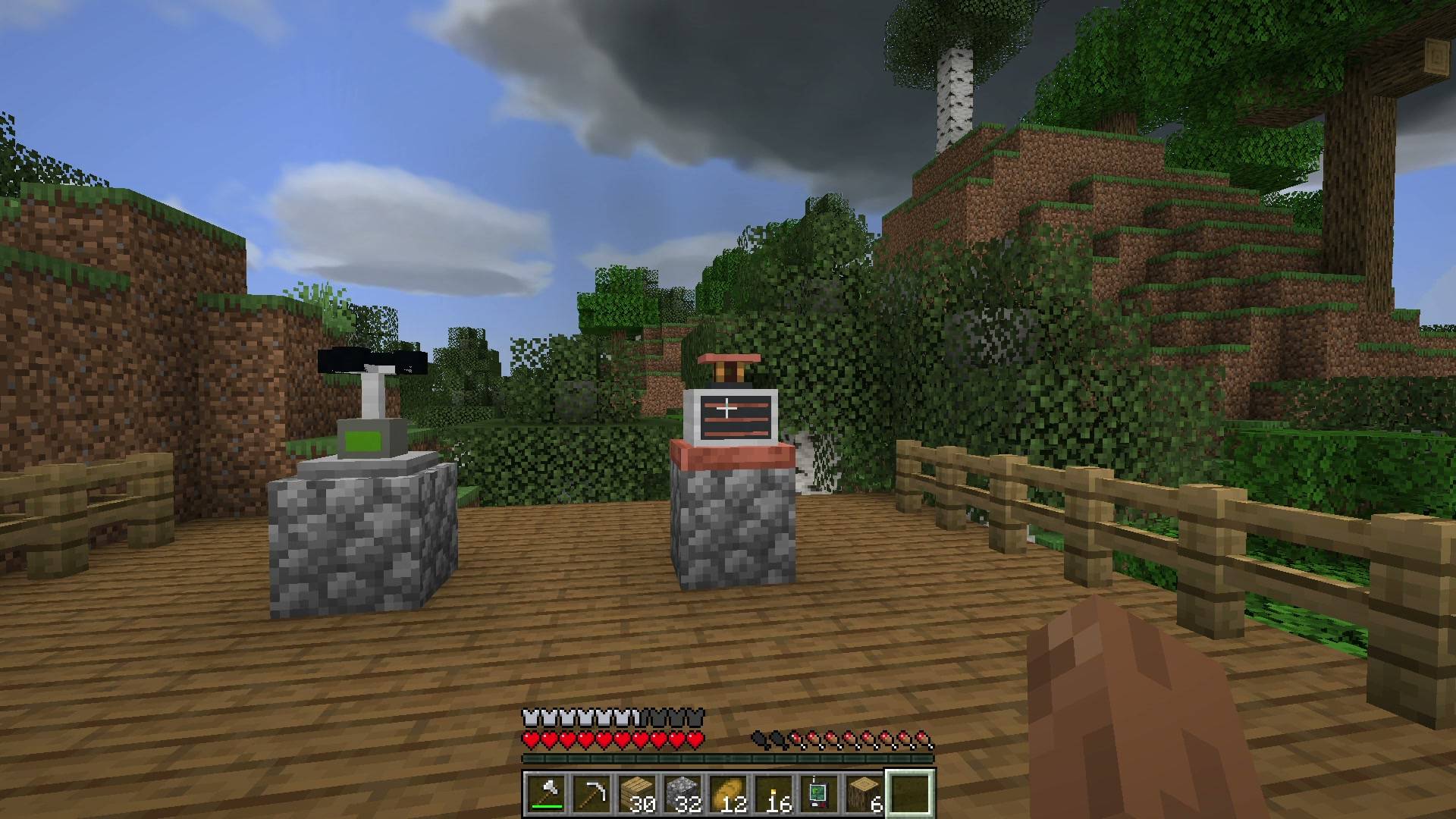 1.4.2 - Weather instruments The Weather Probe and Tornado Detector at a field station. Both are craftable survival tools with comparator output.
-
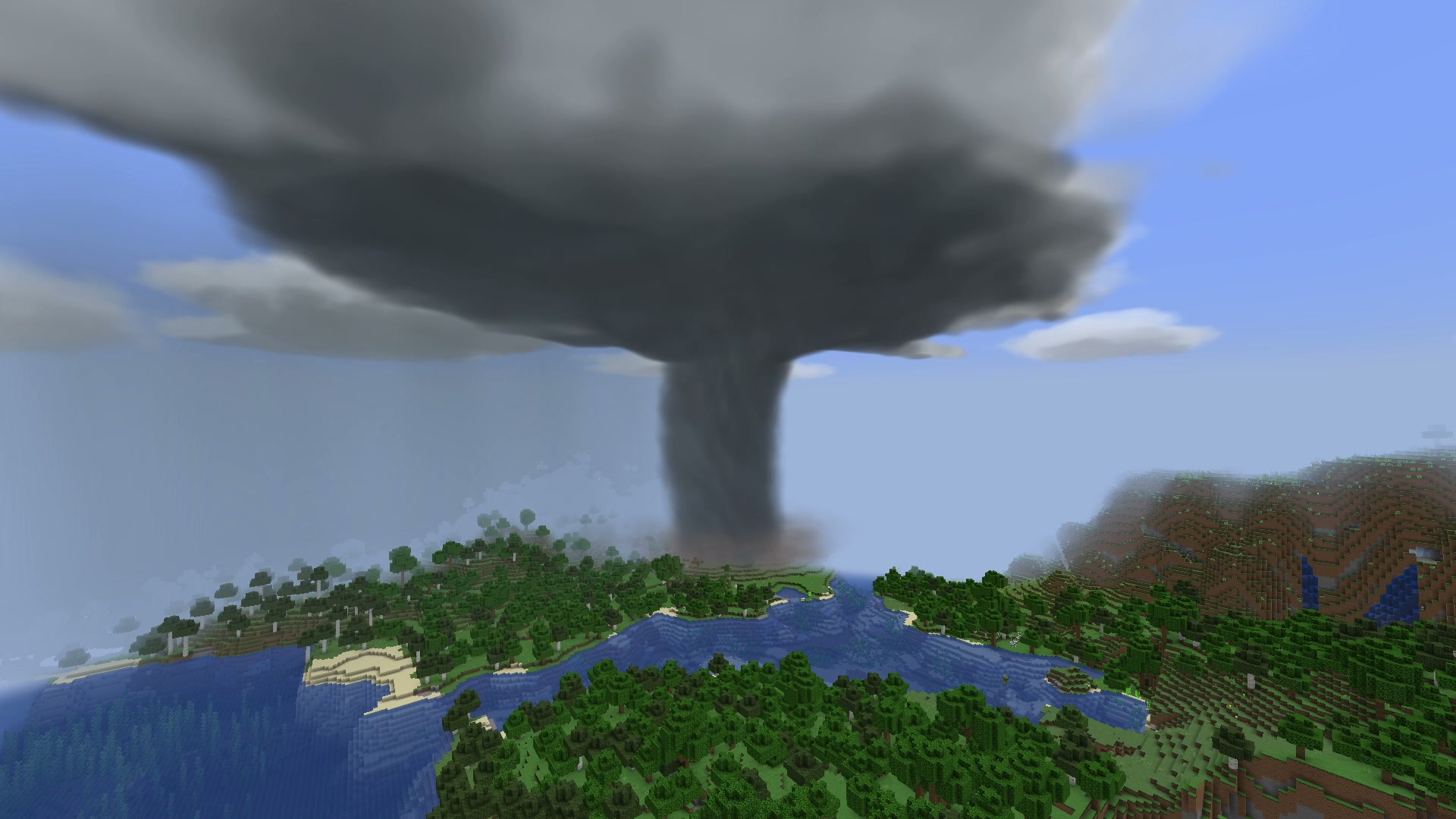 1.4.2 - Supercell tornado A mature tornado beneath its rotating parent storm. In-game screenshot from the rebuilt 1.4.2 weather system.
Versions
Files
Relations
Project Relations
More like this
Similar Mods
Suggestions use data such as tags, dependencies, dependents, descriptions, titles, and more to rank how much they overlap with this mod.
On ModDex
Community snapshot
By the numbers
Statistics
Want to reach Minecraft players?
We're looking for a server hosting partner to feature here and other parts of the site. Interested? Send us a message!
Get in touchGet it on
Available Platforms
On ModDex
Community snapshot
By the numbers
Statistics
Resources