
Community listing page, reviews here may not be monitored by the author.
Redstone Bits


No reviews yet
Adds a few new Redstone utilities to Minecraft
Community voices
Reviews
No reviews yet. Be the first to review this project!
Get it on
Available Platforms
Compatibility
Supported Environments
Must be installed on both the client and the server.
About
Project Details
For authors
Embed Badge
If you're the author of this project, you can embed a live badge anywhere that supports HTML or Markdown. It updates automatically whenever ratings change.
Use HTML for any page that supports it, or Markdown for README files and Markdown-based descriptions.
Identifiers
Platform IDs
About
Description
Redstone Bits adds a few new Redstone utilities to Minecraft!
- The Placer is much like a Dispenser, except it places a block that's inside its inventory. Like a Dispenser, it chooses it at random. It places it directly in front of itself when given a Redstone signal.
- The Breaker, much like you'd expect, breaks the block in front of it when given a Redstone Signal. You can put a tool (or any item) into it, and it will use that tool to break the block. It takes time to break the block (the same amount of time the item inside would take), and the progress can be seen in its GUI. You can cancel breaking a block by giving it another Redstone signal. Comparators can also be used to determine the breaking progress.
- The Checker is more like an Observer. Sort of. Put blocks in its inventory, and it will output a signal if the block in front of it matches any of the ones in its inventory. The inventory slot the block is in determines the output signal strength.
- The Counter will emit a signal strength based on how many times it has received a signal. Power it once, and it will output a signal strength of 1 until you power it again, whereupon it'll go up to 2. Once it reaches 15, it will loop back around to 0. If right clicked, it will go in reverse.
- The Adder is like a Counter, only its signal strength will go be increased by the strength it receives. If you power it with strength 3, it will output a strength of 3. Power it again with a strength of 5, it will go up to 8. It, too, will loop back around to (and past) 0, and can be right clicked to subtract instead.
- The Resistor will reduce the strength of a signal given to it. By default, it halves the signal strength. You can right click it to change it to "third mode", which will divide the signal by 3. Another right click will change it to "one point five mode", which will divide the signal by 1.5. One more right click will return it to "halve mode".
- The Inverter is pretty straightforward, it will invert any signal strength (or lack thereof) that gets input. Input strength 15, it outputs 0. Input strength 3, it outputs 12. Input nothing, it outputs 15. Can be right clicked to go into "inverter no inverting!" mode, where it acts as a simple one-way gate that preserves the strength input.
- The Rotator will rotate blocks placed in front of it when it receives a redstone signal. It can be right clicked to switch from clockwise to counterclockwise. Using a comparator you can determine the current rotation of the targeted block (if supported).
- Copper Buttons are buttons that will stay pressed for different lengths based on how oxidized they are. Like Copper Blocks, they can be waxed to retain their oxidization state forever.
- Medium Weighted Pressure Plates act similarly to Light and Heavy Weighted Pressure Plates, but somewhere in the middle. Each oxidization level changes the weighting. They can also be waxed.
- Analog Redstone Lamps emit a light level based on the signal strength they receive.
- Redstone Displays visually show the strength received as a number.
- Redstone Glass, inspired by an /r/minecraftsuggestions post by /u/Fer9721, is opaque by default but becomes transparent when it receives a Redstone signal, which it then passes to neighbouring Redstone Glass in all directions. Using a Comparator, you can retrieve its signal level, allowing it to be used as essentially omnidirectional Redstone wire.
Using these, as well as vanilla blocks like Observers and Pistons, one can automate many things or simply make neat contraptions.
Enjoy!
DISCLAIMER: This is NOT a Forge mod! It does not work with Forge. It uses the Fabric Mod Loader (found here) in addition to the Fabric API. It will most likely never be ported to Forge. Do not ask for a Forge port! You will be ignored!
Redstone Bits adds a few new Redstone utilities to Minecraft!
- The Placer is much like a Dispenser, except it places a block that's inside its inventory. Like a Dispenser, it chooses it at random. It places it directly in front of itself when given a Redstone signal.
- The Breaker, much like you'd expect, breaks the block in front of it when given a Redstone Signal. You can put a tool (or any item) into it, and it will use that tool to break the block. It takes time to break the block (the same amount of time the item inside would take), and the progress can be seen in its GUI. You can cancel breaking a block by giving it another Redstone signal. Comparators can also be used to determine the breaking progress.
- The Checker is more like an Observer. Sort of. Put blocks in its inventory, and it will output a signal if the block in front of it matches any of the ones in its inventory. The inventory slot the block is in determines the output signal strength.
- The Counter will emit a signal strength based on how many times it has received a signal. Power it once, and it will output a signal strength of 1 until you power it again, whereupon it'll go up to 2. Once it reaches 15, it will loop back around to 0. If right clicked, it will go in reverse.
- The Adder is like a Counter, only its signal strength will go be increased by the strength it receives. If you power it with strength 3, it will output a strength of 3. Power it again with a strength of 5, it will go up to 8. It, too, will loop back around to (and past) 0, and can be right clicked to subtract instead.
- The Resistor will reduce the strength of a signal given to it. By default, it halves the signal strength. You can right click it to change it to "third mode", which will divide the signal by 3. Another right click will change it to "one point five mode", which will divide the signal by 1.5. One more right click will return it to "halve mode".
- The Inverter is pretty straightforward, it will invert any signal strength (or lack thereof) that gets input. Input strength 15, it outputs 0. Input strength 3, it outputs 12. Input nothing, it outputs 15. Can be right clicked to go into "inverter no inverting!" mode, where it acts as a simple one-way gate that preserves the strength input.
- The Rotator will rotate blocks placed in front of it when it receives a redstone signal. It can be right clicked to switch from clockwise to counterclockwise. Using a comparator you can determine the current rotation of the targeted block (if supported).
- Copper Buttons are buttons that will stay pressed for different lengths based on how oxidized they are. Like Copper Blocks, they can be waxed to retain their oxidization state forever.
- Medium Weighted Pressure Plates act similarly to Light and Heavy Weighted Pressure Plates, but somewhere in the middle. Each oxidization level changes the weighting. They can also be waxed.
- Analog Redstone Lamps emit a light level based on the signal strength they receive.
- Redstone Displays visually show the strength received as a number.
- Redstone Glass, inspired by an /r/minecraftsuggestions post by /u/Fer9721, is opaque by default but becomes transparent when it receives a Redstone signal, which it then passes to neighbouring Redstone Glass in all directions. Using a Comparator, you can retrieve its signal level, allowing it to be used as essentially omnidirectional Redstone wire.
Using these, as well as vanilla blocks like Observers and Pistons, one can automate many things or simply make neat contraptions.
Enjoy!
Screenshots
Gallery
-
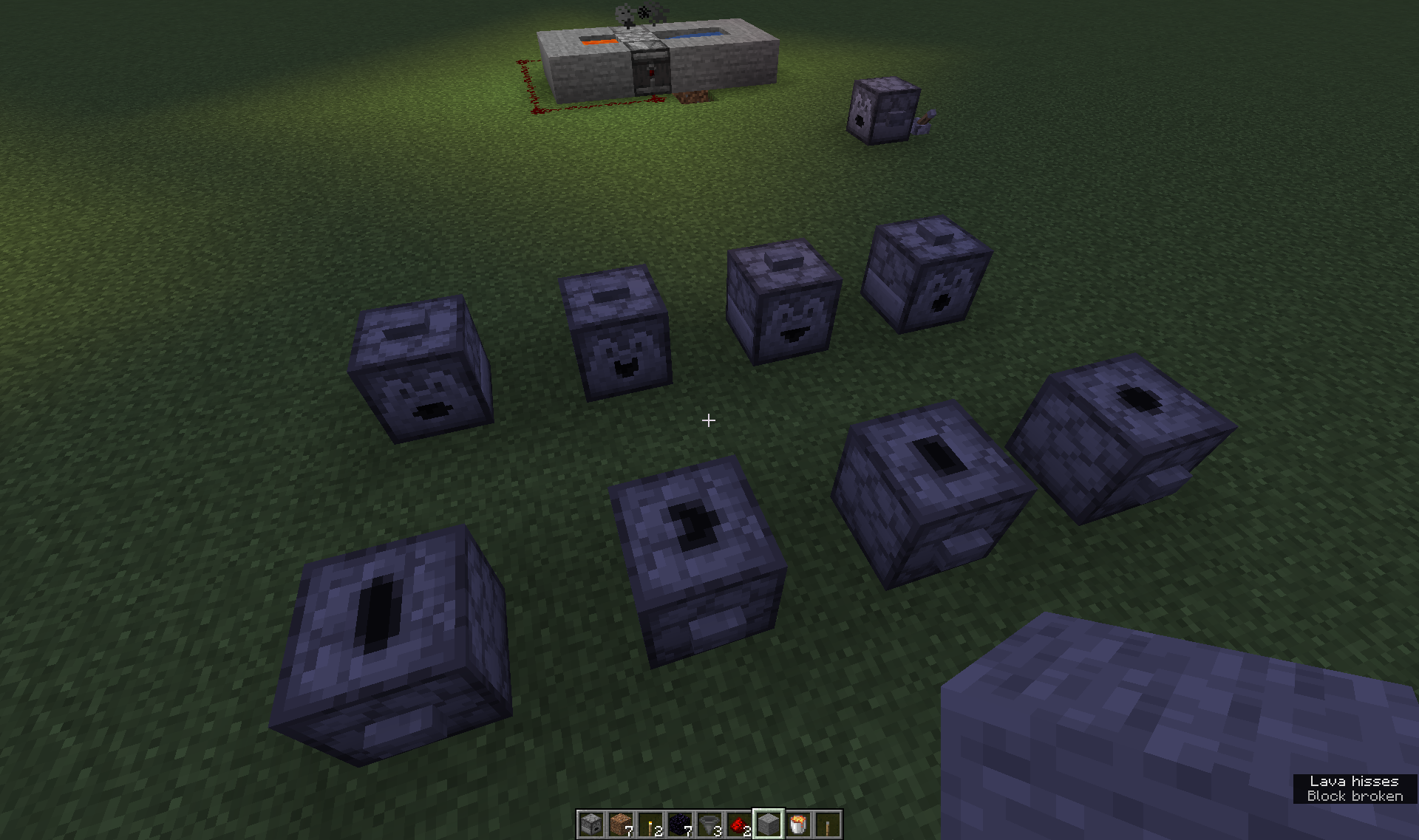 The family Breakers and Placers, plus Vanilla's Droppers and Dispensers.
Versions
Files
Relations
Project Relations
More like this
Similar Mods
Suggestions use data such as tags, dependencies, dependents, descriptions, titles, and more to rank how much they overlap with this mod.
On ModDex
Community snapshot
By the numbers
Statistics
Want to reach Minecraft players?
We're looking for a server hosting partner to feature here and other parts of the site. Interested? Send us a message!
Get in touchGet it on
Available Platforms
On ModDex
Community snapshot
By the numbers