
Redstone Manager
Control all your redstone switches from one place. Link all the levers and control them from a single block.
No ratings yet
Be the first to rate it.
Community listing page
Community listing page, reviews may not be monitored by the author.

Community voices
Reviews
No reviews yet. Be the first to review this project!
Get it on
Available Platforms
Compatibility
Supported Environments
Must be installed on both the client and the server.
About
Project Details
For authors
Embed Badge
If you're the author of this project, you can embed a live badge anywhere that supports HTML or Markdown. It updates automatically whenever ratings change.
Use HTML for any page that supports it, or Markdown for README files and Markdown-based descriptions.
Identifiers
Platform IDs
About
Description
Redstone Manager
This mods is relatively new and might have some bugs.
Please report issues and feedback on the GitHub.
Manage all your redstone switches from one central command block
Here is a sample image of how the mod is supposed to work, this is still all work in progress, and things are sure to change:
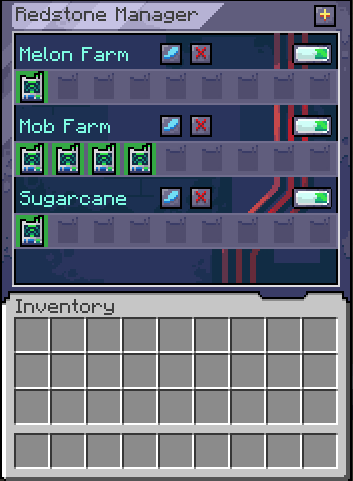
Using the mod
Start by crafting a Manager and a Linker.
Crouch + right click with the Linker on a Lever to link them.
Or right click with a linker on one block and right click on another to link all the levers in that range if you have the Pouch with Linkers in it.
Open the manager and create your first group by clicking on the plus button.
Place the Linker inside the newly created group.
From within the Manager, you can now toggle that single lever on/off or toggle the entire group.
For modpacks
The linker works on a tag system, where it looks if the block has a tag: redstonemanager:linkable_items.
If the block has that tag, it will allow the link to be created between them.
Afterward it is checking for the powered state of that block to get its state.
For devs
You can add this mod to your project by adding this:
maven {
    name = "Gac Repository"
    url = uri("https://maven.igorilic.dev/releases")
}
And then adding this as a dependency:
implementation "dev.igorilic:redstonemanager:${rm_version}"Have suggestions?
If you have any suggestions that you think can improve the mod, open an issue for it and let's have a discussion about it.
Redstone Manager
This mods is relatively new and might have some bugs.
Please report issues and feedback on the GitHub.
Manage all your redstone switches from one central command block
Here is a sample image of how the mod is supposed to work, this is still all work in progress, and things are sure to change:
Using the mod
Start by crafting a Manager and a Linker.
Crouch + right click with the Linker on a Lever to link them.
Open the manager and create your first group by clicking on the plus button.
Place the Linker inside the newly created group.
From within the Manager, you can now toggle that single lever on/off or toggle the entire group.
For modpacks
The linker works on a tag system, where it looks if the block has a tag: redstonemanager:linkable_items.
If the block has that tag, it will allow the link to be created between them.
Afterward it is checking for the powered state of that block to get its state.
For devs
You can add this mod to your project by adding this:
maven {
    name = "Gac Repository"
    url = uri("https://maven.igorilic.dev/releases")
}
And then adding this as a dependency:
implementation "dev.igorilic:redstonemanager:${rm_version}"
Have suggestions?
If you have any suggestions that you think can improve the modpack, open an issue for it and let's have a discussion about it.
Or join the discord server: https://discord.gg/7maXVvt2c4
Screenshots
Gallery
Versions
Files
Relations
Project Relations
More like this
Similar Mods
Suggestions use data such as tags, dependencies, dependents, descriptions, titles, and more to rank how much they overlap with this mod.
Stats
- Downloads
-
45k
 39k
 6k
- Used in
- 11 modpacks
- Followers
- 0
- In stacks
- 0
- Created
-
- Last synced
-
Nov 21, 2026 6:31 PM UTC
New file updates sync automatically.
When ModDex last fully re-synced this project from CurseForge or Modrinth. A new file release triggers a resync usually within minutes, and every project is also re-synced on a schedule. Edits that don't ship a file, such as a new description or screenshots, are checked every few hours and can appear before this date changes.
How syncing works
External Links

Stats
- Downloads
-
45k
39k
6k
- Used in
- 11 modpacks
- Followers
- 0
- In stacks
- 0
- Created
-
- Last synced
-
Nov 21, 2026 6:31 PM UTC
New file updates sync automatically.
When ModDex last fully re-synced this project from CurseForge or Modrinth. A new file release triggers a resync usually within minutes, and every project is also re-synced on a schedule. Edits that don't ship a file, such as a new description or screenshots, are checked every few hours and can appear before this date changes.
How syncing works