
Community listing page, reviews may not be monitored by the author.
Render Distance Cycler 1.21.6+

No reviews yet
Re-adds the F3 + F keybind and adds a command to change your render distance.

Community voices
Reviews
No reviews yet. Be the first to review this project!
Get it on
Available Platforms
Compatibility
Supported Environments
Runs entirely on the client. Works on vanilla servers.
About
Project Details
For authors
Embed Badge
If you're the author of this project, you can embed a live badge anywhere that supports HTML or Markdown. It updates automatically whenever ratings change.
Use HTML for any page that supports it, or Markdown for README files and Markdown-based descriptions.
Identifiers
Platform IDs
About
Description
Render Distance Cycler
This mod started as a version port of kryptonaught's mod.
It makes your render distance adjustable on the fly by the F3 + F keybind or by the /rd command.
Feature details
-
F3+F:- increases your render distance by one
-
F3+Shift+F:- decreases your render distance by one
-
/renderDistanceor/rd- tells you how high your render distance currently is
-
/renderDistance <number>&/rd <number>- sets your render distance to the specified value
For 1.21.11 and above:
- the key used for the
F3shortcut can be rebound in the settings, just like for other debug function keybinds - debug keybind dedicated to increasing render distance
- debug keybind dedicated to decreasing render distance
Update 2.0.0
You can now change your render distance via a command!
/renderDistance or /rd will give you the value of your current render distance.
/renderDistance <number> or /rd <number> will set your render distance to the provided value.
2 is the minimum value for this input.
If the specified value exceeds the maximum render distance, the highest possible value will be used.
To get a command with a similar function for versions prior to 1.21.6, the mods from either rinmav9055 or ExiledLizard635 can be used.
Update 2.1.0
Since Minecraft has F3 rebindable shortcuts now, I've added rebinding support to the mod as well.
To stay in parity with the Minecraft versions, the key is only rebindable from 1.21.11 onward. If support for rebinding on earlier versions is not specifically requested, I won't add it. You are however free to join my discord server or open an issue on the GitHub repository if you would like to have it on an older version aswell.
Update 2.2.0
Two optional keybinds were added, dedicated to increasing or decreasing only.
There is also a translation to Russian now, thanks to Evga314.
Screenshots
Gallery
-
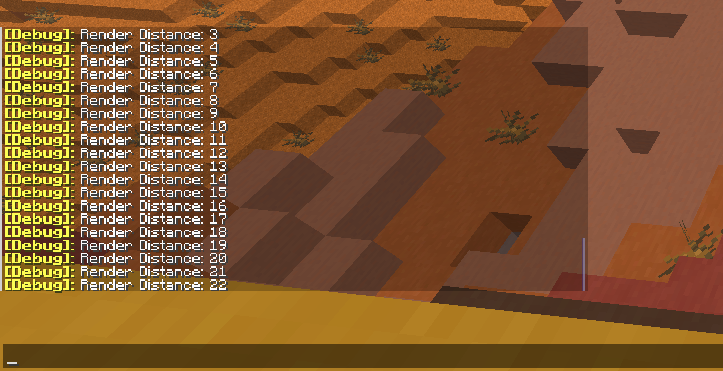 Keybind used within the game
Versions
Files
Relations
Project Relations
More like this
Similar Mods
Suggestions use data such as tags, dependencies, dependents, descriptions, titles, and more to rank how much they overlap with this mod.
On ModDex
Community snapshot
By the numbers
Statistics


Get it on
Available Platforms
On ModDex
Community snapshot
By the numbers