Community listing page, reviews may not be monitored by the author.
ResourcePackDirectory


No reviews yet
Modify Your ResourcePack Driectory

Community voices
Reviews
No reviews yet. Be the first to review this project!
Get it on
Available Platforms
Compatibility
Supported Environments
Runs entirely on the client. Works on vanilla servers.
About
Project Details
For authors
Embed Badge
If you're the author of this project, you can embed a live badge anywhere that supports HTML or Markdown. It updates automatically whenever ratings change.
Use HTML for any page that supports it, or Markdown for README files and Markdown-based descriptions.
Identifiers
Platform IDs
About
Description
ResourcePackDirectory

Allows to hot change the Minecraft resource pack directory. (No need to restart your MC)
更改資源包的資料夾 (不須重啟MC)
Main Purpose
- pretty useful for different Minecraft launcher and instance like MultiMC PrismMC LunerClient FeatherLauncher etc.
🎯 Features
- Custom Resource Pack Directory: Place your resource packs anywhere you want
- Cross-Platform Support: Compatible with Fabric, NeoForge, and Forge
- Easy Configuration: Simple in-game settings interface for directory management
- Real-time Application: Change directory location without restarting the game
🚀 Installation
- Ensure you have installed a supported mod loader (Fabric/NeoForge/Forge)
- Place the mod file in your
modsfolder - Launch the game
⚙️ Usage
Through In-Game Settings
- Install Mod Menu (Fabric only)
- Click "Mods" in the main menu
- Find "ResourcePackDirectory" and click the settings button
- Use the following options:
- Path Input Field: Directly enter the new resource pack directory path
- Browse Button: Open file browser to select directory
- Reset Button: Restore to default directory (
./resourcepacks/) - Confirm: Apply changes
- Cancel: Discard changes
Note
I make ModMenu an optional dependency because some client can't use Modmenu, thus we need other mods like Menulogue or any else
Through Configuration File (Require restart)
Configuration file location: config/resourcepackdirectory.json
{
  "resourcepackdirectory": "./resourcepacks/"
}
📄 License
This project is licensed under All Rights Reserved.
👤 Author
Gahaha
Make your resource pack management more flexible!
ResourcePackDirectory
Allows to hot change the Minecraft resource pack directory. (No need to restart your MC)
更改資源包的資料夾 (不須重啟MC)
Main Purpose
- pretty useful for different Minecraft launcher and instance like MultiMC PrismMC LunerClient FeatherLauncher etc.
🎯 Features
- Custom Resource Pack Directory: Place your resource packs anywhere you want
- Cross-Platform Support: Compatible with Fabric, NeoForge, and Forge
- Easy Configuration: Simple in-game settings interface for directory management
- Hot Change: Change directory location without restarting the game
⚙️ Usage
Through In-Game Settings
- Install Mod Menu (Fabric only)
- Click "Mods" in the main menu
- Find "ResourcePackDirectory" and click the settings button
- Use the following options:
- Path Input Field: Directly enter the new resource pack directory path
- Browse Button: Open file browser to select directory
- Reset Button: Restore to default directory (
./resourcepacks/) - Confirm: Apply changes
- Cancel: Discard changes
Note
I make ModMenu an optional dependency because some client can't use Modmenu, thus we need other mods like Menulogue or any else
Through Configuration File (Require restart)
Configuration file location: config/resourcepackdirectory.json
{
  "resourcepackdirectory": "./resourcepacks/"
}
📄 License
This project is licensed under All Rights Reserved.
👤 Author
Gahaha
Make your resource pack management more flexible!
Screenshots
Gallery
-
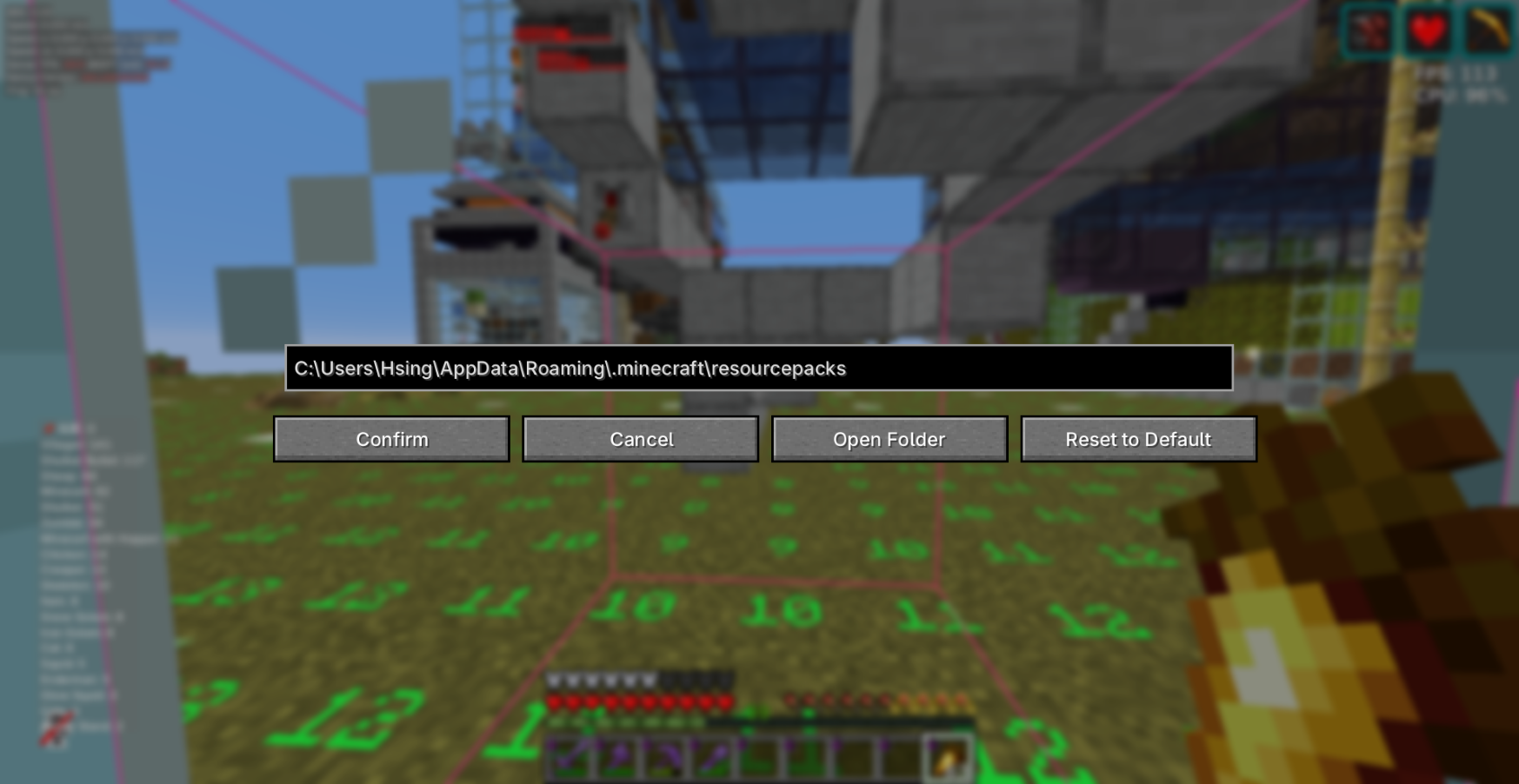 setting screan simple setting
Versions
Files
Relations
Project Relations
More like this
Similar Mods
Suggestions use data such as tags, dependencies, dependents, descriptions, titles, and more to rank how much they overlap with this mod.
On ModDex
Community snapshot
By the numbers
Statistics

Get it on
Available Platforms
On ModDex
Community snapshot
By the numbers