Community listing page, reviews here may not be monitored by the author.
RPG Enchanting


No reviews yet
Introduces an alternative/replacement/addition to the traditional enchanting system. It is heavily inspired by the game "Heroes of Hammerwatch 2".

Community voices
Reviews
No reviews yet. Be the first to review this project!
Get it on
Available Platforms
Compatibility
Supported Environments
Must be installed on both the client and the server.
About
Project Details
For authors
Embed Badge
If you're the author of this project, you can embed a live badge anywhere that supports HTML or Markdown. It updates automatically whenever ratings change.
Use HTML for any page that supports it, or Markdown for README files and Markdown-based descriptions.
Identifiers
Platform IDs
About
Description
RPG Enchanting
Introduces an alternative/replacement/addition to the traditional enchanting system. It is heavily inspired by the game "Heroes of Hammerwatch 2".
Enchantment limit
Each item can be enchanted with a maximum of 2 enchantments, one "prefix" and one "suffix" enchantment.
Every enchantment is either a prefix or a suffix enchantment.
Tooltip changes
Enchantments are no longer displayed in a list below the item name. Instead the item name is modified.
E.g. an Iron Pickaxe enchanted with Efficiency and Fortune is called "Efficient Iron Pickaxe of Fortune".
(Items can still be renamed, these changes only affect the default name)
RPG Enchanting Table
This new block allows the player to enchant items in a more controlled way. The table will replace exiting enchantments of the same group (prefix or suffix). Only unlocked enchantments are available for the player to choose from.
Unlocking enchantments
Enchantments can be unlocked by three different methods.
- Advancements
The server config allows pairing advancements to specific enchantments. When the player has the advancement when interacting with the RPG Enchanting Table, the corresponding enchantments of the specified level are unlocked.
- Surrounding blocks
The server config allows pairing blocks to specific enchantments. When a player interacts with the RPG Enchanting Table, the table searches for these in a configurable radius. When a block from the list is found, the corresponding enchantments of the specified level are unlocked.
- Enchanted books in Chiseled Bookshelves
When enabled in the server config, the RPG Enchanting Table looks for Chiseled Bookshelves, similar to the second option. When a Chiseled Bookshelf that stores Enchanted Books is found, every of those enchantments is unlocked.
Enchanting cost
Enchanting costs experience and items.
These items are defined in the server config.
Both item and experience cost are higher when an existing enchantment is replaced.
Compatibility with custom enchantments
RPG Enchanting uses the existing enchantment technology, but expects enchantments to be configured a certain way.
Namely, enchantments must be present in one of these enchantment tags: "rpgenchanting:prefix_enchantments" or "rpgenchanting:suffix_enchantments".
RPG Enchanting uses these two enchantment tags for all its logic.
> Note that putting an enchantment into both tags at the same time can lead to unexpected behaviour.
Additionally, the same tag needs to be their "exclusive_set". This ensures that only one enchantment from each group can be present on an item.
> The enchantment tag that includes an enchantment and the tag defined as the "exclusive_set" should be the same.
The item name additions are controlled by localization keys of these formats:
"rpgenchanting.<namespace>.<id>.<level>.prefix"
"rpgenchanting.<namespace>.<id>.<level>.suffix"
E.g. if the "minecraft:efficiency" enchantment is in the "prefix" tag, the localization keys would look like this:
- "rpgenchanting.minecraft.efficiency.1.prefix"
- "rpgenchanting.minecraft.efficiency.2.prefix"
- "rpgenchanting.minecraft.efficiency.3.prefix"
- "rpgenchanting.minecraft.efficiency.4.prefix"
- "rpgenchanting.minecraft.efficiency.5.prefix"
Built-in data and resource packs
RPG Enchanting comes with several data/resource packs that bring compatibility for vanilla Minecraft and several mods.
- The RPG Series mods by Daedelus
- The More RPG Series mods by Fichte
The mod Patched is required for full functionality.
These packs include the following:
- adding all enchantments to one of these enchantment tags
- each enchantment has a corresponding patch file, that sets the "exclusive_set" to either "#rpgenchanting:prefix_enchantments" or "#rpgenchanting:suffix_enchantments".
> Using Patched is not a requirement, the exclusive_set can also be configured the normal way. Using "Patched" ensures compatibility with mods/data packs that modify vanilla enchantments
The resource packs provide the localization for the item name additions.
Customization
These features of RPG Enchanting can also be customized:
- The RPG Enchanting Table spawns particles, exactly like the vanilla Enchanting Table. The blocks that trigger this behaviour are defined in the "rpgenchanting:enchanting_particle_targets" block tag.
- The background sprite of the item cost slot can optionally cycle between two textures. This can be enabled in the client config. The textures are identical by default, but they can be changed with a resource pack.
- The enchantment tooltips can optionally display a description of the enchantment. This can be enabled in the client config. Installing the mod Enchantment Descriptions is recommended.
- The item and experience cost for enchanting can be modified. The equations are as follows:
> item_cost = old_enchantment.anvil_cost * old_enchantment.level * serverConfig.old_enchantment_item_cost_multiplier + new_enchantment.anvil_cost * new_enchantment.level * serverConfig.new_enchantment_item_cost_multiplier
> experience_cost = old_enchantment.min_cost(depends on old_enchantment.level) * serverConfig.old_enchantment_experience_cost_multiplier + new_enchantment.max_cost(depends on new_enchantment.level) * serverConfig.new_enchantment_experience_cost_multiplier
Technical details
Data component
RPG Enchanting adds the "rpgenchanting:show_enchantment_name_additions" data component. When this component is present on an itemStack, the item name is modified with enchantment pre/suffixes.
The RPG Enchanting Table automatically adds this component to items that it enchants.
Additional modifications
The RPG Enchanting Table uses the vanilla data component to store enchantments on an item. However, it sets the "show_in_tooltip" flag to false. This avoids redundant display of information.
Enchanted items generated by loot tables will be modified in a similar way. This can be disabled in the server config.
RPG Enchanting
Introduces an alternative/replacement/addition to the traditional enchanting system. It is heavily inspired by the game "Heroes of Hammerwatch 2".
Enchantment limit
Each item can be enchanted with a maximum of 2 enchantments, one "prefix" and one "suffix" enchantment.
Every enchantment is either a prefix or a suffix enchantment.
Tooltip changes
Enchantments are no longer displayed in a list below the item name. Instead, the item name is modified.
E.g. an Iron Pickaxe enchanted with Efficiency and Fortune is called "Efficient Iron Pickaxe of Fortune".
(Items can still be renamed, these changes only affect the default name)
The RPG Enchanting Table adds a "Enchanted by player_name" line to items it enchants. This is purely cosmetic and it can be disabled in the config (both in the client config and in the server config).
RPG Enchanting Table
This new block allows the player to enchant items in a more controlled way. The table will replace existing enchantments of the same group (prefix or suffix). Only unlocked enchantments are available for the player to choose from.
The RPG Enchanting Table can be crafted with the same recipe as the vanilla Enchanting Table (replacing it). It has the same properties when interacting with the world (emits light, mineable faster with a pickaxe, etc)
Unlocking enchantments
Enchantments can be unlocked by three different methods.
- Advancements
The server config allows pairing advancements to specific enchantments. When the player has the advancement when interacting with the RPG Enchanting Table, the corresponding enchantments of the specified level are unlocked.
- Surrounding blocks
The server config allows pairing blocks to specific enchantments. When a player interacts with the RPG Enchanting Table, the table searches for these in a configurable radius. When a block from the list is found, the corresponding enchantments of the specified level are unlocked.
- Enchanted books in Chiseled Bookshelves
When enabled in the server config, the RPG Enchanting Table looks for Chiseled Bookshelves, similar to the second option. When a Chiseled Bookshelf that stores Enchanted Books is found, each of those enchantments is unlocked.
Settings
Several settings define how exactly the RPG Enchanting Table works. These settings can be defined for each individual RPG Enchanting Table (via block entity data), with a default defined in the server config.
- Block Reach Radius, defines the area around the RPG Enchanting Table where blocks are checked to unlock enchantments.
- Enchanted Book Consumption Mode, defines what happens with enchanted books in surrounding bookshelves, when their enchantment is applied to an item. These include:
- KEEP (nothing happens)
- CONSUME (enchanted books are replaced with a configurable item when one of their enchantments is used)
- PARTIAL_CONSUME (same as consume, but books with multiple enchants are not replaced, only the relevant enchantment is removed)
- Enchantment Unlock Mode, defines how exactly enchantments are unlocked (also see above)
- ADDITION (all three methods are working like normal)
- BLOCK_REQUIRED_FOR_ADVANCEMENT (enchantments unlocked by advancements are only added, when they are also unlocked by blocks, book enchantments are added like normal)
Enchanting cost
Enchanting costs experience and items.
These items are defined in the server config.
Both item and experience cost are higher when an existing enchantment is replaced.
Compatibility with custom enchantments
RPG Enchanting uses the existing enchantment technology, but expects enchantments to be configured a certain way.
Namely, enchantments must be present in one of these enchantment tags: "rpgenchanting:prefix_enchantments" or "rpgenchanting:suffix_enchantments".
RPG Enchanting uses these two enchantment tags for all its logic.
Note that putting an enchantment into both tags at the same time can lead to unexpected behaviour.
The item name additions are controlled by localization keys of these formats:
"rpgenchanting.<namespace>.<id>..prefix"
"rpgenchanting.<namespace>.<id>..suffix"
E.g. if the "minecraft:efficiency" enchantment is in the "prefix" tag, the localization keys would look like this:
- "rpgenchanting.minecraft.efficiency.1.prefix"
- "rpgenchanting.minecraft.efficiency.2.prefix"
- "rpgenchanting.minecraft.efficiency.3.prefix"
- "rpgenchanting.minecraft.efficiency.4.prefix"
- "rpgenchanting.minecraft.efficiency.5.prefix"
Display Order
The pre- and suffix enchantment names are "wrapped" around the item name, the suffix is processed first.
What does this mean?
The final item name is a combination of the "item name additions" of both enchantment and the original item name.
E.g. "Efficient Iron Pickaxe of Fortune"
However, instead of "prefix_name + item_name + suffix_name", the order is much more customizable.
The translations for the "item name additions" have to contain "%s". This marks the position of the "wrapped" string.
As mentioned earlier, the suffix is processed first. This means that the wrapped object is:
- the item name for suffix strings
- the item name (possibly wrapped by the suffix string) for prefix strings
This feature is useful when playing in languages with alternative sentence structures.
Example
The translation for the "Fortune" enchantment could be changed from "%s of Fortune" to "Fortunate %s of Fortune".
A with Fortune enchanted iron pickaxe would now be named: "Fortunate Iron Pickaxe of Fortune".
Example 2
Taking the modified Fortune translation, but adding an Efficiency enchantment (with the default translation).
The name for the iron pickaxe is now: "Efficient Fortunate Iron Pickaxe of Fortune".
Item Name Overwrites
Item name overwrites can give specific combinations of items and enchantments a unique localization.
To enable this feature for a given combination, add a localization key to a lang file in a resource pack. The key has to follow one of these formats:
"prefix_enchantment_translation_key.prefix_enchantment_level.item_translation_key.suffix_enchantment_translation_key.suffix_enchantment_level"
"prefix_enchantment_translation_key.prefix_enchantment_level.item_translation_key"
"item_translation_key.suffix_enchantment_translation_key.suffix_enchantment_level"
For combinations with a missing enchantment, replace the translation key with an empty string and the level with 0.
Overwrites that only define one enchantment use the regular format for additional enchantments. Note that only one overwrite can be active for a specific item stack. A suffix overwrite has priority over a prefix overwrite.
Example
"minecraft.efficiency.5.item.minecraft.diamond_pickaxe.minecraft.fortune.3": "Super Mega Lucky And Fast Pickaxe"
Built-in data and resource packs
RPG Enchanting comes with several data/resource packs that bring compatibility for vanilla Minecraft and several mods.
- "Dungeons and Taverns" by NovaWostra
- "Extra RPG Attributes" by Forg
- The RPG Series mods by Daedelus
- The More RPG Series mods by Fichte
The mod Defaulted is required for full functionality.
These packs include the following:
- adding all enchantments to one of these enchantment tags:
- "#rpgenchanting:prefix_enchantments" or "#rpgenchanting:suffix_enchantments"
The resource packs provide the localization for the item name additions.
Customization
These features of RPG Enchanting can also be customized:
- The RPG Enchanting Table spawns particles, exactly like the vanilla Enchanting Table. The blocks that trigger this behaviour are defined in the "rpgenchanting:enchanting_particle_targets" block tag.
- The background sprite of the item cost slot can optionally cycle between two textures. This can be enabled in the client config. The textures are identical by default, but they can be changed with a resource pack.
- The enchantment tooltips can optionally display a description of the enchantment. This can be enabled in the client config. Installing the mod Enchantment Descriptions is recommended.
- The item and experience cost for enchanting can be modified. The equations are as follows:
item_cost = old_enchantment.anvil_cost * old_enchantment.level * serverConfig.old_enchantment_item_cost_multiplier + new_enchantment.anvil_cost * new_enchantment.level * serverConfig.new_enchantment_item_cost_multiplier
experience_cost = old_enchantment.min_cost(depends on old_enchantment.level) * serverConfig.old_enchantment_experience_cost_multiplier + new_enchantment.max_cost(depends on new_enchantment.level) * serverConfig.new_enchantment_experience_cost_multiplier
Technical details
Data components
"rpgenchanting:show_enchantment_name_additions"
When this component is present on an itemStack, the item name is modified with enchantment pre/suffixes.
The RPG Enchanting Table automatically adds this component to items that it enchants.
"rpgenchanting:player_enchanted"
This component saves a player profile and displays the player name in the item tooltip.
The RPG Enchanting Table automatically adds this component to items that it enchants. This can be disabled for every player in the server config.
The tooltip addition can also be disabled in the client config. This will only affect that client.
Additional modifications
The RPG Enchanting Table uses the vanilla data component to store enchantments on an item. However, it sets the "show_in_tooltip" flag to false. This avoids redundant display of information.
Enchanted items generated by loot tables will be modified in a similar way. This can be disabled in the server config.
Screenshots
Gallery
-
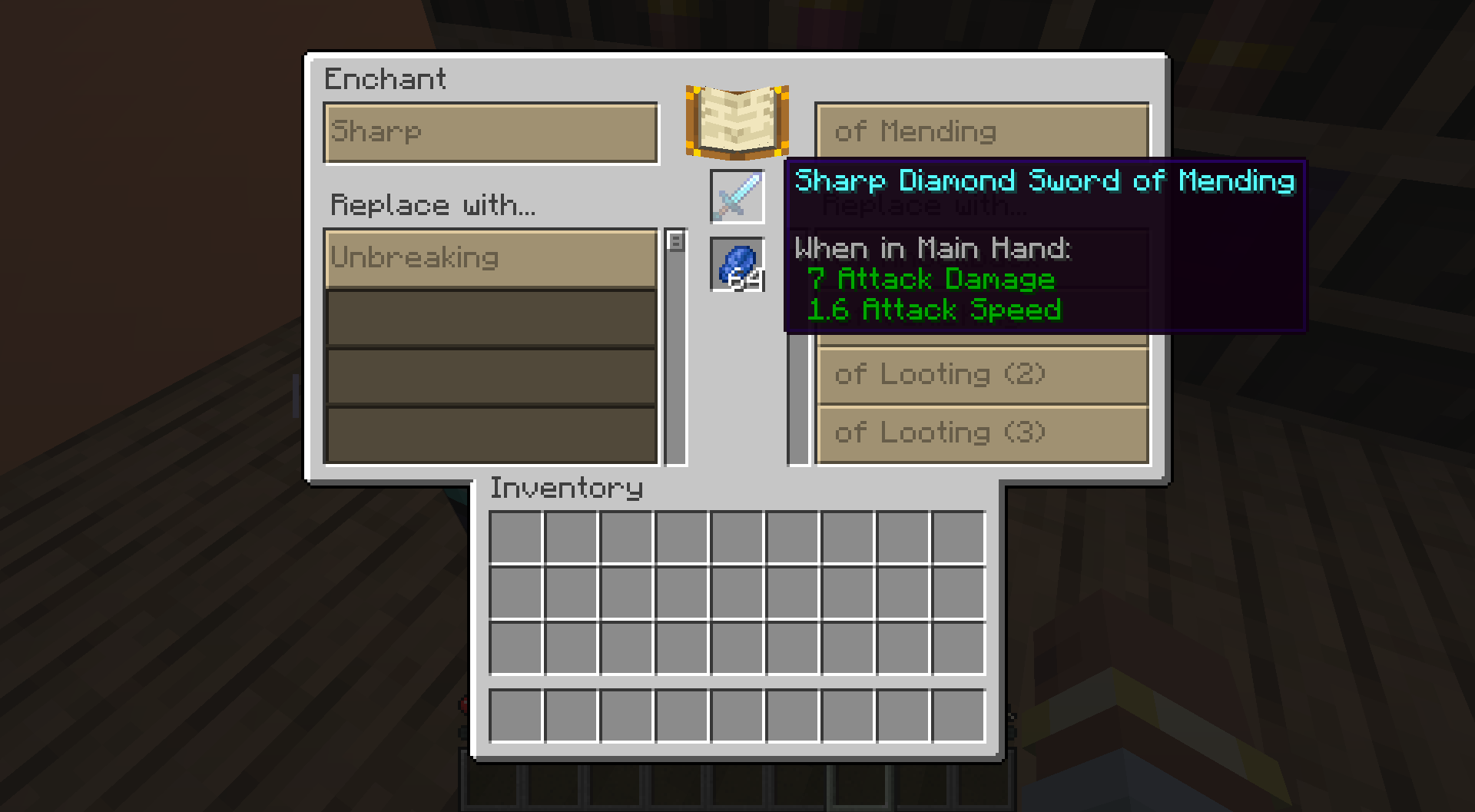 RPG Enchanting Screen
-
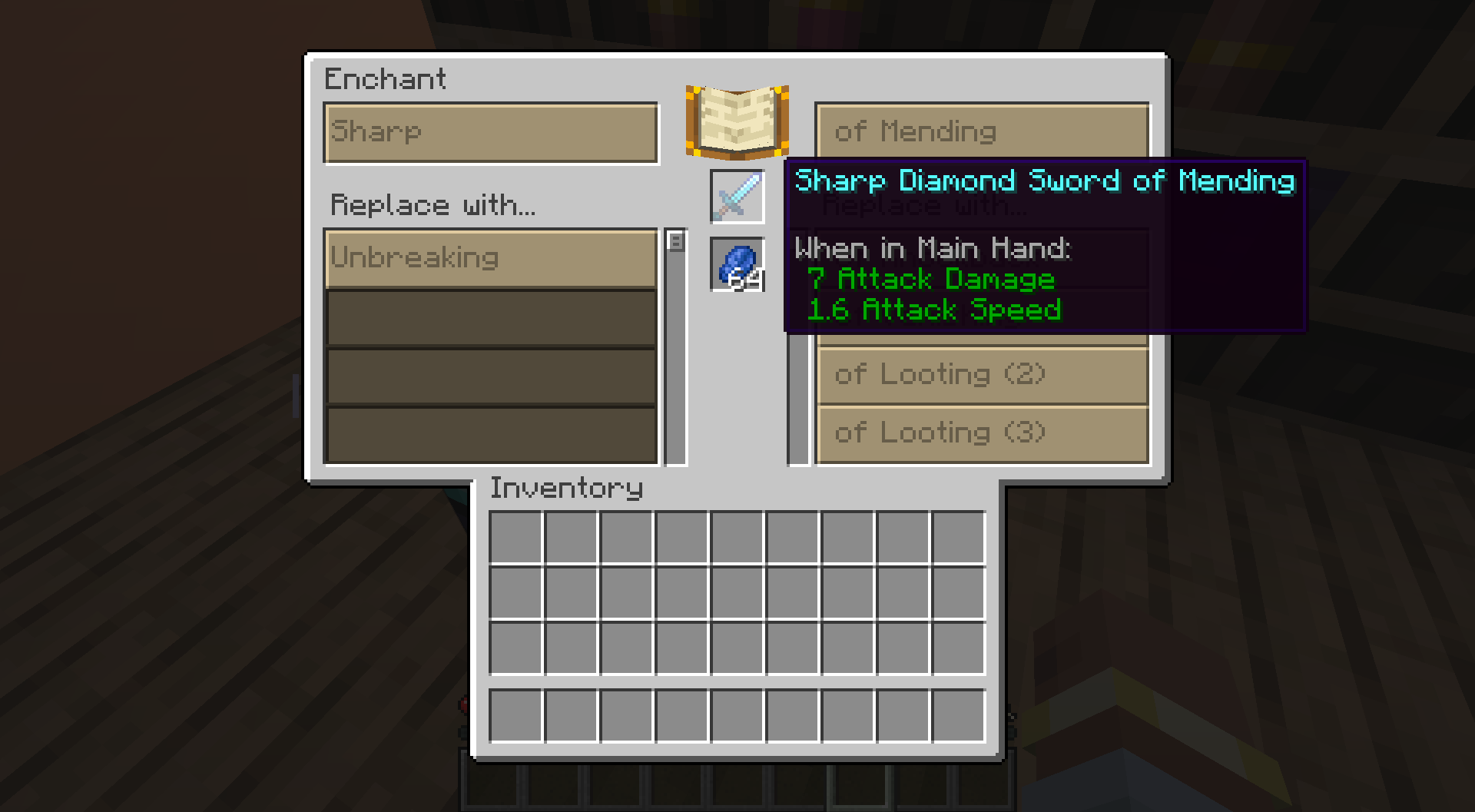 RPG Enchanter
Versions
Files
Relations
Project Relations
More like this
Similar Mods
Suggestions use data such as tags, dependencies, dependents, descriptions, titles, and more to rank how much they overlap with this mod.
- RPG Crafting
- RPG Inventory
- Refined Enchanting
- Enchantix
- RPG-Hud
- DarkSmithing - RPG Smithing Template Recipes (Armor Trims)
- DarkSmelting - RPG Smelt Armor, Tools, Weapons
- RPG Origins
- DarkTimer - RPG Clear Entity Lag
- DarkGlint - RPG Enchantment Glint
- DarkHeads - RPG Player Heads
- DarkRTP - RTP RPG Random Teleport
On ModDex
Community snapshot
By the numbers
Statistics
 (opens in a new tab)
Get it on
Available Platforms
On ModDex
Community snapshot
By the numbers