
Community listing page, reviews here may not be monitored by the author.
Satisfactory Planner


No reviews yet
A client-side utility mod that adds a fully interactive, Satisfactory-style project planner. See a complete crafting tree, track required resources against your inventory, and manage your building goals directly in-game.
Does not follow a specific thematic focus apart from vanilla Minecraft.
Used for mods with little to no gameplay elements.
Includes quality of life improvements and small tweaks to enhance and customize gameplay.
Adds client-side tools and features to enhance the user experience.
Adds tools to customize the user interface and menus.
Community voices
Reviews
Filters
Click once to include, again to exclude, again to clear
No reviews yet. Be the first to review this project!
Get it on
Available Platforms
Compatibility
Supported Environments
Runs entirely on the client. Works on vanilla servers.
About
Project Details
For authors
Embed Badge
If you're the author of this project, you can embed a live badge anywhere that supports HTML or Markdown. It updates automatically whenever ratings change.
Use HTML for any page that supports it, or Markdown for README files and Markdown-based descriptions.
Identifiers
Platform IDs
Resources
External Links
About
Description
Tired of alt-tabbing to a wiki or scribbling notes for complex recipes from your favorite tech mods? Satisfactory Planner brings the powerful and intuitive project management UI from Satisfactory directly into Minecraft!
This is a client-side mod that adds a dynamic, on-screen HUD to help you plan, track, and execute your crafting projects, from a single piston to an entire factory.
## ✨ Features
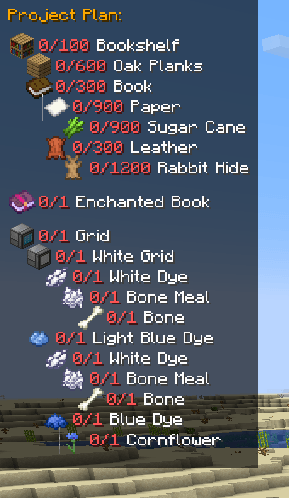
* **Dynamic Crafting Tree HUD:** An elegant, on-screen display shows you a complete, multi-level tree of all ingredients required for your chosen item.
* **Real-Time Tracking:** The HUD automatically checks your inventory and updates in real-time, showing you exactly what you have and what you still need (`11/64 Cobblestone`). Completed items are marked with a green check!
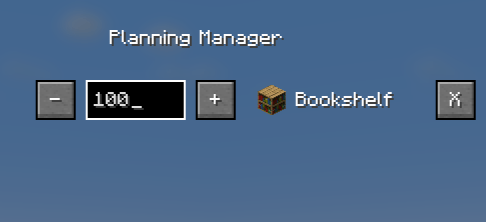
* **Interactive Planning Manager:** Press a key (`K` by default) to open a dedicated screen where you can:
* Change the target amount of items to craft using `[+]` and `[-]` buttons.
* Manually type in the exact number you need (e.g., `1024`).
* Remove projects you no longer need.
* **Seamless EMI Integration:** Simply hover over any item in the EMI item list and press `P` to add it to your plan. It also works with items in your inventory!
* **Persistence:** Your project list is automatically saved when you close the game and reloaded when you join a world.
* **Broad Recipe Support:** Supports standard crafting table recipes as well as Furnace, Blast Furnace, and Smoker recipes.
## 🎮 How to Use
* **Adding a Recipe:** Hover over an item in your inventory or the EMI list and press **P**.
* **Managing Your List:** Press **K** to open the Planning Manager. Here you can change amounts or delete projects.
* **Clearing the List:** Press **O** to remove all active projects from the HUD.
## ⚙️ Dependencies
* **Required:** **NeoForge** for Minecraft 1.21.1.
* **Highly Recommended:** **EMI** (to add recipes directly from the item list).
---
*This mod was created with the help of an AI assistant. It's a journey from a simple idea to a fully functional tool. We hope you find it useful!*
Tired of alt-tabbing to a wiki or scribbling notes for complex recipes from your favorite tech mods? Satisfactory Planner brings the powerful and intuitive project management UI from Satisfactory directly into Minecraft!
This is a client-side mod that adds a dynamic, on-screen HUD to help you plan, track, and execute your crafting projects, from a single piston to an entire factory.
✨ Features
- Dynamic Crafting Tree HUD: An elegant, on-screen display shows you a complete, multi-level tree of all ingredients required for your chosen item.
- Real-Time Tracking: The HUD automatically checks your inventory and updates in real-time, showing you exactly what you have and what you still need (
11/64 Cobblestone). Completed items are marked with a green check! - Interactive Planning Manager: Press a key (
Kby default) to open a dedicated screen where you can:- Change the target amount of items to craft using
[+]and[-]buttons. - Manually type in the exact number you need (e.g.,
1024). - Remove projects you no longer need.
- Seamless EMI Integration: Simply hover over any item in the EMI item list and press
Pto add it to your plan. It also works with items in your inventory! - Persistence: Your project list is automatically saved when you close the game and reloaded when you join a world.
- Broad Recipe Support: Supports standard crafting table recipes as well as Furnace, Blast Furnace, and Smoker recipes.
- Change the target amount of items to craft using
🎮 How to Use
- Adding a Recipe: Hover over an item in your inventory or the EMI list and press P.
- Managing Your List: Press K to open the Planning Manager. Here you can change amounts or delete projects.
- Clearing the List: Press O to remove all active projects from the HUD.
⚙️ Dependencies
- Required: NeoForge for Minecraft 1.21.1.
- Highly Recommended: EMI (to add recipes directly from the item list).
This mod was created with the help of an AI assistant. It's a journey from a simple idea to a fully functional tool. We hope you find it useful!
Screenshots
Gallery
-
 2025-12-25_20.54.42.png 2025-12-25_20.54.42.png
 -
 2025-12-25_20.54.11.png 2025-12-25_20.54.11.png


Versions
Files
Relations
Project Relations
More like this
Similar Mods
Suggestions use data such as tags, dependencies, dependents, descriptions, titles, and more to rank how much they overlap with this mod.
On ModDex
Community snapshot
By the numbers
Statistics
Want to reach Minecraft players?
We're looking for a server hosting partner to feature here and other parts of the site. Interested? Send us a message!
Get in touchGet it on
Available Platforms
On ModDex
Community snapshot
By the numbers
Statistics
Resources