
Community listing page, reviews here may not be monitored by the author.
SecureBarter

No reviews yet
SecureBarter Long-Distance Trading
Community voices
Reviews
No reviews yet. Be the first to review this project!
Get it on
Available Platforms
About
Project Details
For authors
Embed Badge
If you're the author of this project, you can embed a live badge anywhere that supports HTML or Markdown. It updates automatically whenever ratings change.
Use HTML for any page that supports it, or Markdown for README files and Markdown-based descriptions.
Identifiers
Platform IDs
Resources
External Links
About
Description
# SecureBarter for 26.1.2 Fabric is out!
SecureBarterV10 is the first properly packaged release of SecureBarter.
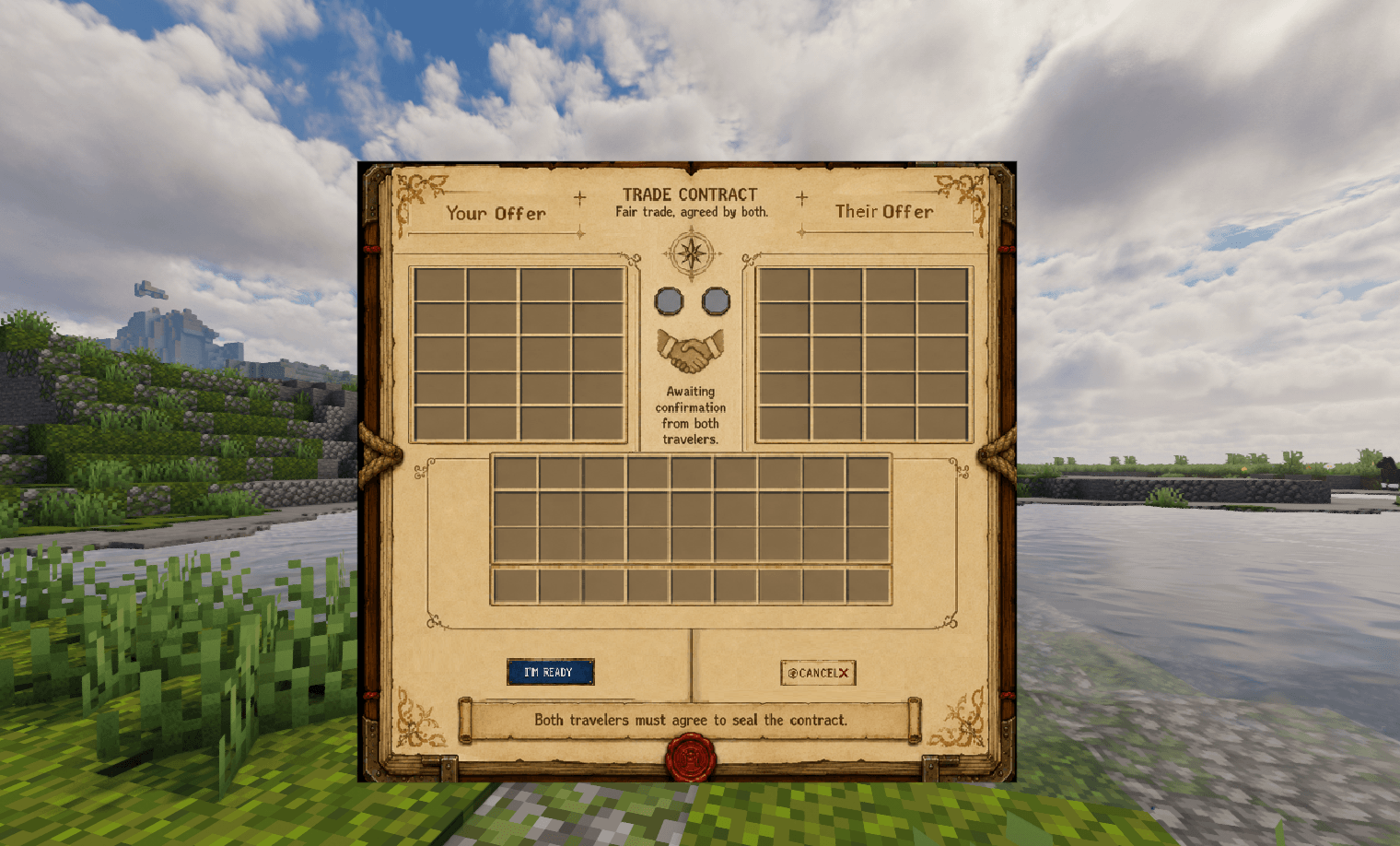
This version keeps trade behavior, while BEAUTIFIYING the GUI texture delivery.
## Highlights
- Added full FancyMenu-powered trade screen support.
- Added automatic client-side FancyMenu layout/asset installation.
- Added ready-state indicator lights in the two middle circles.
- Kept the mod safe for dedicated servers by avoiding a hard FancyMenu runtime dependency.
## Ready Indicator Lights - (Hard to test alone, let me know if it don't work)
- Added functional ready-state indicators for the two gray circles in the middle of the contract UI.
- The player’s ready state and the other player’s ready state are now reflected visually.
- Circles turn green when the corresponding player is ready.
- Circles remain gray while waiting.
Inspired by popular Rust trading plugins, this mod eliminates the risk of dropping valuable items on the ground or getting scammed by other players. Trade safely with anyone, no matter how far away they are.
🌟 Key Features
Infinite Distance Trading: Initiate trades with any online player from anywhere in the world. No need to meet up or travel back to base.
📜 How to Use Commands
Trading is incredibly easy and requires just a couple of chat commands:
- Send a Request: Type /trade <player-name> to invite a friend or server member to trade.
- Accept the Request: The other player types /trade accept to open the secure trade window.
- Complete the Barter: Place your desired items into the UI slots, review the other player's items, and click "Im Ready"
🐛 Bug Reporting & Feedback
SecureBarter is built to be rock-solid, but your feedback helps it grow! If you encounter any random errors, UI glitches, or potential exploits, please report them immediately here.
This next bit is the boring stuff
## GUI / FancyMenu
- SecureBarter now exposes the trade screen as:
`com.safeplayertrading.client.SecureBarterScreen`
- FancyMenu can target the SecureBarter trade screen directly.
- The SecureBarter screen is now intentionally blank/transparent.
- FancyMenu owns the visible contract/parchment art, labels, decorations, and visual button styling.
- Removed reliance on the vanilla chest background for the trade UI.
- Removed visible placeholder GUI textures from the trade screen.
## One-Jar FancyMenu Setup
- Bundled the FancyMenu contract image inside the SecureBarter jar.
- Bundled the FancyMenu layout file inside the SecureBarter jar.
- On client launch, if FancyMenu is installed, SecureBarter installs the needed files into:
`config/fancymenu/assets/securebarter_trade_contract.png`
`config/fancymenu/customization/com.safeplayertrading.client.securebarterscreen_layout_1.txt`
- SecureBarter also adds the screen target to:
`config/fancymenu/customizablemenus.txt`
- The FancyMenu image source now uses the working local path:
`[source:local]/config/fancymenu/assets/securebarter_trade_contract.png`
- This fixes broken/missing image references such as old placeholder paths or jar resource paths that caused purple/black missing textures.
## Packaging / Compatibility
- Built as:
`SecureBarterV10-26.1.2-fabric-port.3-SAFE.jar`
- Minecraft target:
`Minecraft Java 26.1.2`
- Loader:
Fabric`
- FancyMenu support targets:
`fancymenu-fabric-3.9.1
- FancyMenu is not hard-required inside `fabric.mod.json`.
- SecureBarter suggests FancyMenu instead of forcing it at runtime.
- This keeps dedicated server loading safer.
- Recommended CurseForge setup: mark FancyMenu as a required project relation on the CurseForge file/project page.
## Server Safety
- Removed the client mixin approach.
- Removed FancyMenu hard dependency from the runtime jar.
- Client-only FancyMenu setup runs only through the client entrypoint.
- Dedicated servers do not need FancyMenu installed.
- Dedicated server smoke test reached the normal EULA stop without crashing from FancyMenu dependency issues.
Screenshots
Gallery
-
 Screenshot 2026-06-17 204816.png Screenshot 2026-06-17 204816.png
Versions
Files
Relations
Project Relations
More like this
Similar Mods
Suggestions use data such as tags, dependencies, dependents, descriptions, titles, and more to rank how much they overlap with this mod.
On ModDex
Community snapshot
By the numbers
Statistics
Want to reach Minecraft players?
We're looking for a server hosting partner to feature here and other parts of the site. Interested? Send us a message!
Get in touchGet it on
Available Platforms
On ModDex
Community snapshot
By the numbers
Statistics
Resources