Community listing page, reviews here may not be monitored by the author.
Server.Properties for LAN

No reviews yet
Get server.properties file for each Local World ...!
Community voices
Reviews
No reviews yet. Be the first to review this project!
Get it on
Available Platforms
About
Project Details
For authors
Embed Badge
If you're the author of this project, you can embed a live badge anywhere that supports HTML or Markdown. It updates automatically whenever ratings change.
Use HTML for any page that supports it, or Markdown for README files and Markdown-based descriptions.
Identifiers
Platform IDs
About
Description
LAN Server Properties Modifier
Ever thought of playing offline Modded Minecraft Multiplayer with friends...
but realized that setting up a server is really annoying !
Well then... This Mod Is For YOU .!
To know how to play on LAN shared worlds over The Internet please scroll down
Server.Properties for LAN is a mod which creates a server.properties file inside every world folder and forces your LAN World to use the settings in this file. It also creates a serverGlobalConfig.properties file inside the config folder for Global Default properties ...!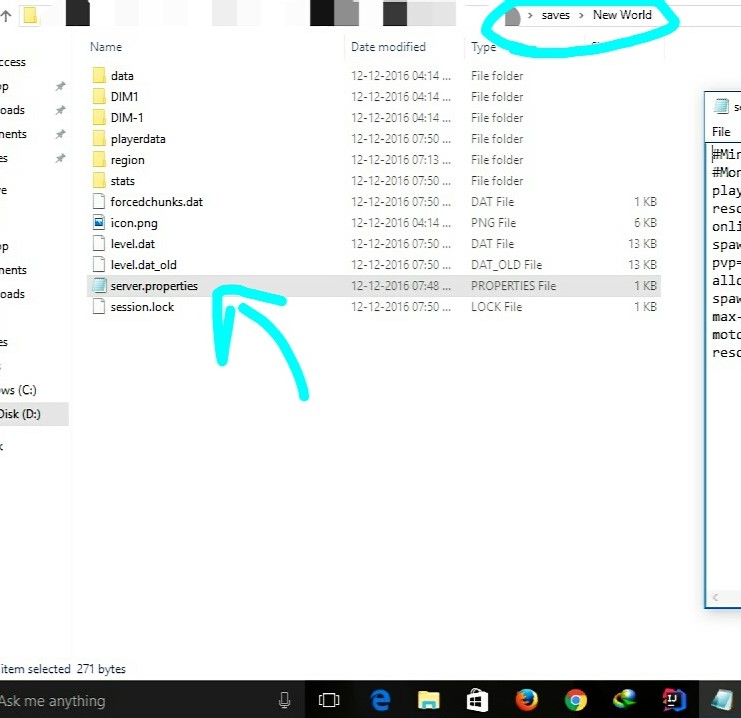
This means that all of the settings of a server can now be done for a Local World.
It, however, does not provide all the settings of a Multiplayer Server... ...but only provides the useful ones which are not editable in-game
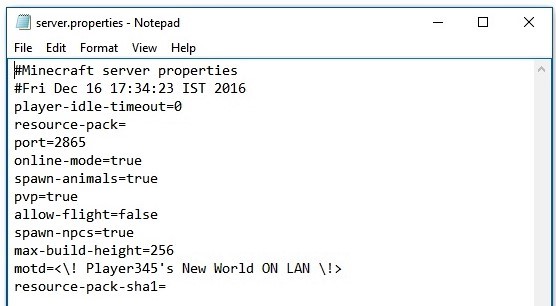
Currently, it creates the server.properties file with the following options:--


Requirements:--
- Minecraft 1.8.9+/Minecraft 1.7.x
- Minecraft Forge
IT SHOULD WORK ON ALL VERSIONS AFTER 1.8.9(+NOW 1.7.x)
...If you want to Open the world for LAN and invite your friends over the internet to join...
With the new Port Config option, you can do just that.
Let me explain how ...
- For the people over The Internet to be able to detect your Server(Open to LAN),
-
they must be able to communicate with you on the Port on which your Server is running.
- To do this you must tell your Router(Modem thingy) to route all traffic on that Port to you(Local IP).
-
This is done by a method called PORT FORWARDING
- Generally Port Forwarding requires setting up your router manually, however
-
There is an EASY way called UPNP Port Mapping
- For this, I recommend any UPNP Port Forwarding application to forward your server's port to your PC running the server.
- Use this for Windows...!(Click Here)
- Before Forwarding the Port, you need to put an exception for your Port in your local Firewall.
- (One time process only, for a particular port number)
- To do this in Windows... Go to Firewall Settings -> Advanced Firewall Settings ->
- And Create a New Rule in both the Inbound and Outbound Sections.
- Each section should have two new rules to allow your Port via TCP and UDP.
- So there will be a total of four rules.
- After you are done with Port Forwarding(TCP and UDP), all you have to do is give your friends your Public IP.
- Search Google for "My IP" and it will tell you your public IP.
- For your friends to connect to your server, they have to add your server to their Server List with the Server Address as
-
<YourPublicIP>:<ServerPort>
And that is it ...!
Once Done, your friends will be able to connect to your LAN world over The Internet ...!
CHANGE-LOG
GitHub Reset
Reset GitHub page to setup multiversion environment and prepare for revamp.
Appologies for lost Issues, Forks and all repo. data.
v2.65-1.7.x
- Ported to Minecraft 1.7.x...!
v2.65
- Added version check function.
- Updated mcmod.info
- Some minor code optimisations.
- ModID changed to 'splan'.
v2.6
- Fixed a bug causing the port number to ignore provided settings.
- Now setting port to 0 uses a random port.
v2.5
- Fixed file path issue on OSs other than Windows.
v2.4
- Added Global Config file, found in the config folder by the name of "serverGlobalConfig.properties".
- Added option "overrideGlobalDefaults" in local config files to override the global settings when needed.
- DO NOT FORGET to set "overrideGlobalDefaults" to true for the local properties file to be used.
v2.3
- Fixed Reflection Obfuscation issues.(maxViewDistance and maxPlayers work now !)
- Updated to latest MCP Mappings.
v2.2
- Fixed fatal Bug causing Server-Full in first run...!
- Added max-view-distance for servers(Set it to any number below 0 for default minecraft behavior)...!
v2.1
- Added MaxPlayers config support...!
- Added white-list support(Reflection)...
- NOTE :
- The white-list feature works using the whitelist.json file made by Minecraft Servers.
- See the configuration for the whitelist.json file Here.
- The whitelist.json file should be manually configured.
- !...YOU NEED TO PUT YOUR OWN UUID AND USERNAME IN IT TOO...!
- The whitelist.json file is only created if white-list is set to true in the server.properties file.
- On the first run, with white-list set to true, the white-list feature DOES NOT WORK.
- The server must be Stopped and Started again after the first run with white-list set to true.
v2
- Port Setup Support (Set Port to 0 for Vanilla Random Port)(CoreMod)
- Bug Fixes
v1
- Initial release.
Steps To Install:--
- Download the .jar file from here.
- Paste it into your mods folder.
- Done!
To Apply The Changes In Settings Of The server.properties File,
...You Only Have To Close Your World And Open It Again...
... NO NEED TO RESTART MINECRAFT ...!
View Source At
https://github.com/jaideepheer/MinecraftForge-Mods-ServerPropertiesLAN
< It Is Well Documented :) >
Also checkout Custom DiscordRPC
It allows custom Discord rich text
and you can use JavaScript...!
Feel free to use this in any mod pack.
Screenshots
Gallery
-
 Logo2
Logo2 -
 Logo
Logo
Versions
Files
Relations
Project Relations
More like this
Similar Mods
Suggestions use data such as tags, dependencies, dependents, descriptions, titles, and more to rank how much they overlap with this mod.
On ModDex
Community snapshot
By the numbers
Statistics
Want to reach Minecraft players?
We're looking for a server hosting partner to feature here and other parts of the site. Interested? Send us a message!
Get in touchGet it on
Available Platforms
On ModDex
Community snapshot
By the numbers