Community listing page, reviews here may not be monitored by the author.
Service Log

No reviews yet
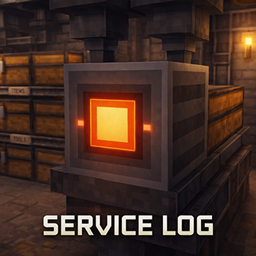
A utility block that monitors the inventory placed behind it and displays its status in-game.
Community voices
Reviews
No reviews yet. Be the first to review this project!
Get it on
Available Platforms
About
Project Details
For authors
Embed Badge
If you're the author of this project, you can embed a live badge anywhere that supports HTML or Markdown. It updates automatically whenever ratings change.
Use HTML for any page that supports it, or Markdown for README files and Markdown-based descriptions.
Identifiers
Platform IDs
Resources
External Links
About
Description
Service Log
Monitor nearby storage at a glance — without opening every container.
Service Log adds a compact, technical-looking panel block that reads the inventory placed directly behind it and shows its status in-world.
Perfect for players who build storage rooms, workshops, factories, machine areas, and automation setups and want a cleaner, more immersive way to track containers.

Why Use Service Log?
If you enjoy building organized bases, automation lines, or factory-style rooms, Service Log gives your storage systems a more readable and immersive feel.
Instead of checking containers one by one, you get a physical monitoring panel that fits naturally into your build and helps your logistics look alive.
Service Log is built to be:
- Compact
- Readable
- Immersive
- Practical
- Easy to integrate into both survival and creative builds
Features
- Monitors the inventory placed directly behind the block
- Adds a clean technical panel for storage and automation builds
- Improves visual clarity in workshops, machine rooms, and organized bases
- Great for factory-themed, industrial, and logistics-focused designs
- Lightweight utility block with both practical and decorative value
How It Works
Place the Service Log block with a supported inventory directly behind it.
When positioned correctly, the panel reads that inventory and displays its status in-world, giving you a fast and immersive way to monitor nearby storage without constantly opening containers manually.
Great For
Service Log fits especially well in:
- Storage rooms
- Chest walls
- Barrel-based storage setups
- Hopper lines
- Item routing systems
- Workshop interiors
- Factory-style builds
- Technical and industrial bases
- Decorative automation corridors
How to Use
- Craft and place the Service Log block
- Put a supported inventory directly behind it
- Chest
- Barrel
- Hopper
- Other supported inventories
- Face the block so the front panel is visible from the direction you want
- Use your storage system as normal
- Check the panel for quick in-world monitoring
Design Goal
Service Log is designed to make Minecraft storage and logistics feel more physical, readable, and integrated into the world.
Rather than relying only on menus, this mod adds a real block that visually represents monitoring inside your build — ideal for players who want their technical setups to look as good as they function.
Notes
- The monitored inventory must be placed directly behind the block
- Best used in organized storage and automation environments
- Intended as a lightweight utility and decorative enhancement for logistics-focused builds
In One Line
Service Log adds a compact in-world monitoring panel for containers placed behind it, making storage and automation builds cleaner, more immersive, and easier to read.
Screenshots
Gallery
Versions
Files
Relations
Project Relations
More like this
Similar Mods
Suggestions use data such as tags, dependencies, dependents, descriptions, titles, and more to rank how much they overlap with this mod.
On ModDex
Community snapshot
By the numbers
Statistics
Want to reach Minecraft players?
We're looking for a server hosting partner to feature here and other parts of the site. Interested? Send us a message!
Get in touchGet it on
Available Platforms
On ModDex
Community snapshot
By the numbers
Statistics
Resources