

Community listing page, reviews here may not be monitored by the author.
SGL (Super GUI Lib)

No reviews yet
Super GUI Lib - A library for creating beautiful GUIs without assets.

Community voices
Reviews
No reviews yet. Be the first to review this project!
Get it on
Available Platforms
Compatibility
Supported Environments
Runs entirely on the client. Works on vanilla servers.
About
Project Details
For authors
Embed Badge
If you're the author of this project, you can embed a live badge anywhere that supports HTML or Markdown. It updates automatically whenever ratings change.
Use HTML for any page that supports it, or Markdown for README files and Markdown-based descriptions.
Identifiers
Platform IDs
Resources
External Links
About
Description
SuperGUILib V2 - Enhanced Minecraft GUI Library
A modern, easy-to-use GUI library for Minecraft 1.21.11 (Fabric) that makes creating beautiful user interfaces simple and fun!
🎮 What is SuperGUILib?
SuperGUILib is a powerful toolkit that helps Minecraft mod developers create stunning graphical user interfaces without dealing with complex rendering code. Think of it as a "GUI builder" that lets you create menus, settings screens, and interactive displays with just a few lines of code!
Perfect for:
- Settings menus
- Custom inventories
- Interactive displays
- Configuration screens
- In-game tools and utilities
✨ Key Features
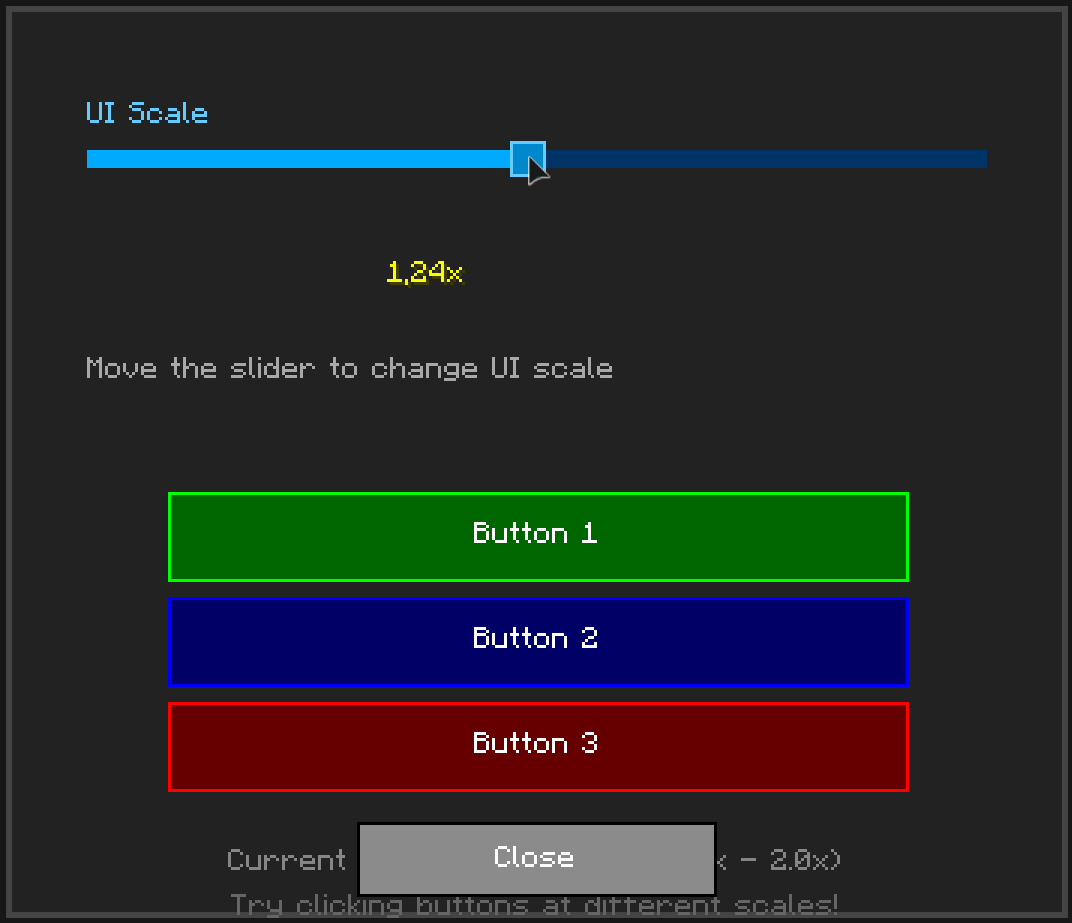
- 🎨 Beautiful Pre-styled Components - Buttons, sliders, text fields, and more
- 🖱️ Interactive Elements - Click sounds, hover effects, cooldowns
- 📜 Auto-scrolling - Automatically handles content overflow
- 🎯 Item Display - Show Minecraft items with tooltips
- 🎵 Custom Sounds - Add audio feedback to your UI
- 📱 Responsive Design - Adapts to different screen sizes
- 🚀 Easy to Use - Simple builder pattern API
🚀 Quick Start
Try It In-Game
Run these commands to see examples:
/sgl-v2 testgui          - Enhanced examples menu with all features
/sgl testgui             - Original examples menu
Create Your First GUI
import org.stepan1411.super_gui_lib.client.api.GuiBuilder;
import net.minecraft.client.gui.screen.Screen;

public class MyFirstGUI {
    public static Screen create() {
        return GuiBuilder.create("My Settings")
            .panelSize(300, 200)

            .label("Welcome to My Mod!")
                .color(0xFFFFFF00)
                .add()

            .button("Click Me")
                .onPress(() -> System.out.println("Hello!"))
                .add()

            .slider("Volume")
                .value(0.7)
                .onChange(value -> setVolume(value))
                .add()

            .build();
    }
}
That's it! You just created a GUI with a label, button, and slider in under 20 lines of code!
📚 Code Examples
Example 1: Simple Settings Menu
Screen settingsGui = GuiBuilder.create("Game Settings")
    .panelSize(350, 250)

    .slider("Master Volume")
        .value(0.8)
        .fillColor(0xFF00FF00)
        .onChange(vol -> game.setVolume(vol))
        .add()

    .slider("Brightness")
        .value(0.5)
        .fillColor(0xFFFFAA00)
        .onChange(bright -> game.setBrightness(bright))
        .add()

    .button("Apply")
        .surface(Surface.DARK_PANEL)
        .onPress(() -> saveSettings())
        .add()

    .button("Cancel")
        .onPress(() -> closeScreen())
        .add()

    .build();
Example 2: Interactive Button with Cooldown
GuiBuilder.create("Combat Menu")
    .panelSize(300, 200)

    .button("Quick Attack")
        .cooldownSeconds(1.0)  // 1 second cooldown
        .onPress(() -> player.attack())
        .add()

    .button("Heavy Attack")
        .cooldownSeconds(3.0)  // 3 second cooldown
        .surface(Surface.flat(0xFF660000))
        .onPress(() -> player.heavyAttack())
        .add()

    .build();
Example 3: Text Input Form
GuiBuilder.create("Player Registration")
    .panelSize(350, 250)

    .label("Enter your name:").add()

    .textField()
        .placeholder("Name...")
        .textOnly()           // Only letters allowed
        .maxLength(20)
        .onChange(name -> playerName = name)
        .add()

    .label("Enter your age:").add()

    .textField()
        .placeholder("Age...")
        .numbersOnly()        // Only numbers allowed
        .maxLength(3)
        .onChange(age -> playerAge = age)
        .add()

    .button("Submit")
        .onPress(() -> registerPlayer())
        .add()

    .build();
Example 4: Custom Styled Menu
GuiBuilder.create("Styled Menu")
    .panelSize(400, 300)
    .panelSurface(Surface.flat(0xE0101010).and(Surface.outline(0xFF00AAFF)))

    .label("Super Cool Menu")
        .color(0xFF00FFFF)
        .scale(2.0f)
        .shadow(true)
        .add()

    .button("Neon Button")
        .size(250, 25)
        .surface(Surface.flat(0xFF003366).and(Surface.outline(0xFF00FF00)))
        .onPress(() -> doSomething())
        .add()

    .build();
🎨 Available Components
| Component | Description | Use Case |
|---|---|---|
| Button | Clickable button with cooldown support | Actions, navigation |
| Slider | Horizontal/vertical value selector | Volume, brightness, settings |
| Label | Text display with styling | Titles, descriptions |
| TextField | Text input with validation | User input, search |
| ItemDisplay | Show Minecraft items with tooltips | Inventories, showcases |
| VolumeMeter | VU-meter style indicator | Audio levels, progress |
| ScrollContainer | Auto-scrolling container | Long content lists |
🎯 Component Features
Buttons
- Custom colors and surfaces
- Click sounds
- Cooldown system
- Hover effects
- Dynamic text updates
Sliders
- Horizontal and vertical
- Custom colors (track, fill, handle)
- Value labels
- Real-time callbacks
- Smooth dragging
Text Fields
- Placeholder text
- Text-only or numbers-only validation
- Max length limits
- Custom colors
- Border styling
Item Display
- Show any Minecraft item
- Automatic tooltips
- Scalable size
- Custom backgrounds
- Dynamic updates
📦 Installation
For Mod Developers
- Download
SuperGUILib-*.jar - Add to your project's
libsfolder - Update
build.gradle:
dependencies {
    modImplementation files('libs/SuperGUILib-*.jar')
    include files('libs/SuperGUILib-*.jar')
}
Building from Source
./gradlew build
The compiled JAR will be in build/libs/
📖 Documentation
Full documentation available SGL-WIKI:
- Home - Overview and introduction
- Quick Start - Get started in 5 minutes
- Components Guide - All components explained
- Examples - Real-world code examples
- Advanced Features - Scrolling, cooldowns, styling
🎮 In-Game Commands
Test all features with these commands:
/sgl-v2 testgui              - Enhanced V2 menu (recommended!)
/sgl testgui                 - Original examples menu
🌈 Color Format
SuperGUILib uses ARGB (Alpha-Red-Green-Blue) format:
0xAARRGGBB
  ││││││└└─ Blue (00-FF)
  ││││└└─── Green (00-FF)
  ││└└───── Red (00-FF)
  └└─────── Alpha (00=transparent, FF=opaque)
Examples:
0xFFFF0000- Opaque red0x80FF0000- Semi-transparent red0xFF00FF00- Opaque green0x800033FF- Semi-transparent blue
Need help? Check the Wiki
Screenshots
Gallery



Versions
Files
Relations
Project Relations
More like this
Similar Mods
Suggestions use data such as tags, dependencies, dependents, descriptions, titles, and more to rank how much they overlap with this mod.
On ModDex
Community snapshot
By the numbers
Statistics

 (opens in a new tab)
Get it on
Available Platforms
On ModDex
Community snapshot
By the numbers
Statistics
Resources