Community listing page, reviews here may not be monitored by the author.
Simple Shulker Preview


No reviews yet
Displays a configurable icon indicating the contents of a shulker box, as well as a capacity bar.
Community voices
Reviews
No reviews yet. Be the first to review this project!
Get it on
Available Platforms
Compatibility
Supported Environments
Runs entirely on the client. Works on vanilla servers.
About
Project Details
For authors
Embed Badge
If you're the author of this project, you can embed a live badge anywhere that supports HTML or Markdown. It updates automatically whenever ratings change.
Use HTML for any page that supports it, or Markdown for README files and Markdown-based descriptions.
Identifiers
Platform IDs
About
Description
Simple Shulker Preview
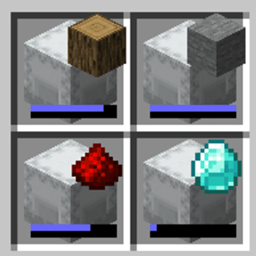
Simple Shulker Preview is a small fabric mod that displays a configurable icon indicating the contents of a shulker. It also provides a capacity bar to display how full the shulker is (in items, not slots).
MIGRATION: Please note that this mod is still being actively developed, but due to the limitations and difficulties of managing CurseForge it has permanently migrated to Modrinth here.
Dependencies
This mod requires ModMenu to adjust the configs. The Cloth Config API is embedded - you don't need to download it yourself.
Configs
I won't go through all the configs, since they've increased over time. A brief overview is as follows:
- Display Item - Decides which item in the shulker should be displayed based on position or quantity.
- Icon Positions - Modify the x and y offsets of the icon, as well as scale.
- Capacity Bar - Display a capacity bar, indicating how full the shulker box is.
- Bar Position - Set the position, size, and _direction_ the capacity bar is drawn.
- Stack Limits - Set minimum limits for the number of items required to display an icon
- Enable ... - Option to enable additional features, such as bundles or recursive shulker support
- Disable Mod - Disables the mod so that overlay icons are not displayed.
Mod Compatibility
The following features have been tested for compatibility and work with this mod. Mods with these functionalities should also work, however I can't promise anything.
- Bundles - can show the icon on bundles too)
- Custom heads - treats custom heads as individual items rather than a single player head
- Recursive shulkers - shulkers stored in shulkers
- Stacked shulkers - full / empty shulkers that are stacked together
- Variable shulkers sizes - shulkers that don't have 27 storage slots
The following mods were used in testing:
- Carpet Essential Addons
- Reinforced Shulker Boxes Mod
- MicroCutting
- HeadIndex
- JustMobHeads
- MoreMobHeads
- Player Head Drops
- All Mob Heads
Simple Shulker Preview



Simple Shulker Preview is a small fabric mod that displays an icon indicating the contents of a shulker. This icon appears on top of the shulker icon in inventory slots.
For other download pages, please see CurseForge or Modrinth.
Dependencies
This mod requires YetAnotherConfigLib (YACL) v3 to manage configurations, and ModMenu to access the config screen in-game.
Configs
I won't go through all the configs, since they've increased over time. A brief overview is as follows:
| Option | Description |
|---|---|
Preview Selection Logic |
Decides which item in the container should be displayed based on position or quantity. |
Icon Based on Container Name |
Provides options to display an icon based on custom-named containers. |
Preview Icon Position & Size |
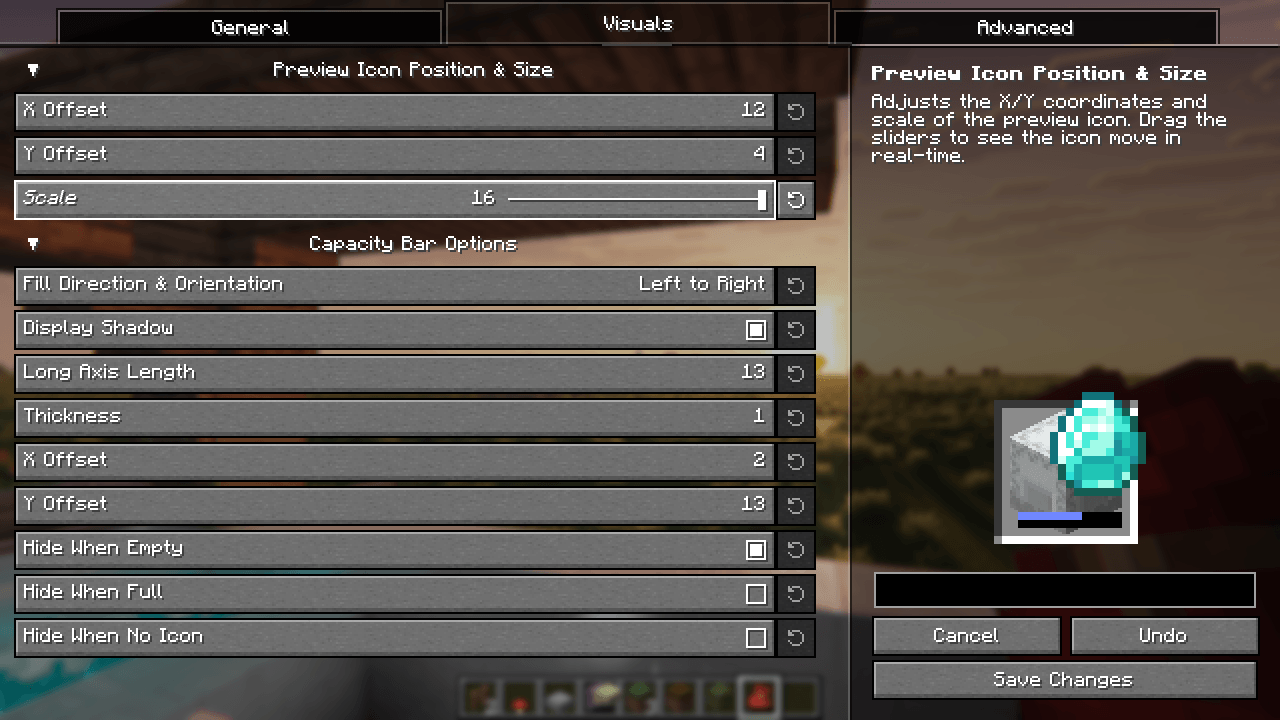
Adjust the x and y offsets of the icon, as well as scale (general, stacked, or bundle). |
Show Capacity Bar |
Toggle the capacity bar, indicating how full the container is. |
Capacity Bar Options |
Set the position, size, orientation, and shadow of the capacity bar. |
Thresholds to Show Preview Icon |
Set minimum limits for the number of items/slots required to display an icon. |
Preview Icons on Bundles / Modded |
Toggle compatibility modes for Bundles, other container items, etc. |
Enable Mod |
Globally enables or disables all preview icons and capacity bars. |
When using custom named shulkers, you need to name it using the same conventions required for spawning in items. For example, naming a shulker minecraft:grass_block (or simply grass_block) will display a grass block. If an invalid name has been given, it will continue to follow the 'Preview Selection Logic' configuration (unless 'Icon Based on Container Name' has been set to 'Hide Icons Unless Named', of course).
Contributing
Contributions and suggestions are always welcome! Please limit all issues to only one feature at a time - feel free to open multiple at once if you have many ideas. Similarly, please limit pull requests to a single feature at a time and try to follow the existing code style.
To further discuss or get notifications of new updates, check out my Discord. If you like what I do, consider supporting me on Ko-Fi! 
Screenshots
Gallery
-
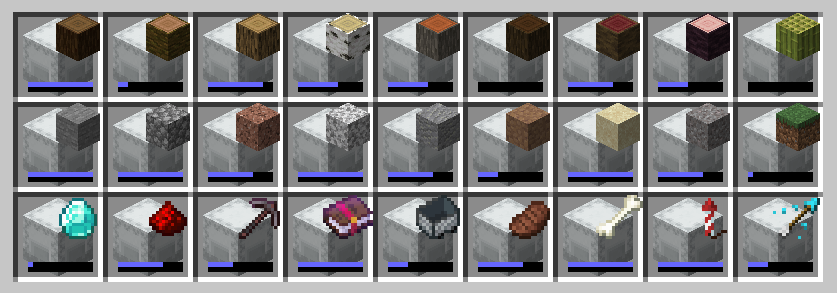
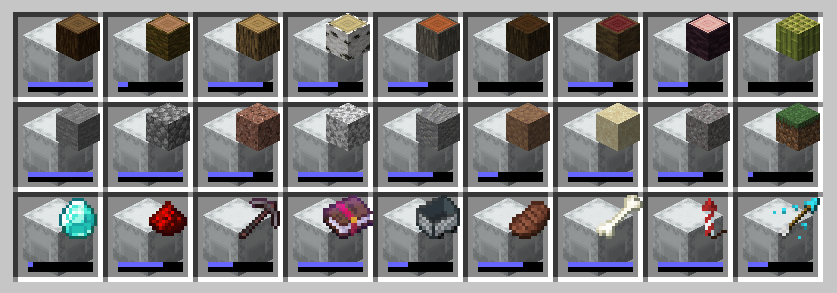 Filled Inventory An inventory filled with information!
-
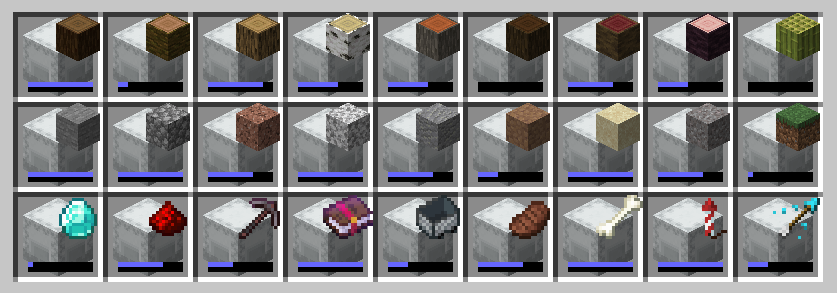 An inventory full of information! An example of simple shulker preview at work, with many icons and capacities displayed on the shulkers.
 -
Visuals Screen The visuals tab in the Simple Shulker Preview configs, providing an interactive preview of your setup.
Versions
Files
Relations
Project Relations
More like this
Similar Mods
Suggestions use data such as tags, dependencies, dependents, descriptions, titles, and more to rank how much they overlap with this mod.
On ModDex
Community snapshot
By the numbers
Statistics
Want to reach Minecraft players?
We're looking for a server hosting partner to feature here and other parts of the site. Interested? Send us a message!
Get in touchGet it on
Available Platforms
On ModDex
Community snapshot
By the numbers