
Community listing page, reviews here may not be monitored by the author.
Simple-Trading-Device

No reviews yet
On-the-Go Trading Instruments
Community voices
Reviews
No reviews yet. Be the first to review this project!
Get it on
Available Platforms
About
Project Details
For authors
Embed Badge
If you're the author of this project, you can embed a live badge anywhere that supports HTML or Markdown. It updates automatically whenever ratings change.
Use HTML for any page that supports it, or Markdown for README files and Markdown-based descriptions.
Identifiers
Platform IDs
Resources
External Links
About
Description
Simple Trading Device
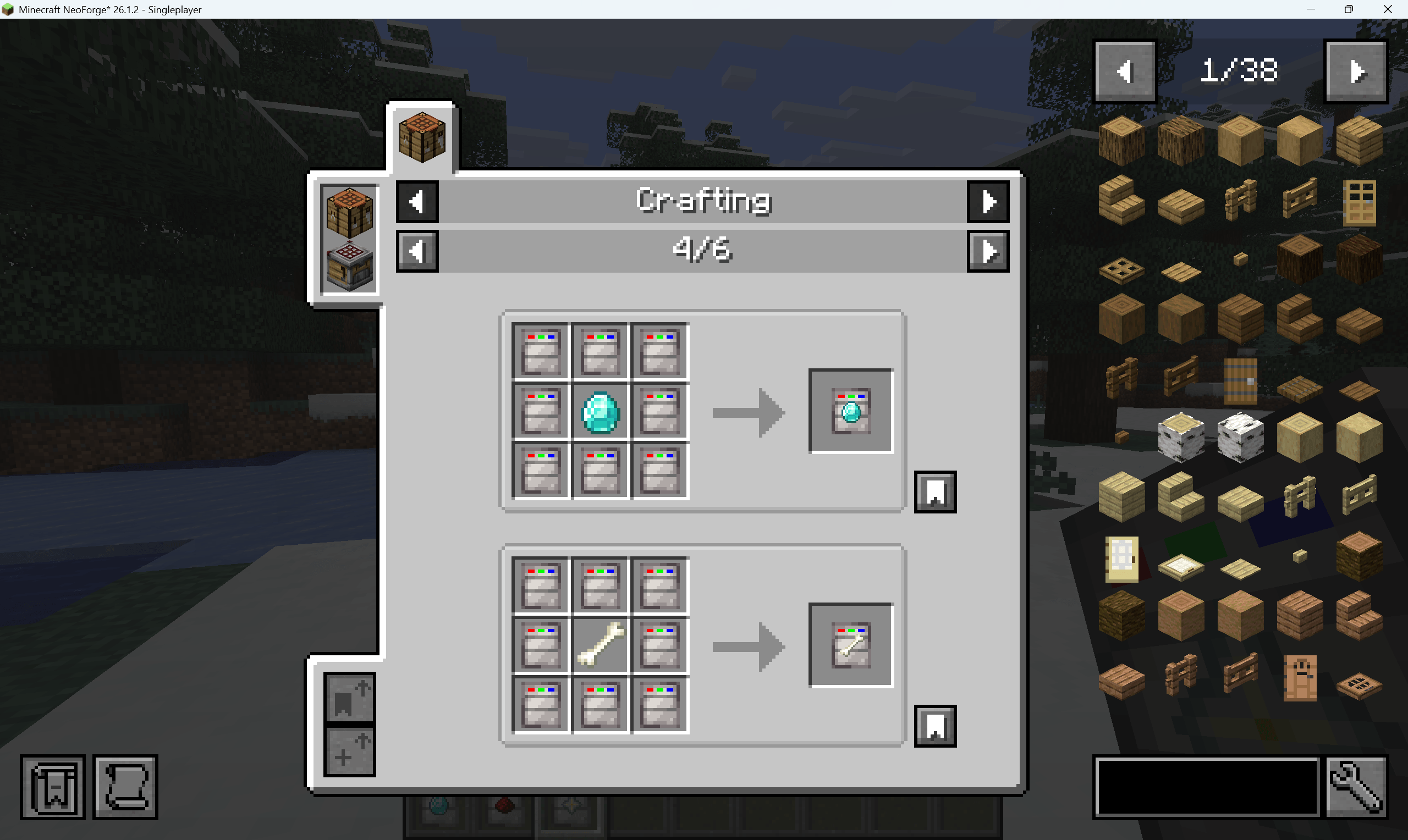
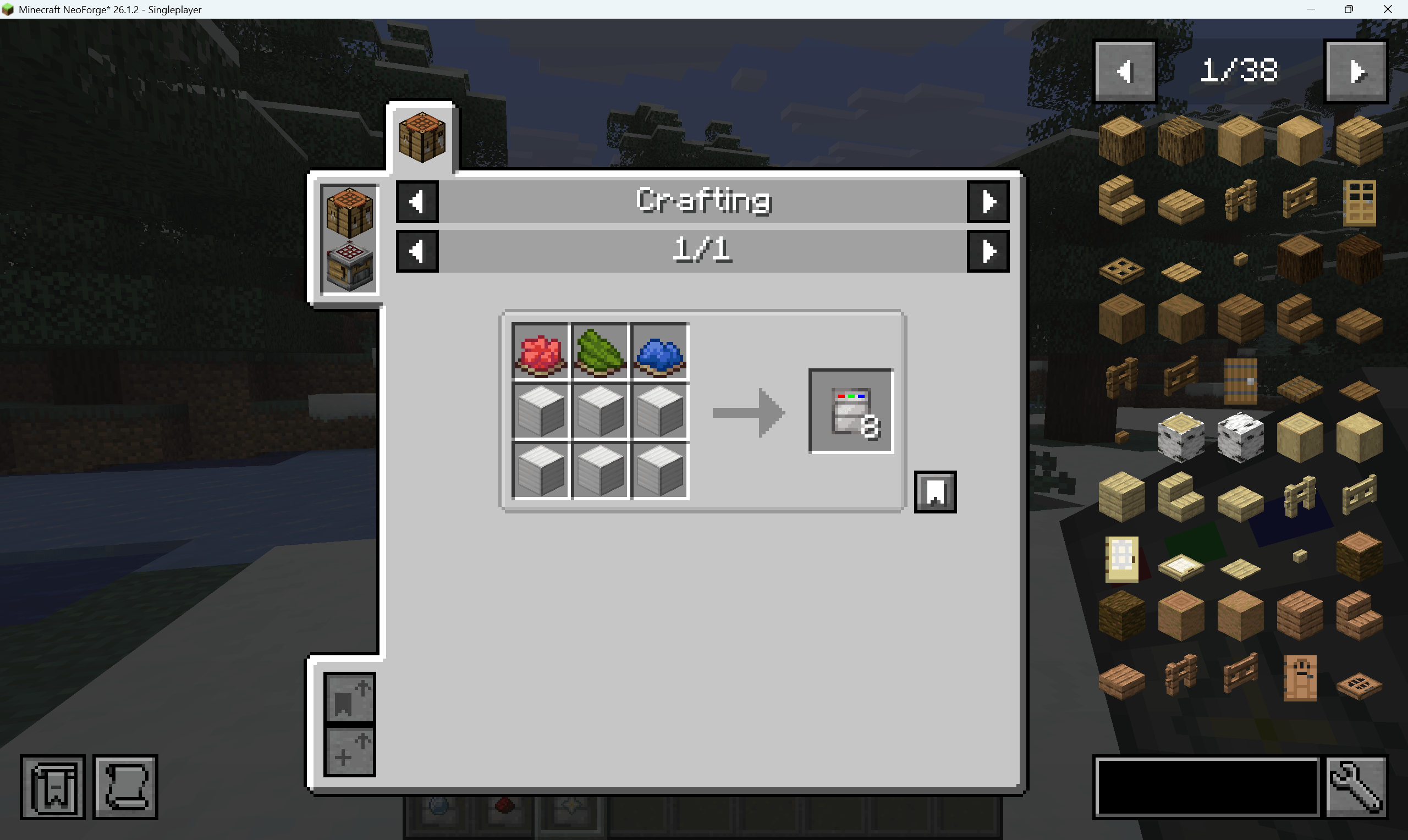
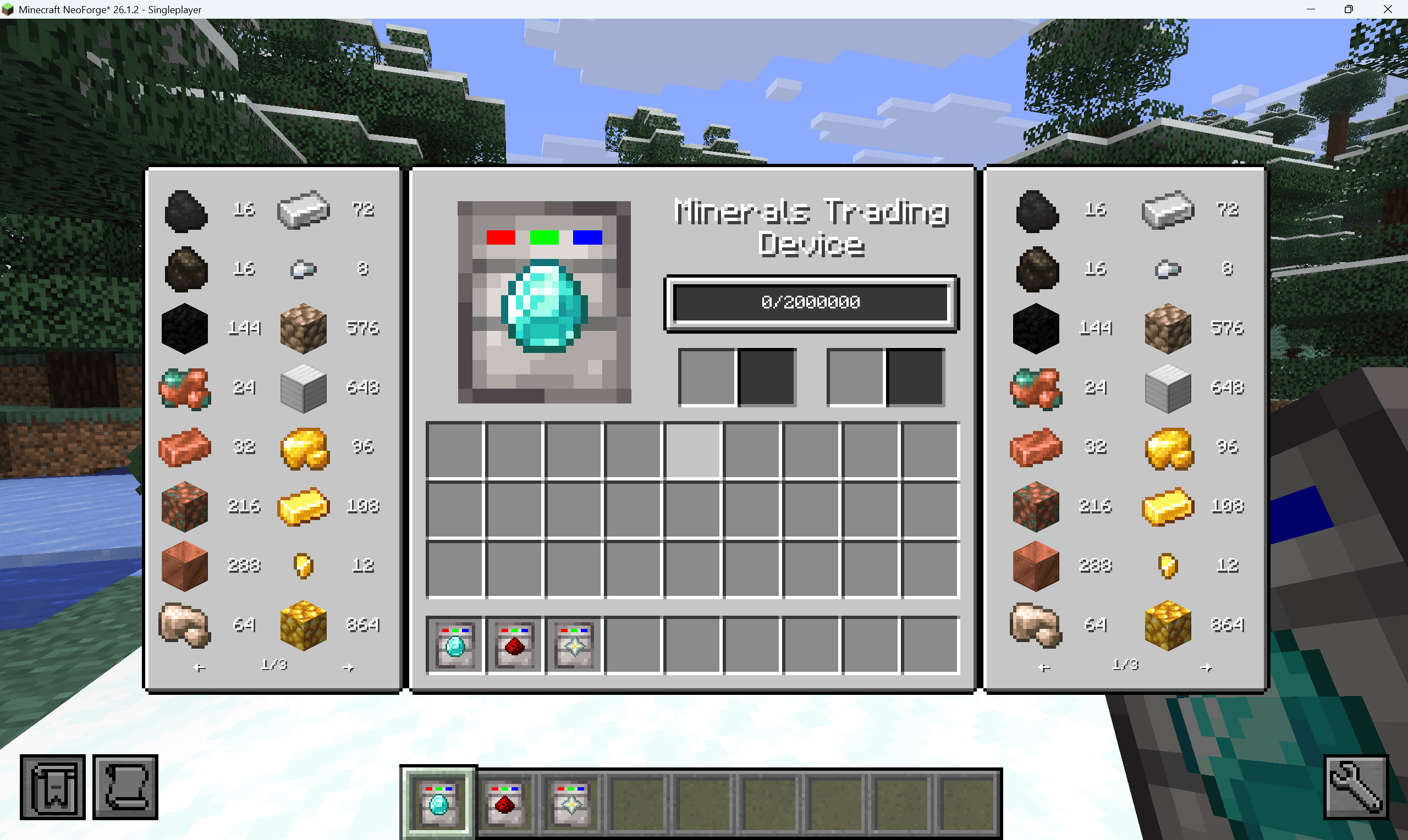
Simple Trading Device adds portable trading items for Minecraft/NeoForge. A trading device stores a numeric trade value, accepts configured item or fluid inputs, and lets the player spend that stored value to buy configured outputs.
The mod ships with built-in vanilla Minecraft trading groups and also supports JSON-driven extension. You can:
- add entries to an existing built-in holder
- create a brand-new holder
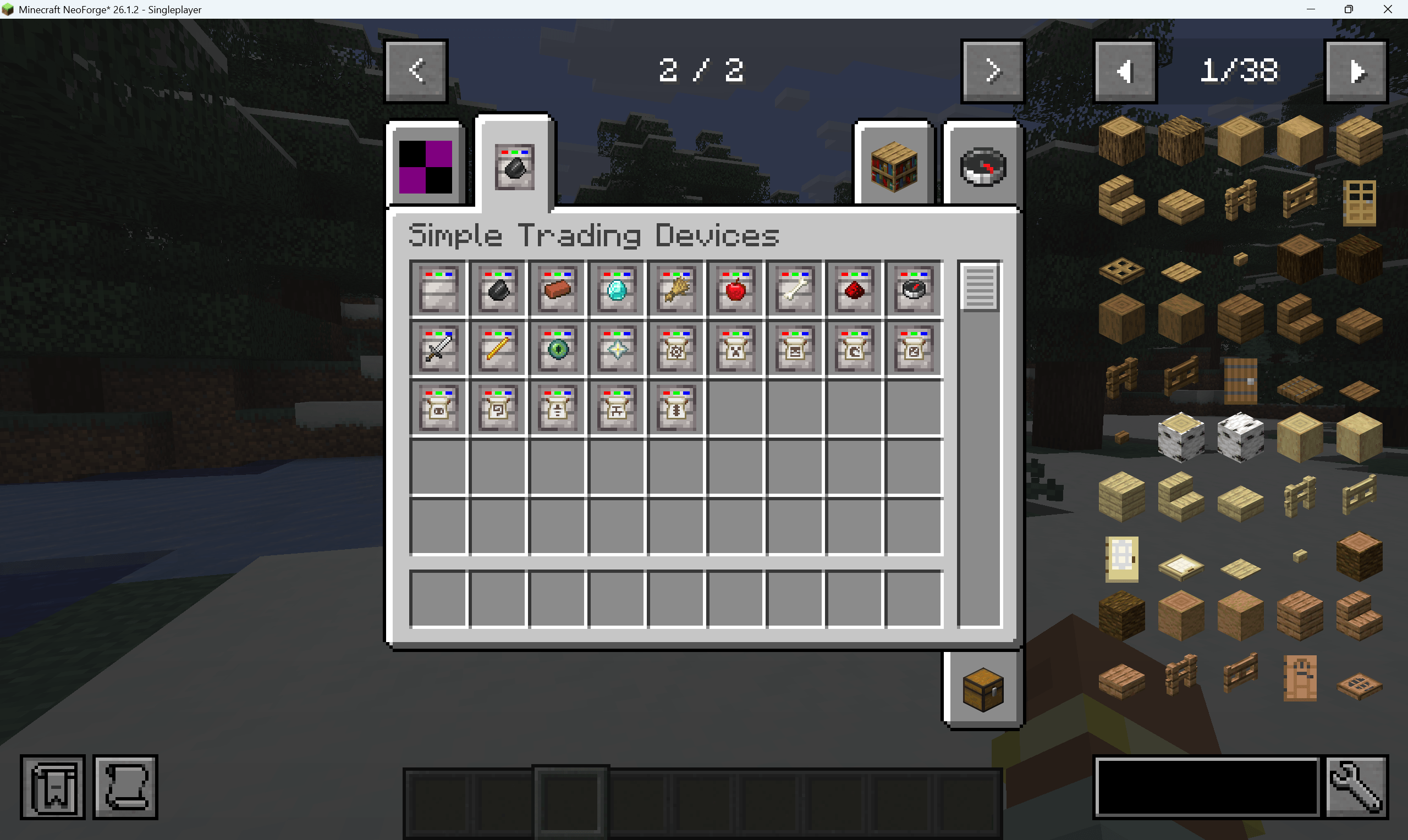
- register a new trading device item that uses that holder
Main Features
- Portable trading devices with independent stored value.
- Built-in vanilla trading holders grouped by item theme.
- Item and fluid input conversion.
- Item and fluid output purchases.
- Durability-aware equipment pricing.
- JSON loading for extra trading entries.
- JSON loading for extra trading device items.
- Optional blank additional devices for custom holders.
How Trading Works
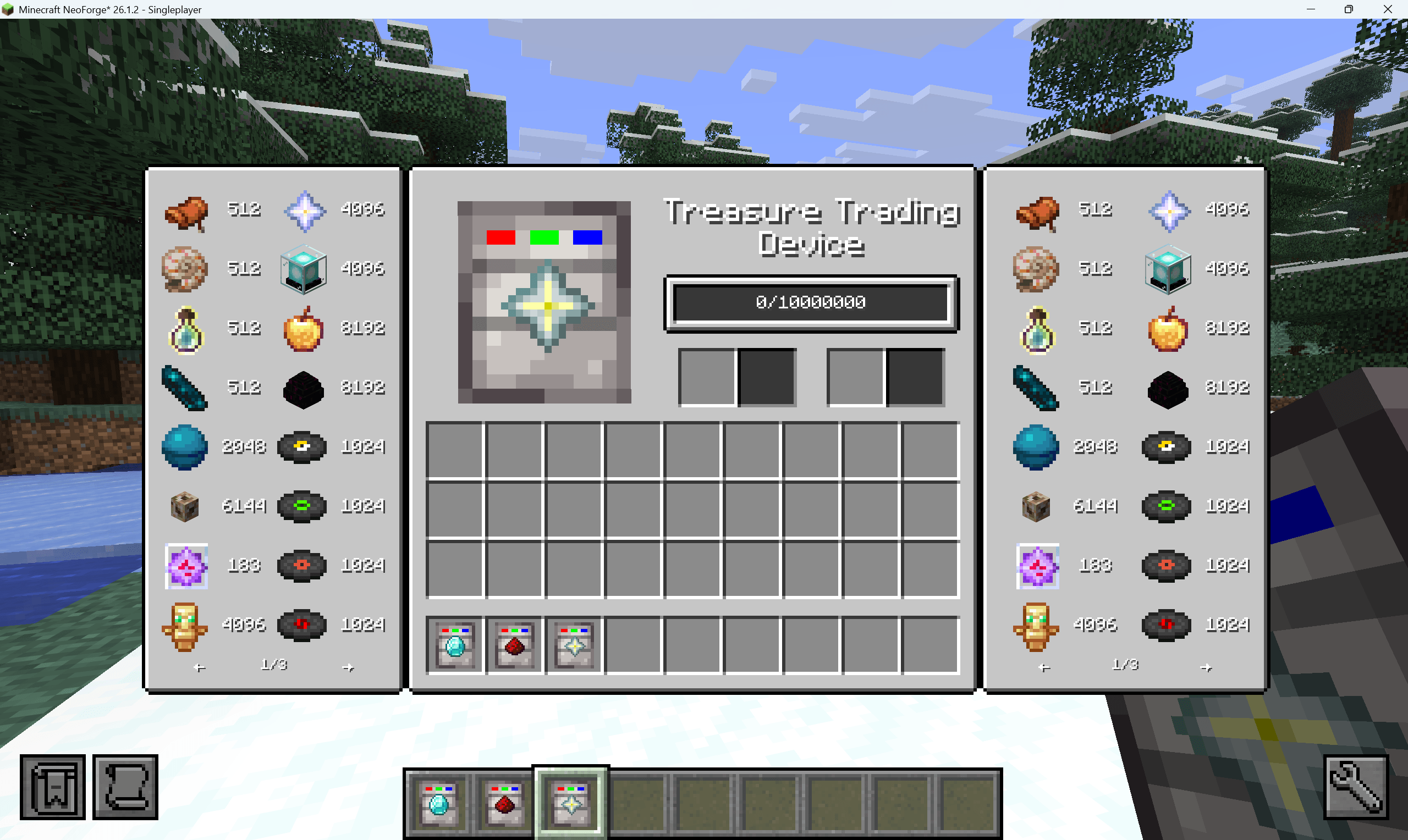
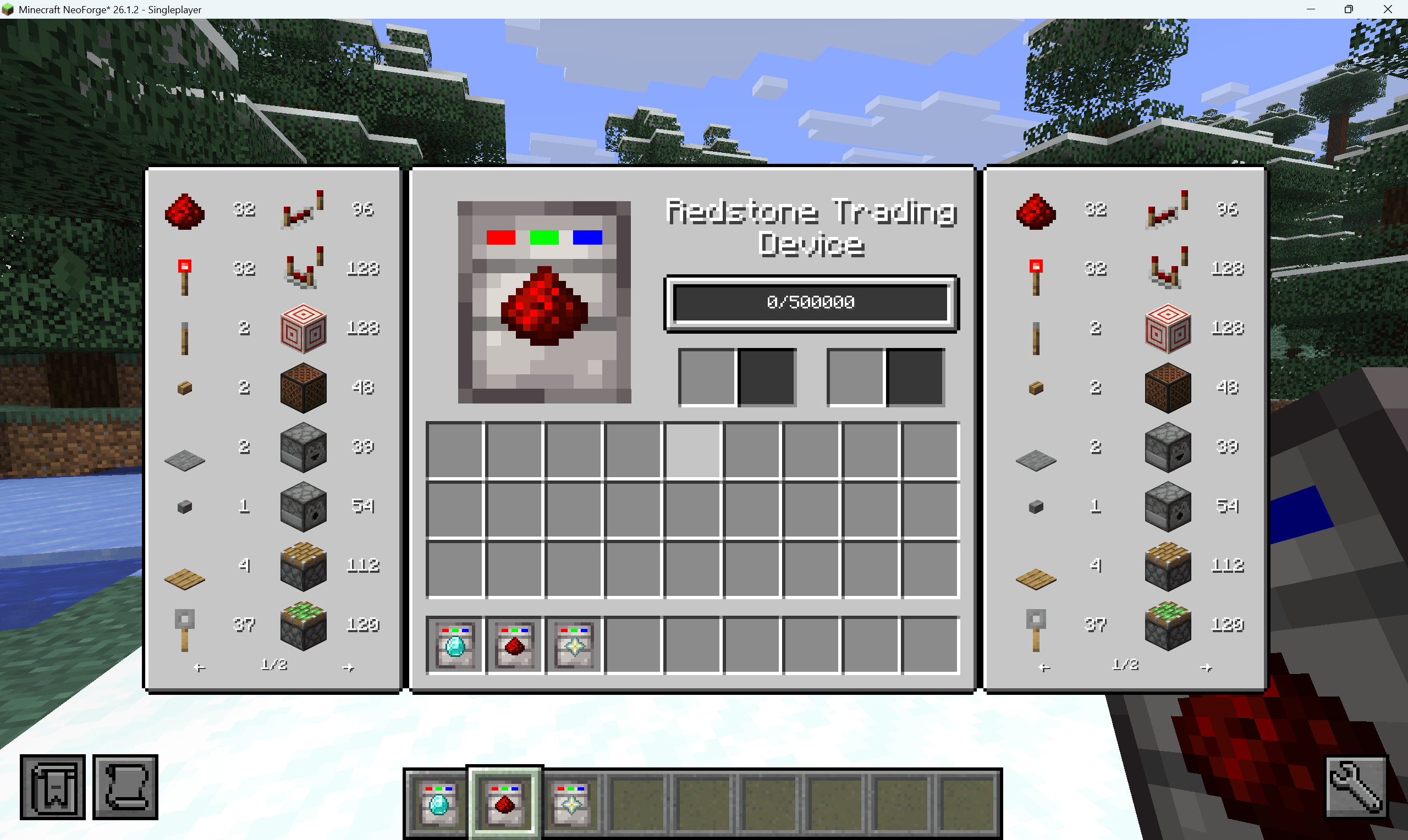
Right-click a trading device to open its UI.
- The center bar shows stored value.
- The left side shows accepted inputs.
- Insert an accepted item or fluid to convert it into stored value.
- The right side shows buyable outputs.
- Click an output entry to spend stored value and move the result into the output slot.
Purchase multiplier keys:
- No modifier: buy 1 unit
- Shift: buy 4 units
- Ctrl: buy 8 units
- Alt: buy 64 units
Items are priced and traded per single item. Fluids are priced and traded in 1000 mB units.
Configuration
The mod uses a YAML config file:
config/simple_trading_device/simple_trading_device.yamlDefault values:
general:
  enableTradingHolderJsonConfig: true
  enableTradingDeviceJsonConfig: false
  enableAdditionalTradingDevice: false
enableTradingHolderJsonConfig
Loads extra trading entries from:
config/simple_trading_device/trading_holder_entries.jsonDefault: true
enableTradingDeviceJsonConfig
Loads extra trading device items from:
config/simple_trading_device/trading_devices.jsonDefault: false
enableAdditionalTradingDevice
Registers ten extra blank devices:
additional_trading_device_0additional_trading_device_1additional_trading_device_2additional_trading_device_3additional_trading_device_4additional_trading_device_5additional_trading_device_6additional_trading_device_7additional_trading_device_8additional_trading_device_9
These devices use holder keys additional_0 through additional_9.
Default: false
JSON Workflow
There are two JSON files:
trading_holder_entries.json: defines trade contentstrading_devices.json: defines extra trading device items
Use the following rules:
- If you only want to add trades to an existing built-in device, edit
trading_holder_entries.json. - If you want a completely new device, create a new holder in
trading_holder_entries.json, then register a device for that holder intrading_devices.json. - JSON-registered devices also need a model file and language entry from your resource pack or generated assets.
Trading Holder Keys
Built-in holder keys:
| Holder key | Device item | Content theme |
|---|---|---|
common |
simple_trading_device:common_trading_device |
Dirt, stone, sand, gravel, clay, ice, obsidian, logs, planks, sticks |
building |
simple_trading_device:building_trading_device |
Bricks, polished stone, glass, terracotta, concrete, wool |
minerals |
simple_trading_device:minerals_trading_device |
Coal, copper, iron, gold, redstone, lapis, quartz, amethyst, diamond, emerald, netherite |
farming |
simple_trading_device:farming_trading_device |
Seeds, crops, saplings, mushrooms, fruit, leather, feathers, honey |
food |
simple_trading_device:food_trading_device |
Bread, fish, meat, stew, golden food |
mob_drops |
simple_trading_device:mob_drops_trading_device |
Rotten flesh, bones, string, gunpowder, slime, blaze drops, ender pearls, ghast tears |
redstone |
simple_trading_device:redstone_trading_device |
Redstone dust, switches, rails, repeaters, comparators, pistons, hoppers, TNT |
utility |
simple_trading_device:utility_trading_device |
Torches, containers, workstations, buckets, minecarts, compass, clock, anvil, enchanting table, boats |
equipment |
simple_trading_device:equipment_trading_device |
Tools, weapons, armor, bows, shield, fishing rod, shears, trident, horse armor |
nether |
simple_trading_device:nether_trading_device |
Nether blocks, Nether wood, Nether wart, glowstone, lava, blaze rods, ancient debris |
end |
simple_trading_device:end_trading_device |
End stone, purpur, chorus items, eyes of ender, dragon breath, shulker shells, elytra |
treasure |
simple_trading_device:treasure_trading_device |
Saddle, nautilus shell, heart of the sea, conduit, totem, nether star, beacon, music discs, smithing templates |
additional_0 to additional_9 |
Optional additional devices | Empty holders intended for JSON content |
You may also create a completely new holder key in JSON. A new holder only becomes visible in-game when some trading device uses that same holder key.
trading_holder_entries.json
Path:
config/simple_trading_device/trading_holder_entries.jsonThis file must be a JSON array.
Each object must contain a holder field. After that, you can use either:
- a single direct entry on the same object
- an
entriesarray
Supported Fields
| Field | Required | Description |
|---|---|---|
holder |
Yes | Holder key such as mob_drops, nether, additional_0, or a custom key |
entries |
No | Array of entry objects |
type |
Yes for each entry | Must be input, output, or both |
item |
Item entry only | Vanilla ItemStack JSON parsed by the Minecraft codec |
fluid |
Fluid entry only | NeoForge FluidStack JSON parsed by the NeoForge codec |
yield |
Yes | Trade value |
baseYield |
Optional alternative to yield |
Same meaning as yield |
tooltip |
No | Single tooltip line |
tooltips |
No | Array of tooltip lines |
Rules:
typeonly acceptsinput,output, orboth- exactly one of
itemorfluidmust exist yieldmust be greater than0- item ids and fluid ids should use full names such as
minecraft:diamond - for item stacks,
countis optional and defaults to the vanilla codec result - for fluid stacks,
amountis optional and the mod fills in1000 - invalid entries are logged and skipped
Quantity And Component Notes
- JSON item inputs are matched by
Itemand priced per single item.item.countis parsed by the codec, but it does not change input matching or the per-unit value calculation. - JSON fluid inputs are matched by
Fluidand priced per1000 mB.fluid.amountis parsed by the codec, but input matching and per-unit value calculation still use the fluid type and a trade unit of1000 mB. - JSON item outputs buy
1item per unit. Purchase modifiers therefore buy1,4,8, or64items. - JSON fluid outputs buy
1000 mBper unit. Purchase modifiers therefore buy1000,4000,8000, or64000 mB. - JSON output entries preserve item or fluid components on the purchased resource, but output quantity still follows the fixed unit rules above.
- JSON input entries are not component-sensitive. If you need input matching or pricing that depends on full item or fluid components, register that trade in Java and provide a custom
TradingHolder.YieldCalculator. SeeTradingHolderRegistry.registerItem(...),TradingHolderRegistry.registerFluid(...), andTradingHolder.YieldCalculator.
Type Meaning
input: can be converted into stored valueoutput: can be bought from stored valueboth: available as both input and output
Minimal Single Entry Example
[
  {
    "holder": "mob_drops",
    "type": "output",
    "item": {
      "id": "minecraft:creeper_spawn_egg"
    },
    "yield": 2048
  }
]
Holder Block Example
[
  {
    "holder": "spawn_eggs",
    "entries": [
      {
        "type": "input",
        "item": {
          "id": "minecraft:rotten_flesh"
        },
        "yield": 8,
        "tooltip": "Input currency for spawn egg trades"
      },
      {
        "type": "input",
        "item": {
          "id": "minecraft:bone"
        },
        "yield": 12
      },
      {
        "type": "output",
        "item": {
          "id": "minecraft:zombie_spawn_egg"
        },
        "yield": 2048
      },
      {
        "type": "output",
        "item": {
          "id": "minecraft:skeleton_spawn_egg"
        },
        "yield": 2048
      },
      {
        "type": "output",
        "item": {
          "id": "minecraft:creeper_spawn_egg"
        },
        "yield": 4096
      }
    ]
  }
]
Fluid Example
[
  {
    "holder": "fluid_supplies",
    "entries": [
      {
        "type": "both",
        "fluid": {
          "id": "minecraft:water"
        },
        "yield": 16,
        "tooltip": "1000 mB per trade unit"
      },
      {
        "type": "both",
        "fluid": {
          "id": "minecraft:lava"
        },
        "yield": 64
      }
    ]
  }
]
trading_devices.json
Path:
config/simple_trading_device/trading_devices.jsonThis file is only loaded when enableTradingDeviceJsonConfig is true.
The file must be a JSON array. Each object registers one extra trading device item.
Supported Fields
| Field | Required | Description |
|---|---|---|
id |
Yes | Item id path only, for example spawn_egg_trading_device |
holder |
Yes | Holder key used by the device |
maxStorage |
Yes | Maximum stored trade value |
Rules:
idmust not include a namespaceholdermay point to a built-in holder or a new custom holdermaxStoragemust be greater than0
Example:
[
  {
    "id": "spawn_egg_trading_device",
    "holder": "spawn_eggs",
    "maxStorage": 5000000
  },
  {
    "id": "fluid_supplies_trading_device",
    "holder": "fluid_supplies",
    "maxStorage": 1000000
  }
]
Assets Required For JSON Devices
JSON device registration creates the item and binds it to a holder. It does not automatically give you final distributed client assets.
For every JSON device id, also provide:
assets/simple_trading_device/models/item/<id>.jsonassets/simple_trading_device/lang/en_us.json- optionally
assets/simple_trading_device/lang/zh_cn.json
Model Example
If your device id is spawn_egg_trading_device, create:
assets/simple_trading_device/models/item/spawn_egg_trading_device.jsonExample model:
{
  "parent": "simple_trading_device:item/trading_device",
  "textures": {
    "layer0": "simple_trading_device:item/trading_device_shell",
    "layer1": "minecraft:item/zombie_spawn_egg"
  }
}
The shared parent model is:
assets/simple_trading_device/models/item/trading_device.jsonIt renders the shell as the base layer and a centered 8x8 overlay as the top layer.
Language Example
Add a translation entry:
{
  "item.simple_trading_device.spawn_egg_trading_device": "Spawn Egg Trading Device"
}
Without a model or language entry, the device can still register, but it will not have the intended client presentation.
Full Example: Create A New Custom Device
- Enable JSON device loading:
general:
  enableTradingHolderJsonConfig: true
enableTradingDeviceJsonConfig: true- Register a holder and its trade contents in
trading_holder_entries.json:
[
  {
    "holder": "spawn_eggs",
    "entries": [
      {
        "type": "input",
        "item": {
          "id": "minecraft:bone"
        },
        "yield": 12
      },
      {
        "type": "output",
        "item": {
          "id": "minecraft:zombie_spawn_egg"
        },
        "yield": 2048
      }
    ]
  }
]- Register the device in
trading_devices.json:
[
  {
    "id": "spawn_egg_trading_device",
    "holder": "spawn_eggs",
    "maxStorage": 5000000
  }
]- Add the model file:
{
  "parent": "simple_trading_device:item/trading_device",
  "textures": {
    "layer0": "simple_trading_device:item/trading_device_shell",
    "layer1": "minecraft:item/zombie_spawn_egg"
  }
}- Add the language entry:
{
  "item.simple_trading_device.spawn_egg_trading_device": "Spawn Egg Trading Device"
}
After that, the device should appear in the trading devices creative tab and open the holder you defined.
Built-in Device Storage
| Device | Max storage |
|---|---|
| Common Trading Device | 100,000 |
| Building Trading Device | 150,000 |
| Minerals Trading Device | 2,000,000 |
| Farming Trading Device | 100,000 |
| Food Trading Device | 100,000 |
| Mob Drops Trading Device | 250,000 |
| Redstone Trading Device | 500,000 |
| Utility Trading Device | 500,000 |
| Equipment Trading Device | 5,000,000 |
| Nether Trading Device | 2,000,000 |
| End Trading Device | 5,000,000 |
| Treasure Trading Device | 10,000,000 |
| Additional Trading Devices | 100,000,000 |
| JSON Trading Devices | Defined by maxStorage |
Development
Source repository:
- Repository: https://github.com/wanggugu197/Simple-Trading-Device
- Issues: https://github.com/wanggugu197/Simple-Trading-Device/issues
Environment requirements:
- Java 25
- Gradle 9.x
- Minecraft
26.1.2 - NeoForge
26.1.2.71+
License
GNU Lesser General Public License v3.
Screenshots
Gallery
-
 6.png 6.png
 -
 5.png 5.png
 -
 4.png 4.png
 -
 3.png 3.png
 -
 2.png 2.png
 -
 1.png 1.png
Versions
Files
Relations
Project Relations
More like this
Similar Mods
Suggestions use data such as tags, dependencies, dependents, descriptions, titles, and more to rank how much they overlap with this mod.
On ModDex
Community snapshot
By the numbers
Statistics
Want to reach Minecraft players?
We're looking for a server hosting partner to feature here and other parts of the site. Interested? Send us a message!
Get in touchGet it on
Available Platforms
On ModDex
Community snapshot
By the numbers
Statistics
Resources