Community listing page, reviews here may not be monitored by the author.
Simple Usage Log

No reviews yet
Log server usage simply and independently. Logs server start and stop, and player login and out. The log file Simple Usage Log.txt is located in the server main folder.
Community voices
Reviews
No reviews yet. Be the first to review this project!
Get it on
Available Platforms
About
Project Details
For authors
Embed Badge
If you're the author of this project, you can embed a live badge anywhere that supports HTML or Markdown. It updates automatically whenever ratings change.
Use HTML for any page that supports it, or Markdown for README files and Markdown-based descriptions.
Identifiers
Platform IDs
Resources
External Links
About
Description
WHAT DOES IT DO
Logs server start and stop, and player login and out.
The log file Simple Usage Log.txt is located in the server main folder.
or just type the chat command to see recent entries /log
commands for operators (ops)
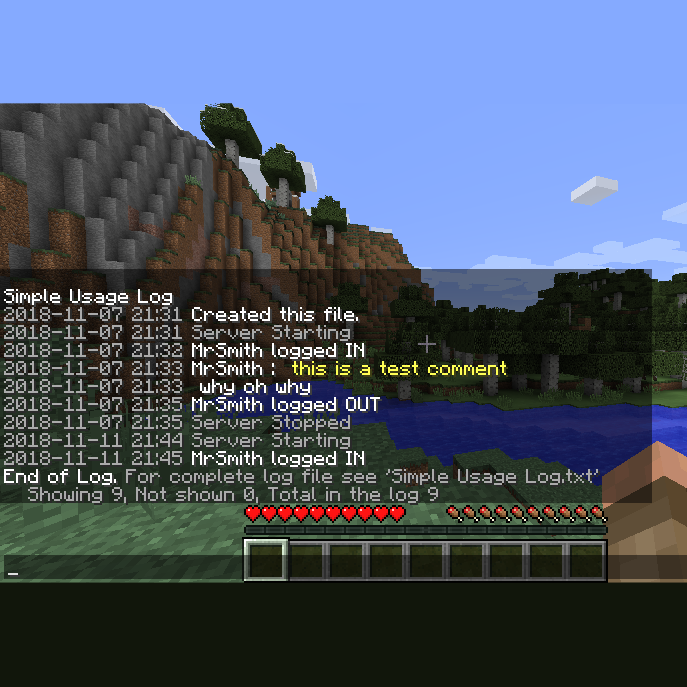
/log - displays up to 90 of the last log entries in chat
/log <number of lines> - displays that many lines of the log in chat
/log <player name> - displays up to 90 last lines of the log that are about that player
/log <any text comment longer than 1 word> - adds this comment into the log file
(commands are for Minecraft versions 1.9.4 & up)
What if?
Have you ever wondered if anyone has been on your server? /log
How about if a specific player has been on? /log playername
What if you want to make a note in the log file about something that recently happened such as a server glitch? /log the server seems to have crashed several times when larry logs in
Who was it that just now logged in then out? /log 10
Has a friend of mine even been on the server yet? /log friendsname
Overly huge log file size? Nope. This mod detects a large(5MB) log file size and moves it to Simple Usage Log old file.txt and removes any previous old file at the same time. It will never grow past the size of these two files. When it automatically archives to the old file it also starts a new current file.
Using this in the server console does work. If your console display can be wide enough it will look good. Normally forge adds the time and modid to the beginning of every line. Not so pretty when trying to read the log in the console. I found that in single player the MultiMC Minecaft launcher can be widened to look good.
The old versions of this mod for Minecraft 1.7.10 and 1.8 did not get the update and are usable but is not as friendly and the /log command does not exist for it.
INSTALLATION
Put this in the mods folder with your other Forge mods and restart the server. Thats it.
Be sure you get the correct jar file for your version of minecraft. (official downloads)
The good version of this (2.0.1) is available for Minecraft 1.9.4 through 1.12.2
NOTES
This is open source.
Source code is included.
You may modify or redistribute this if you wish.
You may use this for anything.
:)
Link to the page on Minecraft Forum.
I officially make this page the official page for this mod as of Today (November 11, 2018).
PS: If you write a nice report program for this log file I would be happy to post it here. Ideas: perhaps an in-game command that publishes a report with graphs to a web page by ftp or even http upload, on a timer ofcourse.
Screenshots
Gallery
-
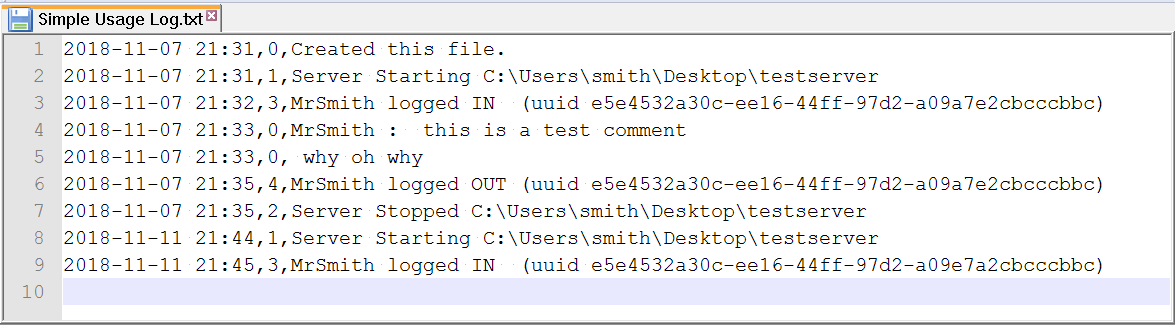 Simple Usage Log.txt What the actual log file looks like.
 -
screen shot sample This is a very short example of displaying the log file using /log from in the game chat.
Versions
Files
Relations
Project Relations
More like this
Similar Mods
Suggestions use data such as tags, dependencies, dependents, descriptions, titles, and more to rank how much they overlap with this mod.
On ModDex
Community snapshot
By the numbers
Statistics
Want to reach Minecraft players?
We're looking for a server hosting partner to feature here and other parts of the site. Interested? Send us a message!
Get in touchGet it on
Available Platforms
On ModDex
Community snapshot
By the numbers
Statistics
Resources