Community listing page, reviews may not be monitored by the author.
Skill Slots


No reviews yet
Adds player skill slots for item-based skills for mods and modpacks

Community voices
Reviews
No reviews yet. Be the first to review this project!
Get it on
Available Platforms
Compatibility
Supported Environments
Must be installed on both the client and the server.
About
Project Details
For authors
Embed Badge
If you're the author of this project, you can embed a live badge anywhere that supports HTML or Markdown. It updates automatically whenever ratings change.
Use HTML for any page that supports it, or Markdown for README files and Markdown-based descriptions.
Identifiers
Platform IDs


About
Description
 Example for adding a new skill using KubeJS:
// priority: 0
// Server script
// Make your item can be put in skill slots
// If the item already has a right-click function, the skill already works now
ServerEvents.tags('item', event => {
event.add('skillslots:skill', 'minecraft:diamond')
})
// Of course, you can use KubeJS to create an item, and add some fancy right-click function to it
ItemEvents.rightClicked('minecraft:diamond', event => {
event.player.tell('You right clicked a diamond!')
// Cooldown, works
event.player.addItemCooldown(event.item, 60)
})
// This event will also be called when using the skill
BlockEvents.rightClicked(event => {
// Check the item cooldown by yourself
event.player.tell('You right clicked a block!')
})
// Here you will know how to get access to the skill slots from a player
ItemEvents.rightClicked('minecraft:emerald', event => {
let handler = Java.loadClass('snownee.skillslots.SkillSlotsHandler').of(event.player)
let diamond = Item.of('minecraft:diamond')
// Here are some NBT options to customize the skill
diamond.nbt =
diamond.nbt.SkillSlots = {
UseDuration: 20,
IconScale: 1.5,
// CanBeToggled: true, // make your skill work as a passive skill. the player can toggle it on/off
ChargeCompleteSound: 'minecraft:entity.player.levelup', // leave it empty to mute
}
// In config, you can disable the player ability to change skills
// Here is an example to change the skill through KubeJS
handler.setItem(0, diamond)
// Example of checking if the player has a skill that can be toggled and currently activated
let index = handler.findActivatedPassiveSkill(skill => skill.item.id === 'minecraft:diamond')
if (index !== -1) {
let skill = handler.skills.get(index)
event.player.tell(skill.item.id)
}
})
handler.setSlots(int) to set the amount of the unlocked slots, or use the Slot Unlock item provided by this mod.
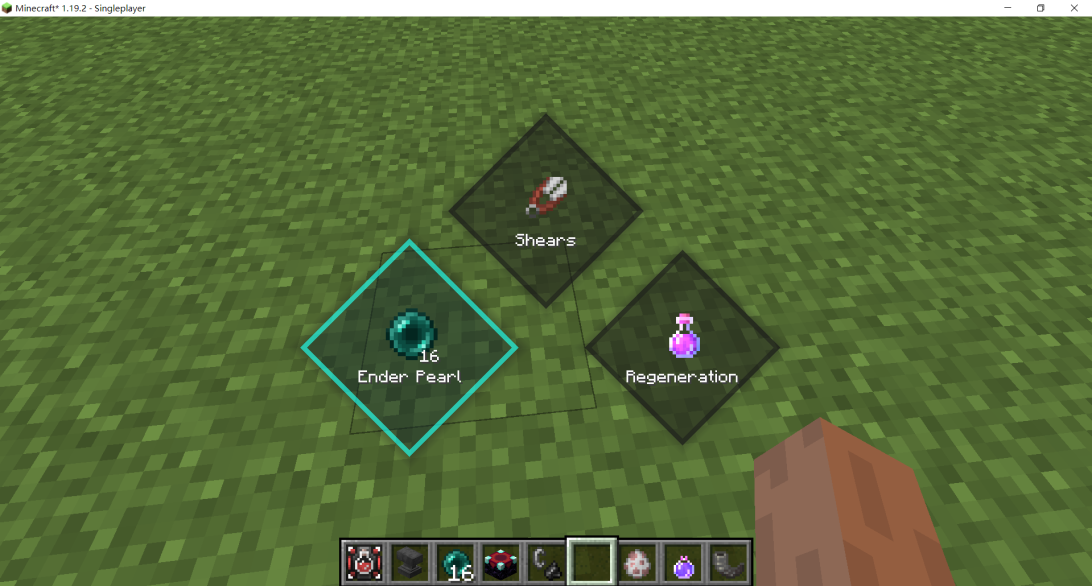
The colored button border is provided only when JEI is installed.
 Example for adding a new skill using KubeJS:
// priority: 0
// Server script
// Make your item can be put in skill slots
// If the item already has a right-click function, the skill already works now
ServerEvents.tags('item', event => {
event.add('skillslots:skill', 'minecraft:diamond')
})
// Of course, you can use KubeJS to create an item, and add some fancy right-click function to it
ItemEvents.rightClicked('minecraft:diamond', event => {
event.player.tell('You right clicked a diamond!')
// Cooldown, works
event.player.addItemCooldown(event.item, 60)
})
// This event will also be called when using the skill
BlockEvents.rightClicked(event => {
// Check the item cooldown by yourself
event.player.tell('You right clicked a block!')
})
// Here you will know how to get access to the skill slots from a player
ItemEvents.rightClicked('minecraft:emerald', event => {
let handler = Java.loadClass('snownee.skillslots.SkillSlotsHandler').of(event.player)
let diamond = Item.of('minecraft:diamond')
// Here are some NBT options to customize the skill
diamond.nbt =
diamond.nbt.SkillSlots = {
UseDuration: 20,
IconScale: 1.5,
// CanBeToggled: true, // make your skill work as a passive skill. the player can toggle it on/off
ChargeCompleteSound: 'minecraft:entity.player.levelup', // leave it empty to mute
}
// In config, you can disable the player ability to change skills
// Here is an example to change the skill through KubeJS
handler.setItem(0, diamond)
// Example of checking if the player has a skill that can be toggled and currently activated
let index = handler.findActivatedPassiveSkill(skill => skill.item.id === 'minecraft:diamond')
if (index !== -1) {
let skill = handler.skills.get(index)
event.player.tell(skill.item.id)
}
})
handler.setSlots(int) to set the amount of the unlocked slots, or use the Slot Unlock item provided by this mod.
The colored button border is provided only when JEI is installed.
Skill Slots is a mod that adds player skill slots for item-based skills. You can use KubeJS or Java code to create your own skills.
// priority: 0
// Server script

// Make your item can be put in skill slots
// If the item already has a right-click function, the skill already works now
ServerEvents.tags('item', event => {
  event.add('skillslots:skill', 'minecraft:diamond')
})

// Of course, you can use KubeJS to create an item, and add some fancy right-click function to it
ItemEvents.rightClicked('minecraft:diamond', event => {
  event.player.tell('You right clicked a diamond!')
  // Cooldown, works
  event.player.addItemCooldown(event.item, 60)
})

// This event will also be called when using the skill
BlockEvents.rightClicked(event => {
  // Check the item cooldown by yourself
  event.player.tell('You right clicked a block!')
})

// Here you will know how to get access to the skill slots from a player
ItemEvents.rightClicked('minecraft:emerald', event => {
  let handler = Java.loadClass('snownee.skillslots.SkillSlotsHandler').of(event.player)

  let diamond = Item.of('minecraft:diamond')
  // Here are some NBT options to customize the skill
  diamond.nbt = {}
  diamond.nbt.SkillSlots = {
    UseDuration: 20,
    IconScale: 1.5,
    // CanBeToggled: true, // make your skill work as a passive skill. the player can toggle it on/off
    ChargeCompleteSound: 'minecraft:entity.player.levelup', // leave it empty to mute
  }

  // In config, you can disable the player ability to change skills
  // Here is an example to change the skill through KubeJS
  handler.setItem(0, diamond)

  // Example of checking if the player has a skill that can be toggled and currently activated
  let index = handler.findActivatedPassiveSkill(skill => skill.item.id === 'minecraft:diamond')
  if (index !== -1) {
    let skill = handler.skills.get(index)
    event.player.tell(skill.item.id)
  }
})
You can use handler.setSlots(int) to set the amount of the unlocked slots, or use the Slot Unlock item provided by this mod.
The colored button border is provided only when JEI is installed.

Screenshots
Gallery
-
demo
Versions
Files
Relations
Project Relations
More like this
Similar Mods
Suggestions use data such as tags, dependencies, dependents, descriptions, titles, and more to rank how much they overlap with this mod.
On ModDex
Community snapshot
By the numbers
Statistics

Get it on
Available Platforms
On ModDex
Community snapshot
By the numbers