
Community listing page, reviews here may not be monitored by the author.
SkinsLib

No reviews yet
This project adds an in‑game skin library: browse/search skins, preview them, import by username or PNG (drag/drop supported), and apply a selected skin directly to your player.
Community voices
Reviews
No reviews yet. Be the first to review this project!
Get it on
Available Platforms
Compatibility
Supported Environments
Runs entirely on the client. Works on vanilla servers.
About
Project Details
For authors
Embed Badge
If you're the author of this project, you can embed a live badge anywhere that supports HTML or Markdown. It updates automatically whenever ratings change.
Use HTML for any page that supports it, or Markdown for README files and Markdown-based descriptions.
Identifiers
Platform IDs
Resources
External Links
About
Description
Skins lib
A modern, ever-growing library of roleplay and funny skins.
SkinsLib makes managing and applying Minecraft skins fast and simple. Browse a growing collection of skins, preview them live, and apply them instantly from an easy-to-use interface.
Features Browse & Search
Quickly find skins using the built-in search bar and scroll through the skin grid.
One-Click Apply
Select any skin and apply it instantly in-game.
Live Preview
Preview skins in real time with:
Slim and wide model support Lighting Idle animation Context Actions
Right-click a skin to open additional options, such as deleting it (where allowed).
Import Options
Add new skins in multiple ways:
By Minecraft username From a local PNG file Drag & Drop
Drag a .png file into the screen, give it a name, and import it instantly.
Usage Open SkinsLib from your client GUI. Use the search field to find skins. Left-click a skin to select and apply it. Right-click a skin to open the context menu (for example delete, where allowed). To import skins: Click Add Skin → Add By Username Click Add Skin → Add From PNG Or drag a .png file onto the screen. Controls Left-click — Select or apply a skin Right-click — Open the context menu on a skin Scroll — Navigate the skin grid Drag preview — Click and drag inside the preview to rotate or tilt the model Import Tips Use 64×64 PNG skin files (standard Minecraft format). Names are auto-suggested, but you can edit them before confirming. Newly imported skins are not automatically selected; choose them from the grid. Requirements Fabric Loader (matching your Minecraft version) Fabric API Installation Download the latest .jar from Modrinth. Place the file in your mods/ folder. Launch Minecraft using Fabric with Fabric API installed. Compatibility Client-side mod — does not require server installation. Works alongside most cosmetic and GUI mods. If you encounter conflicts, please report them.
THIS MOD WAS HIGHLY INSPIRED BY ESSENTIAL MOD. IF THE OWNER OF ESSENTIAL IS NOT OK WITH IT, PLEASE MESSAGE ME ON DISCORD. DISCORD USERNAME: Freeperr
Screenshots
Gallery
-
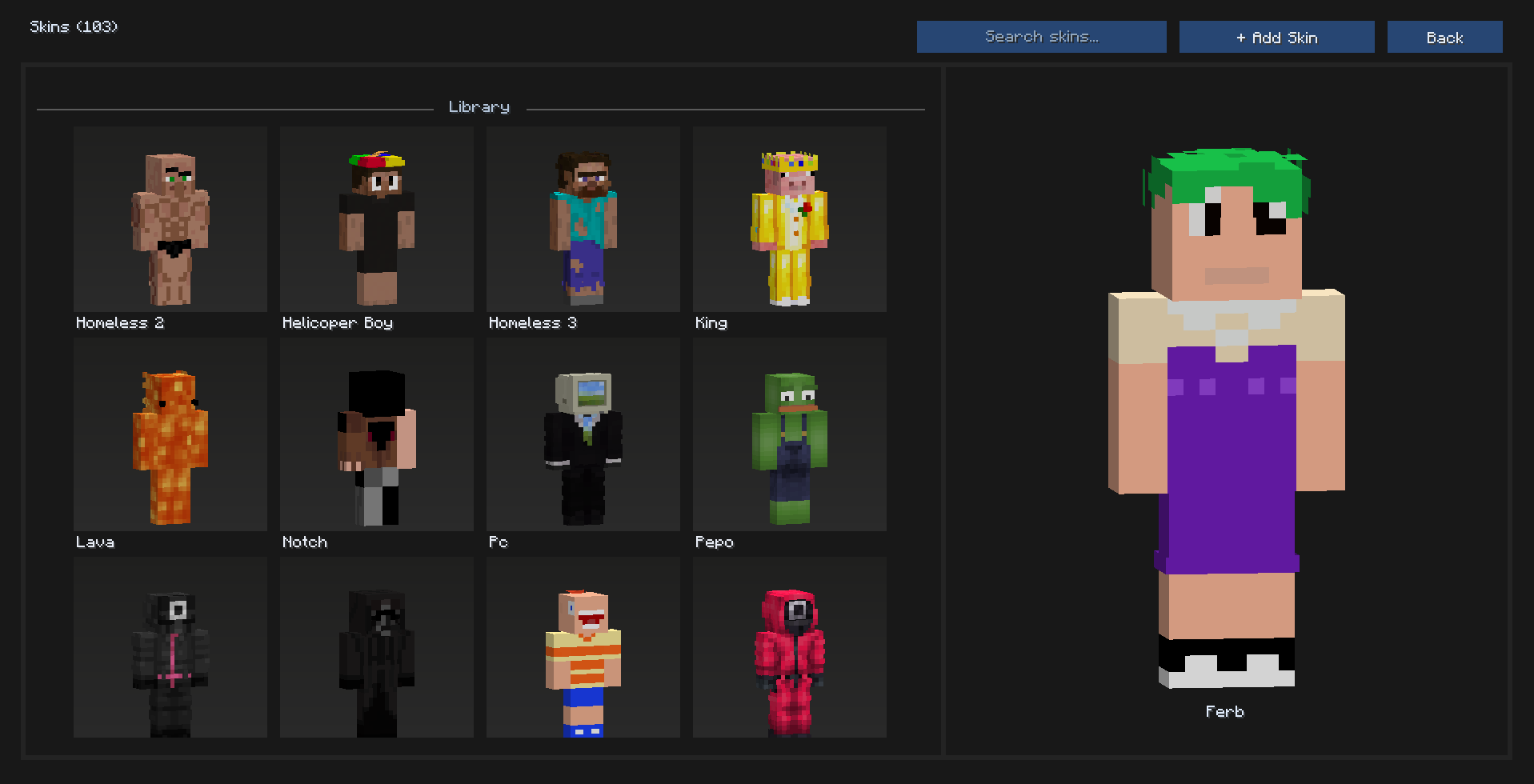 Main menu
Versions
Files
Relations
Project Relations
More like this
Similar Mods
Suggestions use data such as tags, dependencies, dependents, descriptions, titles, and more to rank how much they overlap with this mod.
On ModDex
Community snapshot
By the numbers
Statistics

Want to reach Minecraft players?
We're looking for a server hosting partner to feature here and other parts of the site. Interested? Send us a message!
Get in touchGet it on
Available Platforms
On ModDex
Community snapshot
By the numbers
Statistics
Resources