
Community listing page, reviews may not be monitored by the author.
Slots Checker


No reviews yet
This mod provides a command to view and modify any player's inventory, hotbar, ender chest, armor, and offhand slots (requires level 4 admin privileges).

Community voices
Reviews
No reviews yet. Be the first to review this project!
Get it on
Available Platforms
Compatibility
Supported Environments
Runs entirely on the server. Also works in singleplayer.
About
Project Details
For authors
Embed Badge
If you're the author of this project, you can embed a live badge anywhere that supports HTML or Markdown. It updates automatically whenever ratings change.
Use HTML for any page that supports it, or Markdown for README files and Markdown-based descriptions.
Identifiers
Platform IDs
About
Description
This mod provides a command to view and modify any player's inventory, hotbar, ender chest, armor, and offhand slots (requires level 4 admin privileges).
When installed on the client, it provides in-game interface translations.
Supports en_us, zh_cn, zh_hk, and zh_tw languages.
Important:
- Required on the server, optional on the client.
- For the time being, it is not supported to view or modify the data of offline players (offline players refer to those who are not currently online, not to players who log in via offline mode).
- Creative inventory problem.
Commands
/slots-checker inventory <player>
Open the player's inventory interface.

/slots-checker hotbar <player>
Open the player's hotbar interface.

/slots-checker ender <player>
Open the player's ender chest interface.

/slots-checker armor <player>
Open the player's armor interface.
The first four columns are in sequence: helmets, chestplates, leggings, and boots. The last five fields are invalid.
This interface has no item restrictions. Any item can be directly placed in the armor slot.

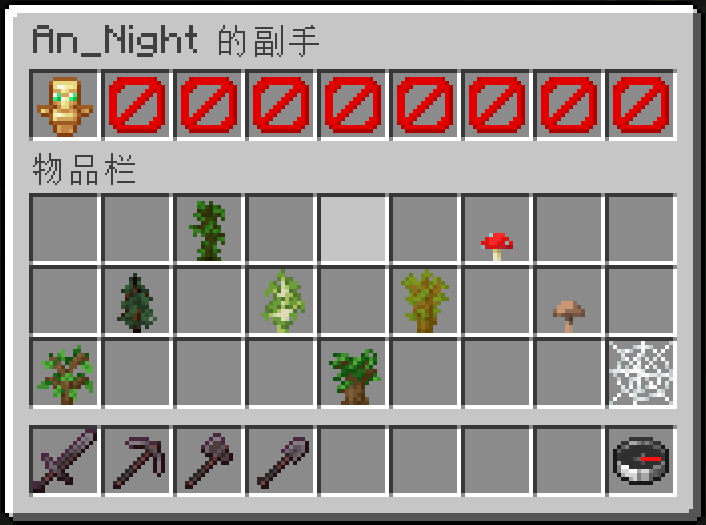
/slots-checker offhand <player>
Open the player's offhand interface.
The last 8 fields are invalid.
License
- Current version (v2 and later): Open source, licensed under the Apache License 2.0.
- Historical versions (v1 and earlier): Closed-source development; previously declared under the MIT License but source code was not publicly released.
Slots Checker







This mod provides a command to view and modify any player's inventory, hotbar, ender chest, armor, and offhand slots (requires level 4 admin privileges).
When installed on the client, it provides in-game interface translations.
Supports en_us, zh_cn, zh_hk, and zh_tw languages.
Important:
- Required on the server, optional on the client.
- For the time being, it is not supported to view or modify the data of offline players (offline players refer to those who are not currently online, not to players who log in via offline mode).
- Creative inventory problem.
Commands
-
/slots-checker inventory <player>
Open the player's inventory interface.

-
/slots-checker hotbar <player>
Open the player's hotbar interface.

-
/slots-checker ender <player>
Open the player's ender chest interface.

-
/slots-checker armor <player>
Open the player's armor interface.
The first four columns are in sequence: helmets, chestplates, leggings, and boots. The last five fields are invalid.
This interface has no item restrictions. Any item can be directly placed in the armor slot.

-
/slots-checker offhand <player>
Open the player's offhand interface.
The last 8 fields are invalid.

License
- Current version (v2 and later): Open source, licensed under the Apache License 2.0.
- Historical versions (v1 and earlier): Closed-source development; previously declared under the MIT License but source code was not publicly released.
Screenshots
Gallery
-
 Inventory
 -
 Hotbar
 -
 Ender Chest
 -
 Armor (Outdated) v1.0.0 & v2.0.0
 -
 Armor v2.1.0 +
 -
 Offhand (Outdated) v1.0.0 & v2.0.0
 -
 Offhand v2.1.0 +
Versions
Files
Relations
Project Relations
More like this
Similar Mods
Suggestions use data such as tags, dependencies, dependents, descriptions, titles, and more to rank how much they overlap with this mod.
On ModDex
Community snapshot
By the numbers
Statistics

Get it on
Available Platforms
On ModDex
Community snapshot
By the numbers