
Community listing page, reviews here may not be monitored by the author.
Smart Completion


No reviews yet
Provides better suggestions to complete commands
Community voices
Reviews
No reviews yet. Be the first to review this project!
Get it on
Available Platforms
Compatibility
Supported Environments
Runs entirely on the client. Works on vanilla servers.
About
Project Details
For authors
Embed Badge
If you're the author of this project, you can embed a live badge anywhere that supports HTML or Markdown. It updates automatically whenever ratings change.
Use HTML for any page that supports it, or Markdown for README files and Markdown-based descriptions.
Identifiers
Platform IDs
About
Description

Because typing is too much effort


📖 About
Client-side mod that provides better autocompletion suggestions for commands.
Supports modded and custom commands from datapacks or server plugins, and it's not required on the server to work.
💡 Usage
In order to type a command/argument made up of several words, type only a few initials of its words.
For example, if you want to type /gamerule doDaylightCycle true, you could type /gr dc t

⌨ Keyboard Shortcuts
In addition of <Tab>, you may also use <Ctrl>+<Space> to accept suggestions, which automatically inserts a space so you can start typing the next argument.
Additionally, if the current command is known to be incomplete (your text is in red), pressing <Enter> will accept the selected suggestion, if any, rather than attempting to execute an invalid command.
By default, accepting a suggestion with <Ctrl>+<Space> or by using the middle button to click it will also erase the remaining text after the cursor, if you decide to edit an earlier argument at some point. This behavior can be configured per key/mouse button.
🔀 Disambiguating Suggestions
To disambiguate between suggestions, you may need to type more than one letter per word.
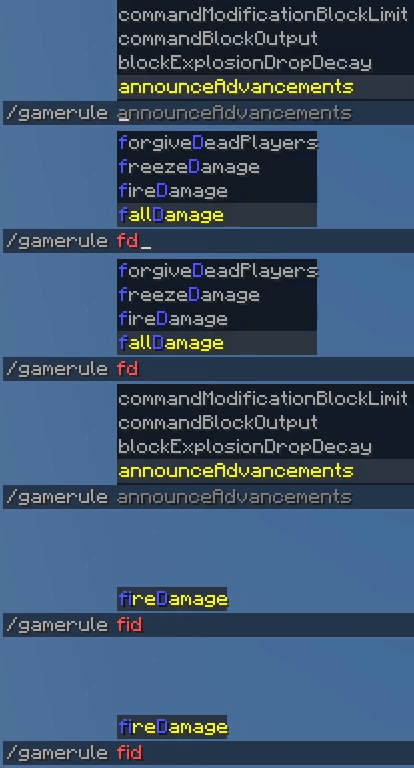
For example, to type fireDamage instead of fallDamage, which appears first when typing fd, you may type fid.
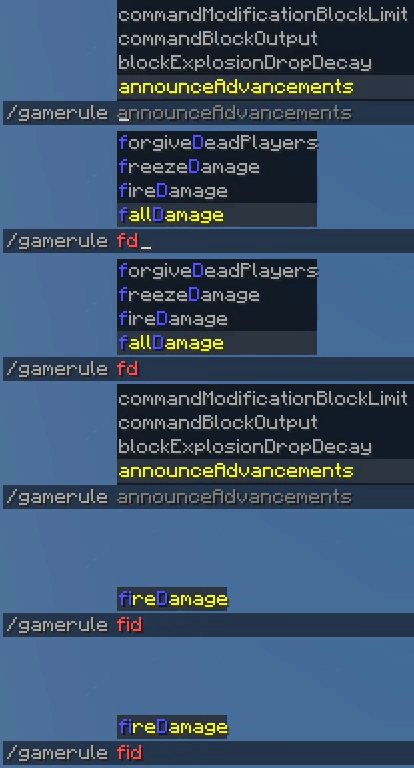
In general, it's way faster to type a few more letters to get the suggestion you want in front of the list rather than using the arrows/cycling with <Tab> to select it, as typing can build muscle memory.
Over time you will become used to the minimum number of letters you need to type the commands you frequently use, and typing them will feel like a breeze.
🔍 Browsing Suggestions
Since the words you type don't need to be at the start of the name you're typing, you may discover way more useful suggestions compared to how Minecraft suggestions usually work.
For example, if you type /give @p wood, you'll see suggestions for all items that contain a word that starts with wood.
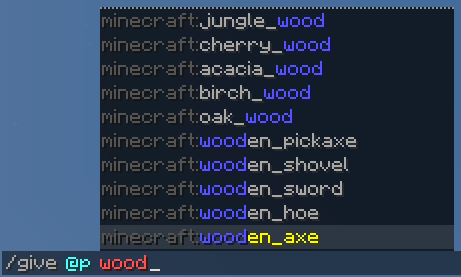
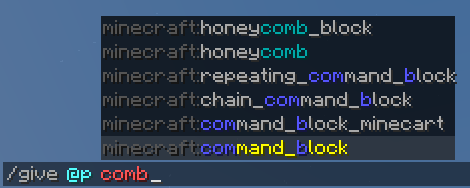
Additionally, if your query doesn't match any of the initials of a suggestion, it will also look anywhere within suggestions to provide fuzzy matches, which are listed after smart matches. This is helpful when you don't know exactly what you're looking for.
🎁 Extra Features
This mod also inverts the order of suggestions by default, so the most relevant suggestion is the closest one to the input bar and where your eyes are already looking at.
If you find this too confusing, you may disable it with the following command:
/smartcompletion invert_suggestion_order false
It also prevents the mouse from selecting suggestions as they appear under it, an old bug that makes typing commands in small windows harder than it needs to be.
✨ How does it work?
For each command you type, we ask the server for suggestions twice. Once omitting whatever you've typed for your last argument (blind query), and another including everything as a guarantee (informed query). Most of the time, only one request is sent, since we also caches requests while you type to reduce latency and blinking of the suggestions list.
Then, we work under the assumption that the server will reply with all possible suggestions to the blind query, and perform a smart filtering and sorting of the suggestions in the client side.
If there are any unexpected suggestions in the informed list that were not matched by our filtering, they'll also be shown in a different color, so you never fail to see any suggestion from potential complex commands that provide their own smart suggestions.
To filter suggestions, we use two approaches:
- A smart match between segments of your query and the initials of parts of the suggestion (gr matches gamerule) (how completion works in any code editor)
- A weak search for each part of your query within the suggestion (lock on matches blockExplosionDropDecay) (helpful when you don't know what you're looking for)
✂ How are words split?
We split words at any non-alphabetic character, as well as at camelCase words.
In addition, if a command cannot be split in this way, we will assume it's written in flatcase, like most Minecraft commands.
Unfortunately, unless you have a dictionary, breaking down flatcase systematically is impossible. That's why use a small dictionary of words used by Minecraft, Fabric, (Neo)Forge and WorldEdit commands to attempt to break down commands into words.
This dictionary can be overridden by resource packs (see wiki), but feel free to report any issues with words not being split correctly.
📋 How are suggestions sorted?
Suggestions are sorted according to the following criteria, whichever applies first:
- Suggestions closer to the cursor are shown first (/give @p chest suggests [ before minecart_chest)
- Matches of word initials are shown before fallback matches (doWeatherCycle > sendCommandFeedback)
- Significant matches beyond some thresholds are shown first (apple > acacia_pressure_plate)
- Matches with more initial matches are shown first (doInsomnia > disableRaids)
- Matches where some initials could've matched more than one word are shown first (doDaylightCycle > doWeatherCycle)
- Suggestions with less words are shown first (doInsomnia > doImmediateRespawn)
- Matches closer to the start of the suggestion are shown first (gamemode > defaultgamemode)
- Shorter suggestions are shown first (tp > tell)
Otherwise, the suggestions are shown in the original order provided by the server (usually alphabetic) (fallDamage > fireDamage).
Currently, there's no way to customize this order. If you have any suggestions to improve it, feel free to let me hear them. The reasoning behind these criteria is matching natural expectations, and enabling conflict disambiguation by typing more initials right away.
🎨 Customization
Suggestions are highlighted according to the styles defined in the style.json file, which can be overridden by resource packs (see wiki).
By default, matches inside a suggestion are highlighted in blue.
Alternative matches for a query part (doDaylightCycle), fallback matches (sendCommandFeedback) and unexpected server suggestions are all highlighted in dark aqua.
In addition, if a suggestion starts with a prefix of words, followed by a colon, (i.e., a resource location namespace), it will be highlighted in dark gray unless matched (minecraft:golden_apple).
❓ Help
This mod has a wiki, which you may check out.
Also, if you're having any trouble, or maybe just want to say hello, feel free to drop by our Discord Server.
🤝 Support this project
If you want to support this project, share it with your friends!
Because typing is too much effort

![Available for [Neo]Forge](https://img.shields.io/badge/Neo-Forged-d7742f?labelColor=757580&style=flat-square&logo=data:image/png;base64,iVBORw0KGgoAAAANSUhEUgAAABAAAAAQCAYAAAAf8/9hAAAAAXNSR0IArs4c6QAAAARnQU1BAACxjwv8YQUAAAAJcEhZcwAADsMAAA7DAcdvqGQAAAFuSURBVDhPY8AB+qAYBtD5eEFfWrDvfxAGsbHwUQATlIYBkOJCdTlpKBcBQGIgOSATxRBmKA0CcM1RGdkMB/buZShUFbQMUpexfMjMzZBXXsnw/PYNBgVpScuz12/xA9XvBGlCcYHd71cMNx89ZXhw6hmYLS38F4xBbJAYSA7ERgboXmCI5HvO8GNfNYOx2g8GdW1mMAaxQWIgOXSAYgDINgnh32CMDmDiIDXIAGZA3/5Ek0KQAqWGowwCqUugwgwMH1/8ANMgMZAcSA1ILVAIHJgwA4oc55/pf/GWFcyxD0wA0zDNIAATA6kBqQUyi0B8uAuW+JmDXfDu6X2Gt68hfgUphhkKEgPJgdSA1AKFwC5gBBFQADYEFGD4wNlbHAwxm05iuAAOYLaC/Guz8DUYg9jIrsEHQK74D8I/v3z5//zmZTAGsWHiIDUQpRCA7AUYACsAeQfMgwKos0EA7HQYwGYADKDYBAQoGqkEGBgA772uLRHGneYAAAAASUVORK5CYII=)


📖 About
Client-side mod that provides better autocompletion suggestions for commands.
Supports modded and custom commands from datapacks or server plugins, and it's not required on the server to work.
💡 Usage
In order to type a command/argument made up of several words, type only a few initials of its words.
For example, if you want to type /gamerule doDaylightCycle true, you could type /gr dc t.

⌨ Keyboard Shortcuts
In addition of <Tab>, you may also use <Ctrl>+<Space> to accept suggestions, which automatically inserts a space so you can start typing the next argument.
Additionally, if the current command is known to be incomplete (your text is in red), pressing <Enter> will accept the selected suggestion, if any, rather than attempting to execute an invalid command.
By default, accepting a suggestion with <Ctrl>+<Space> or by using the middle button to click it will also erase the remaining text after the cursor, if you decide to edit an earlier argument at some point. This behavior can be configured per key/mouse button.
🔀 Disambiguating Suggestions
To disambiguate between suggestions, you may need to type more than one letter per word.
For example, to type fireDamage instead of fallDamage, which appears first when typing fd, you may type fid.
![Disambiguate between `[f]all[D]amage` and `[f]ire[D]amage` by typing more letters](https://wsrv.nl/?url=https%3A%2F%2Fendorh.github.io%2Fsmart-completion%2Fimages%2Ffd-fid.gif&n=-1)
In general, it's way faster to type a few more letters to get the suggestion you want in front of the list rather than using the arrows/cycling with <Tab> to select it, as typing can build muscle memory.
Over time you will become used to the minimum number of letters you need to type the commands you frequently use, and typing them will feel like a breeze.
🔍 Browsing Suggestions
Since the words you type don't need to be at the start of the name you're typing, you may discover way more useful suggestions compared to how Minecraft suggestions usually work.
For example, if you type /give @p wood, you'll see suggestions for all items that contain a word that starts with wood (e.g., oak_[wood]), not just items whose name itself starts with wood (e.g., [wood]en_axe).

Additionally, if your query doesn't match any of the initials of a suggestion, it will also look anywhere within suggestions to provide fuzzy matches, which are listed after smart matches. This is helpful when you don't know exactly what you're looking for.
🎁 Extra Features
This mod also inverts the order of suggestions by default, so the most relevant suggestion is the closest one to the input bar and where your eyes are already looking at.
If you find this too confusing, you may disable it with the following command:
/smartcompletion invert_suggestion_order false
It also prevents the mouse from selecting suggestions as they appear under it, an old bug that makes typing commands in small windows harder than it needs to be.
✨ How does it work?
For each command you type, we ask the server for suggestions twice. Once omitting whatever you've typed for your last argument (blind query), and another including everything as a guarantee (informed query). Most of the time, only one request is sent, since we also cache requests while you type to reduce latency and blinking of the suggestions list.
Then, we work under the assumption that the server will reply with all possible suggestions to the blind query, and perform a smart filtering and sorting of the suggestions in the client side.
If there are any unexpected suggestions in the informed list that were not matched by our filtering, they'll also be shown in a different color, so you never fail to see any suggestion from potential complex commands that provide their own smart suggestions.
To filter suggestions, we use two approaches:
- A smart match between segments of your query and the initials of parts of the suggestion (
grmatches[g]ame[r]ule) (how completion works in any code editor) - A weak search for each part of your query within the suggestion (
lock onmatchesb(lock)Explosi(on)DropDecay) (helpful when you don't know what you're looking for)
✂ How are words split?
We split words at any non-alphabetic character, as well as at camelCase words.
In addition, if a command cannot be split in this way, we will assume it's written in flatcase, like most Minecraft commands.
Unfortunately, unless you have a dictionary, breaking down flatcase systematically is impossible. That's why use a small dictionary of words used by Minecraft, Fabric, [Neo]Forge and WorldEdit commands to attempt to break down commands into words.
This dictionary can be overridden by resource packs (see wiki), but feel free to report any issues with words not being split correctly.
📋 How are suggestions sorted?
Suggestions are sorted according to the following criteria, whichever applies first:
-
Suggestions closer to the cursor are shown first (
/give @p chestsuggests[beforeminecart_chest) -
Matches of word initials are shown before fallback matches (
[d]oWeather[C]ycle>sen[dC]ommandFeedback) -
Significant matches beyond some thresholds are shown first (
[app]le>[a]cacia_[p]ressure_[p]late) -
Matches with more initial matches are shown first (
[d]o[I]nsomnia>[di]sableRaids) -
Matches where some initials could've matched more than one word are shown first (
[d]o(D)aylight[C]ycle>[d]oWeather[C]ycle) -
Suggestions with less words are shown first (
[d]o[I]nsomnia>[d]o[I]mmediateRespawn) -
Matches closer to the start of the suggestion are shown first (
[g]ame[m]ode>default[g]ame[m]ode) -
Shorter suggestions are shown first (
[t]p>[t]ell) -
Otherwise, the suggestions are shown in the original order provided by the server (usually alphabetic) (
[f]all[D]amage>[f]ire[D]amage).
Currently, there's no way to customize this order. If you have any suggestions to improve it, please let me hear them. The reasoning behind these criteria is matching natural expectations, and enabling conflict disambiguation by typing more initials right away.
🎨 Customization
Suggestions are highlighted according to the styles defined in the style.json file, which can be overridden by resource packs (see wiki).
By default, matches inside a suggestion ([g]ame[r]ule) are highlighted in blue.
Alternative matches for a query part ([d]o(D)aylight[C]ycle), fallback matches (sen[dC]ommandFeedback) and unexpected server suggestions are all highlighted in dark aqua.
In addition, if a suggestion starts with a prefix of words, followed by a colon, (i.e., a resource location namespace), it will be highlighted in dark gray unless matched ({minecraft:}[g]olden_[ap]ple).
❓ Help
This mod has a wiki, which you may check out.
Also, if you're having any trouble, or maybe just want to say hello, feel free to drop by our Discord Server.
🤝 Support this project
If you want to support this project, share it with your friends!
Screenshots
Gallery
-
![[g]olden_[ap]ple.png](https://media.forgecdn.net/attachments/938/356/g-olden_-ap-ple.png) [g]olden_[ap]ple.png [g]olden_[ap]ple.png
[g]olden_[ap]ple.png [g]olden_[ap]ple.png -
 gr-dc-t.gif gr-dc-t.gif
 -
 give-oak-door-facing-east.gif give-oak-door-facing-east.gif
 -
 fd-fid.gif fd-fid.gif
 -
![[d]o[I]nsomnia.png](https://media.forgecdn.net/attachments/938/343/d-o-i-nsomnia.png) [d]o[I]nsomnia.png [d]o[I]nsomnia.png
[d]o[I]nsomnia.png [d]o[I]nsomnia.png -
 honey(comb).png honey(comb).png
 -
![[t]eam[m]sg.png](https://media.forgecdn.net/attachments/938/348/t-eam-m-sg.png) [t]eam[m]sg.png [t]eam[m]sg.png
[t]eam[m]sg.png [t]eam[m]sg.png -
![[app]le.png](https://media.forgecdn.net/attachments/938/354/app-le.png) [app]le.png [app]le.png
[app]le.png [app]le.png
-
![[app]le](https://cdn.modrinth.com/data/Go1Kxy32/images/f62b70ce986b165ffe290df6df6a407290748bee.png) [app]le The sorting algorithm is tuned to match some user expectations. Feel free to let us know if it doesn't match yours!
[app]le The sorting algorithm is tuned to match some user expectations. Feel free to let us know if it doesn't match yours! -
![[g]older_[ap]ple](https://cdn.modrinth.com/data/Go1Kxy32/images/a4f6ae73f7341a4a82d4cbae1ab9d3309fc1e0a6.png) [g]older_[ap]ple "/give @p gap" suggests "minecraft:golden_apple"
[g]older_[ap]ple "/give @p gap" suggests "minecraft:golden_apple" -
![/[g]ame[r]ule [d]o(D)aylight[C]ycle [t]rue](https://cdn.modrinth.com/data/Go1Kxy32/images/472b5cd3217007aa8fd2e7f0ae841784f3bf7ef0.gif) /[g]ame[r]ule [d]o(D)aylight[C]ycle [t]rue Set `doDaylightCycle` gamerule by typing only 5 letters.
/[g]ame[r]ule [d]o(D)aylight[C]ycle [t]rue Set `doDaylightCycle` gamerule by typing only 5 letters. -
 Give `oak_door` facing east. (Slightly) better experience with complex arguments.
 -
![[f]all[D]amage vs [fi]re[D]amage](https://cdn.modrinth.com/data/Go1Kxy32/images/6f0b59af611e0102b35ed03b20672af6d586529e.gif) [f]all[D]amage vs [fi]re[D]amage Disambiguate suggestions by typing a few more letters, rather than cycling up/down the list. Your muscle memory will thank you.
[f]all[D]amage vs [fi]re[D]amage Disambiguate suggestions by typing a few more letters, rather than cycling up/down the list. Your muscle memory will thank you. -
![[d]o[I]nsomnia](https://cdn.modrinth.com/data/Go1Kxy32/images/d332494869d4926ef0f9372ea20dfb49ecad2c77.png) [d]o[I]nsomnia Try typing as few letters as possible. If you need to type more letters before the last, I recommend using <Ctrl>+<Backspace> to delete the entire last argument and start over.
[d]o[I]nsomnia Try typing as few letters as possible. If you need to type more letters before the last, I recommend using <Ctrl>+<Backspace> to delete the entire last argument and start over. -
 honey(comb) Fuzzy search lets you find suggestions even if you don't remember exactly their wording.
 -
![[t]eam[m]sg](https://cdn.modrinth.com/data/Go1Kxy32/images/4ee8c89f953d56e2ae316e537d511a7b63c26591.png) [t]eam[m]sg Old abbreviations are made obsolete by proper typing assistance.
[t]eam[m]sg Old abbreviations are made obsolete by proper typing assistance.
Versions
Files
Relations
Project Relations
More like this
Similar Mods
Suggestions use data such as tags, dependencies, dependents, descriptions, titles, and more to rank how much they overlap with this mod.
On ModDex
Community snapshot
By the numbers
Statistics
Want to reach Minecraft players?
We're looking for a server hosting partner to feature here and other parts of the site. Interested? Send us a message!
Get in touchGet it on
Available Platforms
On ModDex
Community snapshot
By the numbers