
Community listing page, reviews here may not be monitored by the author.

Community voices
Reviews
No reviews yet. Be the first to review this project!
Get it on
Available Platforms
Compatibility
Supported Environments
Runs entirely on the client. Works on vanilla servers.
About
Project Details
For authors
Embed Badge
If you're the author of this project, you can embed a live badge anywhere that supports HTML or Markdown. It updates automatically whenever ratings change.
Use HTML for any page that supports it, or Markdown for README files and Markdown-based descriptions.
Identifiers
Platform IDs
About
Description
Sound Culling


A client-side Fabric mod for Minecraft that lets you block individual sound events in-game. Mute annoying, spammy, or unnecessary sounds (specific mobs, blocks, or UI sounds) without touching your resource packs or volume sliders.
Features
- Dynamic sound registry — lists every registered sound event, including ones added by other mods.
- Localized names — each sound shows its in-game subtitle in your selected language (English, Russian, …), with the raw id underneath.
- Preview — click ▶ to play any sound before deciding.
- Quick controls — block or unblock everything (or just your current search results) in one click.
- Master switch — instantly mute all sounds without losing your per-sound settings.
- Search — filter the list by name or id.
- Lightweight — blocked sounds are cancelled before they ever reach the sound engine.
Requirements
- Minecraft (supported versions list on Modrinth)
- Fabric Loader (compatible version)
- Fabric API
- Cloth Config API — bundled inside the jar.
- Mod Menu — recommended, used to open the config screen.
Installation
- Install Fabric Loader for Minecraft.
- Drop the following into your
modsfolder:soundculling-*.jar(from Releases or Modrinth)- Fabric API
- Mod Menu (recommended)
- Launch the game and open Mods → Sound Culling → Config.
Settings are stored in config/soundculling.json.
Building from source
git clone https://github.com/Fix85/SoundCulling.git
cd SoundCulling
./gradlew build
The built jar is written to build/libs/. Requires JDK 21.
License
Released under the MIT License.
Русский
Клиентский мод на Fabric для Minecraft, позволяющий блокировать отдельные звуки прямо в игре. Заглушайте раздражающие или ненужные звуки (мобов, блоков, интерфейса) без правки ресурс-паков и ползунков громкости.
Возможности
- Динамический список звуков — отображаются все зарегистрированные звуки, в том числе из других модов.
- Локализованные названия — для каждого звука показывается его внутриигровой субтитр на выбранном языке, а под ним — технический id.
- Предпрослушивание — нажмите ▶, чтобы воспроизвести звук перед решением.
- Быстрые действия — заблокировать или разблокировать всё (или только результаты поиска) одной кнопкой.
- Главный переключатель — мгновенно отключить все звуки, не теряя индивидуальные настройки.
- Поиск — фильтрация списка по названию или id.
- Лёгкость — заблокированные звуки отменяются до попадания в звуковой движок.
Требования
- Minecraft (список поддерживаемых версий смотрите в разделе «Версии» на Modrinth)
- Fabric Loader (совместимая версия)
- Fabric API
- Cloth Config API — встроен в jar.
- Mod Menu — рекомендуется, открывает экран настроек.
Установка
- Установите Fabric Loader for Minecraft.
- Поместите в папку
mods:soundculling-*.jar(из раздела Releases или с Modrinth)- Fabric API
- Mod Menu (рекомендуется)
- Запустите игру и откройте Моды → Sound Culling → Настройки.
Настройки хранятся в config/soundculling.json.
Сборка из исходников
git clone https://github.com/Fix85/SoundCulling.git
cd SoundCulling
./gradlew build
Готовый jar появится в build/libs/. Требуется JDK 21.
Лицензия
Распространяется по лицензии MIT.
Screenshots
Gallery
-
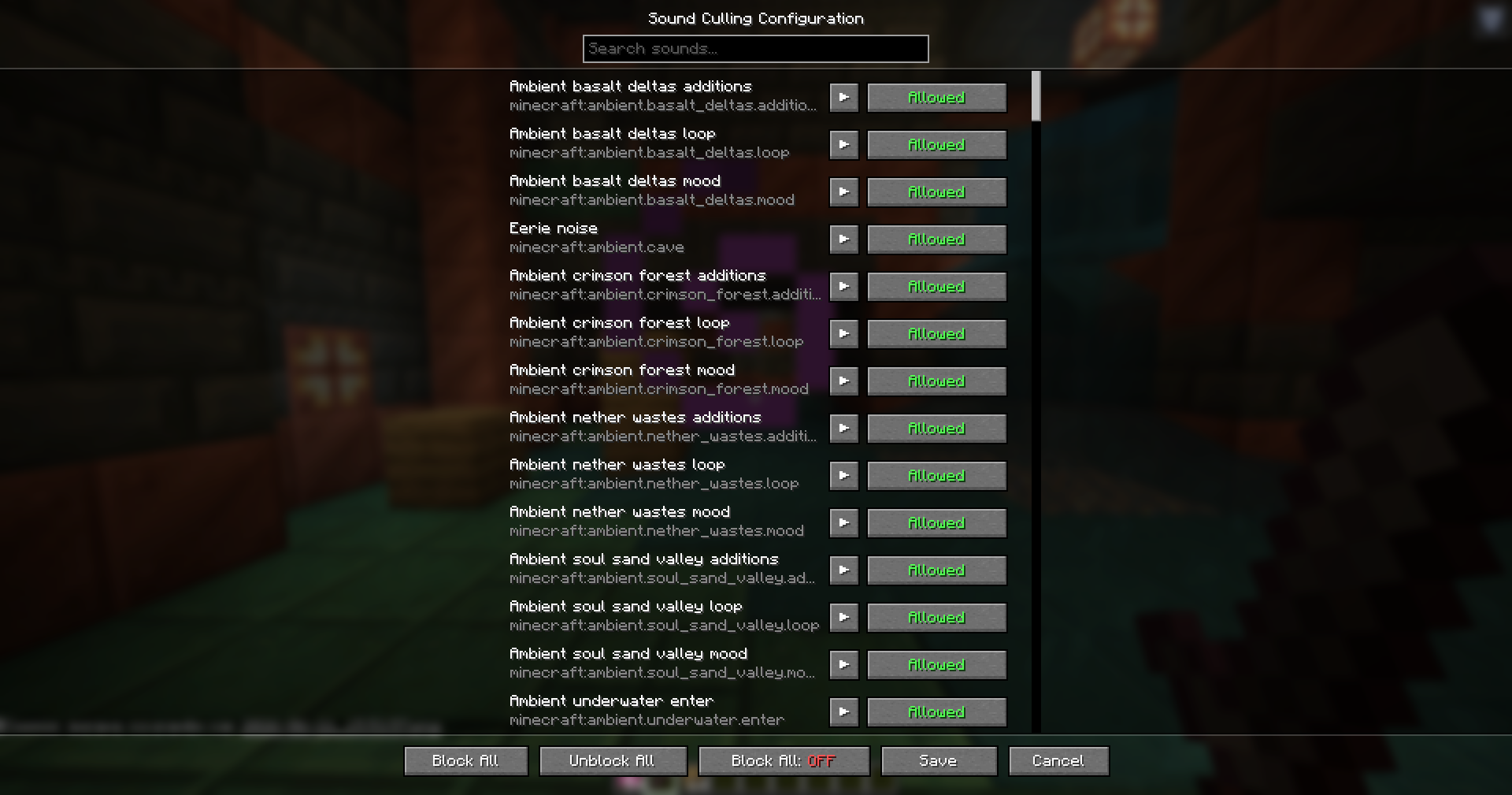 Config Screen Configuration screen showing registered sounds, subtitles, play/preview buttons, and individual sound culling toggles.
Versions
Files
Relations
Project Relations
More like this
Similar Mods
Suggestions use data such as tags, dependencies, dependents, descriptions, titles, and more to rank how much they overlap with this mod.
On ModDex
Community snapshot
By the numbers
Statistics

Want to reach Minecraft players?
We're looking for a server hosting partner to feature here and other parts of the site. Interested? Send us a message!
Get in touchGet it on
Available Platforms
On ModDex
Community snapshot
By the numbers