
Community listing page, reviews here may not be monitored by the author.
Stats Overlay

No reviews yet
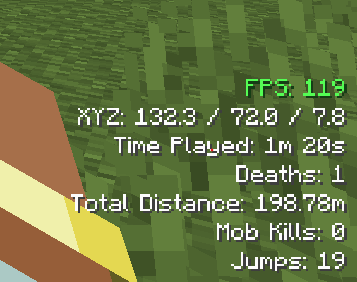
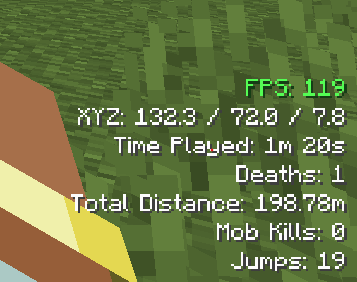
Minimalist in-game HUD to monitor your world statistics. Easily track your FPS, location, progress, and others.
Community voices
Reviews
No reviews yet. Be the first to review this project!
Get it on
Available Platforms
Compatibility
Supported Environments
Runs entirely on the client. Works on vanilla servers.
About
Project Details
For authors
Embed Badge
If you're the author of this project, you can embed a live badge anywhere that supports HTML or Markdown. It updates automatically whenever ratings change.
Use HTML for any page that supports it, or Markdown for README files and Markdown-based descriptions.
Identifiers
Platform IDs
Resources
External Links
About
Description
📊 Stats Overlay
A lightweight, highly customizable client-side mod that displays essential survival and gameplay statistics directly on your HUD in real-time. Keep track of your progress without ever breaking your immersion!
✨ Features
- Stats Tracking:
- FPS and XYZ Coordinates.
- Time Played, Deaths, and Distance Traveled.
- Mob Kills, Jumps, Sneak Time, Villager Interactions, and Fish Caught and many others.
- Customizations: Adjust the HUD screen position, scale, opacity, color and others.
🎮 Controls (Default Keybinds)
- [K] : Toggle HUD Display
- [F7] : Open Config Menu
🌐 Language Support
- English (US):
en_us - Tiếng Việt (Việt Nam):
vi_vn - Deutsch (Deutschland):
de_de - Español (España):
es_es - Français (France):
fr_fr - 日本語 (日本):
ja_jp - Русский (Россия):
ru_ru - 简体中文 (中国):
zh_cn
🛠️ Configuration Guide
You can fine-tune every feature either directly in-game by pressing [F7] or by modifying the config file manually. The configuration menu is neatly organized into three intuitive categories:
- Layout and Size Settings: Change scale, positioning, padding, and transparency.
- Color Settings: Pick color presets or toggle custom HEX colors for a personalized look.
- HUD Components Management: Toggle visibility for specific stats and manage the exact HUD ordering.
⚙️ Compatibility & Versions
- Current Supported Versions: Minecraft 1.21.1, 1.21.4 and 1.21.11
- Mod Loader: NeoForge (Fully Client-Side — no server installation required!)
💡 Note: Fabric support is currently planned and will be added in a future update. Stay tuned!
Preview:
Screenshots
Gallery
-
 Preview
Versions
Files
Relations
Project Relations
More like this
Similar Mods
Suggestions use data such as tags, dependencies, dependents, descriptions, titles, and more to rank how much they overlap with this mod.
On ModDex
Community snapshot
By the numbers
Statistics

Want to reach Minecraft players?
We're looking for a server hosting partner to feature here and other parts of the site. Interested? Send us a message!
Get in touchGet it on
Available Platforms
On ModDex
Community snapshot
By the numbers
Statistics
Resources