
Community listing page, reviews here may not be monitored by the author.
StreamerTags

No reviews yet
Streaming name prefixes (TTV, TT, or YT) and custom name colors!
Community voices
Reviews
No reviews yet. Be the first to review this project!
Get it on
Available Platforms
About
Project Details
For authors
Embed Badge
If you're the author of this project, you can embed a live badge anywhere that supports HTML or Markdown. It updates automatically whenever ratings change.
Use HTML for any page that supports it, or Markdown for README files and Markdown-based descriptions.
Identifiers
Platform IDs
Resources
External Links
About
Description
StreamerTags is a simple Fabric mod that lets players show in game chat, scoreboard, and above their player model, which platforms they are currently streaming on by toggling platform tags on or off. It also adds custom username color control.
Players can enable Twitch, YouTube, and/or TikTok tags, and the server adds those tags before the player’s Minecraft name in chat, the tab list, and above-player nametags.
Tags:
[TTV] = Twitch
[YT] = YouTube
[TT] = TikTok
Examples:
[TTV] PlayerName
[YT] PlayerName
[TT] PlayerName
[TTV][YT] PlayerName
[TTV][YT][TT] PlayerName
Features:
- Manual streaming platform toggles
- Supports Twitch, YouTube, and TikTok
- Multiple tags can be active at the same time
- Tags appear in chat
- Tags appear in the tab/player list
- Tags appear above the player’s head
- Color-coded platform tags
- Server-authoritative toggle states
- Optional client GUI opened with the Insert key
- Command fallback for players without the client mod
- Player states can persist across restarts depending on server config
- Admin commands for managing and debugging player tags
Installation:
Install the mod on the server for the tag system to work.
For the easiest experience, install the mod on both the server and client:
- Server install: required for tags, commands, saving player states, and display updates
- Client install: optional, adds the Insert-key toggle GUI
Players who do not install the client mod can still use the command system if the server has the mod installed.
Player Commands:
/streamtags
/streamtags status
/streamtags toggle twitch
/streamtags toggle youtube
/streamtags toggle tiktok
/streamtags set twitch true
/streamtags set twitch false
/streamtags set youtube true
/streamtags set youtube false
/streamtags set tiktok true
/streamtags set tiktok false
/streamtags clear
/streamtags refresh
Admin Commands:
/streamtagsadmin reload
/streamtagsadmin config status
/streamtagsadmin status <player>
/streamtagsadmin set <player> twitch <true|false>
/streamtagsadmin set <player> youtube <true|false>
/streamtagsadmin set <player> tiktok <true|false>
/streamtagsadmin clear <player>
/streamtagsadmin refresh <player>
/streamtagsadmin refreshall
/streamtagsadmin debug <player>
/streamtagsadmin selftest
/streamtagsadmin enable
/streamtagsadmin disable
Client GUI:
If installed on the client, press Insert while in-game to open the StreamerTags toggle menu. From there, players can turn Twitch, YouTube, and TikTok tags on or off and then click save to send their current tag state to the server.
Server Config:
The server creates its config files automatically at:
config/streamertags/server.json
config/streamertags/players/
Useful config options include:
- Enable or disable the mod
- Allow or block players from changing their own tags
- Persist player toggles across restarts
- Clear toggles when players log out
- Enable or disable chat tags
- Enable or disable tab list tags
- Enable or disable above-head nametag tags
- Change display order for Twitch, YouTube, and TikTok tags
Requirements:
- Minecraft 1.21.11
- Fabric Loader 0.19.3+
- Fabric API
- Java 21+
Recommended Setup:
For servers, install StreamerTags on the server and recommend players install it on the client if they want the GUI. The command system works without the client mod, but the client mod makes toggling tags easier.
StreamerTags is designed for players and servers that want a clean, simple way to show streaming platform tags without complicated setup.
OPEN TO SUGGESTIONS AND COMMENTS, PLEASE LEAVE FEEDBACK! :D Thanks <3
Screenshots
Gallery
-
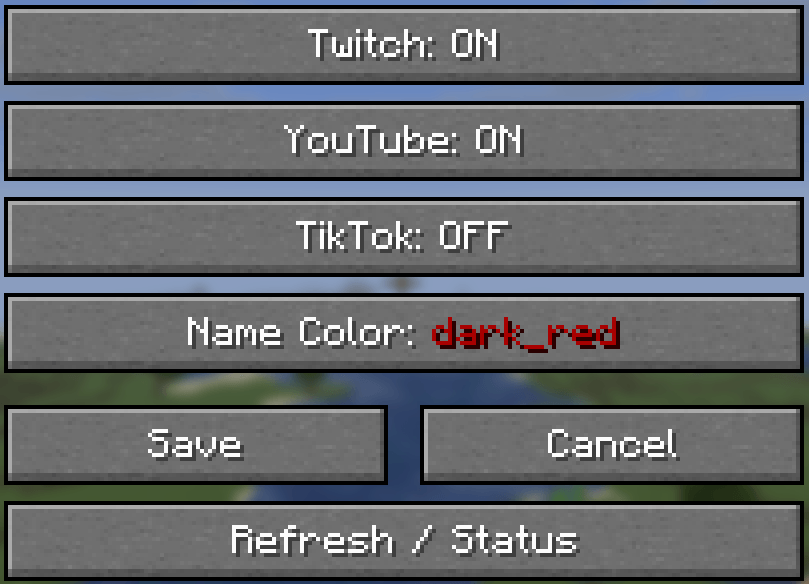 Screenshot 2026-07-08 205726.png Screenshot 2026-07-08 205726.png
Versions
Files
Relations
Project Relations
More like this
Similar Mods
Suggestions use data such as tags, dependencies, dependents, descriptions, titles, and more to rank how much they overlap with this mod.
On ModDex
Community snapshot
By the numbers
Statistics
Want to reach Minecraft players?
We're looking for a server hosting partner to feature here and other parts of the site. Interested? Send us a message!
Get in touchGet it on
Available Platforms
On ModDex
Community snapshot
By the numbers
Statistics
Resources