Community listing page, reviews here may not be monitored by the author.
TACZ Field Pickup


No reviews yet
TACZ Field Pickup is a mod that brings an immersive gun-pickup experience to TaCZ (Timeless and Classics: Zero).
Community voices
Reviews
No reviews yet. Be the first to review this project!
Get it on
Available Platforms
Compatibility
Supported Environments
Must be installed on both the client and the server.
About
Project Details
For authors
Embed Badge
If you're the author of this project, you can embed a live badge anywhere that supports HTML or Markdown. It updates automatically whenever ratings change.
Use HTML for any page that supports it, or Markdown for README files and Markdown-based descriptions.
Identifiers
Platform IDs
Resources
External Links
About
Description
## 一、模组简介 / Introduction
TACZ Field Pickup is a mod that brings an immersive gun-pickup experience to TaCZ (Timeless and Classics: Zero).
TACZ Field Pickup 是一个为 TaCZ(Timeless and Classics: Zero)枪械模组打造的沉浸式捡枪体验模组。
In vanilla Minecraft and vanilla TaCZ, picking up a gun is just "walk over the drop and grab it automatically", with no immersion at all.
在原版 Minecraft 和原版 TaCZ 中,捡枪就是"走过掉落物自动拾取",毫无代入感。
This mod changes that:
本模组改变了这一切:
- Guns are no longer picked up automatically when you walk over them.
- 靠近枪械不再自动拾取。
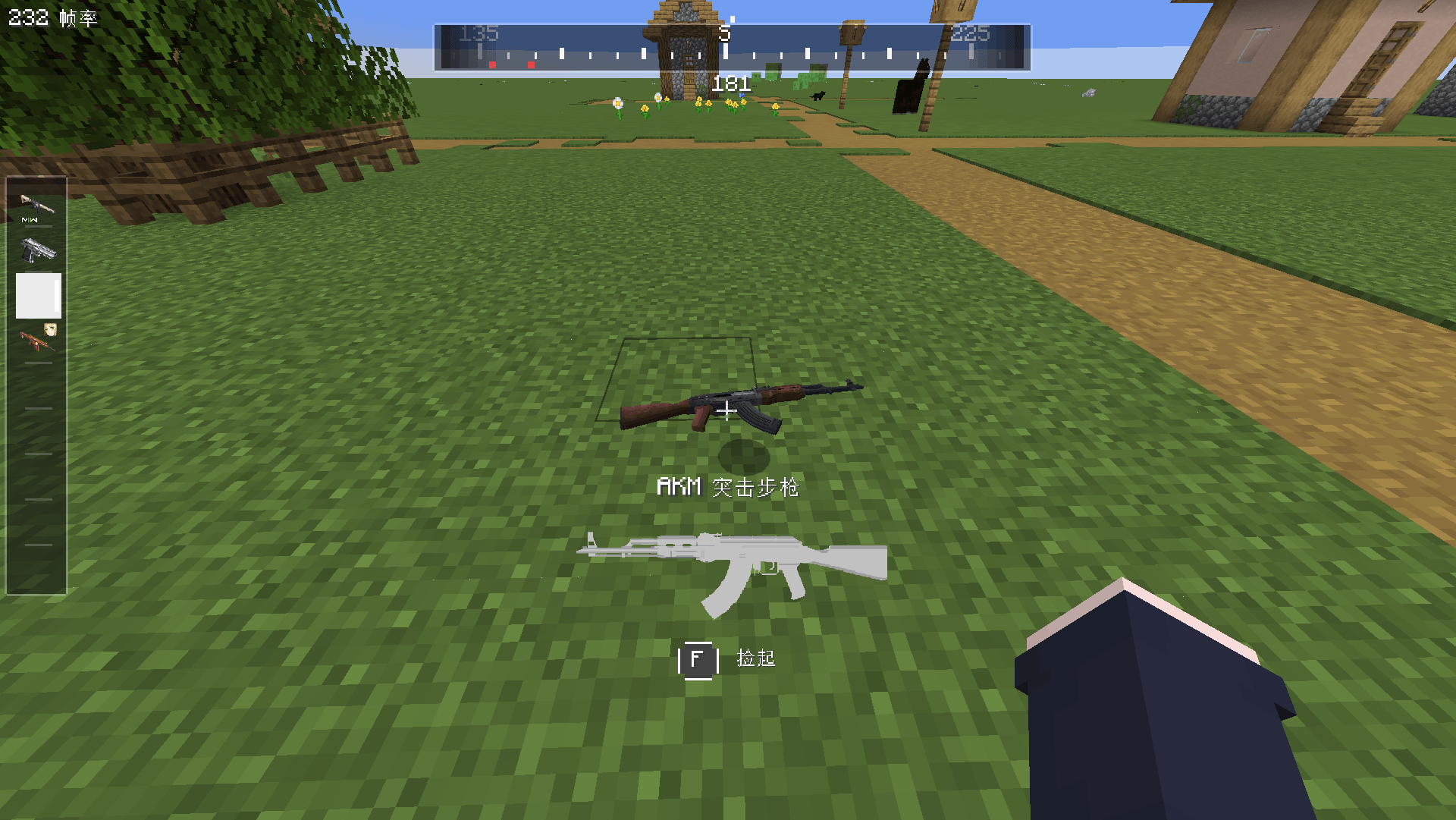
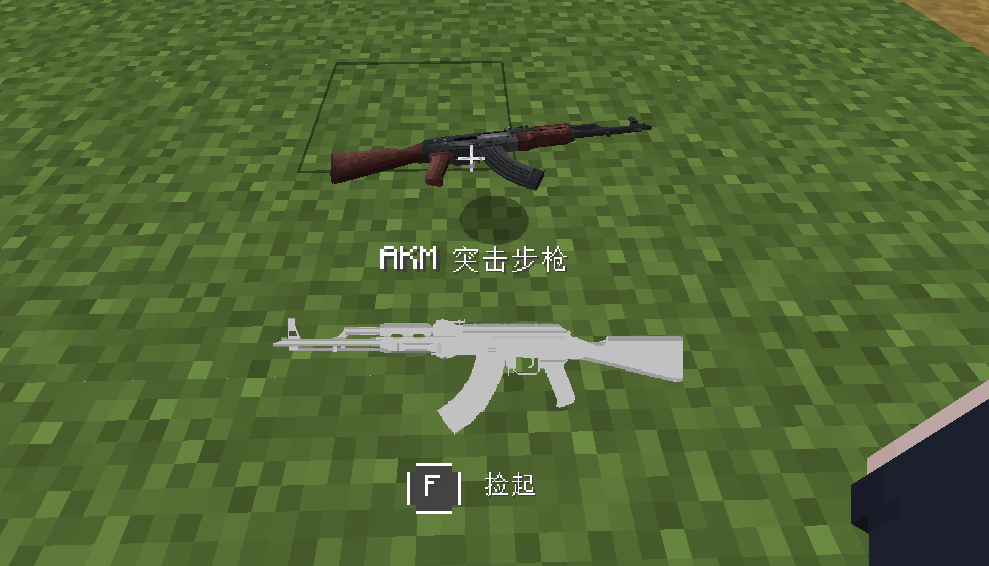
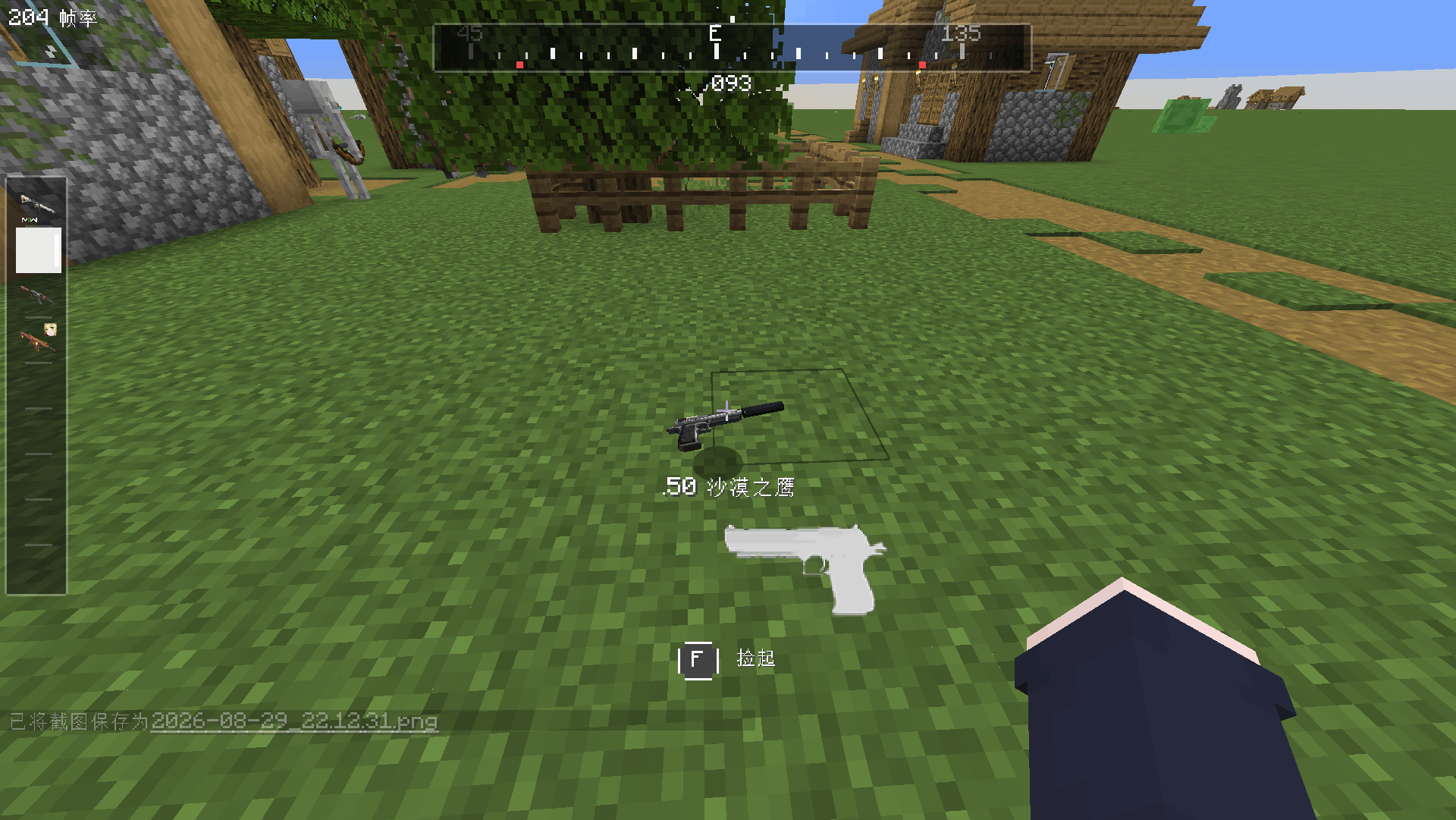
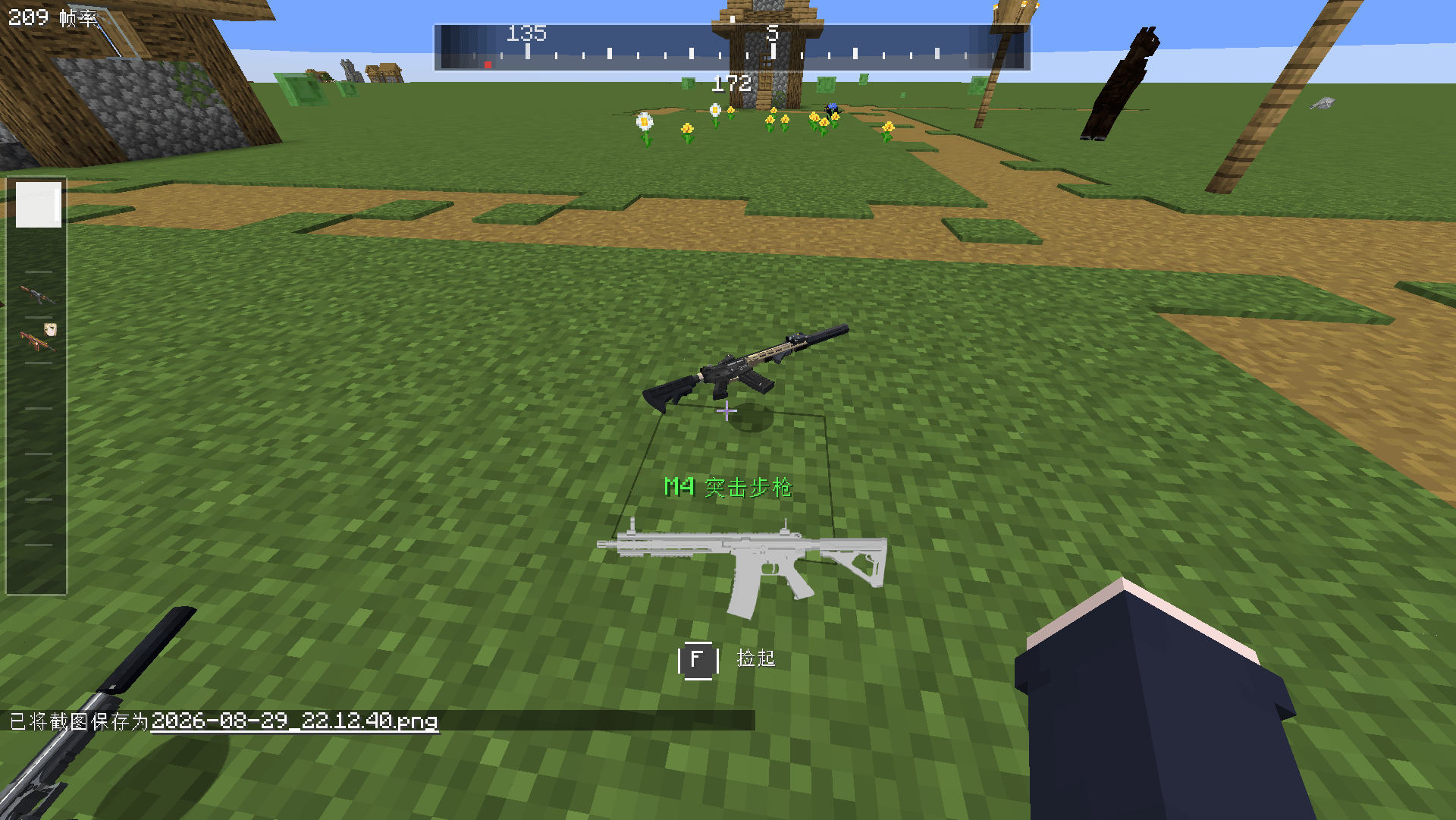
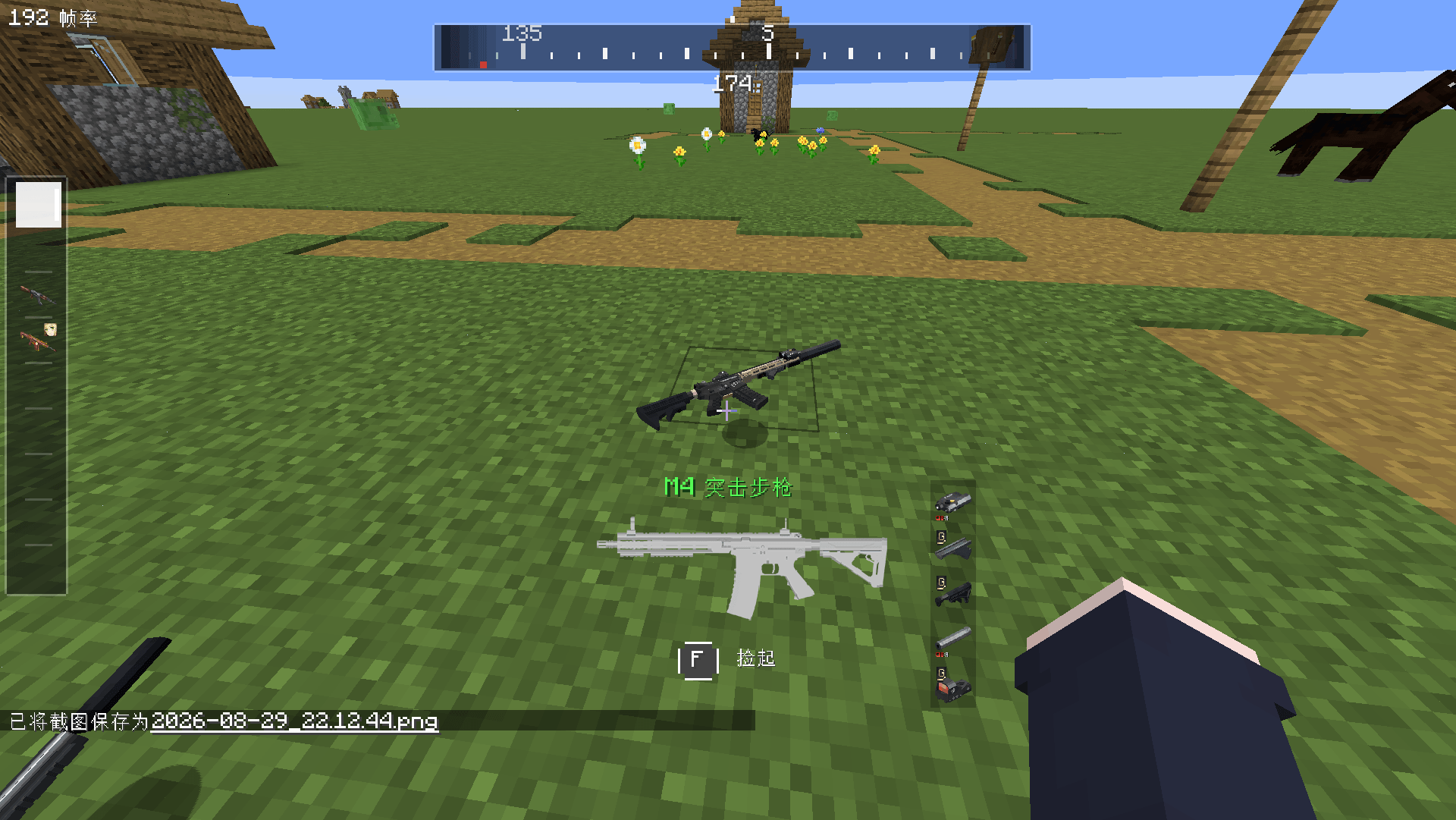
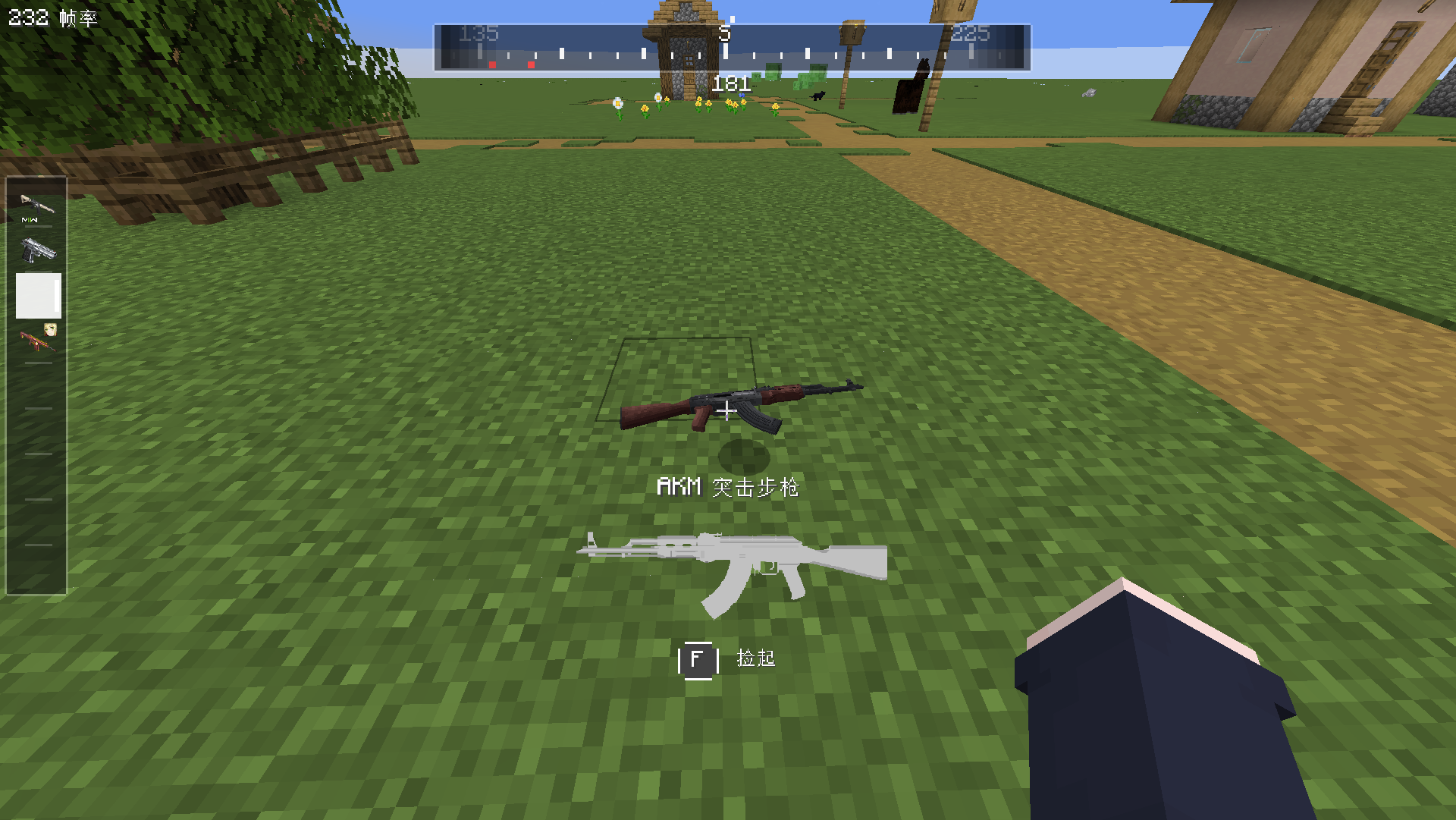
- When you aim your crosshair at a dropped gun, a polished pickup UI appears, showing the gun's name, thumbnail and a pickup prompt.
- 当你把准心对准地上的枪械时,会弹出一个精致的捡枪 UI,展示枪械的名称、缩略图和捡枪提示。
- Press the key to actually pick the gun up — just like in an FPS game: aim, confirm, grab.
- 按下按键才能真正把枪捡起来——就像 FPS 游戏里一样:瞄准、确认、拾取。
It turns picking up a gun from a mindless collision into a deliberate, controllable interaction, greatly improving immersion in both survival and PvP scenarios.
它让"捡枪"从一次无意识的碰撞,变成一个有仪式感、可操控的交互过程,大幅提升生存与 PVP 场景下的沉浸体验。
---
## 二、功能特性 / Features
### 🎯 沉浸式捡枪 UI / Immersive Pickup UI
When aiming at a dropped gun, three elements are shown:
准星对准掉落枪械时,会显示三个要素:
1. Gun name, enlarged and centered.
1. 枪械名称,放大居中显示。
2. Gun thumbnail, using the TaCZ gun HUD texture.
2. 枪械缩略图,使用 TaCZ 枪械 HUD 贴图。
3. Pickup prompt, a key button with text.
3. 捡枪提示,按键按钮加文案。
While holding the key, a long-press progress bar (gold → green) gives clear feedback.
按住按键时会显示长按进度条(金色 → 绿色),反馈清晰。
### 🔫 全新的捡枪逻辑 / New Pickup Logic
Press F to pick up a gun: it goes into your hotbar, preferring the selected slot, then the first empty slot.
按 F 键捡枪:自动放入快捷栏,优先当前选中格,其次第一个空格。
If your hotbar is full, picking up a gun replaces your current held weapon — the old one is tossed toward where your crosshair points, and the new gun enters your hand.
快捷栏已满时,捡枪会直接替换当前手持枪械——旧枪会朝你准星指向的位置抛出,新枪进入手中。
Hold F to store the gun directly into your backpack, perfect for quick looting.
长按 F 键可把枪械直接放入背包,适合快速搜刮。
### ⚖️ 快捷栏枪械数量限制 / Hotbar Gun Limit
You can set a hotbar gun limit (1–9, with the 10th option meaning unlimited).
可设置快捷栏枪械上限(1-9,第 10 档为无限制)。
When the limit is exceeded, extra guns are automatically thrown toward your crosshair, with a "Hotbar gun limit exceeded" message.
超出上限时,多余枪械会自动向准星方向扔出,并弹出"枪械数量超过快捷栏上限"提示。
Guns are thrown right-to-left, keeping the leftmost guns in your hotbar.
扔枪顺序从右往左,保留最左侧的枪械。
### 💀 玩家缴获(死亡掉落)/ Player Capture (Death Drops)
When a player dies, all guns in the hotbar scatter on the ground around the corpse, easy to pick up one by one.
玩家死亡时,快捷栏中的所有枪械会在尸体位置原地散落(扇形错开),方便逐一拾取。
This works independently: even if the server has keepInventory enabled, the guns still drop.
该功能独立生效:即使服务器开启了"死亡不掉落"(keepInventory),枪械依然会掉落。
Only hotbar guns are affected; non-gun items and backpack items are untouched.
只影响快捷栏枪械;非枪械物品与背包物品不受影响。
Perfect for PvP servers: kill a player and "capture" their weapons.
非常适合 PVP 服务器:击杀玩家即可"缴获"对方的武器。
### 🎨 可视化配置界面 / Visual Config Editor
Open it via the Config button in the mod list, or bind a "Open Config Screen" key.
通过模组列表的 Config 按钮打开,或绑定"打开配置界面"按键。
You can adjust the hotbar gun limit, the hold-to-backpack toggle, the player capture toggle and the attachments toggle.
可以调整快捷栏枪械上限、长按入背包开关、玩家缴获开关与配件缩略图开关。
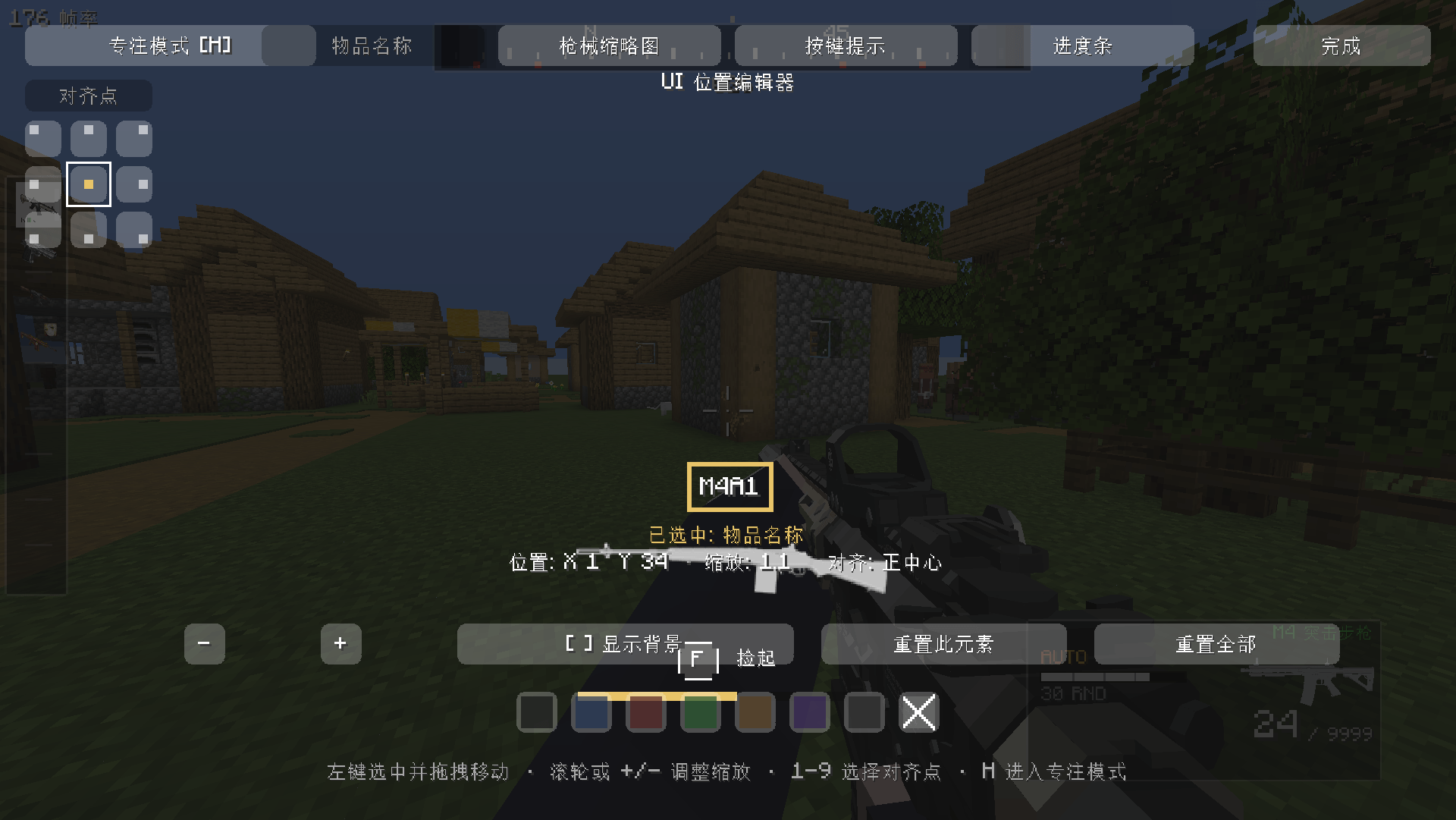
The UI editor lets you reposition, resize and restyle each of the four elements — name, thumbnail, key hint and progress bar — independently.
UI 编辑器支持对名称、缩略图、按键提示、进度条四个元素独立调整位置、大小与背景样式。
Each element supports 9-point anchoring: Top-Left, Top-Center, Top-Right, Left-Center, Center, Right-Center, Bottom-Left, Bottom-Center and Bottom-Right.
每个元素支持九点对齐:左上、上中、右上、左中、正中、右中、左下、下中、右下。
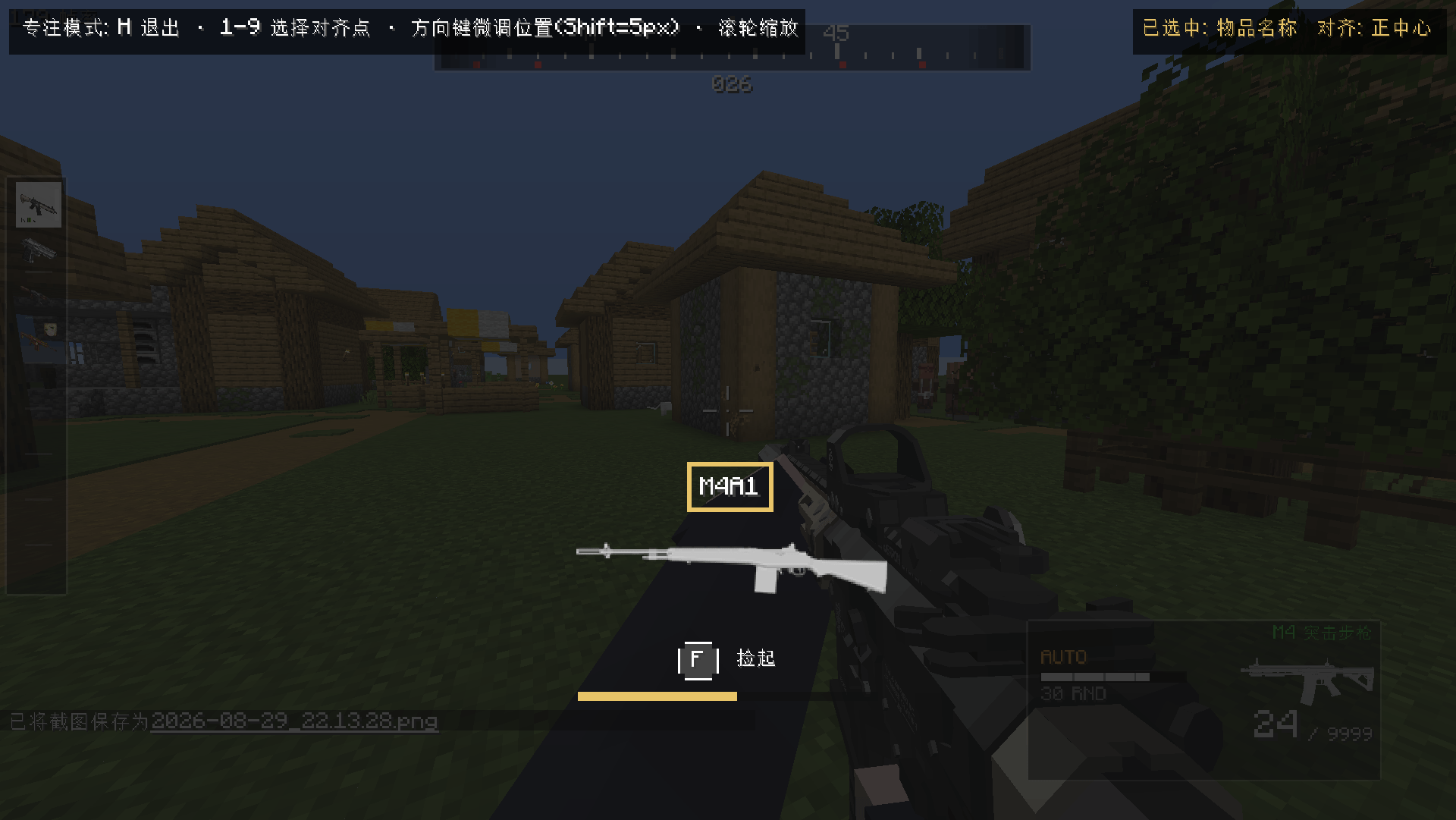
Focus mode (press H) hides all buttons for distraction-free fine-tuning, with arrow keys to nudge and number keys 1–9 to quickly pick an anchor.
专注模式(按 H)会隐藏全部按钮,全屏精细调节,可用方向键微调位置、数字键 1-9 快速对齐。
### 🌍 多语言 / Multi-language
Simplified Chinese and English are built in, switched automatically in-game.
内置简体中文与英文,游戏内自动切换。
---
## 三、操作指南 / Controls
| 操作 Action | 按键 Key (default, rebindable) |
|---|---|
| 捡起枪械(放入快捷栏)Pick up a gun (into hotbar) | **F**(长按 F 放入背包 / hold F for backpack) |
| 打开配置界面 Open config screen | 模组列表 → Config,或自行绑定按键 / Mods list → Config, or bind your own key |
---
## 四、安装要求 / Requirements
You need Minecraft 1.20.1 with Forge 47.x.
需要 Minecraft 1.20.1 与 Forge 47.x。
You need TaCZ (Timeless and Classics: Zero) 1.0.3 or newer.
需要安装 TaCZ(Timeless and Classics: Zero)1.0.3 及以上。
Put the .jar file into the mods folder and launch the game.
将本模组的 .jar 文件放入 mods 文件夹,启动游戏即可。
Install this mod on both client and server; single-player is automatically satisfied.
客户端与服务端都需要安装本模组;单机自动满足。
---
## 五、常见问题 / FAQ
Q: Why don't I automatically pick up guns anymore?
问:为什么靠近枪械不会自动捡起来了?
A: That is the core design of this mod — picking up is now manual and aim-based. Press F to grab a gun.
答:这是本模组的核心设计——捡枪改为手动瞄准拾取。按 F 键即可捡起。
Q: Where did my old gun go when I picked up a new one?
问:捡枪时手里原来的枪去哪了?
A: When the hotbar is full, the new gun replaces your held weapon. The old gun is tossed toward where your crosshair points and can be picked back up.
答:快捷栏已满时会替换手持枪械,旧枪会朝你准心所指的方向抛出,可以再捡回。
Q: Why did my guns still drop even with keepInventory enabled?
问:死亡不掉落开启后,为什么枪还是掉了?
A: That's the "Player Capture" feature, which works independently of vanilla death drops and can be disabled in the config screen.
答:这是"玩家缴获"功能,独立于原版死亡掉落规则,可在配置界面关闭。
Q: I don't like the UI position or size. What can I do?
问:UI 位置或大小不满意怎么办?
A: Open the config screen, enter "Edit UI Position & Size", and use the visual editor to adjust everything freely, with 9-point anchoring and background styling.
答:进入配置界面的"编辑UI位置大小",用可视化编辑器自由调整,支持九点对齐与背景样式。
一、模组简介 / Introduction
TACZ Field Pickup is a mod that brings an immersive gun-pickup experience to TaCZ (Timeless and Classics: Zero). TACZ Field Pickup 是一个为 TaCZ(Timeless and Classics: Zero)枪械模组打造的沉浸式捡枪体验模组。
In vanilla Minecraft and vanilla TaCZ, picking up a gun is just "walk over the drop and grab it automatically", with no immersion at all. 在原版 Minecraft 和原版 TaCZ 中,捡枪就是"走过掉落物自动拾取",毫无代入感。
This mod changes that:
本模组改变了这一切:
- Guns are no longer picked up automatically when you walk over them.
- 靠近枪械不再自动拾取。
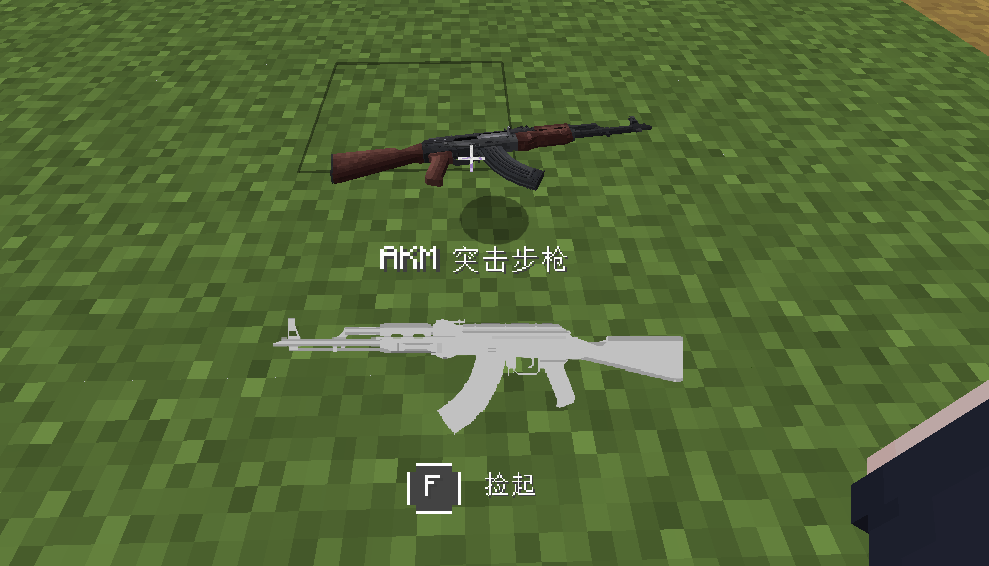
- When you aim your crosshair at a dropped gun, a polished pickup UI appears, showing the gun's name, thumbnail and a pickup prompt.
- 当你把准心对准地上的枪械时,会弹出一个精致的捡枪 UI,展示枪械的名称、缩略图和捡枪提示。
- Press the key to actually pick the gun up — just like in an FPS game: aim, confirm, grab.
- 按下按键才能真正把枪捡起来——就像 FPS 游戏里一样:瞄准、确认、拾取。
It turns picking up a gun from a mindless collision into a deliberate, controllable interaction, greatly improving immersion in both survival and PvP scenarios. 它让"捡枪"从一次无意识的碰撞,变成一个有仪式感、可操控的交互过程,大幅提升生存与 PVP 场景下的沉浸体验。
二、功能特性 / Features
🎯 沉浸式捡枪 UI / Immersive Pickup UI
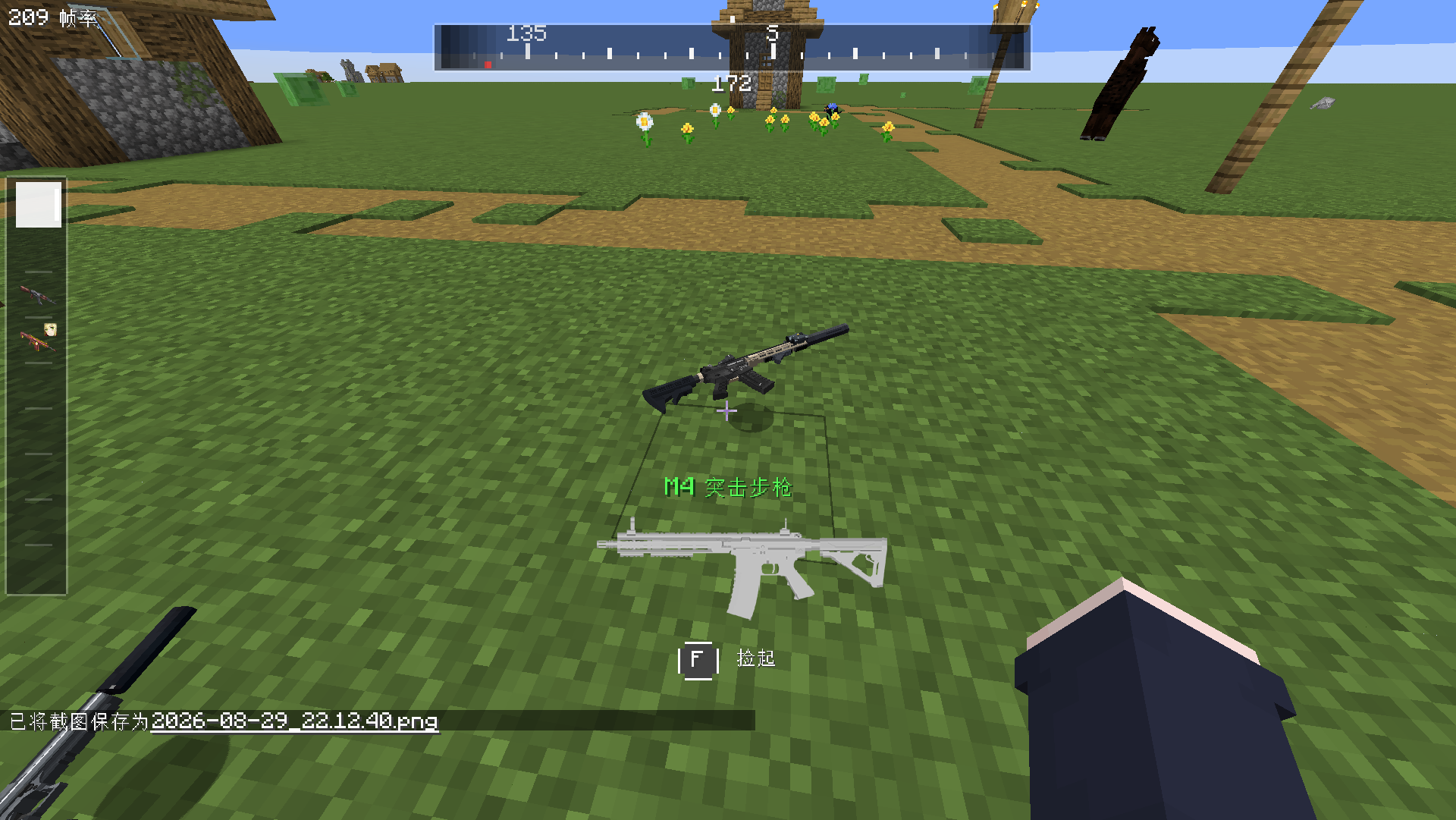
When aiming at a dropped gun, three elements are shown: 准星对准掉落枪械时,会显示三个要素:
- Gun name, enlarged and centered.
- 枪械名称,放大居中显示。
- Gun thumbnail, using the TaCZ gun HUD texture.
- 枪械缩略图,使用 TaCZ 枪械 HUD 贴图。
- Pickup prompt, a key button with text.
- 捡枪提示,按键按钮加文案。
While holding the key, a long-press progress bar (gold → green) gives clear feedback.
按住按键时会显示长按进度条(金色 → 绿色),反馈清晰。
🔫 全新的捡枪逻辑 / New Pickup Logic
Press F to pick up a gun: it goes into your hotbar, preferring the selected slot, then the first empty slot. 按 F 键捡枪:自动放入快捷栏,优先当前选中格,其次第一个空格。
If your hotbar is full, picking up a gun replaces your current held weapon — the old one is tossed toward where your crosshair points, and the new gun enters your hand. 快捷栏已满时,捡枪会直接替换当前手持枪械——旧枪会朝你准星指向的位置抛出,新枪进入手中。
Hold F to store the gun directly into your backpack, perfect for quick looting. 长按 F 键可把枪械直接放入背包,适合快速搜刮。
⚖️ 快捷栏枪械数量限制 / Hotbar Gun Limit
You can set a hotbar gun limit (1–9, with the 10th option meaning unlimited). 可设置快捷栏枪械上限(1-9,第 10 档为无限制)。
When the limit is exceeded, extra guns are automatically thrown toward your crosshair, with a "Hotbar gun limit exceeded" message. 超出上限时,多余枪械会自动向准星方向扔出,并弹出"枪械数量超过快捷栏上限"提示。
Guns are thrown right-to-left, keeping the leftmost guns in your hotbar. 扔枪顺序从右往左,保留最左侧的枪械。
💀 玩家缴获(死亡掉落)/ Player Capture (Death Drops)
When a player dies, all guns in the hotbar scatter on the ground around the corpse, easy to pick up one by one. 玩家死亡时,快捷栏中的所有枪械会在尸体位置原地散落(扇形错开),方便逐一拾取。
This works independently: even if the server has keepInventory enabled, the guns still drop. 该功能独立生效:即使服务器开启了"死亡不掉落"(keepInventory),枪械依然会掉落。
Only hotbar guns are affected; non-gun items and backpack items are untouched. 只影响快捷栏枪械;非枪械物品与背包物品不受影响。
Perfect for PvP servers: kill a player and "capture" their weapons. 非常适合 PVP 服务器:击杀玩家即可"缴获"对方的武器。
🎨 可视化配置界面 / Visual Config Editor
Open it via the Config button in the mod list, or bind a "Open Config Screen" key. 通过模组列表的 Config 按钮打开,或绑定"打开配置界面"按键。
You can adjust the hotbar gun limit, the hold-to-backpack toggle, the player capture toggle and the attachments toggle. 可以调整快捷栏枪械上限、长按入背包开关、玩家缴获开关与配件缩略图开关。
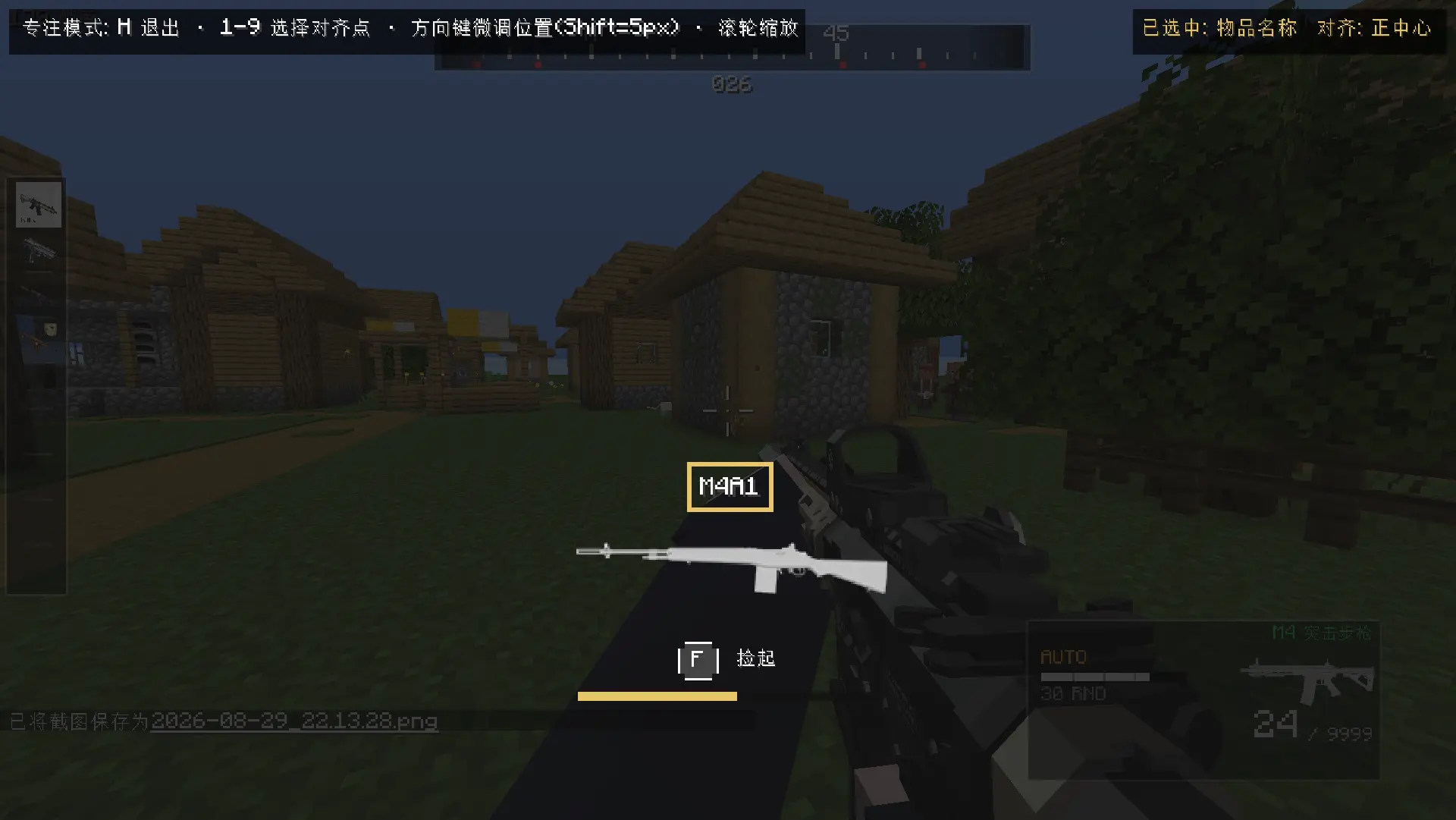
The UI editor lets you reposition, resize and restyle each of the four elements — name, thumbnail, key hint and progress bar — independently. UI 编辑器支持对名称、缩略图、按键提示、进度条四个元素独立调整位置、大小与背景样式。
Each element supports 9-point anchoring: Top-Left, Top-Center, Top-Right, Left-Center, Center, Right-Center, Bottom-Left, Bottom-Center and Bottom-Right. 每个元素支持九点对齐:左上、上中、右上、左中、正中、右中、左下、下中、右下。
Focus mode (press H) hides all buttons for distraction-free fine-tuning, with arrow keys to nudge and number keys 1–9 to quickly pick an anchor.
专注模式(按 H)会隐藏全部按钮,全屏精细调节,可用方向键微调位置、数字键 1-9 快速对齐。
🌍 多语言 / Multi-language
Simplified Chinese and English are built in, switched automatically in-game. 内置简体中文与英文,游戏内自动切换。
三、操作指南 / Controls
| 操作 Action | 按键 Key (default, rebindable) |
|---|---|
| 捡起枪械(放入快捷栏)Pick up a gun (into hotbar) | F(长按 F 放入背包 / hold F for backpack) |
| 打开配置界面 Open config screen | 模组列表 → Config,或自行绑定按键 / Mods list → Config, or bind your own key |
四、安装要求 / Requirements
You need Minecraft 1.20.1 with Forge 47.x. 需要 Minecraft 1.20.1 与 Forge 47.x。
You need TaCZ (Timeless and Classics: Zero) 1.0.3 or newer. 需要安装 TaCZ(Timeless and Classics: Zero)1.0.3 及以上。
Put the .jar file into the mods folder and launch the game. 将本模组的 .jar 文件放入 mods 文件夹,启动游戏即可。
Install this mod on both client and server; single-player is automatically satisfied. 客户端与服务端都需要安装本模组;单机自动满足。
五、常见问题 / FAQ
Q: Why don't I automatically pick up guns anymore? 问:为什么靠近枪械不会自动捡起来了?
A: That is the core design of this mod — picking up is now manual and aim-based. Press F to grab a gun. 答:这是本模组的核心设计——捡枪改为手动瞄准拾取。按 F 键即可捡起。
Q: Where did my old gun go when I picked up a new one? 问:捡枪时手里原来的枪去哪了?
A: When the hotbar is full, the new gun replaces your held weapon. The old gun is tossed toward where your crosshair points and can be picked back up. 答:快捷栏已满时会替换手持枪械,旧枪会朝你准心所指的方向抛出,可以再捡回。
Q: Why did my guns still drop even with keepInventory enabled? 问:死亡不掉落开启后,为什么枪还是掉了?
A: That's the "Player Capture" feature, which works independently of vanilla death drops and can be disabled in the config screen. 答:这是"玩家缴获"功能,独立于原版死亡掉落规则,可在配置界面关闭。
Q: I don't like the UI position or size. What can I do? 问:UI 位置或大小不满意怎么办?
A: Open the config screen, enter "Edit UI Position & Size", and use the visual editor to adjust everything freely, with 9-point anchoring and background styling. 答:进入配置界面的"编辑UI位置大小",用可视化编辑器自由调整,支持九点对齐与背景样式。
Screenshots
Gallery
-
 2026-08-29_22.12.31.png 2026-08-29_22.12.31.png
 -
 2026-08-29_22.12.32.png 2026-08-29_22.12.32.png
 -
 2026-08-29_22.12.40.png 2026-08-29_22.12.40.png
 -
 2026-08-29_22.12.44.png 2026-08-29_22.12.44.png
 -
 2026-08-29_22.12.57.png 2026-08-29_22.12.57.png
 -
 2026-08-29_22.13.28.png 2026-08-29_22.13.28.png
 -
 2026-08-29_22.13.34.png 2026-08-29_22.13.34.png
-
 UI 展示 展示UI的效果
 -
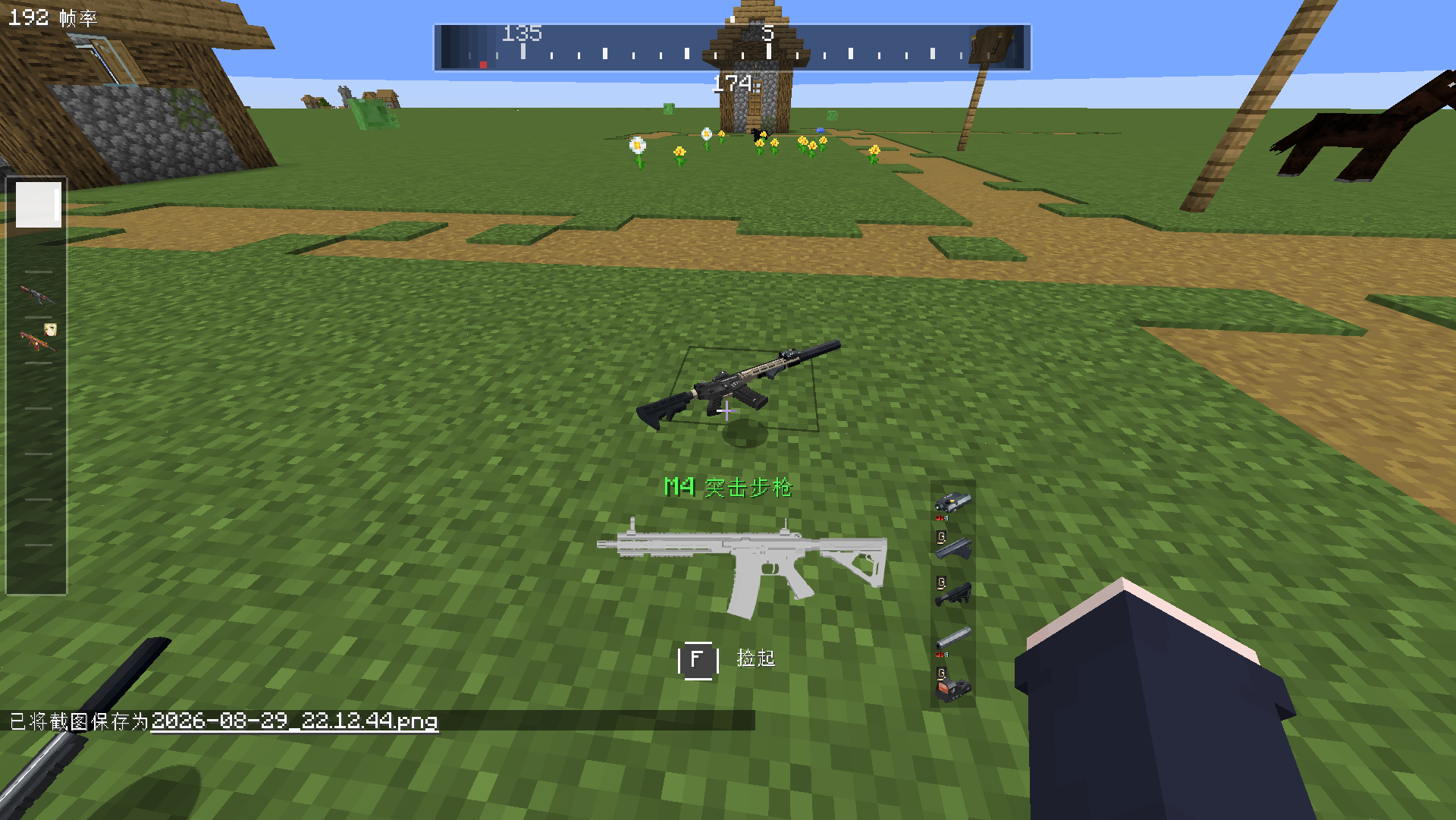 UI 展示 枪械配件 展示地面枪械的枪械配件
 -
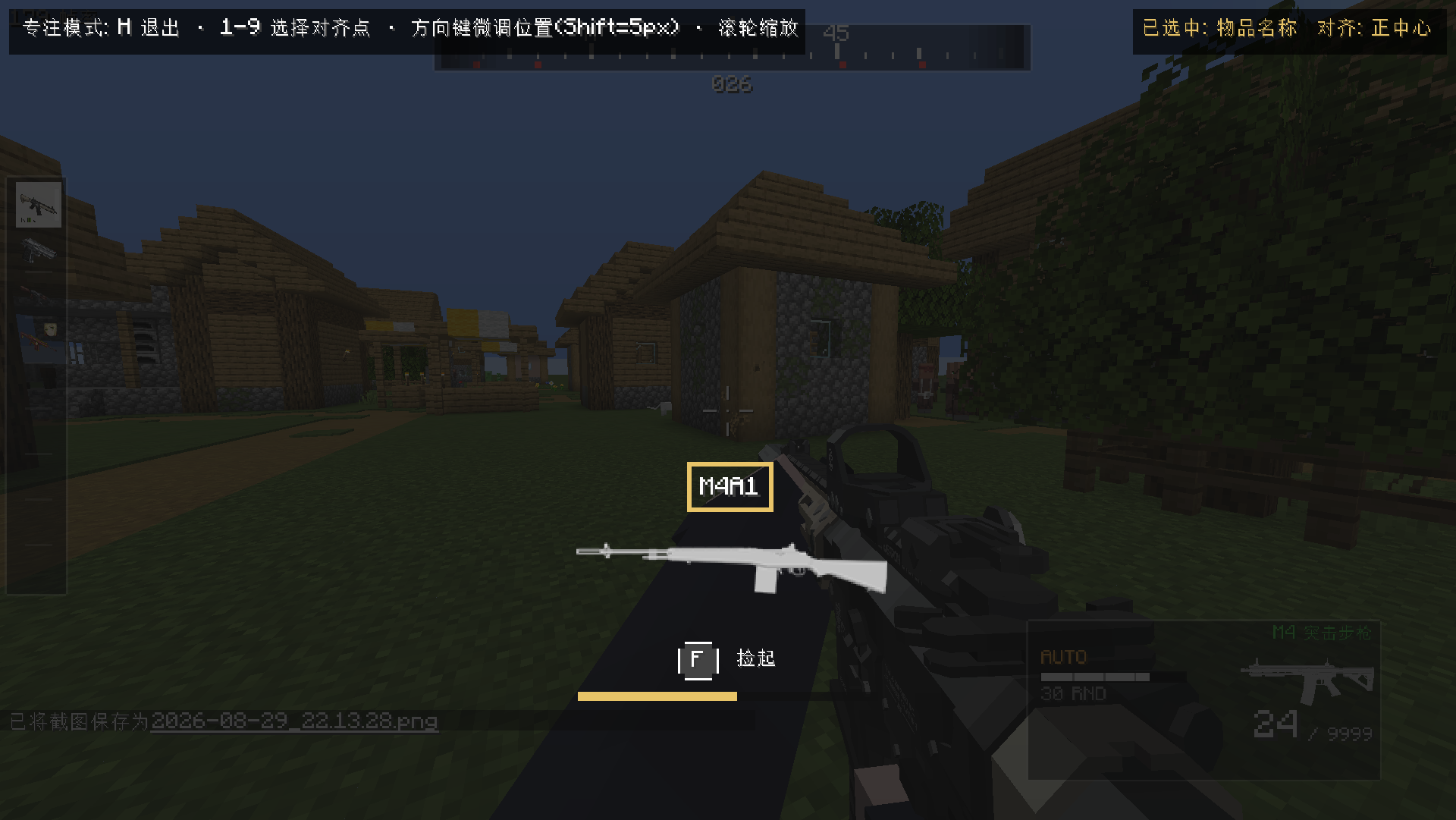 编辑器展示 编辑器是如何运行的
Versions
Files
Relations
Project Relations
More like this
Similar Mods
Suggestions use data such as tags, dependencies, dependents, descriptions, titles, and more to rank how much they overlap with this mod.
- [TaCZ] Timeless and Classics Zero Guns
- TaCZ addon
- [TACZ] LesRaisins Tactical Equipements
- [TaCZ] LesRaisins Append Pack
- TaCZ Tweaks
- [TACZ]Enchanted Arsenal
- [TACZ] Gucci & Vuitton Attachments
- TACZ: Durability (Timeless and Classics Guns)
- TaCZ: TES Compat
- TaCZ Ammo Query
- TACZ Bullet Proof Enchant Add-on
- [TaCZ] Endless Ammo
On ModDex
Community snapshot
By the numbers
Statistics
Want to reach Minecraft players?
We're looking for a server hosting partner to feature here and other parts of the site. Interested? Send us a message!
Get in touchGet it on
Available Platforms
On ModDex
Community snapshot
By the numbers
Statistics
Resources