
Community listing page, reviews here may not be monitored by the author.
Talking Colonists (Minecolonies Addon)


No reviews yet
This mod uses the Gemini Flash 3 Live API to enable talking to the citizens. They talk about their happiness, job, whatever you like!
Community voices
Reviews
No reviews yet. Be the first to review this project!
Get it on
Available Platforms
Compatibility
Supported Environments
Must be installed on both the client and the server.
About
Project Details
For authors
Embed Badge
If you're the author of this project, you can embed a live badge anywhere that supports HTML or Markdown. It updates automatically whenever ratings change.
Use HTML for any page that supports it, or Markdown for README files and Markdown-based descriptions.
Identifiers
Platform IDs
About
Description
You can interactively talk to citizens in your minecolonies just as if they were alive!
New: Colony members can now talk with each other and initiate a conversation with you!
Got questions? Join the discord server!
Also I'm open for open to commissions!
Make sure you are using the latest version of the mod! Older versions might have bugs
Setup Guide
Last tested versions for Minecolonies are:
- Neoforge: 1.1.1305-1.21.1-snapshot
- Forge: 1.20.1-1.1.1218-snapshot
It is possible for later versions of minecolonies for this mod to break.
- Install all dependencies (Minecolonies, Voicechat and Gemini Live Lib)
Video Tutorial:
Needed link: AiStudio
Text Tutorial:

Head to the Google AI Studio and create an API key by pressing the white create API key button
Copy the token
Either the config file via text editor in
config/yacl-mc_talking.json5or via the in-game GUI. Set the token and your desired speaking language:
// This key is used to authenticate with the Gemini API. You can get one at https://aistudio.google.com/apikey  geminiApiKey: "Put your api key here", // don't forget the comma!(The free tier allows up to 3 citizens to be spoken at the same time)
Usage
Craft a Citizen Communication Device using a Book and Quill and a Redstone Torch (I would really appreciate it if someone could create a better texture for it):  Then left click on a citizen you want to talk to and something similar to this will show:
Now the citizen will complain if they are unhappy or missing some resources, just talk right away!
How do I change the language of the citizens?
First have a look at this table and remember your languages "BCP-47 Code" and update the config via notepad in your minecraft serer/modpack location or via ingame ui:
language = "put your languages code here"Troubleshooting
The Citizen isn't speaking, it just shows "listening"
This issue might be related to having the wrong input device set. To make sure your set up is working correctly, open the voice chat settings (by default this is done by pressing v), then click on "Settings" and press the microphone button. If you can't hear yourself talking, adjust input / output devices
My Citizen Status shows "Talking" but I can't hear anything
Same issue as above
Can I include this in my modpack?
Yup
Just a quick disclaimer: If you are using the free tier, google may use data for improvement outside the UK/CH/EEA/EU
You can interactively talk to citizens in your minecolonies just as if they were alive!
Setup Guide
- Install all dependencies (Minecolonies, Voicechat and Gemini Live Lib)
- Head to the Google AI Studio and create an API key by pressing the blue button:
3. Copy the token
- Either the config file via text editor in
config/mc_talking-common.tomlor via the in-game GUI. Set the token and your desired speaking language:
#This key is used to authenticate with the Gemini API. You can get one at https://aistudio.google.com/apikey
gemini_key = "Put your API key here"
(The free tier allows up to 3 citizens to be spoken at the same time)
Usage
Craft a Citizen Communication Device using a Book and Quill and a Redstone Torch (I would really appreciate it if someone could create a better texture for it):
Then left-click on a citizen you want to talk to and something similar to this will show:
Now the citizen will complain if they are unhappy or missing some resources, just talk right away!
Can I include this in my modpack?
Yup
Screenshots
Gallery
-
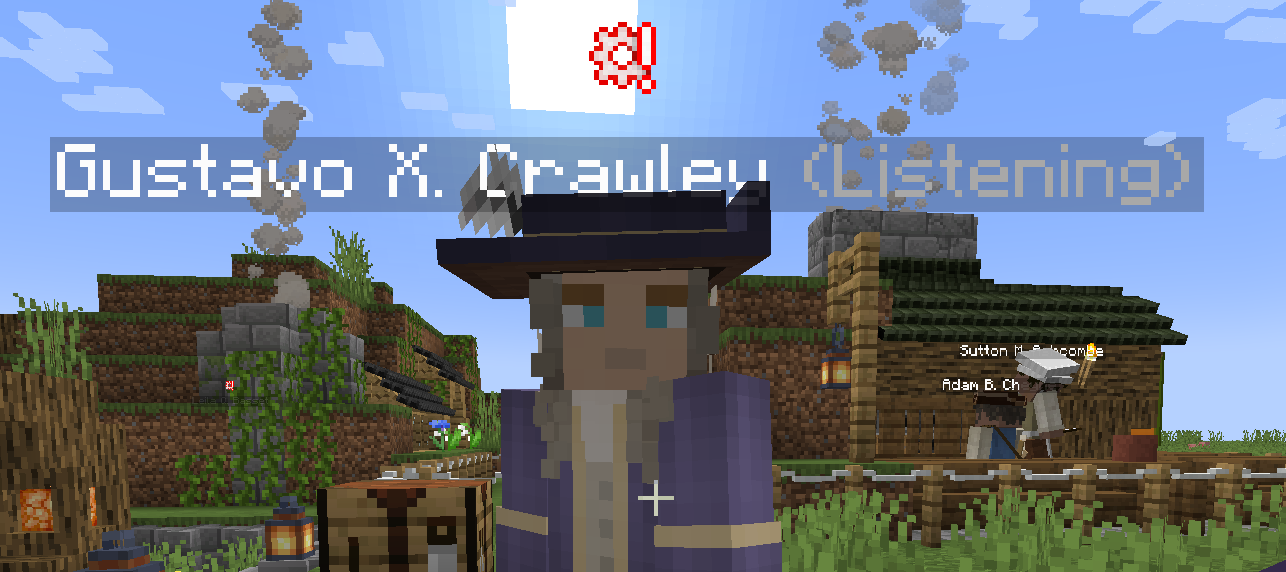 Citizen listening The citizen is listening and is generating a answer
Versions
Files
Relations
Project Relations
More like this
Similar Mods
Suggestions use data such as tags, dependencies, dependents, descriptions, titles, and more to rank how much they overlap with this mod.
On ModDex
Community snapshot
By the numbers
Statistics
Want to reach Minecraft players?
We're looking for a server hosting partner to feature here and other parts of the site. Interested? Send us a message!
Get in touchGet it on
Available Platforms
On ModDex
Community snapshot
By the numbers