
Community listing page, reviews here may not be monitored by the author.
The Toolkits


No reviews yet
A utility bundle for modded minecraft, including recipe dumping, nbt inspection etc

Community voices
Reviews
No reviews yet. Be the first to review this project!
Get it on
Available Platforms
Compatibility
Supported Environments
Must be installed on both the client and the server.
About
Project Details
For authors
Embed Badge
If you're the author of this project, you can embed a live badge anywhere that supports HTML or Markdown. It updates automatically whenever ratings change.
Use HTML for any page that supports it, or Markdown for README files and Markdown-based descriptions.
Identifiers
Platform IDs
About
Description
Link Item
Quark has a shift-T command that can link an item to chat, but it cannot be used in JEI ingredient and bookmark overlay. This mod adds a new shortcut (configurable, default shift-/) that can be used in all these cases. The text is also clickable, which will open the inventory (so is JEI) and input the search term for you. You need to set resource id search to "REQUIRE_PREFIX" in order for the search to work.
open JEI command
/the-toolkits jei search_term
This command is used in the implementation of the link-item function. You may find this useless.
print item nbt
This command print nbt of item to chat. You hold the item and run this command, that's it. You need to be OP to use this OP command.
/the-toolkits nbt get
print player attributes
This command prints player attributes like speed. There are two types of attributes (syncable and dirty). I don't know the difference between them, so I just print them all. This command can be useful, e.g. when you want to understand how apotheosis works, since in apotheosis many effects are implemented by injecting new attributes in the player. You need to be OP to use this command.
/the-toolkits attributes get
recipe dump
This is a newly added feature, currently only available in 1.16.5 and will be ported into higher version in the future. Recipes can be categorized by Serializer, whose name is a resource id, like "minecraft:crafting_shaped" or "create:mechanical_crafting". The first part is "namespace", and the second is "path". This command takes parameters based on this concept.
List all namespaces:
/the-toolkits recipe list
List all paths under this namespace:
/the-toolkits recipe ns list
List all recipes id under this ns:path:
/the-toolkits recipe ns path list
Randomly print one recipe under this ns:path:
/the-toolkits recipe ns path random
Dump recipes under this category (in the form of json), watch the output to see where the result is stored:
/the-toolkits recipe ns path dump
This command may not work well for all type of recipe and will/need to be improved. Read below for the reason.
Let's talk a bit more about the implementation.
It works mostly on IRecipe interface so the basic info are dumped by calling various getter function.
For shaped crafting its a bit special. Shaped crafting have a width/height field which is not presented in the IRecipe interface, and without the height/width you will not able to know how to craft with only the other exported data. So for shaped crafting it takes as a special case and will do a type cast to also export the height and width info. Other recipes kind like create's mechanical crafting seems to inherit from shaped crafting class so will have a height/width too, which is handy and I guess will also benefit some other mods with similar behavior.
For other kind of recipes that needs more fields to "restore" needs to be handled case by case just like the shaped crafting type.
entity inspection command
Wonder what is lagging your world? After you use mods like spark to have an idea of what contributes the most of the lag, do you want to know the location of them? This command helps you dump every entity's location
of a given entity type (you can use classname, name or registry name). This will be useful if you are the OP of a server and want to inspect where exactly is causing the lag. (recommend to be used with spark or other profiler mods)
/the-toolkits entity summary classname/name/registry_name # have a summary of all the entities count
/the-toolkits entity locations classname/name/registry_name name # dump the locations of them
Similar command exists for block_entity as well, replace entity with block_entity and let the suggestion guides you to dump locations of block entities.
Link Item
Quark has a shift-T command that can link an item to chat, but it cannot be used in JEI ingredient and bookmark overlay. This mod adds a new shortcut (configurable, default shift-/) that can be used in all those mentioned screens. The text is also clickable, which will open the inventory (so the JEI) and input the search term for you. You need to set resource id search to "REQUIRE_PREFIX" in order for the search to work.
open JEI command
/the-toolkits jei <search_term>
This command is used in the implementation of the link-item function. You may find this useless.
print item nbt
This command print nbt of item to chat. You hold the item and run this command, that's it. You need to be OP to use this OP command.
/the-toolkits nbt get
print player attributes
This command prints player attributes like speed. There are two types of attributes (syncable and dirty). I don't know the difference between them, so I just print them all. This command can be useful, e.g. when you want to understand how apotheosis works, since in apotheosis many effects are implemented by injecting new attributes in the player. You need to be OP to use this command.
/the-toolkits attributes get
recipe dump
This is a newly added feature, currently only available in 1.16.5 and will be ported into higher version in the future. Recipes can be categorized by Serializer, whose name is a resource id, like "minecraft:crafting_shaped" or "create:mechanical_crafting". The first part is "namespace", the second is "path". This command takes parameters based on this concept.
List all namespaces:
/the-toolkits recipe list
List all paths under this namespace:
/the-toolkits recipe <ns> list
List all recipes id under this ns:path:
/the-toolkits recipe <ns> <path> list
Randomly print one recipe under this ns:path:
/the-toolkits recipe <ns> <path> random
Dump recipes under this category (in the form of json), watch the output to see where the result is stored:
/the-toolkits recipe <ns> <path> dump
This command may not work for all type of recipe and will/need to be improved
entity inspection command
Wonder what is lagging your world? After you use mods like spark to have an idea of what contributes the most of the lag, do you want to know the location of them? This command helps you dump every entity's location of a given entity type (you can use classname, name or registry name). This will be useful if you are the OP of a server and want to inspect where exactly is causing the lag. (recommend to be used with spark or other profiler mods)
/the-toolkits entity summary classname/name/registry_name # have a summary of all the entities count
/the-toolkits entity locations classname/name/registry_name name # dump the locations of them
Similar command exists for block_entity as well, replace entity with block_entity and let the suggestion guides you to dump locations of block entities.
Screenshots
Gallery
-
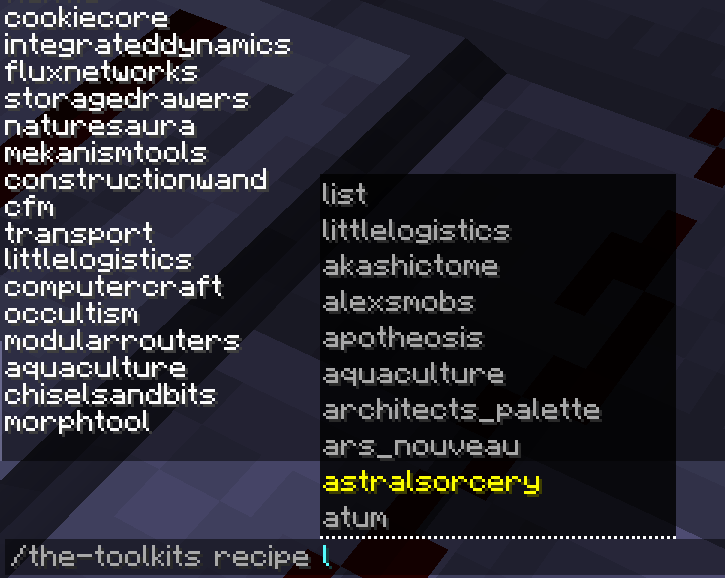 recipe list namespace list namespace, also the namespace would be suggested.
Versions
Files
Relations
Project Relations
More like this
Similar Mods
Suggestions use data such as tags, dependencies, dependents, descriptions, titles, and more to rank how much they overlap with this mod.
On ModDex
Community snapshot
By the numbers
Statistics
 (opens in a new tab)
Get it on
Available Platforms
On ModDex
Community snapshot
By the numbers