Community listing page, reviews here may not be monitored by the author.
TradeChest


No reviews yet
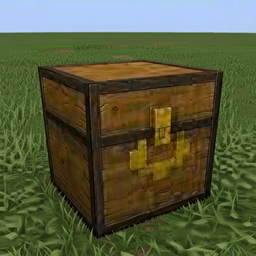
A Minecraft Fabric mod that adds automatic trading chests with a 9x5 inventory layout. Set up vending machine-style shops where customers place buy items and automatically receive sell items in return.

Community voices
Reviews
No reviews yet. Be the first to review this project!
Get it on
Available Platforms
Compatibility
Supported Environments
Must be installed on both the client and the server.
About
Project Details
For authors
Embed Badge
If you're the author of this project, you can embed a live badge anywhere that supports HTML or Markdown. It updates automatically whenever ratings change.
Use HTML for any page that supports it, or Markdown for README files and Markdown-based descriptions.
Identifiers
Platform IDs
About
Description
TradeChest Mod
A Minecraft Fabric mod that adds automatic trading chests with a 9x5 inventory layout. Set up vending machine-style shops where customers place buy items and automatically receive sell items in return.



Features
- Automatic Trading System: Place buy items, get sell items automatically delivered to pickup zone
- 9x5 Inventory Layout: Dedicated areas for buy items, pickup, configuration, owner collection, and sell storage
- Ownership System: Secure your trade setups with username-based ownership
- No Normal Chest Usage: Trade chests can only be used when properly configured
- Item Movement: Buy items automatically move to owner collection area after trades
Requirements
- Minecraft 1.20.1
- Fabric Loader 0.15.7+
- Fabric API
- Java 17 or higher
Installation
For Players
Install Fabric Loader
- Download and run the Fabric Installer
- Select Minecraft 1.20.1 and install Fabric
Download Dependencies
- Download Fabric API for 1.20.1
- Place the Fabric API JAR in your
.minecraft/modsfolder
Install TradeChest Mod
- Download the latest TradeChest mod JAR file
- Place it in your
.minecraft/modsfolder
Launch Game
- Start Minecraft with the Fabric profile
- The Trade Chest item will be available in the Functional Blocks creative tab
For Developers
Clone Repository
git clone https://github.com/rodortega/mc-tradechest.git
cd mc-tradechest
Build from Source
./gradlew buildRun in Development
./gradlew runClient
How to Use
Crafting
Craft a Trade Chest using this recipe:
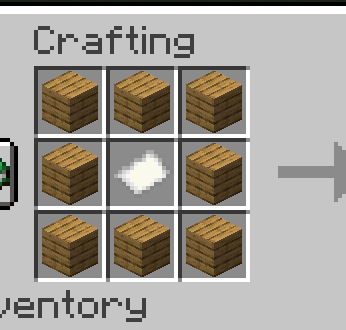
[Planks] [Planks] [Planks]
[Planks] [Paper ] [Planks]
[Planks] [Planks] [Planks]
Basic Setup
Place the Trade Chest - Cannot be used until configured with an owner
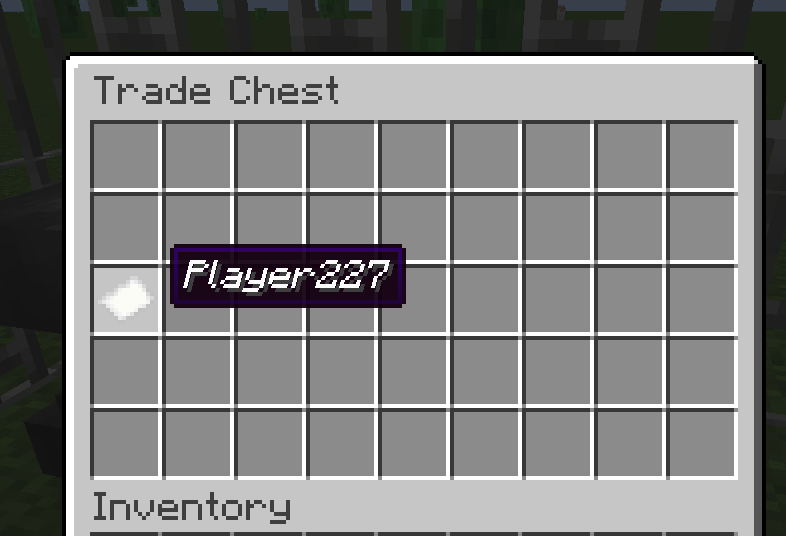
Set Ownership (Slot 18):
- Rename a paper with your exact username using an anvil
- Place it in slot 18 (first slot of third row)
- You are now the owner and can manage the chest
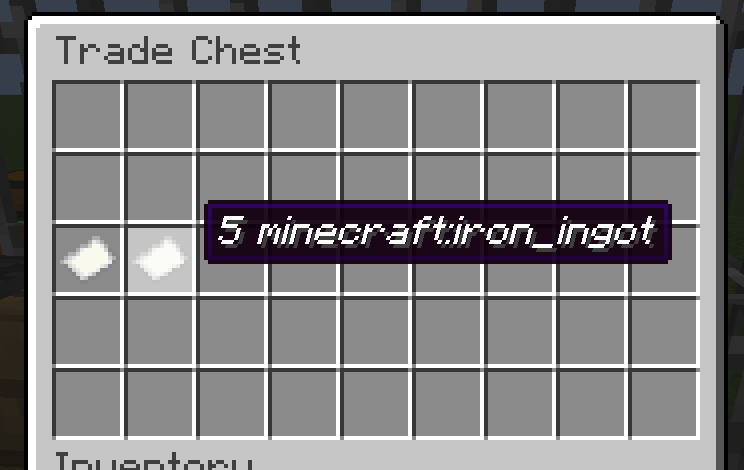
- Configure Buy Requirements (Slot 19):
- Rename a paper:
10 minecraft:iron_ingot - Place in slot 19
- This determines what customers must provide
- Rename a paper:
- Configure Sell Items (Slot 20):
- Rename a paper:
5 minecraft:diamond - Place in slot 20
- This determines what customers receive
- Rename a paper:
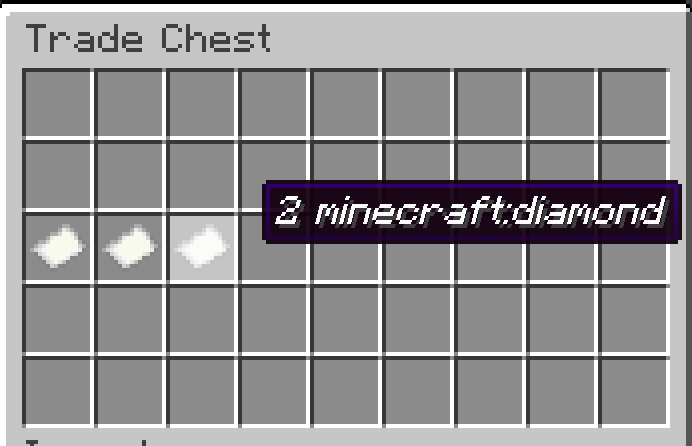
- Stock Sell Items:
- Place diamonds in the bottom row (slots 36-44)
- Only the configured sell item type can be placed there
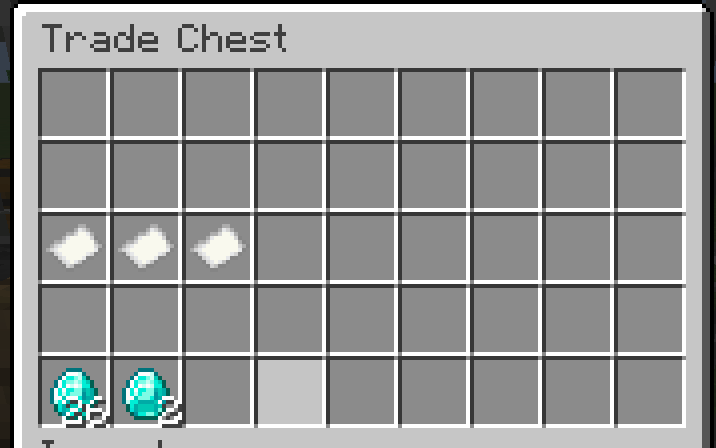
- Ready to Trade:
- Customers place iron ingots in top row (slots 0-8)
- Diamonds automatically appear in pickup zone (slots 9-17)
- Iron ingots move to your collection area (slots 27-35)
Inventory Layout (9x5)
Row 1: [Buy Items Input Area - Customers place buy items here]           (Slots 0-8)
Row 2: [Pickup Zone - Traded items appear here automatically]           (Slots 9-17)
Row 3: [OWNER] [BUY] [SELL] [----LOCKED CONFIGURATION AREA----]         (Slots 18-26)
Row 4: [Owner Collection - Buy items go here after trades]              (Slots 27-35)
Row 5: [Sell Items Storage - Owner stocks sell items here]              (Slots 36-44)
How Trading Works
- Customer Action: Places 10 iron ingots in row 1
- Automatic Processing: System detects complete trade
- Item Movement:
- 5 diamonds move from row 5 to row 2 (pickup zone)
- 10 iron ingots move from row 1 to row 4 (owner collection)
- Customer Pickup: Customer takes diamonds from row 2
- Excess Handling: If customer placed 15 iron, 5 excess remain in row 1 for pickup
Example: Automatic Diamond Shop
Setup Phase:
- Rename papers:
YourUsername,10 minecraft:iron_ingot,5 minecraft:diamond - Place papers in slots 18, 19, 20 respectively
- Stock 64 diamonds in bottom row (slots 36-44)
- Rename papers:
Customer Transaction:
- Customer places 20 iron ingots in top row
- System automatically processes 2 trades (20 ÷ 10 = 2)
- 10 diamonds appear in pickup zone (5 × 2 = 10)
- 20 iron ingots move to owner collection area
- Customer takes 10 diamonds from pickup zone
Owner Benefits:
- Collect 20 iron ingots from row 4 anytime
- Restock diamonds in row 5 as needed
- No manual intervention required
Permissions
| Slot Range | Area | Customers Can | Owner Can |
|---|---|---|---|
| 0-8 | Buy Items Input | Place buy items, take excess | Full access |
| 9-17 | Pickup Zone | Take any items | Full access |
| 18-20 | Configuration | None | Place/remove papers |
| 21-26 | Locked Area | None | None |
| 27-35 | Owner Collection | None | Full access |
| 36-44 | Sell Storage | None | Stock sell items |
Paper Formats
- Owner Paper: Just your exact username (e.g.,
Steve) - Buy Paper:
[amount] [item_id](e.g.,10 minecraft:iron_ingot) - Sell Paper:
[amount] [item_id](e.g.,5 minecraft:diamond)
Troubleshooting
- Can't use chest at all: You need to place an owner paper in slot 18 first
- Can't remove owner paper: Make sure the paper name exactly matches your in-game username
- Can't place buy/sell papers: You must be the owner (have your name paper in slot 18)
- Trading not working: Ensure both buy and sell papers are configured in slots 19-20
- Can't place items in bottom row: Only the configured sell item type is allowed in slots 36-44
- Items not moving automatically: Check that you have sell items stocked and pickup zone isn't full
Building
This mod uses the Fabric toolchain:
# Clean and build
./gradlew clean build

# Run client for testing
./gradlew runClient

# Generate sources jar
./gradlew sourcesJar
Development
Project Structure
src/main/java/com/rodmod/tradechest/- Main mod codesrc/main/resources/- Assets and data filesbuild.gradle- Build configurationgradle.properties- Project properties
Key Classes
RodMod- Main mod initializerTradeChestBlock- Block implementationTradeChestBlockEntity- Block entity with inventory logicTradeChestMenu- Container menu for GUITradeChestSlot- Custom slot with placement restrictions
License
This mod is available under the CC0 license. Feel free to learn from it and incorporate it in your own projects.
TradeChest Mod
A Minecraft Fabric mod that adds automatic trading chests with a 9x5 inventory layout. Set up vending machine-style shops where customers place buy items and automatically receive sell items in return.

Features
- Automatic Trading System: Place buy items, get sell items automatically delivered to pickup zone
- 9x5 Inventory Layout: Dedicated areas for buy items, pickup, configuration, owner collection, and sell storage
- Ownership System: Secure your trade setups with username-based ownership
- No Normal Chest Usage: Trade chests can only be used when properly configured
- Item Movement: Buy items automatically move to owner collection area after trades
Requirements
- Minecraft 1.20.1
- Fabric Loader 0.15.7+
- Fabric API
- Java 17 or higher
Installation
For Players
-
Install Fabric Loader
- Download and run the Fabric Installer
- Select Minecraft 1.20.1 and install Fabric
-
Download Dependencies
- Download Fabric API for 1.20.1
- Place the Fabric API JAR in your
.minecraft/modsfolder
-
Install TradeChest Mod
- Download the latest TradeChest mod JAR file
- Place it in your
.minecraft/modsfolder
-
Launch Game
- Start Minecraft with the Fabric profile
- The Trade Chest item will be available in the Functional Blocks creative tab
For Developers
-
Clone Repository
git clone https://github.com/rodortega/mc-tradechest.git cd mc-tradechest -
Build from Source
./gradlew build -
Run in Development
./gradlew runClient
How to Use
Crafting
Craft a Trade Chest using this recipe:
[Planks] [Planks] [Planks]
[Planks] [Paper ] [Planks]
[Planks] [Planks] [Planks]
Basic Setup
-
Place the Trade Chest - Cannot be used until configured with an owner
-
Set Ownership (Slot 18):
- Rename a paper with your exact username using an anvil
- Place it in slot 18 (first slot of third row)
- You are now the owner and can manage the chest
- Configure Buy Requirements (Slot 19):
- Rename a paper:
10 minecraft:iron_ingot - Place in slot 19
- This determines what customers must provide
- Rename a paper:
- Configure Sell Items (Slot 20):
- Rename a paper:
5 minecraft:diamond - Place in slot 20
- This determines what customers receive
- Rename a paper:
- Stock Sell Items:
- Place diamonds in the bottom row (slots 36-44)
- Only the configured sell item type can be placed there
- Ready to Trade:
- Customers place iron ingots in top row (slots 0-8)
- Diamonds automatically appear in pickup zone (slots 9-17)
- Iron ingots move to your collection area (slots 27-35)
Inventory Layout (9x5)
Row 1: [Buy Items Input Area - Customers place buy items here]           (Slots 0-8)
Row 2: [Pickup Zone - Traded items appear here automatically]           (Slots 9-17)
Row 3: [OWNER] [BUY] [SELL] [----LOCKED CONFIGURATION AREA----]         (Slots 18-26)
Row 4: [Owner Collection - Buy items go here after trades]              (Slots 27-35)
Row 5: [Sell Items Storage - Owner stocks sell items here]              (Slots 36-44)
How Trading Works
- Customer Action: Places 10 iron ingots in row 1
- Automatic Processing: System detects complete trade
- Item Movement:
- 5 diamonds move from row 5 to row 2 (pickup zone)
- 10 iron ingots move from row 1 to row 4 (owner collection)
- Customer Pickup: Customer takes diamonds from row 2
- Excess Handling: If customer placed 15 iron, 5 excess remain in row 1 for pickup
Example: Automatic Diamond Shop
-
Setup Phase:
- Rename papers:
YourUsername,10 minecraft:iron_ingot,5 minecraft:diamond - Place papers in slots 18, 19, 20 respectively
- Stock 64 diamonds in bottom row (slots 36-44)
- Rename papers:
-
Customer Transaction:
- Customer places 20 iron ingots in top row
- System automatically processes 2 trades (20 ÷ 10 = 2)
- 10 diamonds appear in pickup zone (5 × 2 = 10)
- 20 iron ingots move to owner collection area
- Customer takes 10 diamonds from pickup zone
-
Owner Benefits:
- Collect 20 iron ingots from row 4 anytime
- Restock diamonds in row 5 as needed
- No manual intervention required
Permissions
| Slot Range | Area | Customers Can | Owner Can |
|---|---|---|---|
| 0-8 | Buy Items Input | Place buy items, take excess | Full access |
| 9-17 | Pickup Zone | Take any items | Full access |
| 18-20 | Configuration | None | Place/remove papers |
| 21-26 | Locked Area | None | None |
| 27-35 | Owner Collection | None | Full access |
| 36-44 | Sell Storage | None | Stock sell items |
Paper Formats
- Owner Paper: Just your exact username (e.g.,
Steve) - Buy Paper:
[amount] [item_id](e.g.,10 minecraft:iron_ingot) - Sell Paper:
[amount] [item_id](e.g.,5 minecraft:diamond)
Troubleshooting
- Can't use chest at all: You need to place an owner paper in slot 18 first
- Can't remove owner paper: Make sure the paper name exactly matches your in-game username
- Can't place buy/sell papers: You must be the owner (have your name paper in slot 18)
- Trading not working: Ensure both buy and sell papers are configured in slots 19-20
- Can't place items in bottom row: Only the configured sell item type is allowed in slots 36-44
- Items not moving automatically: Check that you have sell items stocked and pickup zone isn't full
Building
This mod uses the Fabric toolchain:
# Clean and build
./gradlew clean build

# Run client for testing
./gradlew runClient

# Generate sources jar
./gradlew sourcesJar
Development
Project Structure
src/main/java/com/rodmod/tradechest/- Main mod codesrc/main/resources/- Assets and data filesbuild.gradle- Build configurationgradle.properties- Project properties
Key Classes
RodMod- Main mod initializerTradeChestBlock- Block implementationTradeChestBlockEntity- Block entity with inventory logicTradeChestMenu- Container menu for GUITradeChestSlot- Custom slot with placement restrictions
License
This mod is available under the CC0 license. Feel free to learn from it and incorporate it in your own projects.
Screenshots
Gallery
Versions
Files
Relations
Project Relations
More like this
Similar Mods
Suggestions use data such as tags, dependencies, dependents, descriptions, titles, and more to rank how much they overlap with this mod.
On ModDex
Community snapshot
By the numbers
Statistics
 (opens in a new tab)
Get it on
Available Platforms
On ModDex
Community snapshot
By the numbers