Community listing page, reviews may not be monitored by the author.
Tycoon Market

No reviews yet
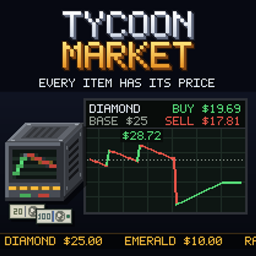
Every item has a price that moves with trade. Buy and sell at the Market Terminal, sell farm output through the Market Depot, fulfil daily contracts, and let auto-buy feed the Litematica printer.

Community voices
Reviews
No reviews yet. Be the first to review this project!
Get it on
Available Platforms
About
Project Details
For authors
Embed Badge
If you're the author of this project, you can embed a live badge anywhere that supports HTML or Markdown. It updates automatically whenever ratings change.
Use HTML for any page that supports it, or Markdown for README files and Markdown-based descriptions.
Identifiers
Platform IDs
Resources
External Links
About
Description
Tycoon Market
Every item has its price.
Tycoon Market gives Minecraft a market. Every item has a value - worked out from what it takes to find or to craft it - and that value moves: buying pushes a price up, selling pushes it down, and on quiet days it slowly sinks. Sell your ore, your wheat or a double chest of cobblestone at the Market Terminal, buy what you are missing, and watch the price chart while you do it.
A price for (almost) everything
- Over 1,200 vanilla items have a base price. Raw materials are priced by effort and rarity - dirt and cobblestone a cent, an oak log 20 cents, raw iron 90 cents, an emerald $10, a diamond $25.
- Everything craftable is priced from its real recipe: the ingredients plus 10 percent for the work, smelting plus a little fuel. An iron block costs nine ingots and a bit more, so crafting back and forth never prints money.
- Other mods' items too. Items with a recipe but no price are priced from the server's own recipes by the same rule, and common raw materials of other mods (tin, lead, silver, uranium, ruby, sapphire ...) have prices by tag.
Prices that move
- Every unit bought raises the price, every unit sold lowers it - a diamond more than a cobblestone, and gently: a stack of raw iron moves its price by about 3 percent.
- Quiet days let a price sink. On every Minecraft day nobody trades an item, its price drifts down towards 75 percent of the base price - and after heavy selling it recovers towards that level again. Selling ore stays worth it, even if you never buy anything.
- Prices stay sane: never below a quarter or above four times the base price.
- Fair trading. The market asks a little above and pays a little below the price, so buying and selling straight back always loses money. Everything sells for at least a cent - even dirt.
The Market Terminal
Crafted from iron ingots, a glass pane, two emeralds and redstone. Right-click it to trade:
- categories on the left, plus In inventory for everything you carry that the market buys
- a search, buy and sell prices with the 7-day trend, sortable columns
- + buys 1 (Shift a stack, Ctrl 16), − sells 1 (Shift a stack, Ctrl all) straight from your inventory
- click an item for its price chart over 30 days, 90 days or a year, with the base price for comparison - and your balance and today's date from Tycoon Calendar in view
Purchases are paid from your Money account first, the rest in clean cash; sales go to your account. Only plain items are bought - nothing enchanted, damaged or named. By default the terminal trades vanilla items only.
Prices in every tooltip. Every item the market deals in shows "Market: $x.xx" in its tooltip - hold Shift for the whole stack. No terminal needs to be open, and it can be switched off in the config.
The Market Depot
An automatic seller for your farms. Hoppers and pipes feed it from any side, and once a second it sells its contents for whoever placed it - same price, same spread, same effect on the market as selling by hand, paid to the owner's account, also while they are offline. It only takes what the terminal would buy, so pipes never clog. A farm that sells more than the market recovers each day still pushes the price down - the depot is only as good as the market behind it.
Auto-buy while printing
Building from a schematic? With Forgematica and the NeoForgematica Printer on the client, the printer no longer stops when material runs out. Every two seconds it looks at the blocks it places next, and the server buys just what is missing - only as much as the printer places until the next look, never stacks ahead - at the terminal price, straight into your inventory. An actionbar line shows what was bought and how much of your daily limit is left.
- Off by default:
/market autobuy on|off, a daily limit per player (/market autobuy limit <dollars>) and an adjustable interval (/market autobuy interval <seconds>). - The server checks everything: clean cash only, a daily limit, a price cap per unit, a request limit, and it subtracts what you already carry - nothing the client sends is trusted.
- Packs decide where it works: by default anywhere, or only within reach of a Market Terminal
(
autobuy.terminalRange), or not at all.
Without Forgematica nothing changes, and a dedicated server never needs it.
Daily contracts
The terminal's Contracts tab has three new orders every Minecraft day: one from the forest (logs, saplings, seeds ...), one from the first mine and farm, one from the deep. Deliver the goods and get twice the base price paid into your account - a good way to your first dollars. Each account fulfils each contract once; with a party, the party shares one account.
Market events (singleplayer)
Thirteen events - droughts, bumper harvests, mining booms, mine collapses, gem rushes, storms and more - push prices for a few days and are announced in chat. By default they only happen in singleplayer; servers can switch them on, and operators can start one by command.
For servers and pack makers
- Data packs: prices (
data/<namespace>/tycoonmarket/prices/*.json), events (.../events/*.json) and contracts (.../contracts/*.json) - override any price, add your own, or take an item off the market. - Config: every number of the market - spread, how strongly trades move prices, the idle drift,
the price limits, which mods' items the terminal trades (
terminal.namespaces), the contract bonus and more.prices.multiplierscales every price and reward for packs where the market is the main income;starter.giveTerminalhands every player a terminal on their first join. - Daily volume (off by default):
dynamics.dailyVolumeis how much of one ware the market takes per day at the normal floor; everything sold beyond that goes at a second, lower floor (dynamics.deepFloor). The terminal shows how much is left today. - Commands:
/market price [item]and/market eventsfor everyone;/market event start|stopand/market reset [item]for operators.
For mod developers
MarketAPI answers price, buyPrice, sellPrice, basePrice, info, quote, history and
isTradable for any item - also for items the terminal does not list - and recordTrade lets your
own shops' sales move the market.
Requirements
- Minecraft 1.21.1, NeoForge
- Money (required) - accounts and payments
- Tycoon Calendar (required) - the date on the terminal
- Tycoon Skills (optional) - a skill tree can hold back buying single items
- Tycoon Retail (optional) - market goods on store shelves, store sales move the price
- Forgematica + NeoForgematica Printer (optional, client) - auto-buy while printing
Works in singleplayer and multiplayer: the market is kept on the server, one market for everybody.
A note on how this was made
This mod was built with substantial help from AI. The design decisions, the playtesting and the direction are mine; a large share of the code, the textures and this text was written with an AI assistant. I would rather say that plainly than have you wonder.
Discord
Questions, bug reports, ideas, or just want to show what you built? Join the Discord - that is where I answer fastest, and where the next version gets shaped.
Screenshots
Gallery
Versions
Files
Relations
Project Relations
More like this
Similar Mods
Suggestions use data such as tags, dependencies, dependents, descriptions, titles, and more to rank how much they overlap with this mod.
On ModDex
Community snapshot
By the numbers
Statistics

Get it on
Available Platforms
On ModDex
Community snapshot
By the numbers
Statistics
Resources