
Community listing page, reviews here may not be monitored by the author.

Community voices
Reviews
No reviews yet. Be the first to review this project!
Get it on
Available Platforms
Compatibility
Supported Environments
Must be installed on both the client and the server.
About
Project Details
For authors
Embed Badge
If you're the author of this project, you can embed a live badge anywhere that supports HTML or Markdown. It updates automatically whenever ratings change.
Use HTML for any page that supports it, or Markdown for README files and Markdown-based descriptions.
Identifiers
Platform IDs
Resources
External Links
About
Description
VibeShare Minecraft
Share images, GIFs, and videos with other players directly inside Minecraft.
VibeShare adds a clean in-game interface where players can paste a media URL, add a short caption, choose where the toast appears, adjust the toast size, and send it to everyone on the server. Media is displayed as a small toast overlay, with a queue so messages appear one after another instead of covering the screen all at once.
Features
- In-game media sharing interface, opened with
Vby default. - Share images, GIFs, and videos from HTTP/HTTPS URLs.
- Add a caption to each shared media toast.
- Choose the toast corner: top left, top right, bottom left, or bottom right.
- Customize toast size.
- Control video volume and mute state.
- Queue system so media plays one item at a time.
- Local
Skipbutton to skip the current media only for yourself. - Local
Clear Queuebutton to remove your current media and queued media. - Toggle all VibeShare toasts locally with
Nby default. - Player heads appear next to media captions for server-shared media.
- Server-side moderation tools for muting users, blocking domains/URLs, duration limits, URL length limits, and logging.
Requirements
Minecraft
- Minecraft
1.21.1 - NeoForge
21.1.x
The mod was built and tested against NeoForge 21.1.228.
Client
Install VibeShare on every client that should see and send shared media.
For video playback, clients also need:
- WaterMedia
- WaterMedia: Binaries
- Optional: WaterMedia YouTube Plugin, if you want YouTube URL support
Images and GIFs do not require WaterMedia.
Server
Install VibeShare on the server if players should share media with each other.
The server does not need WaterMedia, WaterMedia: Binaries, only WaterVision is required.
How It Works
VibeShare is a client + server mod.
The server receives a media request from a player, checks moderation rules, then broadcasts the media URL and caption to connected clients. Each client then displays the media locally.
This means:
- Every player who wants to see VibeShare media needs the mod installed.
- The server needs the mod for shared multiplayer media.
- To share with other players, use a public or reachable
http://orhttps://URL.
Usage
Press V to open the VibeShare screen.
From the interface, you can:
- Paste a media URL.
- Add display text.
- Preview the media locally.
- Send the media to the server.
- Change the toast corner.
- Change toast size.
- Adjust video volume.
- Mute or unmute videos.
- Skip the current media locally.
- Clear your local queue.
Press N to toggle VibeShare toasts locally. When disabled, VibeShare stops displaying media and clears the current overlay for you only.
Queue Behavior
VibeShare uses a local queue per client.
If multiple players send media at the same time, each client queues them and displays one at a time.
Skip only affects you. It skips your current toast and moves to the next item in your local queue. It does not skip media for other players.
Clear Queue also only affects you. It clears your current VibeShare media and your local queue.
Durations
Images and GIFs display for up to 10 seconds.
Videos play until they end in local preview. On servers, videos respect the server moderation duration limit.
Server operators can change the maximum shared duration with:
/vibeshare filter duration <seconds>
Client Commands
/vibeshare
/vibeshare open
/vibeshare show <url>
/vibeshare send <url>
/vibeshare skip
/vibeshare clear
/vibeshare skip skips the current media locally for you only.
/vibeshare clear clears your local VibeShare overlay and queue.
Server Moderation Commands
Server commands require operator permissions.
Mute a player from sending VibeShare media:
/vibeshare mute <player>
Unmute a player:
/vibeshare unmute <player>
List muted players:
/vibeshare mutes
Add a blocked domain, URL fragment, or pattern:
/vibeshare blacklist add <pattern>
Remove a blacklist entry:
/vibeshare blacklist remove <pattern>
List blacklist entries:
/vibeshare blacklist list
Set max shared media duration:
/vibeshare filter duration <seconds>
Set max URL length:
/vibeshare filter urlLength <characters>
Show current moderation filters:
/vibeshare filter status
Server Logs
VibeShare writes media moderation logs to:
logs/vibeshare-media.log
Accepted and rejected media submissions are logged with the player name, URL, duration, and rejection reason when applicable.
Configuration
Client settings are stored in:
config/vibeshare-minecraft.properties
Server moderation settings are stored in:
config/vibeshare-server.properties
Most player-facing settings can be changed directly from the in-game VibeShare screen.
Notes About Local Files
Local file paths can be previewed on your own client, but they cannot be shared with other players unless those players can access the same path on their own machine.
For multiplayer sharing, use an HTTP/HTTPS URL.
Compatibility Notes
VibeShare is designed for NeoForge 1.21.1.
Video playback uses WaterMedia on the client. If WaterMedia is not installed, videos may not play directly, but image and GIF toasts still work.
VibeShare does not require WaterVision.
Safety
Server owners should configure moderation settings before allowing public media sharing. Use mute, blacklist, URL length limits, duration limits, and logs to keep media sharing manageable.
Players can always disable VibeShare toasts locally with the toggle key.
License and Credits
VibeShare Minecraft is licensed under CC BY-NC-ND 4.0 unless otherwise stated.
This license applies only to VibeShare Minecraft's original code and assets. WATERMeDIA, WATERViSION, VLC, LibVLC, Minecraft, NeoForge, and other dependencies remain under their own licenses.
Screenshots
Gallery
-
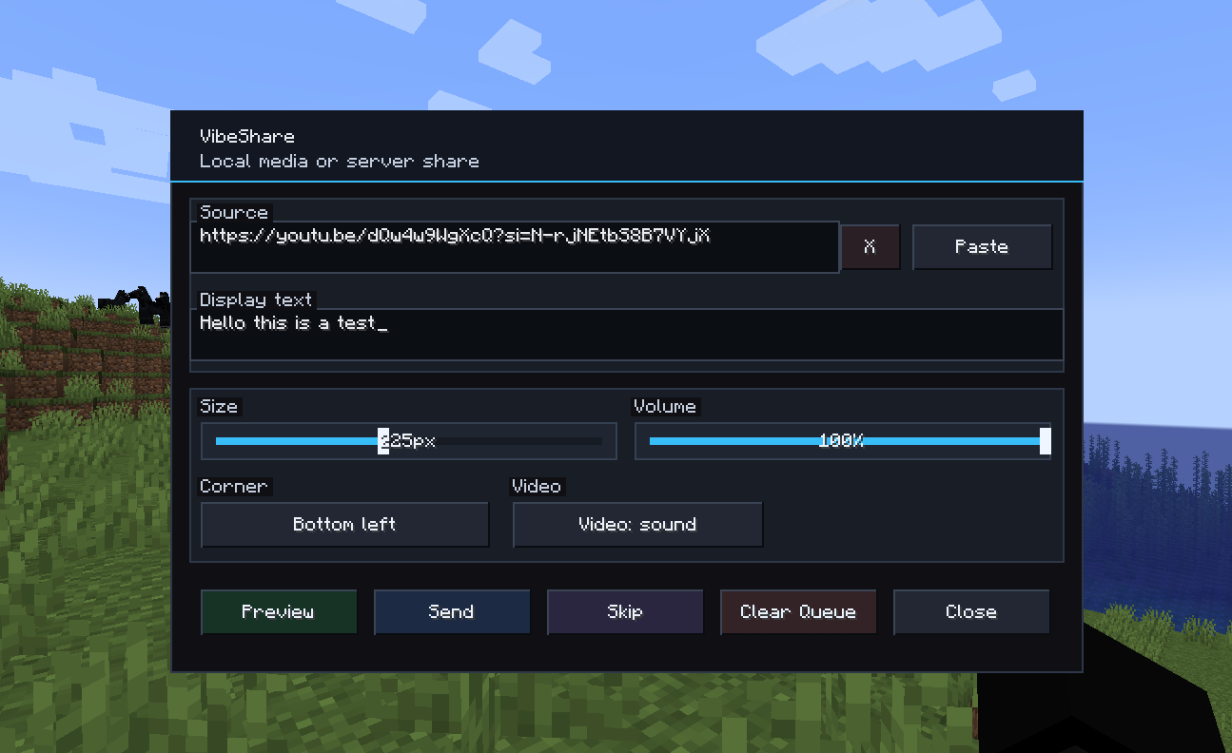 VibeShare screen
 -
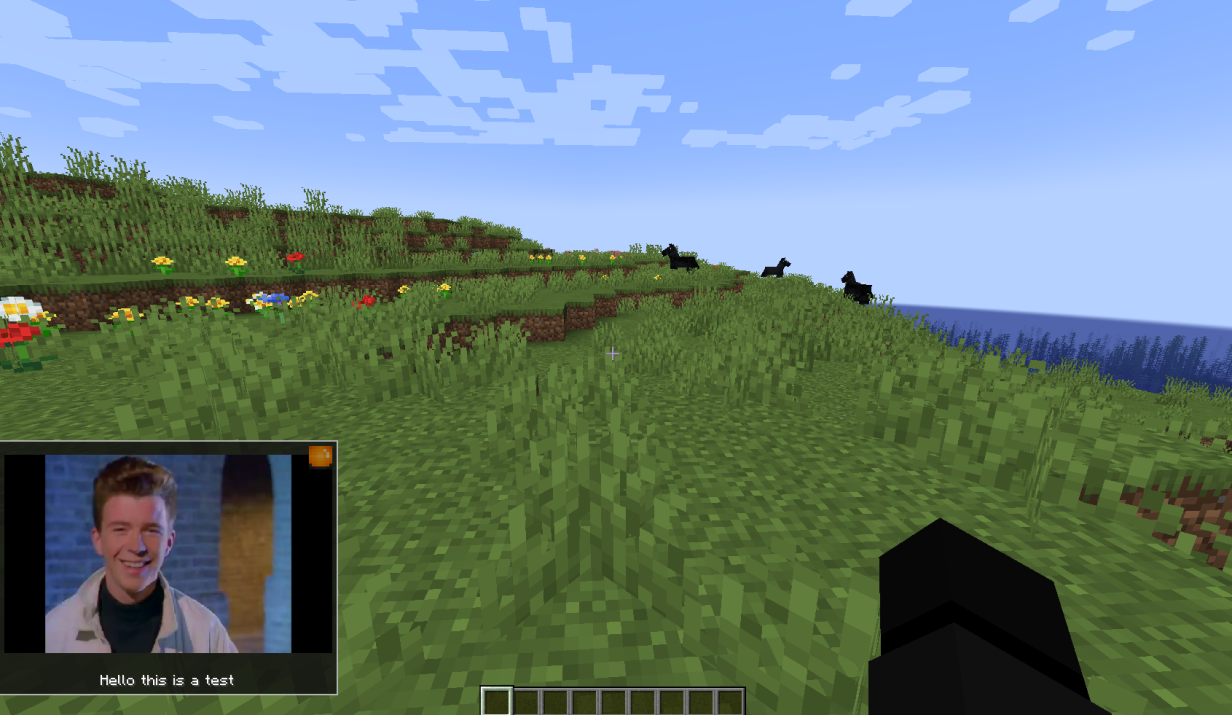 Toast exemple
Versions
Files
Relations
Project Relations
More like this
Similar Mods
Suggestions use data such as tags, dependencies, dependents, descriptions, titles, and more to rank how much they overlap with this mod.
On ModDex
Community snapshot
By the numbers
Statistics

Want to reach Minecraft players?
We're looking for a server hosting partner to feature here and other parts of the site. Interested? Send us a message!
Get in touchGet it on
Available Platforms
On ModDex
Community snapshot
By the numbers
Statistics
Resources