
Community listing page, reviews here may not be monitored by the author.
Viewmodel

No reviews yet
This datapack makes animating viewmodels with OBJMC easier!
Community voices
Reviews
No reviews yet. Be the first to review this project!
Get it on
Available Platforms
About
Project Details
For authors
Embed Badge
If you're the author of this project, you can embed a live badge anywhere that supports HTML or Markdown. It updates automatically whenever ratings change.
Use HTML for any page that supports it, or Markdown for README files and Markdown-based descriptions.
Identifiers
Platform IDs
About
Description
About Me
Vanilla Viewmodels is a Datapack Library which adds an "animation controller" for your OBJMC rendered viewmodels ingame. To work with the datapack, you must have:
- An Animated (Generic in Blockbench) Model.
- objmc installed locally.
- A Basic Understanding of How Resourcepacks and Datapacks work.
Using Viewmodel?
Pros
- Seamless Item Animations that can be ran per function.
- Thanks to OBJMC, the models can be extremely High-Resolution.
Cons
- The OBJMC shader doesn't work with an IRIS shader on.
- The Resourcepack Size may bloat due to high res textures exported by objmc
Utility:
-
How it works.
Since objmc only exports model+texture, it should be noted that the datapack adopts certain conventions to make sure that it works as intended. OBJMC, by default, will not "prepare you a datapack/resourcepack" like how plugins like AnimatedJava does. Hence, creating a resourcepack that correctly follows this datapack's convention is CRUCIAL.
Model in Resourcepack
The optional 'id' parameter accepted in the "play-animation" utils command requires a valid item_model component value. Since every objmc animation exports into its own model+texture, you must:
- Create an Item Model JSON that resembles the model.
e.g. 'first_person:weapons/glock' at assets/first_person/items/weapons/glock.json - Animations for the Model MUST be included in this item_model folder, where the "model with animation" is a model toggled when STRING CUSTOM-MODEL-DATA value === ANIMATION-NAME.
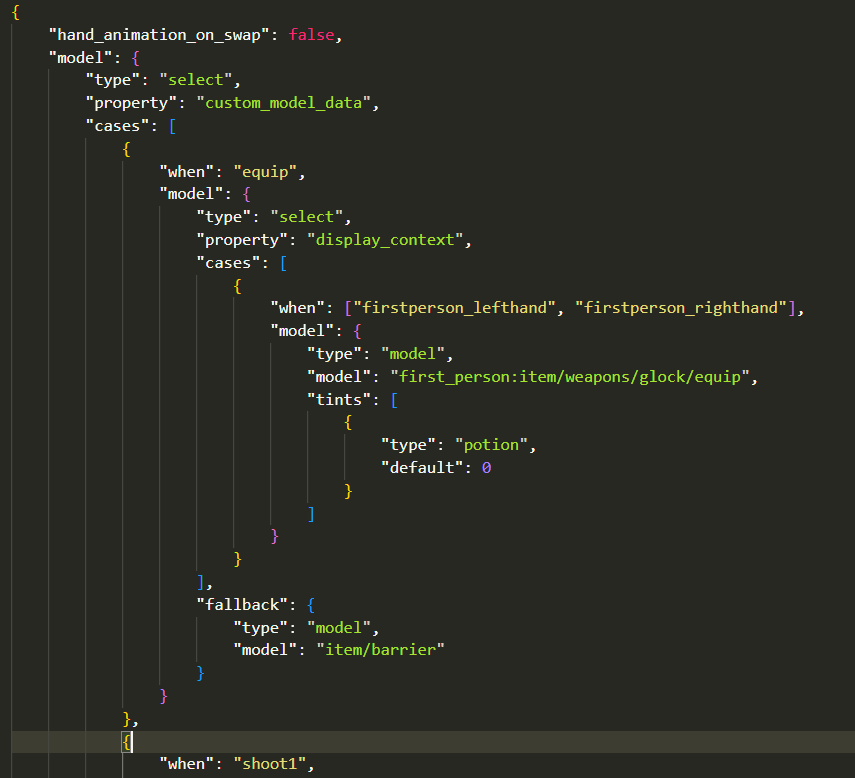 Hence, every animation is a CustomModelData string in the item_model JSON file. Obviously, this implies that adding multiple animations would mean that you'll have to export every animation into its OBJ sequences => put them through OBJMC.py => take the condensed model and mention it in the item_model component.
Registering Models in Datapack.
To Register an OBJMC Animated Model in the datapack, open the function file vm:global/load and add a registry in the data modify line!

Here's how a registry entry's structure looks like:
{
  id: "first_person:weapons/glock", // item_model component
  animations: [
      {
          "name":"equip",
          "start": 0,
          "end": 27,                                      // The Total Ticks of the Animation
          "duration": 30,                                 // Ticks of Animation with Dead Space
          keyframe_functions: [
            { at: 0, function_file: 'test:equip' },       // Run a function file @ 0th keyframe.
            { at: 30, function_file: 'test:end_animation' },
            { at: 25, function_file: 'test:gun_sfx' }
          ]
      },
      {
          "name": "shoot1",
          "start": 0,
          "end": 8,
          "duration": 6,
          "keyframe_functions": [
              { at: 0, function_file: 'gun:shoot' }
          ]
      }
  ]
}
To register an animation that loops infinitely, set the "end" value to -1
-
Playing an Animation
to play an Animation, run the command:
function vm:animations/play {args:{}}
the args:{} field is used to tweak parameters, namely:
id: it stores/applies the *item_model* component value
animation: it stores the name of the animation.
frame: the frame at which the animation should start.
an example command:
function vm:animations/play {args:{id:"first_person:weapons/glock", animation: "equip", frame: 10}}
This command will,
- change the item model of the potion item to first_person_weapons/glock
- set the animation-to-be-played to "equip" (this is handled by setting animation name equal to custom_model_data string that changes the model into one with different animation texture data)
- set the starting frame to 0 (potion color is set to 8388608+10)
-
Stopping an Animation
to stop an animation, simply run the command:
function vm:animations/stop
Credits
- Godlander [& the contributors on objmc github repository.] —— For Making OBJMC (and thus, viewmodels) in Minecraft possible!
- GhostScoutW (@ghostscout on discord) —— For making a Guide on how to setup a working viewmodel project with OBJMC!
- pinkiuses (creator of ATMOS: Minecraft Edition) —— For coming up with the idea of using OBJMC as viewmodels!
- And you!
Screenshots
Gallery
Versions
Files
Relations
Project Relations
More like this
Similar Mods
Suggestions use data such as tags, dependencies, dependents, descriptions, titles, and more to rank how much they overlap with this mod.
On ModDex
Community snapshot
By the numbers
Statistics

Want to reach Minecraft players?
We're looking for a server hosting partner to feature here and other parts of the site. Interested? Send us a message!
Get in touchGet it on
Available Platforms
On ModDex
Community snapshot
By the numbers