
Community listing page, reviews here may not be monitored by the author.
Villager Recruits & Workers: Advanced Grouping + Controls

No reviews yet
Advanced Grouping adds custom groupings for Talhanation’s Villager Recruits & Workers, letting players organize multiple groups under shared icons for easier management and control. Now with collapsible army icons, drag to move, and army formations!
Community voices
Reviews
No reviews yet. Be the first to review this project!
Get it on
Available Platforms
About
Project Details
For authors
Embed Badge
If you're the author of this project, you can embed a live badge anywhere that supports HTML or Markdown. It updates automatically whenever ratings change.
Use HTML for any page that supports it, or Markdown for README files and Markdown-based descriptions.
Identifiers
Platform IDs
Resources
External Links
About
Description
Villager Recruits & Workers: Advanced Grouping
Villager Recruits & Workers: Advanced Grouping is a lightweight companion addon for Talhanation’s Villager Recruits and Workers that adds a cleaner way to organize, manage, and command multiple groups at once.
Instead of controlling every native group separately, this mod lets you place multiple recruit or worker groups into one larger custom grouping. These can represent armies or manage worker groups by locations.
Native groups are not replaced or deleted. This mod simply adds an extra management layer above them.
Major Features
Collapsible Groupings
Large armies and workforces can quickly clutter the command screen. Advanced Grouping adds collapsible groupings so multiple native groups can be compacted under one larger grouping icon.
When collapsed, the grouping stays clean and easy to read. When expanded, you can access the individual groups inside it.
This makes it much easier to manage large armies or worker setups without the command screen becoming overwhelming.
Drag-to-Move Recruit Deployment
Recruits can now be deployed more easily using drag movement controls.
Instead of relying only on normal group commands, you can drag to place or move selected recruits/groups more naturally on the battlefield. This makes positioning troops faster, cleaner, and easier during combat or setup.
Army Formation Support
Advanced Grouping adds formation tools for larger multi-group commands.
These are designed for army-level organization, helping different groups work together in cleaner tactical layouts. For example, you can organize infantry lines, ranged groups, and cavalry wings for better battlefield control.
This is inspired by Total War-style unit control while still working alongside the existing Villager Recruits group system.
!!!!!! IMPORTANT !!!!! - In order for the groups to be reconized as melee, ranged or cav and then work in army formations you need to use the proper group symbols. For melee either of the swords, axe, and shield will work. For ranged the bow, crossbow or any of the arrow icons. For cav the horse icon. For ranged Cav the horse with arrows.
Features
-Create custom multi-group groupings
- Assign multiple native recruit groups into one larger grouping
- Use custom pixel-art icons for each grouping
- Quickly organize groups by role, location, formation, or purpose
- Manage armies, armies, worker groups, and more
- Keep native Villager Recruits groups intact
- Includes a dedicated **Multi Group Settings** menu
How It Works
Open the new **Multi Group Settings** menu, create a grouping, choose an icon, and select which native groups belong inside it.
When editing a grouping, you can see the groups currently assigned to it and remove or reassign them as needed.
The original recruit and worker groups remain untouched. Advanced Grouping only helps organize them.
For the drag to deploy selecting the groups will allow you to use the group formations first select drag then select groups then select the formation then follow the on screen prompt then your recuits will do the rest.
Future Plans
You may have noticed the General has been added in the promotion section. the General system is planned to be built fully in a future update. Generals will provide expanded control over armies and make large group management more meaningful.
Screenshots
Gallery
-
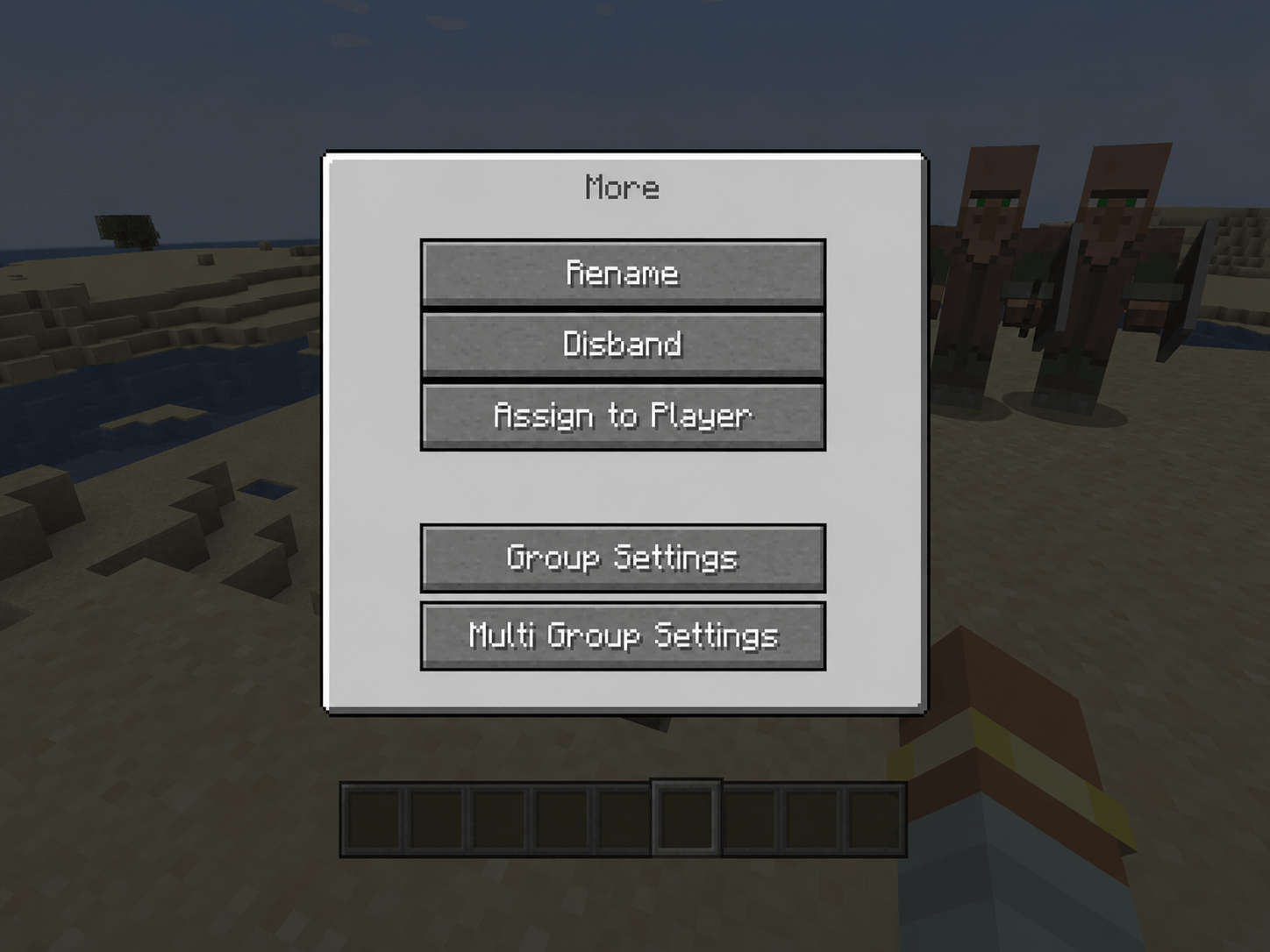 Added Multi Group Settings Tab to the More UI screen ChatGPT Image Jun 22, 2026, 08_52_29 PM (1).png
 -
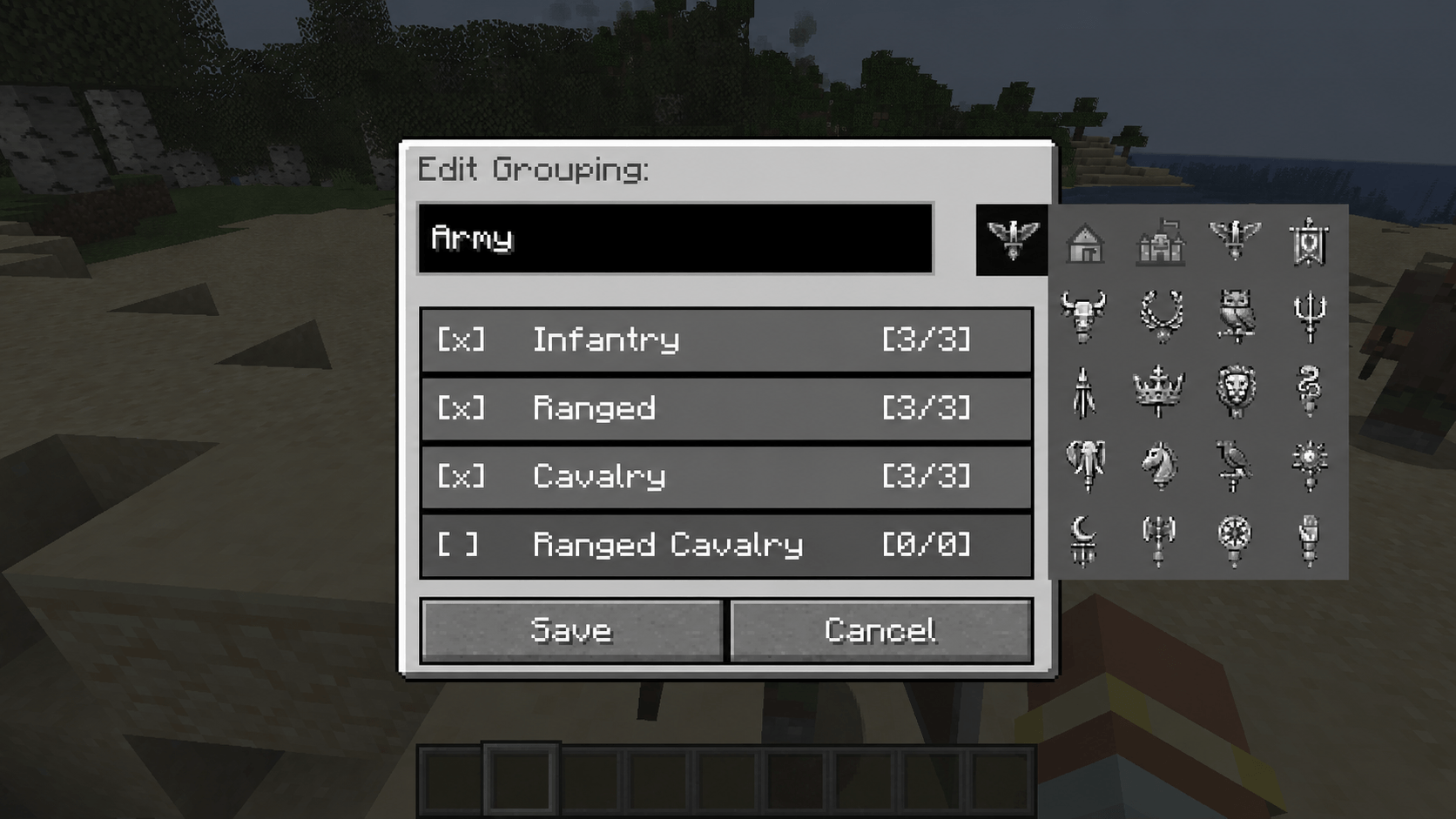 Grouping UI Screen (mirrored from Groups) ChatGPT Image Jun 22, 2026, 08_54_58 PM.png
 -
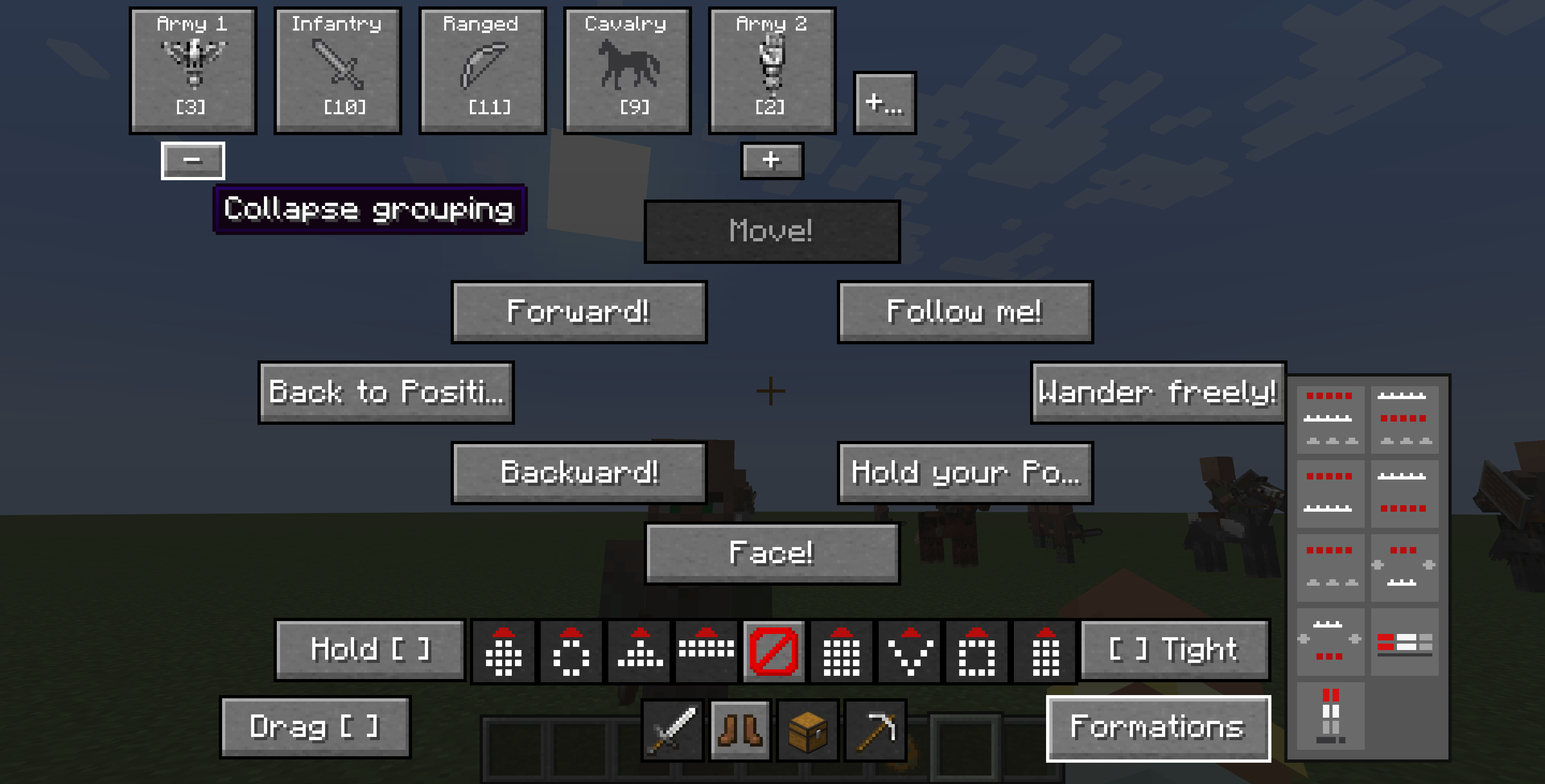 UI Movement Screen UI Movement Screen
Versions
Files
Relations
Project Relations
More like this
Similar Mods
Suggestions use data such as tags, dependencies, dependents, descriptions, titles, and more to rank how much they overlap with this mod.
On ModDex
Community snapshot
By the numbers
Statistics
Want to reach Minecraft players?
We're looking for a server hosting partner to feature here and other parts of the site. Interested? Send us a message!
Get in touchGet it on
Available Platforms
On ModDex
Community snapshot
By the numbers
Statistics
Resources