Community listing page, reviews here may not be monitored by the author.
WI Freecam

No reviews yet
Allows you to move the camera without moving your character. As seen in Wurst.

Community voices
Reviews
No reviews yet. Be the first to review this project!
Get it on
Available Platforms
 CurseForge
Modrinth
CurseForge
Modrinth
About
Project Details
For authors
Embed Badge
If you're the author of this project, you can embed a live badge anywhere that supports HTML or Markdown. It updates automatically whenever ratings change.
Use HTML for any page that supports it, or Markdown for README files and Markdown-based descriptions.
Identifiers
Platform IDs
About
Description

WI Freecam (Wurst-Imperium Freecam)
WI Freecam allows you to detach your camera and move it around freely while your character stays in place. It's the photo mode that Mojang never added. Spectator mode except it doesn't move your character and works on any server. The literal perspective shift you need to become a better builder.
Have you ever built a giant dirt tower just to get a better view of your village? Ever wasted half a stack of rockets trying to take a screenshot of your skyscraper from the perfect angle? Ever dug up all your hidden redstone because you forgot how it works? These are common signs that you need a Freecam.
Why choose WI Freecam
Movement controls that don't suck
You shouldn't have to fight your tools to position a camera.
- WASD is for horizontal movement only. Pressing W won't send you diagonally downward just because your crosshair isn't perfectly level. You have space and shift for that.
- Your camera stops moving the moment you release the button. No sliding past your target as if you're on ice.
- Scroll to change speed, but with precision. You can quickly adjust your speed, but you can also scroll it to an exact value. The on-screen indicator displays your current speed so that there's no guessing (unlike vanilla spectator mode).
- Vertical speed that actually makes sense. WI Freecam stores your preferred ratio between horizontal and vertical speed, not an absolute value that you then have to re-adjust every time. Set it to 50% once and it will always be half as fast as your horizontal speed.
- Precise input mode. CTRL-click on any slider and type in the exact number you want, instead of fiddling with the mouse for 20 minutes because you're one pixel off.
Always up to date
I'm tired of mods that take forever to update when a new Minecraft version comes out. You should be too. "Long term modding version" is a made-up concept by modders who either can't escape dependency hell or stopped playing Minecraft years ago.
WI Freecam provides day one support for every new Minecraft version, usually within 30 minutes of release. That's right, minutes, not weeks! Snapshots are supported too, though those can take a bit longer if they break something.
How is this possible?
First, through lots of automation. As soon as a new Minecraft version is released, a robot compiles the mod against that version, runs it, and goes through a big testing routine where it does everything you could possibly do in the mod at a ridiculously fast speed (it's quite fun to watch). If all tests pass, it then also releases the mod automatically. But if even one pixel looks different, it instead tells me what went wrong so I can get straight to fixing it.
Second, because I built WI Freecam using my own custom settings engine instead of relying on an off-the-shelf config library. You can have the best snapshot automation in the world, but that won't help you at all if you're stuck waiting for Cloth Config to update (as I found out the hard way in my last mod).
A proper modern Freecam
Most Freecam mods are built on decade-old workarounds. Some freeze your movement packets, others spawn a fake camera entity. Both methods mess up the game's physics, which then requires dozens of messy patches to deal with the side effects.
WI Freecam does something radically simpler: it just moves the camera. No fake entities. No frozen packets. No physics workarounds. The camera is just a coordinate: no hitbox, no collision, no name tag, no problems. This wasn't possible in older Minecraft versions, but clinging to outdated fakery today is unnecessary. WI Freecam is what Freecam should have always been.
Safe to use on servers
I can't believe this is a standout feature, but WI Freecam seems to be the only Freecam mod that isn't vulnerable to translation exploits like MC-265322 (link with more info).
It sucks that Mojang still hasn't patched this bug (it's been around since 1.20), but at the same time you should be able to just install a mod and expect it to be safe. There's a certain other Freecam mod developer out there who tells you that this exploit exists but then just goes "good luck, I'm not gonna do anything about it", which I find extremely irresponsible.
WI Freecam still has translations and keybinds by the way. Don't believe anyone who tells you that's not possible.
Feature List
- Free camera movement
- Full player physics while in Freecam
- No fake entities or movement packet shenanigans
- On-the-fly switching between camera control and character control (keybindable too)
- Separate horizontal and vertical speed sliders (ratio-based)
- Scroll to change speed (optional)
- On-screen speed indicator (optional)
- Adjustable initial camera position (inside, in front, on top)
- Optional tracer line to help you find your character
- Hide hand for clean screenshots (optional)
- Disable on damage for safety (optional)
- Works on snapshots, updates instantly to new releases
- No third-party dependencies other than Fabric API
- Automated testing to ensure it works reliably
Disclosure: This mod collects anonymous version statistics, which help me decide which old versions are still worth supporting. An opt out is available in the settings menu, but no personal data is collected anyways.
Installation
⚠ Always make sure that your modloader and all of your mods are made for the same Minecraft version. Your game will crash if you mix different versions.
Installation using Fabric
- Install Fabric Loader.
- Add Fabric API to your mods folder.
- Add WI Freecam to your mods folder.
(NeoForge is not yet supported.)
Chat Commands
/freecam: Opens the settings menu
Keybinds
- Toggle Freecam (default:
U) - Switch Camera/Player Control (default: not bound)
- Open Settings (default:
Right CTRL)
Supported languages
- English (US)
- German (Germany)
Pull requests welcome - add your native language!

WI Freecam (Wurst-Imperium Freecam)
WI Freecam allows you to detach your camera and move it around freely while your character stays in place. It's the photo mode that Mojang never added. Spectator mode except it doesn't move your character and works on any server. The literal perspective shift you need to become a better builder.
Have you ever built a giant dirt tower just to get a better view of your village? Ever wasted half a stack of rockets trying to take a screenshot of your skyscraper from the perfect angle? Ever dug up all your hidden redstone because you forgot how it works? These are common signs that you need a Freecam.
Why choose WI Freecam
Movement controls that don't suck
You shouldn't have to fight your tools to position a camera.
-
WASD is for horizontal movement only. Pressing W won't send you diagonally downward just because your crosshair isn't perfectly level. You have space and shift for that.
-
Your camera stops moving the moment you release the button. No sliding past your target as if you're on ice.
-
Scroll to change speed, but with precision. You can quickly adjust your speed, but you can also scroll it to an exact value. The on-screen indicator displays your current speed so that there's no guessing (unlike vanilla spectator mode).
-
Vertical speed that actually makes sense. WI Freecam stores your preferred ratio between horizontal and vertical speed, not an absolute value that you then have to re-adjust every time. Set it to 50% once and it will always be half as fast as your horizontal speed.
-
Precise input mode. CTRL-click on any slider and type in the exact number you want, instead of fiddling with the mouse for 20 minutes because you're one pixel off.
Always up to date
I'm tired of mods that take forever to update when a new Minecraft version comes out. You should be too. "Long term modding version" is a made-up concept by modders who either can't escape dependency hell or stopped playing Minecraft years ago.
WI Freecam provides day one support for every new Minecraft version, usually within 30 minutes of release. That's right, minutes, not weeks! Snapshots are supported too, though those can take a bit longer if they break something.
How is this possible?
First, through lots of automation. As soon as a new Minecraft version is released, a robot compiles the mod against that version, runs it, and goes through a big testing routine where it does everything you could possibly do in the mod at a ridiculously fast speed (it's quite fun to watch). If all tests pass, it then also releases the mod automatically. But if even one pixel looks different, it instead tells me what went wrong so I can get straight to fixing it.
Second, because I built WI Freecam using my own custom settings engine instead of relying on an off-the-shelf config library. You can have the best snapshot automation in the world, but that won't help you at all if you're stuck waiting for Cloth Config to update (as I found out the hard way in my last mod).
A proper modern Freecam
Most Freecam mods are built on decade-old workarounds. Some freeze your movement packets, others spawn a fake camera entity. Both methods mess up the game's physics, which then requires dozens of messy patches to deal with the side effects.
WI Freecam does something radically simpler: it just moves the camera. No fake entities. No frozen packets. No physics workarounds. The camera is just a coordinate: no hitbox, no collision, no name tag, no problems. This wasn't possible in older Minecraft versions, but clinging to outdated fakery today is unnecessary. WI Freecam is what Freecam should have always been.
Feature List
- Free camera movement
- Full player physics while in Freecam
- No fake entities or movement packet shenanigans
- On-the-fly switching between camera control and character control (keybindable too)
- Separate horizontal and vertical speed sliders (ratio-based)
- Scroll to change speed (optional)
- On-screen speed indicator (optional)
- Adjustable initial camera position (inside, in front, on top)
- Optional tracer line to help you find your character
- Hide hand for clean screenshots (optional)
- Disable on damage for safety (optional)
- Works on snapshots, updates instantly to new releases
- No third-party dependencies other than Fabric API
- Automated testing to ensure it works reliably
Disclosure: This mod collects anonymous statistics to help me decide which versions and environments are still worth supporting. It reports the mod/Minecraft/Fabric version, versions of Mod Menu, Sodium, and Sinytra Connector (if installed), game language, and basic OS info on startup, when you open the mod's settings, and when you enter a world. When entering a world, it also reports the world type (singleplayer, multiplayer, LAN, or Realms). No personal data such as usernames or IPs is ever collected. You can opt out at any time in the settings menu.
Installation
⚠ Always make sure that your modloader and all of your mods are made for the same Minecraft version. Your game will crash if you mix different versions.
Installation using Fabric
- Install Fabric Loader.
- Add Fabric API to your mods folder.
- Add WI Freecam to your mods folder.
(NeoForge is not yet supported.)
Chat Commands
/freecam: Opens the settings menu
Keybinds
- Toggle Freecam (default:
U) - Switch Camera/Player Control (default: not bound)
- Open Settings (default:
Right CTRL)
Supported languages
- English (US)
- German (Germany)
Pull requests welcome - add your native language!
Screenshots
Gallery
-
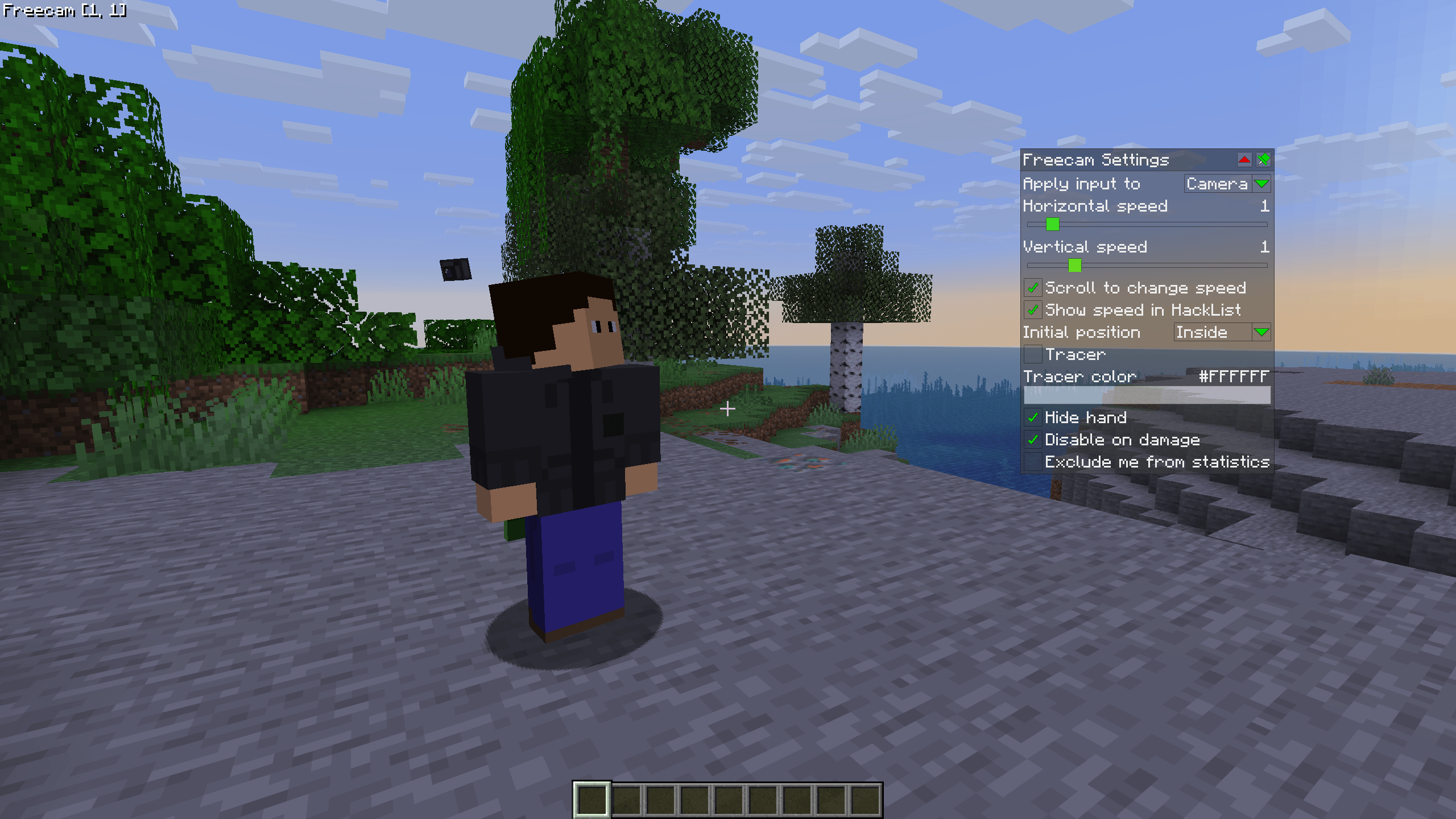 WI Freecam 1.0.png A screenshot of WI Freecam being used. The settings menu is open and visible on the right, while at the same time Freecam is active and the player character is visible in the center.
-
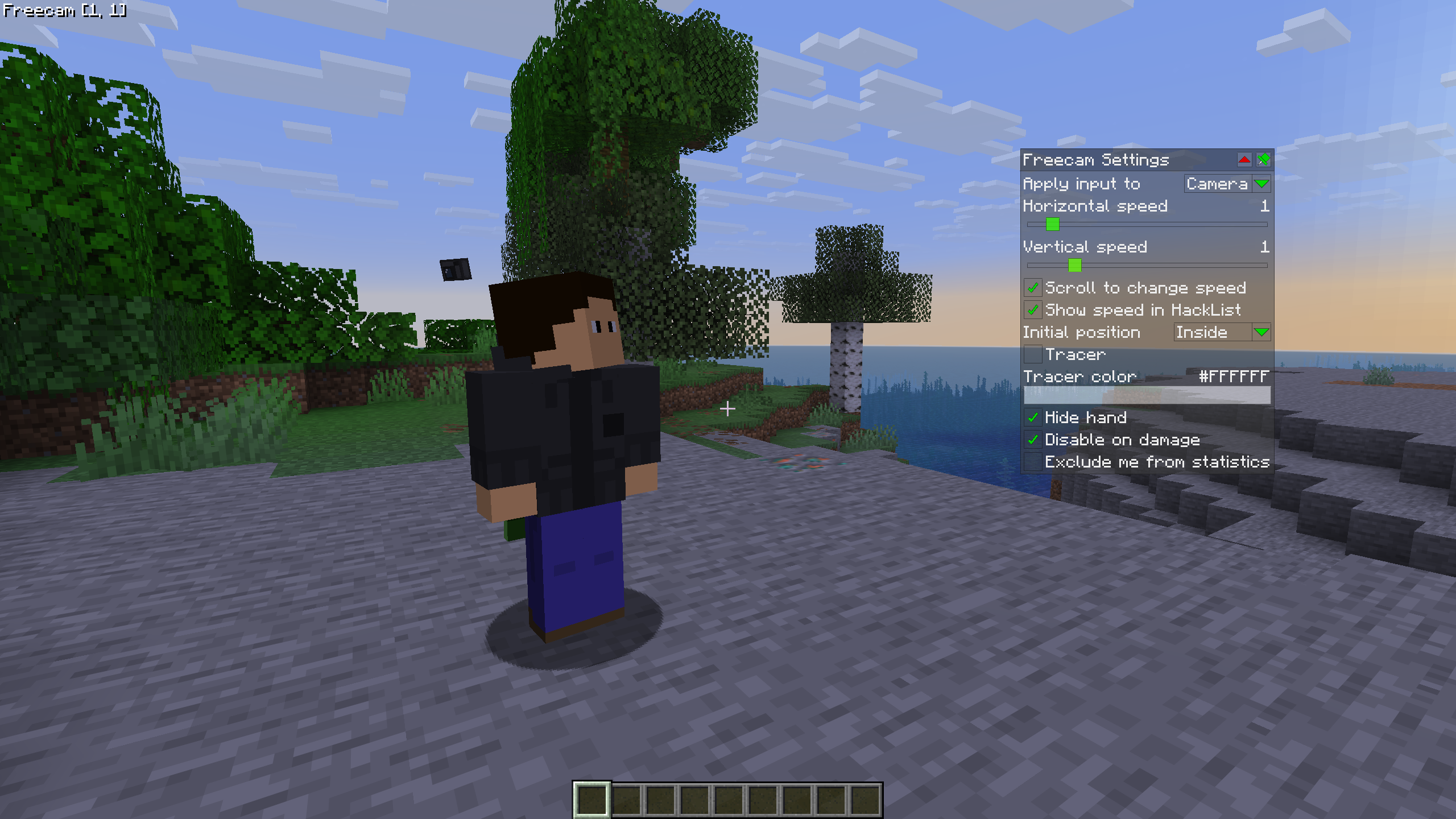 WI Freecam 1.0 A screenshot of WI Freecam being used. The settings menu is open and visible on the right, while at the same time Freecam is active and the player character is visible in the center.
Versions
Files
Relations
Project Relations
More like this
Similar Mods
Suggestions use data such as tags, dependencies, dependents, descriptions, titles, and more to rank how much they overlap with this mod.
On ModDex
Community snapshot
By the numbers
Statistics
 (opens in a new tab)
Get it on
Available Platforms
CurseForge
Modrinth
On ModDex
Community snapshot
By the numbers