
Community listing page, reviews here may not be monitored by the author.
Wireless Redstone Lite


No reviews yet
Wireless redstone for Minecraft 26.1.x. Pair transmitter and receiver blocks by channel + frequency — no wire, no spaghetti. Up to 128 blocks of range by default, configurable.
Community voices
Reviews
No reviews yet. Be the first to review this project!
Get it on
Available Platforms
Compatibility
Supported Environments
Must be installed on both the client and the server.
About
Project Details
For authors
Embed Badge
If you're the author of this project, you can embed a live badge anywhere that supports HTML or Markdown. It updates automatically whenever ratings change.
Use HTML for any page that supports it, or Markdown for README files and Markdown-based descriptions.
Identifiers
Platform IDs
Resources
External Links
About
Description

Wireless Redstone
Tired of running redstone wire through your whole base just to flip one lamp? Drop a transmitter next to your switch, a receiver next to your lamp, match the channel — done. No wire. No floor‑tile mazes. No accidentally powering the wrong piston.
Features
- Transmitter — takes a redstone input from any side, broadcasts on its channel.
- Receiver — outputs the strongest signal it sees on its channel, like a redstone block.
- Channel (1–128) and Frequency (0–65535) — pick any pair to keep your networks separate. Over 8 million combinations per dimension.
- Lock toggle — freezes the channel/frequency so you can't bump them by accident.
- Private toggle — binds the pair to your player, so two players can use the same channel without crossing wires on a multiplayer server.
- Item tooltips show the current config without placing the block — handy for sorting them in a chest.
- Configurable range — defaults to 128 blocks. Server admins can bump it up to 1024 or disable the limit entirely.
How it works
- Craft a transmitter and a receiver (recipes below).
- Place the transmitter and feed it redstone from any side — lever, button, comparator, whatever.
- Place the receiver anywhere in the same dimension within range.
- Right‑click either block to open the config screen. Match the channel + frequency.
- The receiver mirrors whatever signal strength the transmitter sees. Strength matters — comparator outputs travel intact.
Multiple transmitters on the same channel? The receiver picks the strongest. Multiple receivers? They all output the same. No cross‑dimension signalling (yet).
Configuration
Config file lives at config/wirelessredstone.json (created on first launch):
{
  "rangeLocked": true,
  "maxRange": 128
}| Key | Default | What it does |
|---|---|---|
rangeLocked |
true |
When true, receivers ignore transmitters farther than maxRange blocks. Set false for unlimited range within a dimension. |
maxRange |
128 |
Block distance. Clamped to [4, 1024]. |
Edit the file and restart Minecraft (or the dedicated server) for changes to take effect.
Requirements
- Minecraft 26.1.x
- Java 25
- Fabric Loader 0.18.4+ with Fabric API, or NeoForge 26.1+
Roadmap
Future versions may add: a "fixed strength" mode (transmitter always emits a chosen 1–15 instead of mirroring its input), Jade/WAILA tooltips for in‑world inspection, and an owner‑only Private gamerule.
Source
GitHub: kestalkayden/wireless-redstone — CC0‑1.0.
Wireless Redstone
Tired of running redstone wire through your whole base just to flip one lamp? Drop a transmitter next to your switch, a receiver next to your lamp, match the channel — done. No wire. No floor‑tile mazes. No accidentally powering the wrong piston.
Features
- Transmitter — takes a redstone input from any side, broadcasts on its channel.
- Receiver — outputs the strongest signal it sees on its channel, like a redstone block.
- Channel (1–128) and Frequency (0–65535) — pick any pair to keep your networks separate. Over 8 million combinations per dimension.
- Lock toggle — freezes the channel/frequency so you can't bump them by accident.
- Private toggle — binds the pair to your player, so two players can use the same channel without crossing wires on a multiplayer server.
- Item tooltips show the current config without placing the block — handy for sorting them in a chest.
- Configurable range — defaults to 128 blocks. Server admins can bump it up to 1024 or disable the limit entirely.
How it works
- Craft a transmitter and a receiver (recipes below).
- Place the transmitter and feed it redstone from any side — lever, button, comparator, whatever.
- Place the receiver anywhere in the same dimension within range.
- Right‑click either block to open the config screen. Match the channel + frequency.
- The receiver mirrors whatever signal strength the transmitter sees. Strength matters — comparator outputs travel intact.
Multiple transmitters on the same channel? The receiver picks the strongest. Multiple receivers? They all output the same. No cross‑dimension signalling (yet).
Recipes
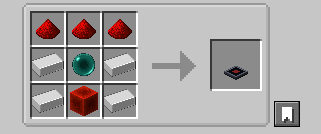
Transmitter — 4 iron + 3 redstone + 1 ender pearl + 1 redstone block
Receiver — 2 iron + 3 redstone + 1 ender pearl + 1 redstone torch
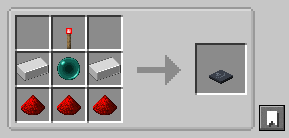
The ender pearl gates these behind your first enderman kill — far enough out that you've explored a bit, but accessible long before diamond or Nether tier.
Configuration
Config file lives at config/wirelessredstone.json (created on first launch):
{
  "rangeLocked": true,
  "maxRange": 128
}
| Key | Default | What it does |
|---|---|---|
rangeLocked |
true |
When true, receivers ignore transmitters farther than maxRange blocks. Set false for unlimited range within a dimension. |
maxRange |
128 |
Block distance. Clamped to [4, 1024]. |
Edit the file and restart Minecraft (or the dedicated server) for changes to take effect.
Requirements
- Minecraft 26.1.x
- Java 25
- Fabric Loader 0.18.4+ with Fabric API, or NeoForge 26.1+
Roadmap
Future versions may add: a "fixed strength" mode (transmitter always emits a chosen 1–15 instead of mirroring its input), Jade/WAILA tooltips for in‑world inspection, and an owner‑only Private gamerule.
Source
GitHub: kestalkayden/wireless-redstone — CC0‑1.0.
Screenshots
Gallery
-
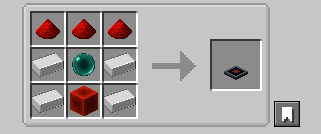 transmitter.png Wireless Redstone Transmitter
 -
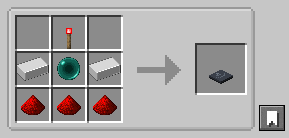 receiver.png Wireless Redstone Receiver
 -
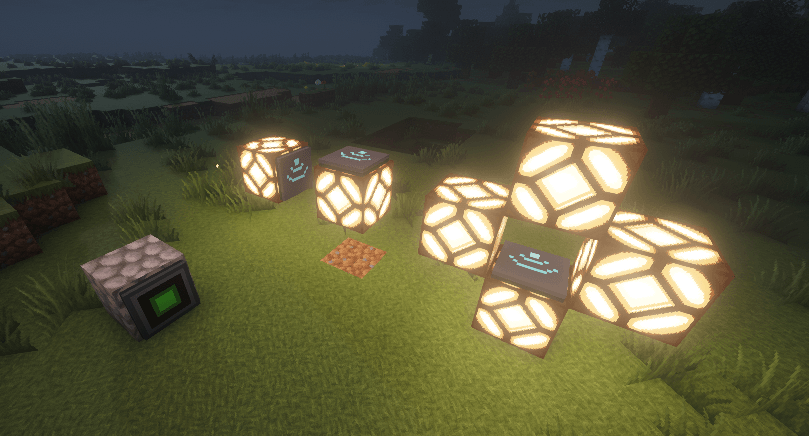 wireless-redstone-example.png An example of a transmitter (set to on) powering 3 wireless transmitters.
-
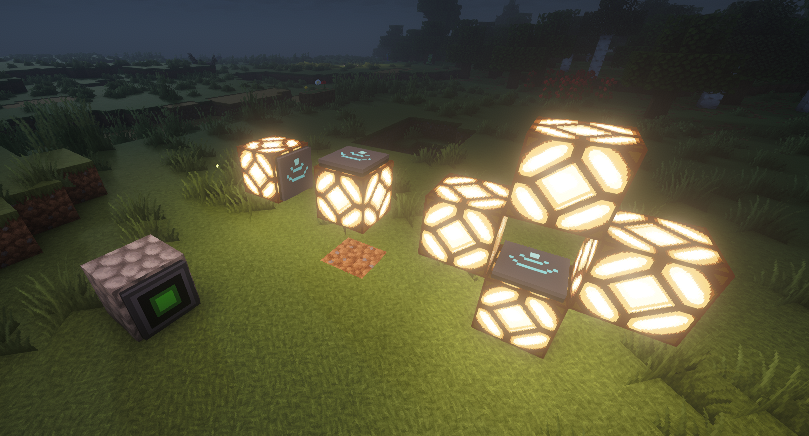 Wireless Redstone Example Here you can see a wireless transmitter set to on, and it is sending a redstone signal to 3 separate receivers on the same frequency/channel
Versions
Files
Relations
Project Relations
More like this
Similar Mods
Suggestions use data such as tags, dependencies, dependents, descriptions, titles, and more to rank how much they overlap with this mod.
On ModDex
Community snapshot
By the numbers
Statistics
Want to reach Minecraft players?
We're looking for a server hosting partner to feature here and other parts of the site. Interested? Send us a message!
Get in touchGet it on
Available Platforms
On ModDex
Community snapshot
By the numbers
Statistics
Resources