Community listing page, reviews here may not be monitored by the author.
Misanthropy's World Corruption Fixer


No reviews yet
Restores your corrupted world caused by missing mods and more
Community voices
Reviews
No reviews yet. Be the first to review this project!
Get it on
Available Platforms
Compatibility
Supported Environments
Runs entirely on the server. Also works in singleplayer.
About
Project Details
For authors
Embed Badge
If you're the author of this project, you can embed a live badge anywhere that supports HTML or Markdown. It updates automatically whenever ratings change.
Use HTML for any page that supports it, or Markdown for README files and Markdown-based descriptions.
Identifiers
Platform IDs
Resources
External Links
About
Description


Are you a modpack developer that wants to remove a world gen mod but scared of players losing their world? This mods for you!
Removing world generation mods in Minecraft often breaks existing saves and dimensions, leaving worlds unable to load. This mod automatically repairs corruption, so you don’t have to mess with manual file edits or complicated recovery steps.
Example: If you install a terrain mod like Terralith and later remove it, your world may refuse to open, Even "Safe Mode" won’t help. Normally, you’d have to follow multi‑step guides online to fix this, but with this mod, you just press one button and the repair runs automatically.
Even if you install a biome mod with custom blocks, they get replaced by the closest vanilla equivalent. So your world stays somewhat normal.
This tool is especially useful for modpack authors, since it saves players from losing progress when mods are swapped in or out.
I will port the mod to other versions if this mod gets enough attention.
Removing world generation mods in Minecraft often breaks existing saves and dimensions, leaving worlds unable to load. This mod provides a simple one‑click “Fix World” button that automatically repairs corruption, so you don’t have to mess with manual file edits or complicated recovery steps.
V0.7 - You can now restore deleted dimensions as well.
Example: If you install a terrain mod like Terralith and later remove it, your world may **refuse to open, Even "Safe Mode" won’t help. Normally, you’d have to follow multi‑step guides online to fix this, but with this mod, you just press one button and the repair runs automatically.
This tool is especially useful for modpack authors, since it saves players from losing progress when mods are swapped in or out.
By clicking "Fix World Corruption" Your world will be probably fixed.
What does it do? (Technical Stuff)

This mod deletes the "Data" category in your level.dat This causes minecraft to forcefully create a new world seed and use level.dat.old to restore items.

Creating a new world seed doesn't mean your existing chunks are being deleted. The new ones are just generated differently.

For curious nerds: If you open your level.dat with NBT Explorer, you will see the "Data" category.
⚠️ Note: It has not been tested with NBT corruptions, so be extra cautious in those cases.

You can use this mod in your modpack freely.
Screenshots
Gallery
-
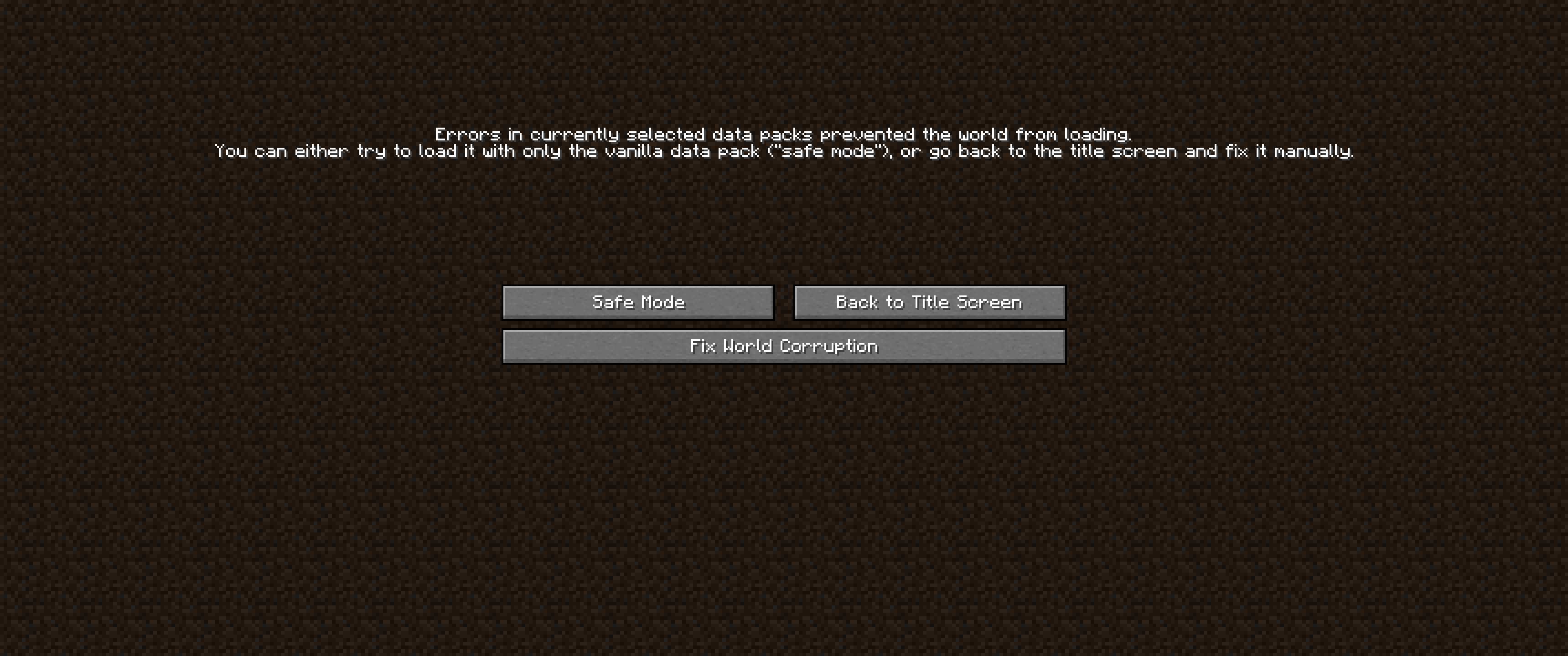 How it looks by pressing the "Fix World Corruption" your world will be probably fixed!
Versions
Files
Relations
Project Relations
More like this
Similar Mods
Suggestions use data such as tags, dependencies, dependents, descriptions, titles, and more to rank how much they overlap with this mod.
On ModDex
Community snapshot
By the numbers
Statistics
Want to reach Minecraft players?
We're looking for a server hosting partner to feature here and other parts of the site. Interested? Send us a message!
Get in touchGet it on
Available Platforms
On ModDex
Community snapshot
By the numbers
Statistics
Resources