
Community listing page, reviews here may not be monitored by the author.
World Host


No reviews yet
Host your singleplayer worlds without having to run a server or setup port forwarding!
Community voices
Reviews
No reviews yet. Be the first to review this project!
Get it on
Available Platforms
Compatibility
Supported Environments
Runs entirely on the client. Works on vanilla servers.
About
Project Details
For authors
Embed Badge
If you're the author of this project, you can embed a live badge anywhere that supports HTML or Markdown. It updates automatically whenever ratings change.
Use HTML for any page that supports it, or Markdown for README files and Markdown-based descriptions.
Identifiers
Platform IDs
About
Description
Preface:
I am not the author of this mod and do not claim to be its authorship.
The author of this mod: Gaming32
I just ported it, for ease of use in builds created in the Curse Forge launcher.
Host your singleplayer worlds without having to run a server or setup port forwarding!
What if my friend doesn't have the mod installed?
If your friend doesn't have the mod installed, you cannot use the friends system with them. However, you can run the command /worldhost ip to get an IP that can be used with tunneling. Do note, however, that not using the friends system could increase ping. If you don't want the ping increase, you can run /worldhost tempip to get a temporary server IP that lasts for at least 60 seconds. Clients who connect within the 60 seconds will remain connected. If you plan to never use the friends system, you can disable it in the mod settings.
How does this mod work?
This mod has a server that your client connects to, this server is used to communicate with other clients using World Host.
- When your friend wants to join you, your friend's client asks the server for an IP address to connect to.
- The server then asks your client to create a join mode (JoinType in the protocol). There are two join mods: UPnP and Proxy.
- UPnP mode is tried first. Your client tries to open a temporary port forward in your router that your friends client can use to connect to you directly.
- If UPnP succeeds, your client tells the server the port to use, then the server tells your friend's client your IP and the port number.
- If UPnP fails, then your client tells the server to use Proxy mode. The server will then give your friend's client the same "proxy IP" as /worldhost ip does.
/worldhost tempip tries to do UPnP first instead of just giving you the proxy IP straightaway.
World Host



Host your singleplayer worlds without having to run a server or setup port forwarding! In the future, we also plan to support Bedrock Edition clients through the use of Geyser.
What if my friend doesn't have the mod installed?
If your friend doesn't have the mod installed, you cannot use the friends system with them. However, you can run the command /worldhost ip to get an IP that can be used with tunneling. Do note, however, that not using the friends system could increase ping. If you don't want the ping increase, you can run /worldhost tempip to get a temporary server IP that lasts for at least 60 seconds. Clients who connect within the 60 seconds will remain connected. If you plan to never use the friends system, you can disable it in the mod settings.
How does this mod work?
This mod has a server that your client connects to, this server is used to communicate with other clients using World Host.
- When your friend wants to join you, your friend's client asks the server for an IP address to connect to.
- The server then asks your client to create a join mode (
JoinTypein the protocol). There are two join mods: UPnP and Proxy. - UPnP mode is tried first. Your client tries to open a temporary port forward in your router that your friends client can use to connect to you directly.
- If UPnP succeeds, your client tells the server the port to use, then the server tells your friend's client your IP and the port number.
- If UPnP fails, then your client tells the server to use Proxy mode. The server will then give your friend's client the same "proxy IP" as
/worldhost ipdoes.
/worldhost tempip tries to do UPnP first instead of just giving you the proxy IP straightaway.
License
The mod is open source and licensed under the MIT License.
Screenshots
Gallery
-
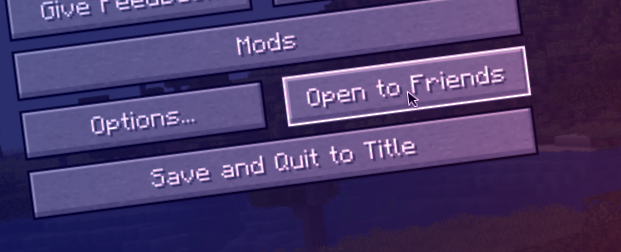 Banner Credit to me for the screenshot and brawaru#0886 for the edits
Versions
Files
Relations
Project Relations
More like this
Similar Mods
Suggestions use data such as tags, dependencies, dependents, descriptions, titles, and more to rank how much they overlap with this mod.
On ModDex
Community snapshot
By the numbers
Statistics
Want to reach Minecraft players?
We're looking for a server hosting partner to feature here and other parts of the site. Interested? Send us a message!
Get in touchGet it on
Available Platforms
On ModDex
Community snapshot
By the numbers