
Community listing page, reviews here may not be monitored by the author.
WorldBinder

No reviews yet
Client-side Fabric tool for permitted world capture, customizable HUD widgets and Movement Tool badges, recovery, target-version export and optional movement assistance.

Community voices
Reviews
No reviews yet. Be the first to review this project!
Get it on
Available Platforms
Compatibility
Supported Environments
Runs entirely on the client. Works on vanilla servers.
About
Project Details
For authors
Embed Badge
If you're the author of this project, you can embed a live badge anywhere that supports HTML or Markdown. It updates automatically whenever ratings change.
Use HTML for any page that supports it, or Markdown for README files and Markdown-based descriptions.
Identifiers
Platform IDs
About
Description
WorldBinder
WorldBinder is a client-side Fabric mod for capturing Minecraft world data your client has already received and exporting it into playable vanilla world saves.
It is designed for players, server owners, builders, developers and preservation-focused users who want to create local archives of worlds, builds or server projects they own, administer or have explicit permission to preserve.
WorldBinder focuses on world capture, export, recovery, inspection, compatibility and long-session reliability.
It does not reveal unloaded or hidden server data, reproduce server-only logic, bypass permissions or grant access to information the Minecraft client never received.
Optional Movement Tools are included for singleplayer, local test worlds and servers where their use is explicitly permitted.
WorldBinder 1.5.0
WorldBinder 1.5.0 expands the mod into a more flexible multi-version release while continuing to improve its interface, accessibility and day-to-day capture workflow.
The same Fabric jar now supports:
- Minecraft 26.1
- Minecraft 26.1.1
- Minecraft 26.1.2
- Minecraft 26.2
- Minecraft 26.3
These versions are also available as export targets alongside older supported target versions.
Highlights in 1.5.0
- One Fabric jar for Minecraft 26.1 through 26.3
- Stable virtual GUI sizing for more consistent layouts
- Refined F9 Control Center and Settings navigation
- Searchable target-version picker
- Gamerule options that follow the selected export target
- Visible keyboard focus throughout supported menus
- Tab navigation between controls
- Ctrl+Tab navigation between F9 sections and Settings tabs
- Optional High Contrast mode
- Optional Reduced Motion mode
- Improved F6 quick-start flow with direct access to the full legal notice
- Improved resource reload handling without unnecessary WorldBinder loading overlays
- Configurable stacked HUD badges for active Movement Tools
- Continued support for the visual HUD Widget Editor
- Continued Chat / Toast / Chat & Toast / None message routing
- Continued Movement Tools support with persistent settings
Interactive resource reloads keep already-ready menus and worlds usable without forcing a separate WorldBinder progress screen. Vanilla loading behavior remains available where needed, while startup and failed reloads continue to use Minecraft's normal loading behavior.
What WorldBinder does
WorldBinder captures world data that is already loaded on your Minecraft client and turns it into a local Minecraft world save.
This can be useful for:
- backing up your own builds
- preserving maps you created or administer
- archiving server projects you have permission to save
- locally inspecting captured world data
- testing exports across different Minecraft versions
- recovering captured chunks after crashes or disconnects
- preparing captured worlds for vanilla or server-side use
- preserving received resource packs together with a world export
WorldBinder can only save data that your client actually receives.
It cannot reconstruct unloaded chunks, hidden dimensions, server-side plugin state, private inventories, server-only logic or other information that was never sent to the client.
Main features
- Client-side world capture
- HotCache-first chunk collection
- Durable temporary chunk cache for long captures
- Vanilla world export
- Multiple target output versions
- Searchable target-version selection
- Block, block entity and entity export where available
- Map, stats and advancement export where available
- Server resource pack export as
resources.zip - Recovery and autosave tools
- Export validation reports
- Configurable performance presets
- F9 Control Center
- F10 live chunk map
- F12 Movement Tools shortcut
- Ctrl+C chunk center coordinate copying
- Queue Dashboard / Profiler
- Visual HUD Widget Editor
- Configurable stacked Movement Tool HUD badges
- Compact WorldBinder toast notifications
- Optional chat feedback
- Chat / Toast / Chat & Toast / None message modes
- Modernized settings, dropdowns and menus
- Main-menu and pause-menu WorldBinder buttons
- Keyboard navigation and visible focus states
- High Contrast accessibility mode
- Reduced Motion accessibility mode
- Dedicated WorldBinder keybind category
- German and English interface text
- Responsive UI for different window sizes and GUI scales
- One Fabric jar for Minecraft 26.1 through 26.3
Direct menu access
WorldBinder can be opened directly from Minecraft's interface.
Use the WorldBinder button in the main menu before joining a world, or open it from the pause menu while already playing.
The default F9 keybind continues to open the WorldBinder Control Center directly.
F9 Control Center
The F9 Control Center is the main hub for WorldBinder.
It provides access to:
- capture status
- archive progress
- recent activity
- warnings
- capture actions
- map tools
- recovery tools
- performance options
- settings
- profiler / queue dashboard
- documentation
- legal and responsible-use information
- about information
WorldBinder 1.5.0 improves keyboard navigation inside the Control Center.
Tab moves between supported controls and Ctrl+Tab switches between F9 sections.
The F6 quick-start flow also includes a direct route to the full legal notice inside F9.
F10 live chunk map
The F10 map shows captured world data in real time.
It can display:
- captured chunks
- partial chunks
- queued chunks
- chunks with entities
- chunks with block entities
- warning and error states
- coverage information
- inspector tooltips
- manual chunk navigation
- follow mode
- filters
You can select a chunk and copy its center coordinate with Ctrl+C, making it easier to inspect or return to captured locations.
Movement Tools
WorldBinder includes optional Movement Tools for singleplayer, local test worlds and servers where these tools are explicitly allowed.
Available tools include:
- Speed
- Fly
- Spider
- Jesus
- No Fall
- Step
- High Jump
- Glide
- Fast Ladder
- Auto Sprint
- Safe Walk
- Auto Jump
- Water Speed
- Air Control
Every Movement Tool is independently configurable and disabled by default.
Movement settings are stored persistently, and supported strength-based tools use bounded controls rather than unrestricted values.
Fly uses shared movement priorities so it can take precedence over helpers that would otherwise conflict. Step suppresses Auto Jump where necessary, and water walking supports source and flowing water with Sneak-to-submerge behavior.
Remote servers remain authoritative and may reject client-side movement assistance. These tools do not grant server permissions or bypass server-side checks.
The default F12 keybind opens Movement Tools directly and can be changed in Minecraft's normal Controls menu.
Movement Tool HUD badges
WorldBinder can display compact stacked HUD badges for active Movement Tools.
This makes it easier to see which movement helpers are currently enabled without reopening the settings screen.
The badge overlay can be configured through the HUD Widget Editor alongside WorldBinder's other HUD elements.
HUD Widget Editor
WorldBinder includes a visual HUD Widget Editor for configuring its overlays.
Depending on the widget, you can:
- click and drag to reposition it
- resize it directly
- change accent colors
- change background colors
- adjust opacity
- hide individual widgets
- configure overlay placement
- customize notification presentation
- position Movement Tool badges
The editor stores positions relative to the screen so layouts remain usable across different window sizes.
Its color controls support visual selection as well as exact HEX/ARGB input.
Messages and notifications
WorldBinder can route status, success, warning and error feedback through different output modes.
Available message modes are:
- Chat
- Toast
- Chat & Toast
- None
This avoids unnecessary duplicate feedback while still letting each user choose how visible WorldBinder messages should be.
Toast notifications use WorldBinder's own compact HUD presentation and can be customized through the Widget Editor.
Settings and accessibility
WorldBinder 1.5.0 continues the modernized settings system and adds further navigation and accessibility improvements.
The interface includes:
- stable virtual GUI sizing
- improved responsive layouts
- searchable target-version selection
- keyboard focus indicators
- Tab navigation
- Ctrl+Tab section and tab switching
- optional High Contrast mode
- optional Reduced Motion mode
- localized tooltips
- consistent dropdowns, buttons, cards and panels
These changes are designed to make WorldBinder easier to use with different window sizes, GUI scales and input preferences.
Target output versions
WorldBinder can export captured worlds for different Minecraft target versions.
WorldBinder 1.5.0 runs from a single Fabric jar on Minecraft 26.1, 26.1.1, 26.1.2, 26.2 and 26.3, and these five 26.x releases are available as export targets alongside older supported targets.
The target-version picker is searchable.
WorldBinder applies version-aware handling to areas such as:
- world metadata
- folder layout
- gamerules
- entities
- POI data
- saved data
- dimensions
- block mappings
Gamerule options follow the selected export target so settings can reflect the version being exported rather than only the currently running Minecraft version.
Downgrades or cross-version exports can still be imperfect when captured data contains blocks, entities, item data, NBT structures or other content that did not exist in the selected target version.
Durable chunk cache
WorldBinder uses a durable temporary chunk cache to improve reliability during large captures.
Cached data is stored under:
saves/WorldBinder/.cache/
This helps protect captured block data during long sessions and reduces the risk of large exports losing already-captured chunk contents.
After a successful export, temporary cache data can be cleaned up automatically.
If Minecraft crashes or an export is interrupted, matching cache data can remain available for recovery.
Recovery and autosave
WorldBinder includes recovery and autosave features designed to reduce data loss during longer capture sessions.
This can help when:
- Minecraft crashes
- a server disconnects you
- Minecraft closes unexpectedly
- a long capture is interrupted
- an export cannot be completed immediately
Recovery can reuse matching chunk cache data where available.
This helps preserve already-captured information without unnecessarily rebuilding a new cache for the same interrupted capture.
Recovery is a safety feature, not a replacement for proper server backups.
Capture and export workflow
A typical WorldBinder workflow looks like this:
- Join a singleplayer world or multiplayer server.
- Open WorldBinder with F9 or the WorldBinder menu button.
- Configure capture behavior, performance and the desired target version.
- Start capturing.
- Move through the area you want to preserve.
- Use the F10 map to inspect coverage.
- Finish or save the capture.
- Export the captured data into a local Minecraft world.
- Open the exported world in Minecraft or import it into a server setup you control.
WorldBinder keeps capture, recovery and export progress visible instead of silently writing a world in the background without context.
Export structure and validation
WorldBinder exports are designed to resemble normal Minecraft world saves.
Depending on the captured data and selected target version, exports may include:
level.datlevel.dat_oldsession.lockicon.pngregion/entities/poi/data/resources.zip- an export
README.md - validation reports where available
For supported modern versions, WorldBinder can also create additional saved-data and dimension structures where needed for better compatibility with vanilla Minecraft and server import workflows.
The validation system helps identify missing or suspicious output before an export is assumed to be complete.
Resource pack export
If a server sends a resource pack and the Minecraft client has access to it, WorldBinder can export the received pack as:
resources.zip
WorldBinder can work with the currently active server resource pack, including cases where a server switches packs or Minecraft reuses an already-downloaded pack.
Resource pack export still depends on what the client actually received and what remains locally accessible.
Performance presets
WorldBinder includes configurable performance presets to balance capture speed and game performance.
Available presets may include:
- Safe
- Balanced
- Fast
- Extreme
- Custom
Users can select a preset based on their system, server conditions and how aggressively WorldBinder should process captured data.
Advanced settings can further control capture limits, queue behavior, autosave timing and HUD/map behavior.
Resource reload behavior
WorldBinder 1.5.0 improves how interactive resource reloads are handled.
When Minecraft is already in a ready menu or world, WorldBinder avoids forcing its own unnecessary loading indicator during compatible interactive reloads.
Vanilla loading behavior remains available where appropriate, and startup or failed reloads continue to use Minecraft's normal behavior.
The goal is to keep the interface usable without hiding genuine loading or failure states.
Responsive interface
WorldBinder uses a responsive interface system built around a stable virtual GUI size.
Major screens include:
- F9 Control Center
- F10 Map
- F12 Movement Tools
- Capture screens
- Settings
- Safety and recovery options
- Performance configuration
- Profiler / Queue Dashboard
- Progress screens
- Export and finish screens
- HUD Widget Editor
The virtual layout helps keep spacing and proportions consistent across different Minecraft window sizes and GUI scales.
Very small windows can still appear more pixelated because Minecraft's pixel-style interface itself is being scaled down.
Keybinds
WorldBinder includes configurable keybinds under the dedicated WorldBinder category in Minecraft Controls.
Default bindings:
- F6: Start / stop world download
- F7: Set position 1
- F8: Set position 2
- F9: Open WorldBinder Control Center
- F10: Open WorldBinder Map
- F12: Open Movement Tools directly
All keybinds can be changed through Minecraft's normal Controls screen.
Compatibility
WorldBinder 1.5.0 is a native Fabric mod.
A single WorldBinder 1.5.0 jar supports:
- Minecraft 26.1
- Minecraft 26.1.1
- Minecraft 26.1.2
- Minecraft 26.2
- Minecraft 26.3
Requirements:
- Fabric Loader 0.19.5 or newer
- A Fabric API build matching your Minecraft version
- Java 25
Mod Menu is optional.
Forge, NeoForge and Quilt are not supported.
Important limitations
WorldBinder can only export data that the Minecraft client actually receives.
An exported world may therefore be incomplete if the server never sent certain information to the client, including:
- unloaded chunks
- distant entities
- inventories
- some block entity data
- server-side-only logic
- hidden dimensions
- plugin-managed data
- custom server systems
- inaccessible resource pack content
Exports can also differ from the original server-side world depending on server setup, custom content, resource packs, entities, dimensions, gamerules, target-version mappings and Minecraft version differences.
WorldBinder is not a replacement for proper server backups.
Responsible use
Only use WorldBinder on worlds, servers, maps, builds and resource packs that you own, administer, created yourself, or where you have explicit permission to archive or export the content.
You are responsible for how exported data is used.
WorldBinder does not grant rights to copy, redistribute, publish or reuse content owned by other people, servers or projects.
Movement Tools should only be used in singleplayer, local test environments or servers where their use is explicitly permitted.
Please respect server rules, creator rights and community guidelines.
Feedback and bug reports
WorldBinder is actively developed and feedback is welcome.
Repository: https://github.com/Philiipp06/WorldBinder
Issues: https://github.com/Philiipp06/WorldBinder/issues
Discord: https://discord.com/invite/V7h3vaXxDZ
Helpful bug reports include:
- Minecraft version
- WorldBinder version
- selected target output version
- Fabric Loader version
- Fabric API version
- window mode and GUI scale for UI issues
- relevant accessibility, toast or menu settings
- what was captured
- what went wrong
- screenshots
- logs
- exported test worlds where possible
Clear reports make issues significantly easier to reproduce and fix.
Project status
WorldBinder is actively developed.
Version 1.5.0 is the current multi-version release for Minecraft 26.1 through 26.3.
Development continues to focus on world export accuracy, target-version compatibility, capture reliability, recovery behavior, performance, accessibility, UI polish and overall usability.
Screenshots
Gallery
-
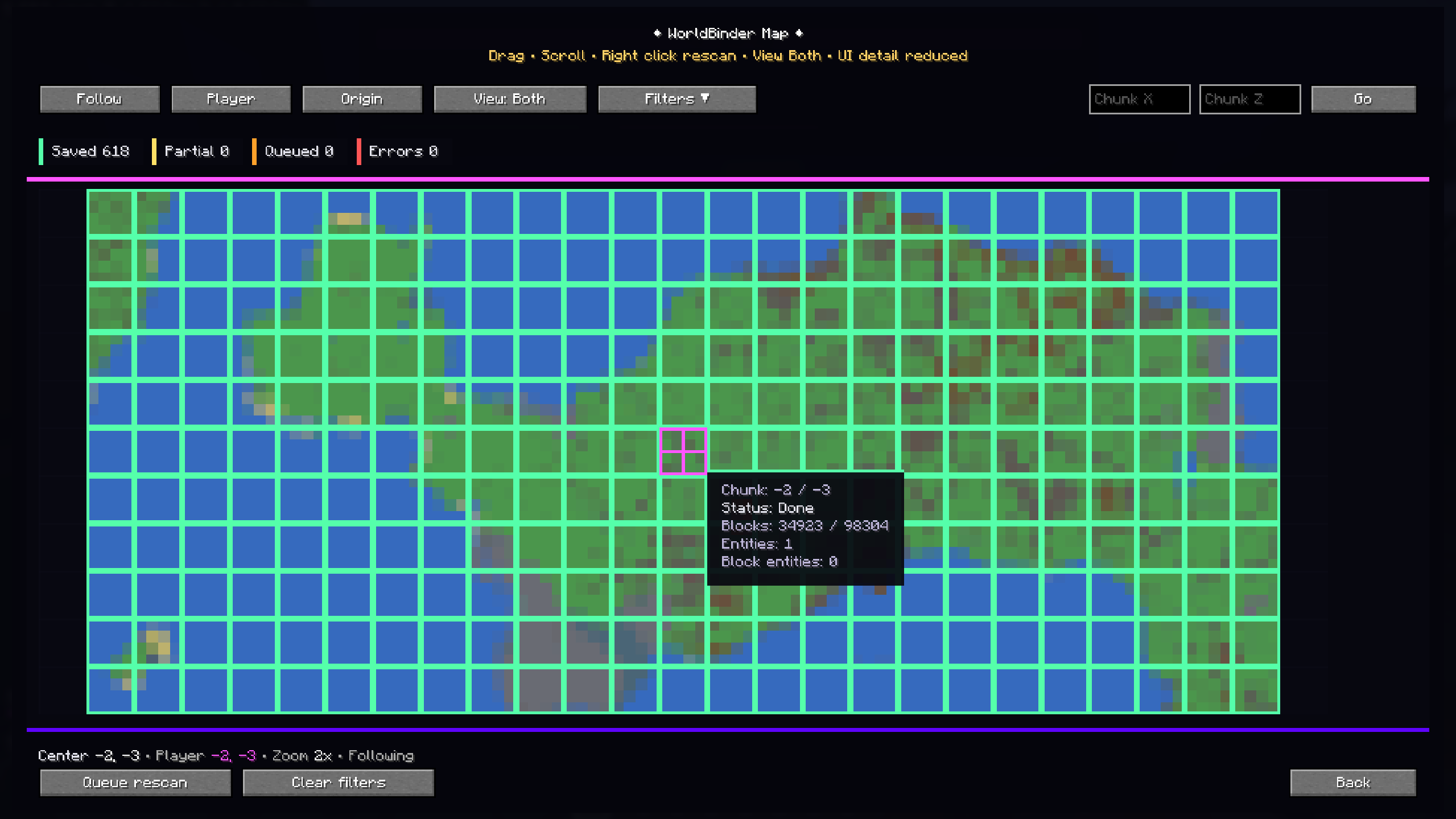 Live Chunk Map The F10 WorldBinder Map shows captured, partial, queued and errored chunks in real time. Alpha V3 improves map readability with responsive scaling, chunk status colors, inspector tooltips, follow mode, filtering, manual chunk navigation and quick rescans.
 -
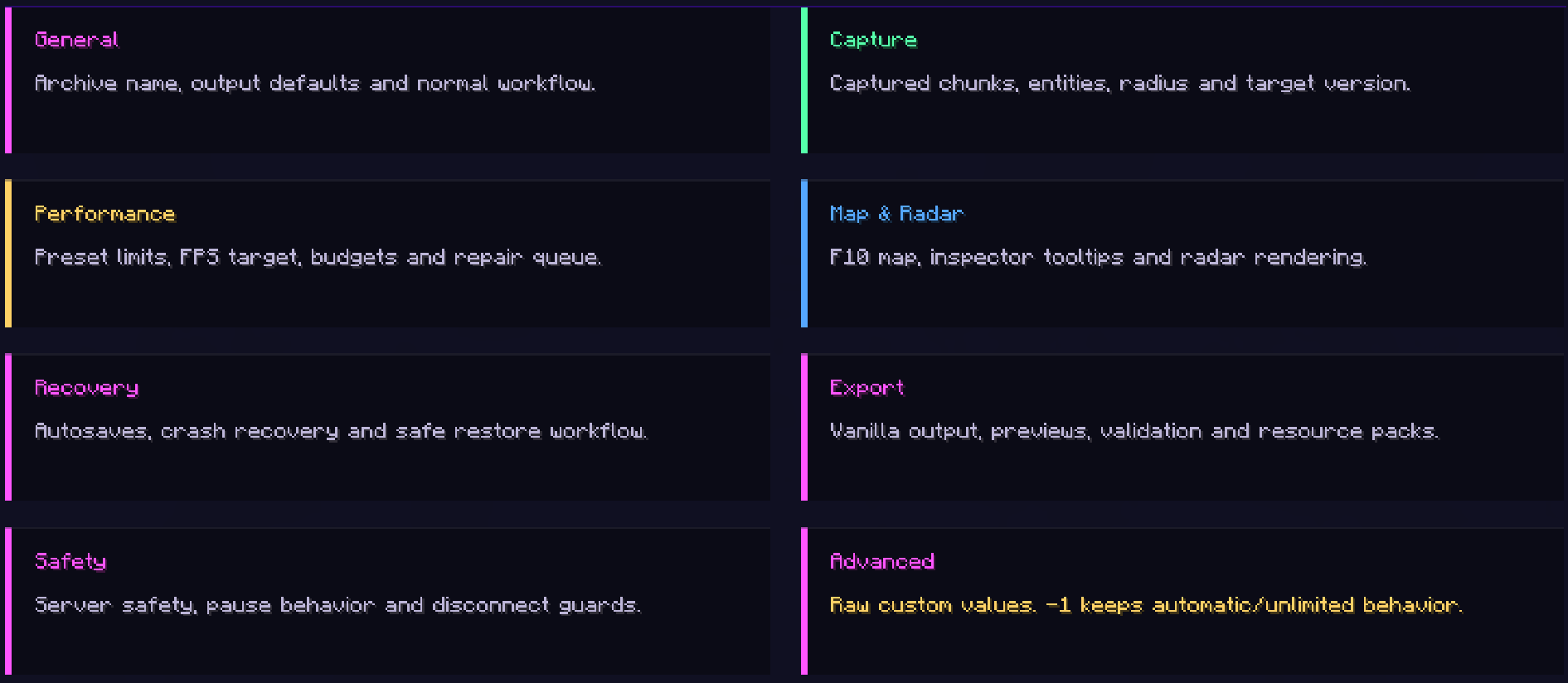 Configuration Overview WorldBinder organizes its configuration into clear sections for general export settings, capture behavior, performance tuning, map/radar options, recovery, validation and advanced controls.
 -
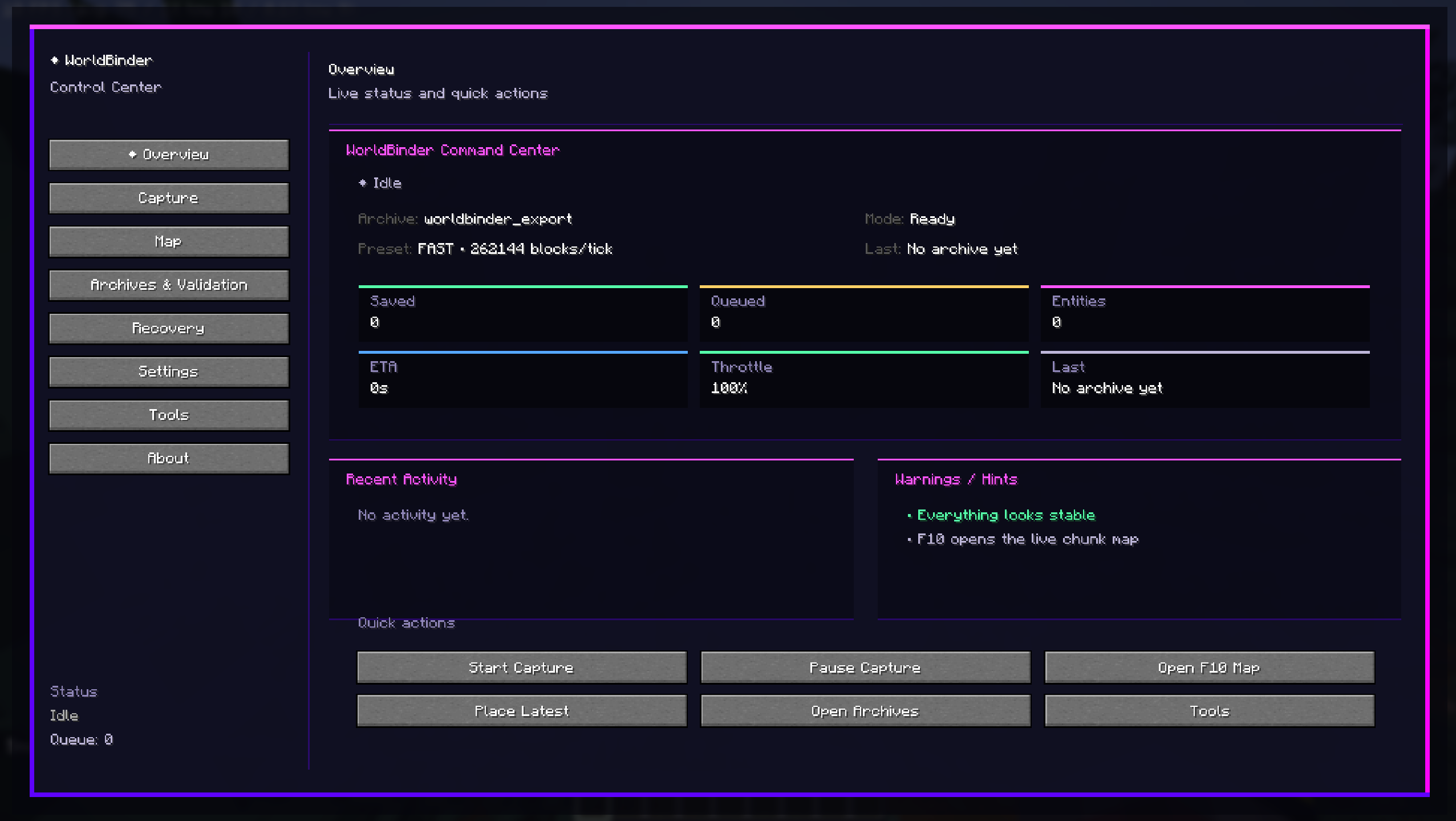 F9 Control Center The WorldBinder Control Center gives quick access to capture status, archive progress, recent activity, warnings and core actions.
 -
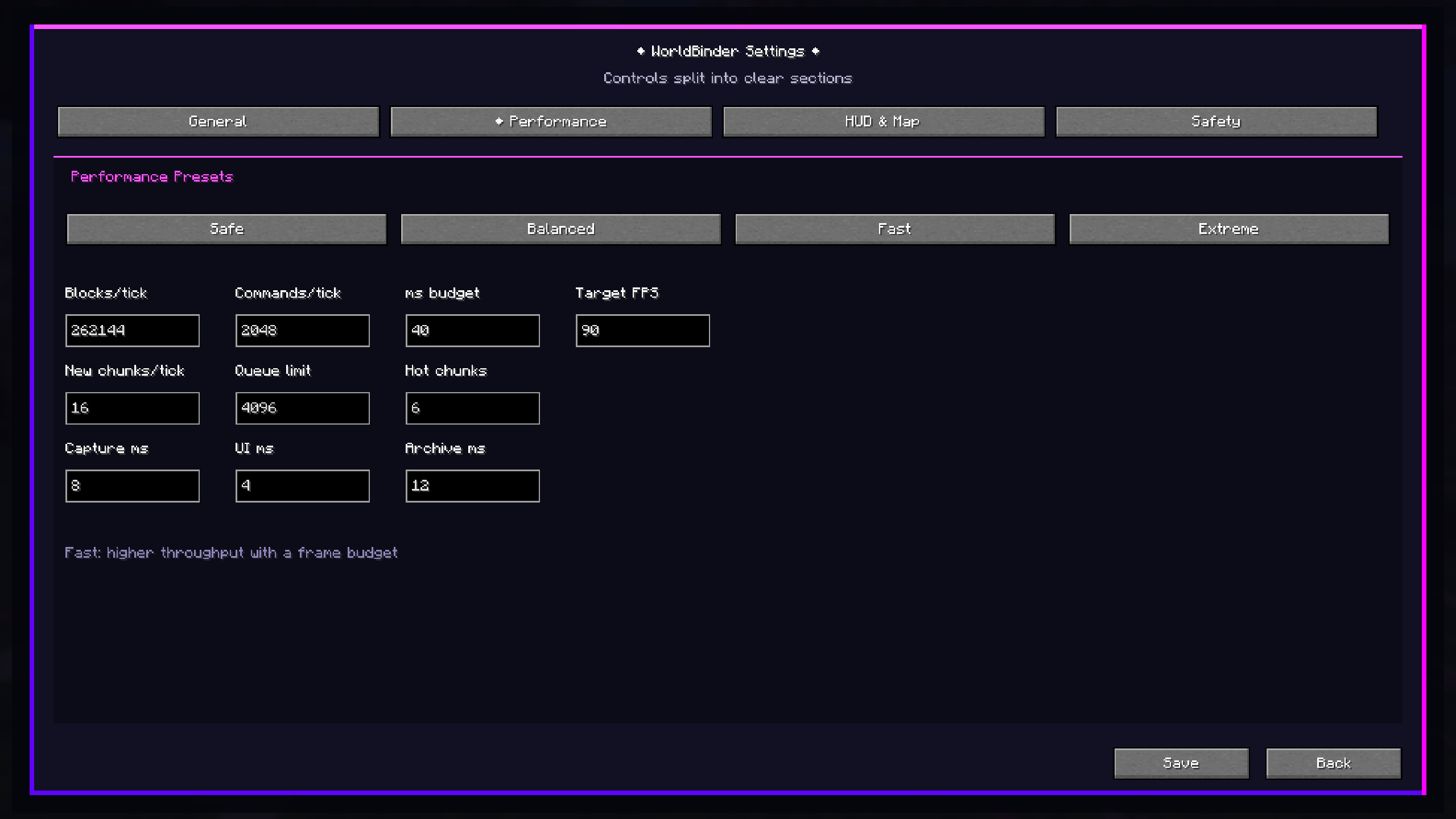 Performance Presets WorldBinder includes configurable performance presets for balancing capture speed, frame budget and queue limits. Users can choose between Safe, Balanced, Fast and Extreme modes, or fine-tune advanced capture values manually for their setup.
 -
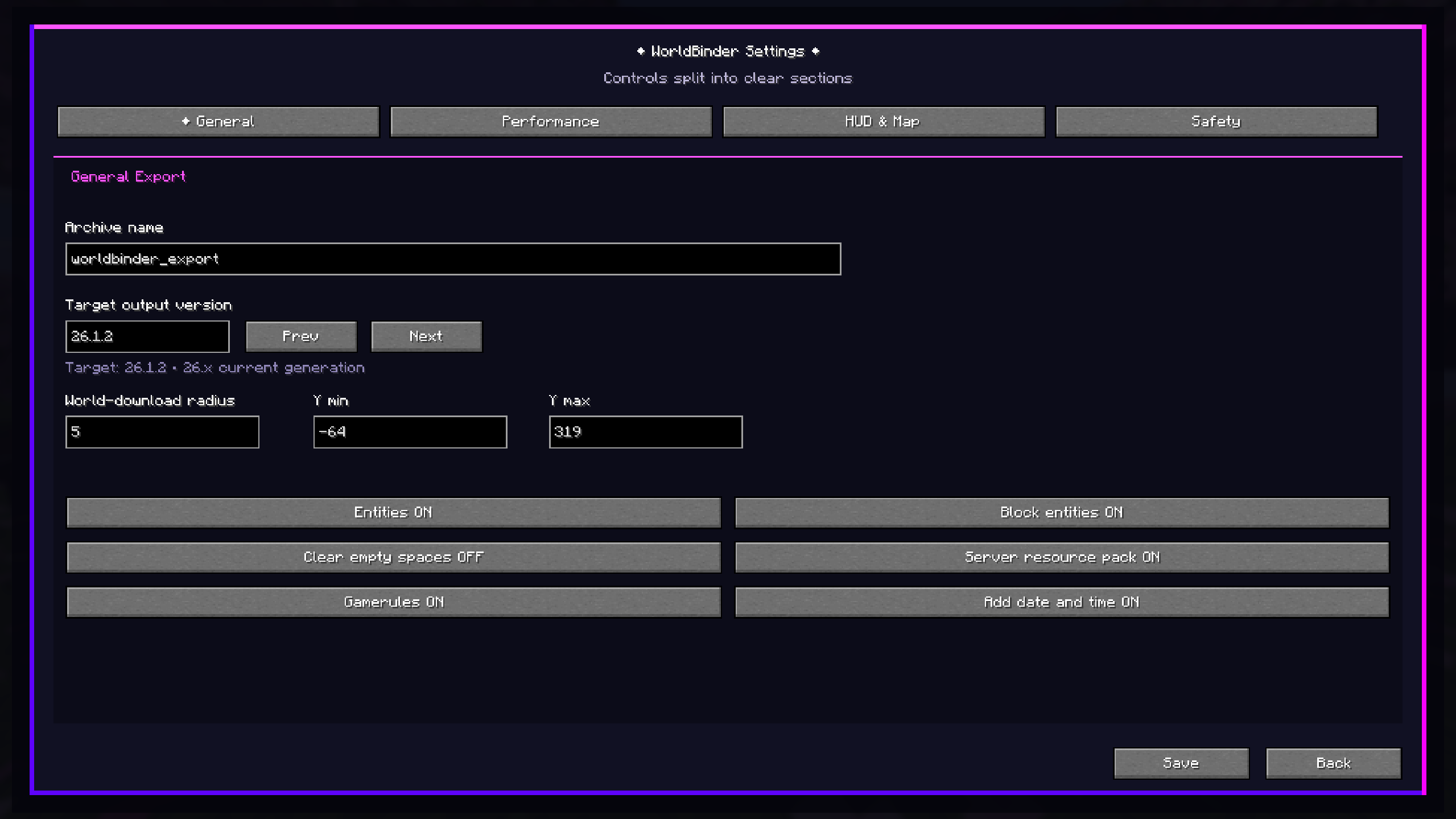 Responsive Settings Menu WorldBinder introduces a fully redesigned settings interface with clear sections for general export options, performance, HUD/map behavior and safety controls.
 -
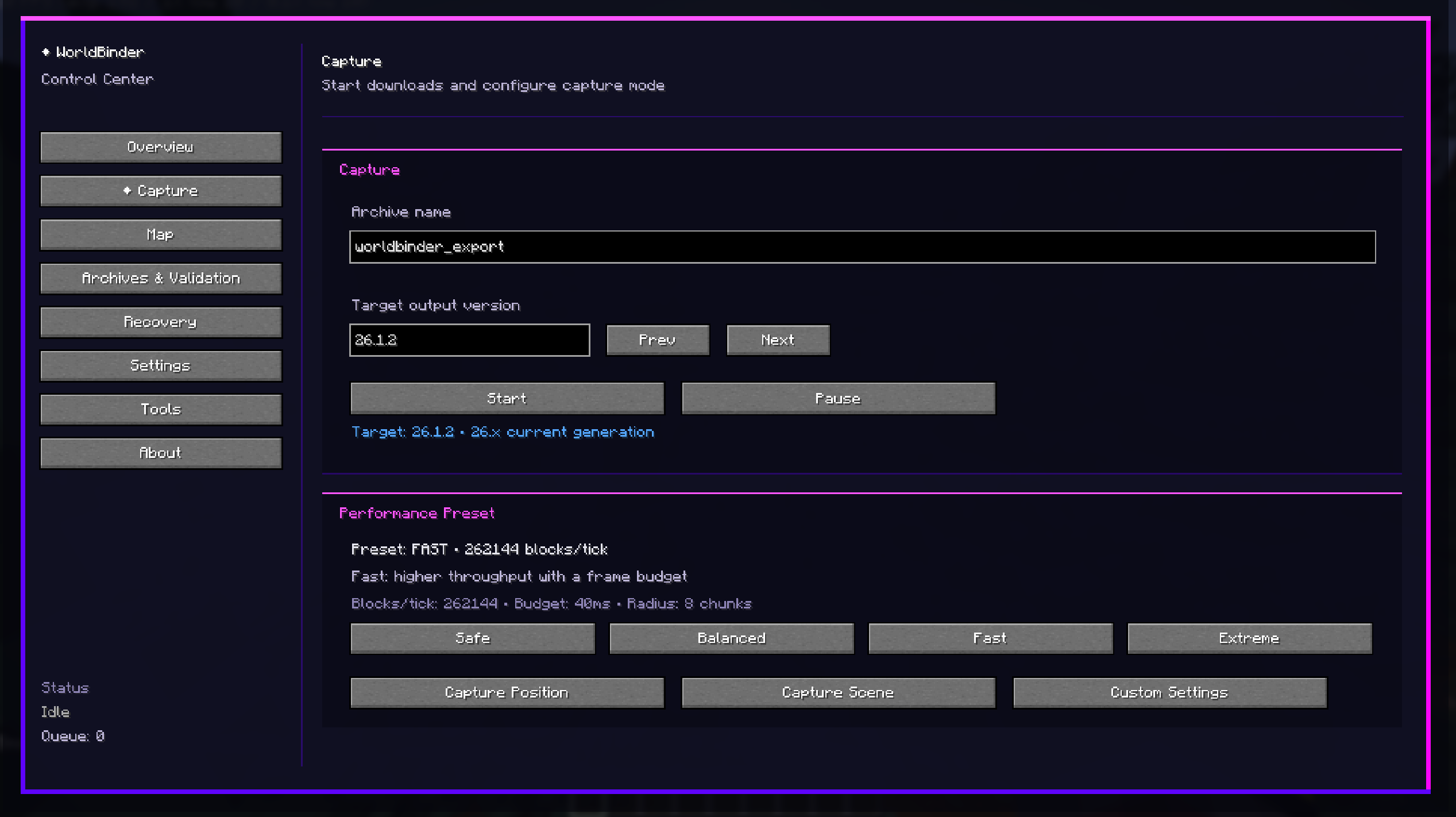 Capture Workflow The Capture screen lets users start, pause and configure world downloads directly from the WorldBinder Control Center.
 -
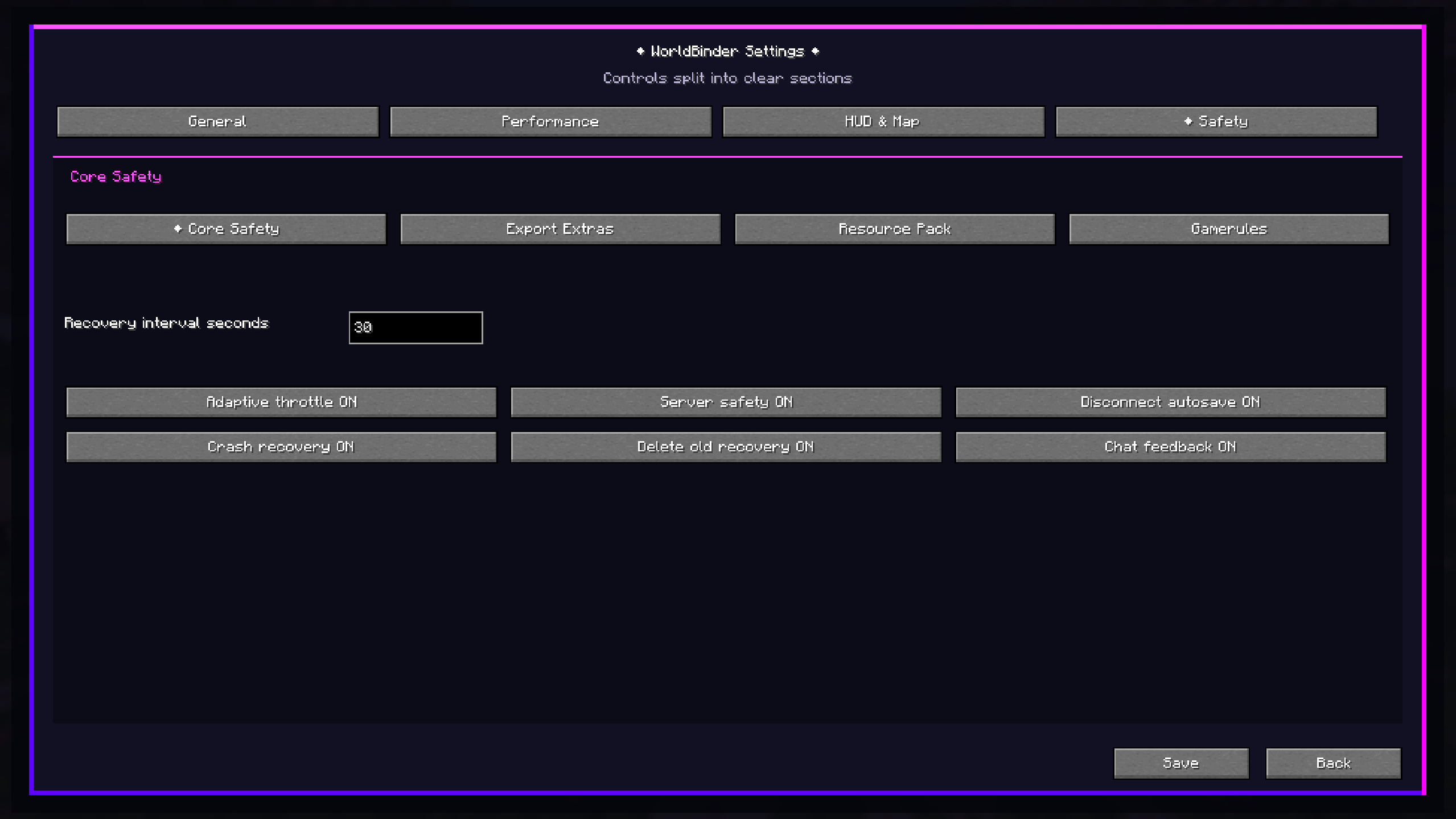 Safety and Recovery Controls WorldBinder includes dedicated safety and recovery options for responsible world capturing. Configure autosaves, crash recovery, adaptive throttling, server safety checks, resource pack handling and gamerule export behavior from one clear menu
Versions
Files
Relations
Project Relations
More like this
Similar Mods
Suggestions use data such as tags, dependencies, dependents, descriptions, titles, and more to rank how much they overlap with this mod.
On ModDex
Community snapshot
By the numbers
Statistics

 (opens in a new tab)
Get it on
Available Platforms
On ModDex
Community snapshot
By the numbers