
Community listing page, reviews here may not be monitored by the author.
YourStageSkybox

No reviews yet
added customskybox feature to Minecraft that can be hot-swapped via commands
Community voices
Reviews
No reviews yet. Be the first to review this project!
Get it on
Available Platforms
Compatibility
Supported Environments
Must be installed on both the client and the server.
About
Project Details
For authors
Embed Badge
If you're the author of this project, you can embed a live badge anywhere that supports HTML or Markdown. It updates automatically whenever ratings change.
Use HTML for any page that supports it, or Markdown for README files and Markdown-based descriptions.
Identifiers
Platform IDs
About
Description
YourStageSkybox
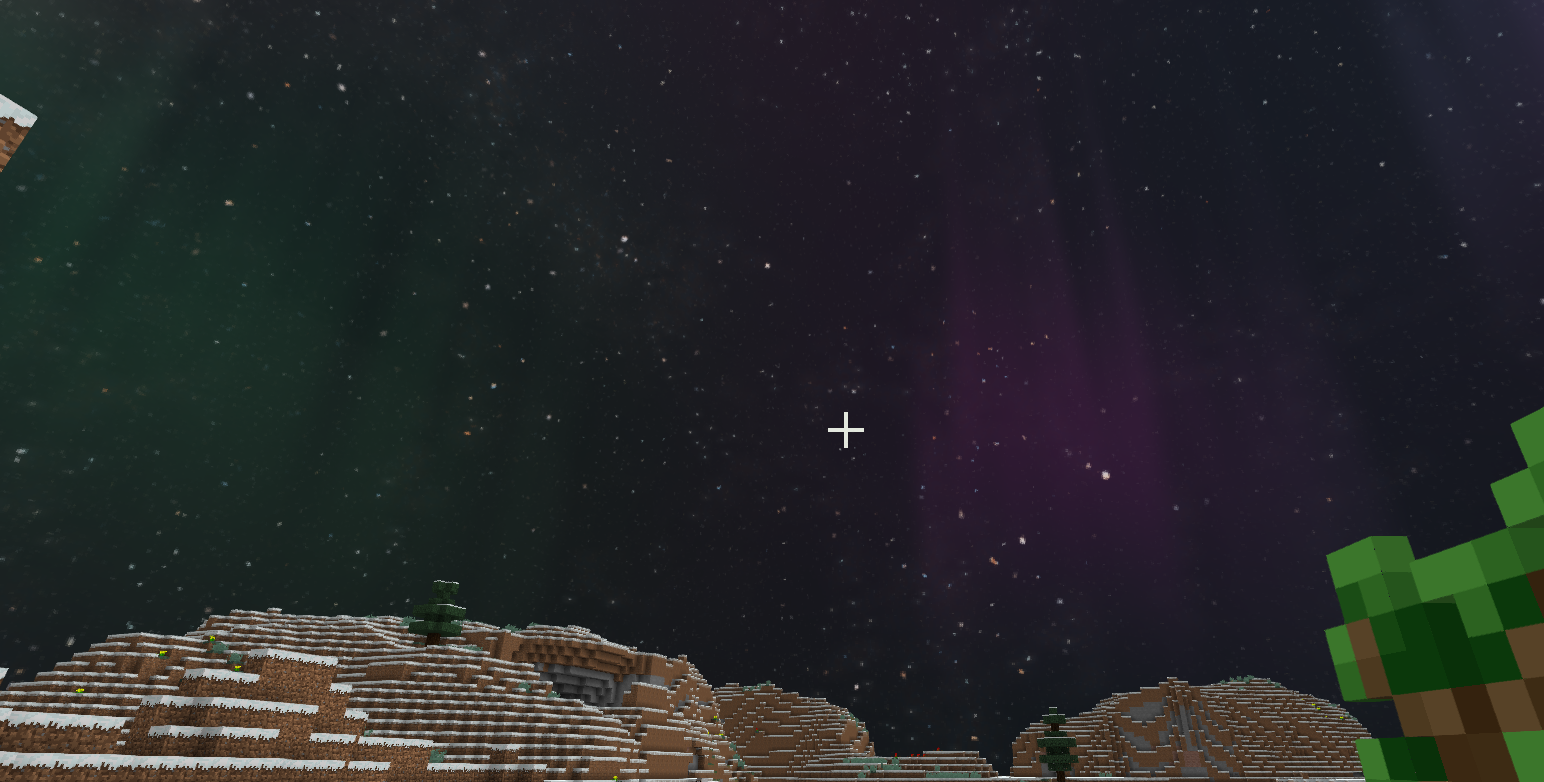
Minecraft Forge Mod — Provides APIs and commands for map creators to import skybox textures via resource packs and switch them instantly, enabling real-time scene atmosphere changes.
Supported Versions
| Directory | MC Version | Forge | Status |
|---|---|---|---|
1.12.2/ |
1.12.2 | 14.23.5.2847 | ✅ Stable |
1.16.5/ |
1.16.5 | 36.2.39 | ✅ Compilable |
1.20.1/ |
1.20.1 | 47.2.0 | ✅ Compilable |
1.21.1/ |
1.21.1 | 52.1.15 | ⚠️ In Progress |
Installation
- Place the version-matched JAR file into Minecraft’s
mods/directory. - Place skybox resource packs into the
resourcepacks/directory. - Launch the game and enable the skybox resource pack in the Resource Packs menu.
Creating a Skybox Resource Pack
File Structure
Your Resource Pack/
├── pack.mcmeta
└── assets/
    └── yourstageskybox/
        └── textures/
            └── skyboxes/
                ├── Skybox_Name1/
                │   ├── panorama_0.png   ← North (-Z)
                │   ├── panorama_1.png   ← East (+X)
                │   ├── panorama_2.png   ← South (+Z)
                │   ├── panorama_3.png   ← West (-X)
                │   ├── panorama_4.png   ← Top (+Y)
                │   └── panorama_5.png   ← Bottom (-Y)
                └── Skybox_Name2/
                    └── ...
pack.mcmeta Example
{
    "pack": {
        "pack_format": 15,
        "description": "My Skybox Resource Pack"
    }
}
pack_formatValues:
- 1.12.2 →
3- 1.16.5 →
6- 1.20.1 →
15
Image Requirements
- Square textures per face (recommended: 1024×1024 or 2048×2048,
.pngformat). - Consistent lighting and color temperature across all 6 images to avoid visible seams.
- Bottom face (
panorama_5) may be a solid color or transparent to minimize visual disruption.
Direction Mapping
| File | Direction | Coordinate |
|---|---|---|
panorama_0 |
North | -Z |
panorama_1 |
East | +X |
panorama_2 |
South | +Z |
panorama_3 |
West | -X |
panorama_4 |
Top | +Y |
panorama_5 |
Bottom | -Y |
Test Resource Packs
Sample skyboxes (demo, starry) are provided in 1.12.2/resourcepack/. Copy them directly to resourcepacks/ for testing.
Command Reference
Permission level ≥ 2 (OP required). Alias: /yss.
/yourstageskybox set <name> [alpha] [duration] [player] [dim]
    Sets skybox. Alpha: 0.0~1.0 (default: 1.0). Duration: transition time in seconds (default: 2.0).

/yourstageskybox clear [player] [dim]
    Restores vanilla sky.

/yourstageskybox alpha <0.0~1.0> [player] [dim]
    Adjusts transparency (no transition animation).

/yourstageskybox duration <seconds> [player] [dim]
    Sets transition duration for next skybox change.

/yourstageskybox info [dim]
    Shows current skybox info and transition progress.

/yourstageskybox list
    Lists all registered skyboxes.

/yourstageskybox reload
    Rescans resource packs (client-side).
Parameters:
player:@a(all),@p(nearest),@r(random), or player name. Default: all players.dim:0= Overworld,-1= Nether,1= End. Default:0(Overworld).
Examples:
/yourstageskybox set starry                    # Sets "starry" skybox for all players in Overworld
/yourstageskybox set sunset 0.8 3.0 @p         # 3-sec transition to "sunset" (80% opacity) for nearest player
/yourstageskybox clear @a 1                    # Clears skybox for all players in the End
/yourstageskybox alpha 0.5 @p                  # Sets 50% opacity for nearest player's skybox
Configuration File
config/yourstageskybox.cfg (1.12.2) or config/yourstageskybox-common.toml (1.16.5+):
| Setting | Default | Description |
|---|---|---|
autoRegister |
false |
Auto-scan resource packs on client startup to register skyboxes |
API Usage
// Set skybox
SkyboxAPI.setSkybox(level, "starry");
SkyboxAPI.setSkybox(level, "sunset", 0.8f, 3000, player);

// Clear skybox
SkyboxAPI.clearSkybox(level);
SkyboxAPI.clearSkybox(level, player);

// Query state
String name = SkyboxAPI.getSkybox(level);
float alpha = SkyboxAPI.getSkyboxAlpha(level, player);
Note:
levelrefers to theWorldobject (Minecraft dimension). All API methods are thread-safe.
YourStageSkybox模组
Minecraft Forge 模组 —— 为地图创作者提供 API 和指令,通过资源包导入天空盒材质后快捷切换,实现场景氛围的即时变化。
支持的版本
| 目录 | MC 版本 | Forge | 状态 |
|---|---|---|---|
1.12.2/ |
1.12.2 | 14.23.5.2847 | ✅ 稳定 |
1.16.5/ |
1.16.5 | 36.2.39 | ✅ 可编译 |
1.20.1/ |
1.20.1 | 47.2.0 | ✅ 可编译 |
1.21.1/ |
1.21.1 | 52.1.15 | ⚠️ 移植中 |
安装
- 将对应版本的 JAR 放入 Minecraft 的
mods/目录 - 将天空盒资源包放入
resourcepacks/目录 - 启动游戏,在资源包界面启用天空盒资源包
制作天空盒资源包
文件结构
你的资源包/
├── pack.mcmeta
└── assets/
    └── yourstageskybox/
        └── textures/
            └── skyboxes/
                ├── 天空盒名称1/
                │   ├── panorama_0.png   ← 北 (-Z)
                │   ├── panorama_1.png   ← 东 (+X)
                │   ├── panorama_2.png   ← 南 (+Z)
                │   ├── panorama_3.png   ← 西 (-X)
                │   ├── panorama_4.png   ← 上 (+Y)
                │   └── panorama_5.png   ← 下 (-Y)
                └── 天空盒名称2/
                    └── ...
pack.mcmeta 示例
{
    "pack": {
        "pack_format": 15,
        "description": "我的天空盒资源包"
    }
}
pack_format取值:1.12.2 用3,1.16.5 用6,1.20.1 用15
图片要求
- 每面正方形(推荐 1024×1024 或 2048×2048,
.png格式) - 六张图的光照和色温需一致,否则接缝处可见
- 底部(panorama_5)可选单色填充或透明,降低视觉干扰
方向对应
panorama_0 ← 玩家面朝北方时看到的画面(-Z)
panorama_1 ← 玩家面朝东方时看到的画面(+X)
panorama_2 ← 玩家面朝南方时看到的画面(+Z)
panorama_3 ← 玩家面朝西方时看到的画面(-X)
panorama_4 ← 玩家抬头看到的画面(+Y)
panorama_5 ← 玩家低头看到的画面(-Y)
测试资源包
1.12.2/resourcepack/ 目录包含两个示例天空盒(demo、starry),可直接复制到 resourcepacks/ 测试。
指令参考
权限等级 ≥ 2(OP)。别名:/yss。
/yourstageskybox set <名称> [alpha] [duration] [player] [dim]
    设置天空盒,alpha 0.0~1.0(默认 1.0),duration 过渡秒数(默认 2.0)

/yourstageskybox clear [player] [dim]
    恢复原版天空

/yourstageskybox alpha <0.0~1.0> [player] [dim]
    调整透明度(不触发过渡动画)

/yourstageskybox duration <秒> [player] [dim]
    设置下次切换的过渡时长

/yourstageskybox info [dim]
    查看当前天空盒信息及过渡进度

/yourstageskybox list
    列出所有已注册天空盒

/yourstageskybox reload
    重新扫描资源包(客户端)
参数说明:
player:@a(所有玩家)、@p(最近)、@r(随机)、玩家名,留空=所有dim:0=主世界、-1=下界、1=末地,留空=0
示例:
/yourstageskybox set starry                    # 全体玩家主世界切换到 starry
/yourstageskybox set sunset 0.8 3.0 @p        # 最近玩家 3 秒过渡到 sunset,透明度 0.8
/yourstageskybox clear @a 1                   # 清除全部玩家末地的天空盒
/yourstageskybox alpha 0.5 @p                # 最近玩家天空盒半透明
配置文件
config/yourstageskybox.cfg(1.12.2)或 config/yourstageskybox-common.toml(1.16.5+):
| 设置 | 默认 | 说明 |
|---|---|---|
autoRegister |
false |
客户端启动时自动扫描资源包注册天空盒 |
API 使用
// 设置天空盒
SkyboxAPI.setSkybox(level, "starry");
SkyboxAPI.setSkybox(level, "sunset", 0.8f, 3000, player);

// 清除
SkyboxAPI.clearSkybox(level);
SkyboxAPI.clearSkybox(level, player);

// 查询
String name = SkyboxAPI.getSkybox(level);
float alpha = SkyboxAPI.getSkyboxAlpha(level, player);
Screenshots
Gallery
Versions
Files
Relations
Project Relations
More like this
Similar Mods
Suggestions use data such as tags, dependencies, dependents, descriptions, titles, and more to rank how much they overlap with this mod.
On ModDex
Community snapshot
By the numbers
Statistics

Want to reach Minecraft players?
We're looking for a server hosting partner to feature here and other parts of the site. Interested? Send us a message!
Get in touchGet it on
Available Platforms
On ModDex
Community snapshot
By the numbers