
Community listing page, reviews here may not be monitored by the author.
ZzaiClear


No reviews yet
The Ultimate Entity Clearing Mod
Community voices
Reviews
No reviews yet. Be the first to review this project!
Get it on
Available Platforms
Compatibility
Supported Environments
Runs entirely on the server. Also works in singleplayer.
Required on the server. Installing it on the client adds functionality.
Varies by version.
About
Project Details
For authors
Embed Badge
If you're the author of this project, you can embed a live badge anywhere that supports HTML or Markdown. It updates automatically whenever ratings change.
Use HTML for any page that supports it, or Markdown for README files and Markdown-based descriptions.
Identifiers
Platform IDs
About
Description
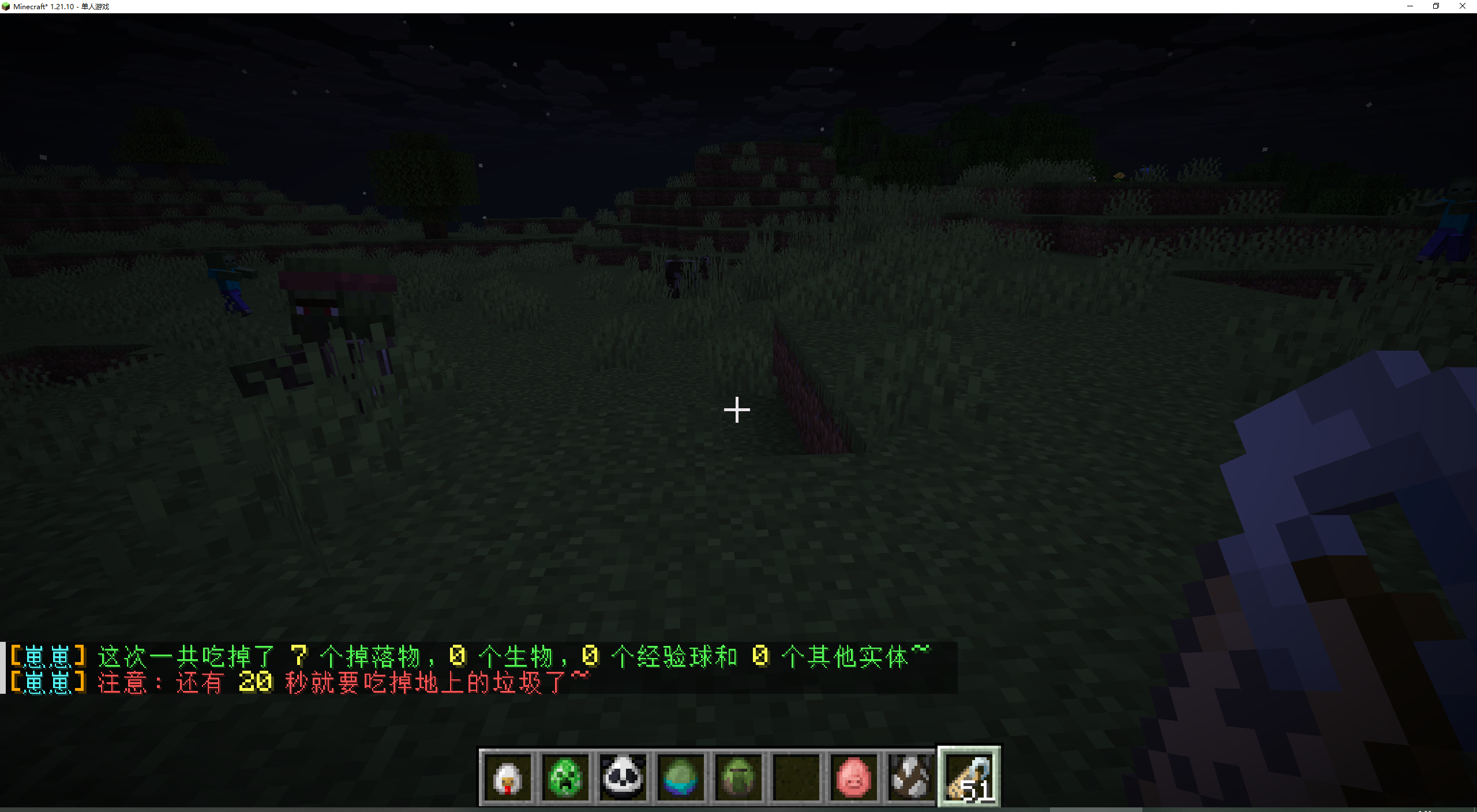
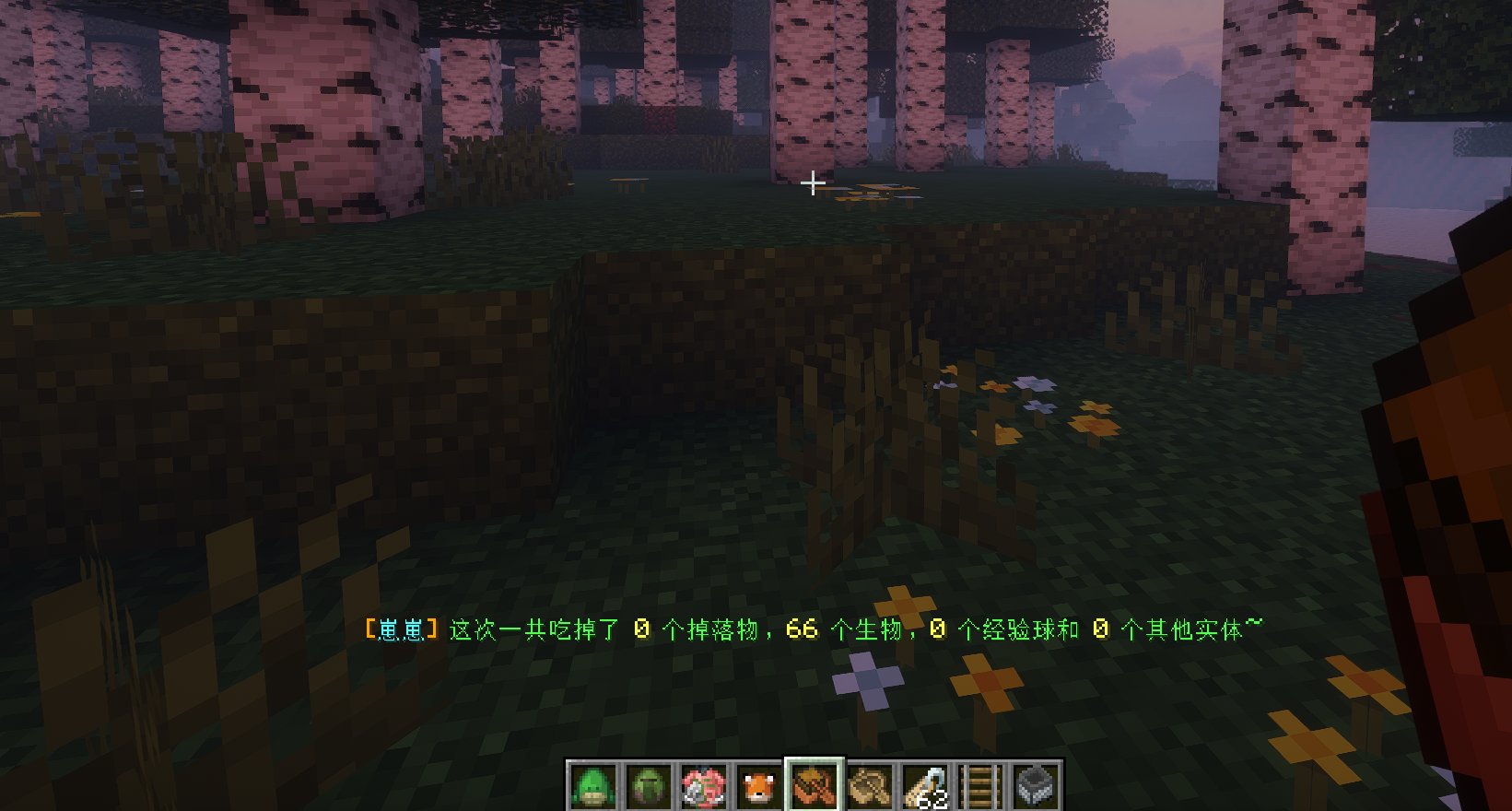
Zzclear is a lightweight, highly intelligent entity clearing and server optimization mod for Minecraft Fabric. It silently operates in the background to automatically sweep up dropped items, abandoned entities, and lag-inducing objects based on a highly configurable frequency timer. With a powerful in-game command system and hot-reloadable configuration logic, it eliminates server lag from its absolute source!
✨ Core Features
- 🕐 Automated Scheduled Clearing: Customize the sweeping cycles (down to the exact minute); when the timer strikes, lingering entities are flawlessly eradicated.
- 🛡️ Smart Whitelists & Filters: Say goodbye to "one-size-fits-all" wipes! Whether it's dropped items, specific monsters, or individual entity types, Zzclear supports precise bypassing and explicit targeting via its blacklist/whitelist arrays.
- 🐴 Rider Protection: Entities currently being ridden by players (horses, boats, minecarts, etc.) are automatically protected from clearing.
- ⏱️ Item Drop Immunity: Newly dropped items can be given a grace period to prevent them from being immediately swept up.
- 🌍 Dimension Filtering: Exclude specific dimensions (e.g., The End) from the sweep cycle entirely.
- 📊 Sweep Threshold: Skip the clearing cycle when the number of target entities is below a configurable minimum, avoiding unnecessary empty runs.
- 🌐 Bilingual Config: Config file comments support Chinese and English, controlled by the
languagefield. Takes effect after/zzclear reload. - 🪓 Total Entity Management:
- Standard Clearing: Dropped Items, Experience Orbs
- Mob Clearing: Hostile/Neutral Monsters, Passive Animals
- Vehicles/Decorations: Boats, Paintings, Item Frames
- Physics/Projectiles: Fired Arrows, Thrown Tridents, Falling Blocks, Primed TNT, Shulker Bullets, Firework Rockets, and more.
- 🔄 Hot-Reload Commands: Changing the configuration data file? No need to restart the server! A single built-in command applies the new rules instantly.
⌨️ In-Game Commands
The primary root command is /zzclear:
1. Configuration Reload (Admin)
/zzclear reload
- Function: Re-reads the
config/config.jsonfile from disk and immediately applies all new clearing filters, timer periods, and refreshes config comment language.
2. Check Clear Countdown (All Players)
/zzclear status
- Function: Shows the remaining time (minutes and seconds) until the next automatic sweep.
3. Manual Immediate Sweeping (Admin)
If you do not want to wait for the background timer intervals, use these commands to instantly wipe specific entity categories:
/zzclear items— Instantly clears all dropped items on the ground./zzclear monsters— Instantly clears all hostile and neutral monsters./zzclear animals— Instantly clears all friendly, passive animals./zzclear xps— Instantly clears all floating experience orbs./zzclear others— Instantly clears miscellaneous entities (e.g., Paintings, Boats, Falling Blocks, Projectiles).
4. Item Whitelists (Admin)
Hold an item in your main hand and instantly register it into the whitelist filters to prevent the sweeper from ever consuming it:
/zzclear white item add— Adds the currently held item into the global whitelist./zzclear white item del— Removes the currently held item from the global whitelist.
5. Entity ID Whitelists (Admin)
If you need to meticulously protect or exclude a specific living organism or object (e.g., minecraft:zombie), utilize these endpoints:
/zzclear white entity add <Entity ID>— Adds a specific entity registry ID into the whitelist./zzclear white entity del <Entity ID>— Un-registers a specific entity registry ID from the whitelist.
Note: These commands fully support in-game Tab autocompletion suggestions!
🔑 Permission Nodes
Without LuckPerms, admin commands require OP level 4. With LuckPerms installed, use these permission nodes for fine-grained control:
| Permission | Description | Default |
|---|---|---|
zzclear.command.admin |
Reload, whitelist management | OP only |
zzclear.command.items |
Manual item clearing | OP only |
zzclear.command.monsters |
Manual monster clearing | OP only |
zzclear.command.animals |
Manual animal clearing | OP only |
zzclear.command.xps |
Manual XP orb clearing | OP only |
zzclear.command.others |
Manual other entity clearing | OP only |
zzclear.command.status |
View clear countdown | All players |
⚙️ Configuration Setup
After launching the game once, the mod automatically generates the config file at:
<game root>/Zzclear/config/config.jsonThe config file includes comments in Chinese or English (controlled by the language field).
Common Settings
| Parameter | Default | Description |
|---|---|---|
language |
"zh" |
Config comment language, zh=Chinese, en=English. Takes effect after reload |
sweepIntervalMinutes |
4 |
Sweep interval in minutes |
warningTimeSeconds |
20 |
Warning time before sweep (seconds) |
finalCountdownSeconds |
5 |
Final countdown duration (seconds) |
countdownMessage |
Chinese text | Countdown warning message template, supports {0} placeholder |
sweepCompleteMessage |
Chinese text | Sweep complete summary template, supports {0}~{3} placeholders |
statusMessage |
Chinese text | /zzclear status message template |
ignoreNamedEntities |
true |
Ignore entities with custom names |
ignoreRiddenEntities |
true |
Protect entities being ridden by players |
newItemImmunitySeconds |
0 |
Item drop immunity (seconds after drop), 0=disabled |
minEntityCountToSweep |
0 |
Minimum entity count to trigger sweep, 0=no limit |
dimensionBlacklist |
[] |
Dimensions excluded from sweep, e.g. ["minecraft:the_end"] |
Item Settings
| Parameter | Default | Description |
|---|---|---|
sweepItems |
true |
Enable item entity sweeping |
useItemWhitelist |
false |
Whitelist mode (protect listed items) |
useItemBlacklist |
false |
Blacklist mode (only sweep listed items) |
itemWhitelist |
[] |
Item whitelist |
itemBlacklist |
["minecraft:diamond"] |
Item blacklist |
Mob Settings
| Parameter | Default | Description |
|---|---|---|
sweepLivingEntities |
true |
Enable living entity sweeping |
dropExp |
false |
Drop experience when killing mobs |
sweepPassiveAnimals |
false |
Sweep passive animals |
sweepHostileMonsters |
true |
Sweep hostile monsters |
useMobWhitelist |
true |
Enable mob whitelist mode |
useMobBlacklist |
false |
Enable mob blacklist mode |
mobWhitelist |
Villagers, Iron Golems, etc. | Mob whitelist |
mobBlacklist |
Villagers, Iron Golems | Mob blacklist |
Other Entity Settings
| Parameter | Default | Description |
|---|---|---|
sweepExperienceOrbs |
false |
Sweep experience orbs |
sweepFallingBlocks |
false |
Sweep falling blocks (e.g. sand) |
sweepArrows |
false |
Sweep arrows |
sweepTridents |
false |
Sweep tridents |
sweepProjectiles |
false |
Sweep projectiles |
sweepShulkerBullets |
false |
Sweep shulker bullets |
sweepFireworks |
false |
Sweep firework rockets |
sweepItemFrames |
false |
Sweep item frames |
sweepPaintings |
false |
Sweep paintings |
sweepBoats |
false |
Sweep boats |
sweepPrimedTNT |
false |
Sweep primed TNT |
Tip: After tweaking the JSON config, jump right back into the game and fire
/zzclear reload. Done instantly, with absolutely zero delays!
Zzclear is a lightweight, highly intelligent entity clearing and server optimization mod for Minecraft Fabric. It silently operates in the background to automatically sweep up dropped items, abandoned entities, and lag-inducing objects based on a highly configurable frequency timer. With a powerful in-game command system and hot-reloadable configuration logic, it eliminates server lag from its absolute source!
✨ Core Features
- 🕐 Automated Scheduled Clearing: Customize the sweeping cycles (down to the exact minute); when the timer strikes, lingering entities are flawlessly eradicated.
- 🛡️ Smart Whitelists & Filters: Say goodbye to "one-size-fits-all" wipes! Whether it's dropped items, specific monsters, or individual entity types, Zzclear supports precise bypassing and explicit targeting via its blacklist/whitelist arrays.
- 🐴 Rider Protection: Entities currently being ridden by players (horses, boats, minecarts, etc.) are automatically protected from clearing.
- ⏱️ Item Drop Immunity: Newly dropped items can be given a grace period to prevent them from being immediately swept up.
- 🌍 Dimension Filtering: Exclude specific dimensions (e.g., The End) from the sweep cycle entirely.
- 📊 Sweep Threshold: Skip the clearing cycle when the number of target entities is below a configurable minimum, avoiding unnecessary empty runs.
- 🌐 Bilingual Config: Config file comments support Chinese and English, controlled by the
languagefield. Takes effect after/zzclear reload. - 🪓 Total Entity Management:
- Standard Clearing: Dropped Items, Experience Orbs
- Mob Clearing: Hostile/Neutral Monsters, Passive Animals
- Vehicles/Decorations: Boats, Paintings, Item Frames
- Physics/Projectiles: Fired Arrows, Thrown Tridents, Falling Blocks, Primed TNT, Shulker Bullets, Firework Rockets, and more.
- 🔄 Hot-Reload Commands: Changing the configuration data file? No need to restart the server! A single built-in command applies the new rules instantly.
⌨️ In-Game Commands
The primary root command is /zzclear:
1. Configuration Reload (Admin)
/zzclear reload
- Function: Re-reads the
config/config.jsonfile from disk and immediately applies all new clearing filters, timer periods, and refreshes config comment language.
2. Check Clear Countdown (All Players)
/zzclear status
- Function: Shows the remaining time (minutes and seconds) until the next automatic sweep.
3. Manual Immediate Sweeping (Admin)
If you do not want to wait for the background timer intervals, use these commands to instantly wipe specific entity categories:
/zzclear items— Instantly clears all dropped items on the ground./zzclear monsters— Instantly clears all hostile and neutral monsters./zzclear animals— Instantly clears all friendly, passive animals./zzclear xps— Instantly clears all floating experience orbs./zzclear others— Instantly clears miscellaneous entities (e.g., Paintings, Boats, Falling Blocks, Projectiles).
4. Item Whitelists (Admin)
Hold an item in your main hand and instantly register it into the whitelist filters to prevent the sweeper from ever consuming it:
/zzclear white item add— Adds the currently held item into the global whitelist./zzclear white item del— Removes the currently held item from the global whitelist.
5. Entity ID Whitelists (Admin)
If you need to meticulously protect or exclude a specific living organism or object (e.g., minecraft:zombie), utilize these endpoints:
/zzclear white entity add <Entity ID>— Adds a specific entity registry ID into the whitelist./zzclear white entity del <Entity ID>— Un-registers a specific entity registry ID from the whitelist.Note: These commands fully support in-game Tab autocompletion suggestions!
🔑 Permission Nodes
Without LuckPerms, admin commands require OP level 4. With LuckPerms installed, use these permission nodes for fine-grained control:
| Permission | Description | Default |
|---|---|---|
zzclear.command.admin |
Reload, whitelist management | OP only |
zzclear.command.items |
Manual item clearing | OP only |
zzclear.command.monsters |
Manual monster clearing | OP only |
zzclear.command.animals |
Manual animal clearing | OP only |
zzclear.command.xps |
Manual XP orb clearing | OP only |
zzclear.command.others |
Manual other entity clearing | OP only |
zzclear.command.status |
View clear countdown | All players |
⚙️ Configuration Setup
After launching the game once, the mod automatically generates the config file at:
<game root>/Zzclear/config/config.json
The config file includes comments in Chinese or English (controlled by the language field).
Common Settings
| Parameter | Default | Description |
|---|---|---|
language |
"zh" |
Config comment language, zh=Chinese, en=English. Takes effect after reload |
sweepIntervalMinutes |
4 |
Sweep interval in minutes |
warningTimeSeconds |
20 |
Warning time before sweep (seconds) |
finalCountdownSeconds |
5 |
Final countdown duration (seconds) |
countdownMessage |
Chinese text | Countdown warning message template, supports {0} placeholder |
sweepCompleteMessage |
Chinese text | Sweep complete summary template, supports {0}~{3} placeholders |
statusMessage |
Chinese text | /zzclear status message template |
ignoreNamedEntities |
true |
Ignore entities with custom names |
ignoreRiddenEntities |
true |
Protect entities being ridden by players |
newItemImmunitySeconds |
0 |
Item drop immunity (seconds after drop), 0=disabled |
minEntityCountToSweep |
0 |
Minimum entity count to trigger sweep, 0=no limit |
dimensionBlacklist |
[] |
Dimensions excluded from sweep, e.g. ["minecraft:the_end"] |
Item Settings
| Parameter | Default | Description |
|---|---|---|
sweepItems |
true |
Enable item entity sweeping |
useItemWhitelist |
false |
Whitelist mode (protect listed items) |
useItemBlacklist |
false |
Blacklist mode (only sweep listed items) |
itemWhitelist |
[] |
Item whitelist |
itemBlacklist |
["minecraft:diamond"] |
Item blacklist |
Mob Settings
| Parameter | Default | Description |
|---|---|---|
sweepLivingEntities |
true |
Enable living entity sweeping |
dropExp |
false |
Drop experience when killing mobs |
sweepPassiveAnimals |
false |
Sweep passive animals |
sweepHostileMonsters |
true |
Sweep hostile monsters |
useMobWhitelist |
true |
Enable mob whitelist mode |
useMobBlacklist |
false |
Enable mob blacklist mode |
mobWhitelist |
Villagers, Iron Golems, etc. | Mob whitelist |
mobBlacklist |
Villagers, Iron Golems | Mob blacklist |
Other Entity Settings
| Parameter | Default | Description |
|---|---|---|
sweepExperienceOrbs |
false |
Sweep experience orbs |
sweepFallingBlocks |
false |
Sweep falling blocks (e.g. sand) |
sweepArrows |
false |
Sweep arrows |
sweepTridents |
false |
Sweep tridents |
sweepProjectiles |
false |
Sweep projectiles |
sweepShulkerBullets |
false |
Sweep shulker bullets |
sweepFireworks |
false |
Sweep firework rockets |
sweepItemFrames |
false |
Sweep item frames |
sweepPaintings |
false |
Sweep paintings |
sweepBoats |
false |
Sweep boats |
sweepPrimedTNT |
false |
Sweep primed TNT |
Tip: After tweaking the JSON config, jump right back into the game and fire
/zzclear reload. Done instantly, with absolutely zero delays!
Screenshots
Gallery
Versions
Files
Relations
Project Relations
More like this
Similar Mods
Suggestions use data such as tags, dependencies, dependents, descriptions, titles, and more to rank how much they overlap with this mod.
On ModDex
Community snapshot
By the numbers
Statistics
Want to reach Minecraft players?
We're looking for a server hosting partner to feature here and other parts of the site. Interested? Send us a message!
Get in touchGet it on
Available Platforms
On ModDex
Community snapshot
By the numbers