Community listing page, reviews may not be monitored by the author.
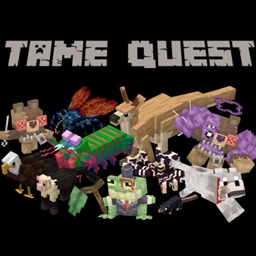
Tame Quest

No reviews yet
A global odyssey of exploration and sorcery. Harness powerful magic to track, battle, and tame every creature across the furthest reaches of the world.

Community voices
Reviews
No reviews yet. Be the first to review this project!
Get it on
Available Platforms
About
Project Details
For authors
Embed Badge
If you're the author of this project, you can embed a live badge anywhere that supports HTML or Markdown. It updates automatically whenever ratings change.
Use HTML for any page that supports it, or Markdown for README files and Markdown-based descriptions.
Identifiers
Platform IDs
Resources
External Links
About
Description
This was a culmination of almost 50 hours of procrastination to create my magnum opus. Based on the very niche need for my girlfriend and me to tame everything, I sat down and created this pack. Based on adventure packs akin to RAD, this modpack will explore Magic, Adventure, technology, and Taming in a neat package that almost any computer can run. You will not go unaided. Accompanying you is a heavily detailed questing chain to guide you through the more troubling and technical mods this pack has to offer.
These Are Some Featured mods with Quests
- Companions
- Rats
- Alex's Caves
- Mo Creatures
- Alex's Mobs
- Collectors Caravan
- Ice and Fire
- Better Archaeology
Note: Ratlantis is disabled by default. I have instructed how to enable it via the Datapack OR Config file
-
Locate your Modpack Folder: Open CurseForge, right-click the Tame Quest profile, and select Open Folder.
-
Open the Config Folder: Find and open the folder named
config. -
Find the Rats Config File: Scroll through the folder and look for a file named
rats-common.toml. -
Edit the File: Right-click
rats-common.tomland open it with a basic text editor (Notepad, TextEdit, or Notepad++ will work perfectly). -
Enable Ratlantis: Look near the very top of the text document for the Ratlantis settings. You are looking for a line that says
ratlantisEnabledByDefault = false. Change thefalsetotrue.
OR
Changing this config ensures the Ratlantis datapack is enabled by default for all new worlds you generate. If you are trying to add it to a world you have already started, this config change usually forces it to activate retroactively. If it still doesn't show up in an old save, you might need to use the in-game command/datapack enable "mod:rats/ratlantis".
Screenshots
Gallery
Versions
Files
Relations
Project Relations
More like this
Similar Modpacks
Suggestions use data such as tags, dependencies, dependents, descriptions, titles, and more to rank how much they overlap with this modpack.
On ModDex
Community snapshot
By the numbers
Statistics

Get it on
Available Platforms
On ModDex
Community snapshot
By the numbers
Statistics
Resources