Community listing page, reviews may not be monitored by the author.
Advanced Creation: a mod for easy building


No reviews yet
Adds a RTS-perspective and a suite of building tools to speed up your minecraft builds.

Community voices
Reviews
No reviews yet. Be the first to review this project!
Get it on
Available Platforms
Compatibility
Supported Environments
Must be installed on both the client and the server.
About
Project Details
For authors
Embed Badge
If you're the author of this project, you can embed a live badge anywhere that supports HTML or Markdown. It updates automatically whenever ratings change.
Use HTML for any page that supports it, or Markdown for README files and Markdown-based descriptions.
Identifiers
Platform IDs
Resources
External Links
About
Description
Advanced creation is a mod dedicated to making building easier, faster and more fun for both casual and hardcore minecraft players.
Find out more about this mod and share your templates on: https://www.advancedcreationmod.com
Do you think this is a cool idea but the implementation s*cks! Come say that to my face on Discord! I'm waiting every day to get scolded by you on how much my stuff s*cks. Please be gentle:
Discord: Official Advanced Creation Kingdom
Want to see what I'm working on and get the latest development updates? Follow me on twitter:
Twitter handle: GraphiteGames_C
Quick overview
Here is a little trailer that shows of some of the features quickly.
News
Public release of the MC 1.12.2 Beta1.2 version with the features from MC 1.16.5 (posted on 26/07/2023)
After being Patreon only for 2 month it is now released to the public here.
Important features are the new terrain editing tools in the EDIT mode: LEVEL, DIG/RAISE, SMOOTH/SHARPEN. There's also the delete bucket in the template inventory screen and FPS optimization tool and more! It also has various bug and crash fixes, ofcourse.
First 2 parts of Advanced Creation tutorial now on Youtube! (posted on 25/02/2023)
 Check them out:
  - Advanced Creation tutorial part 1: Basics
  - Advanced Creation tutorial part 2: BUILD mode
A little late but here are the "monthly" UNSTABLE versions beta1.0.2 for MC 1.16.5 and alpha2.0.2for MC 1.12.2 (posted on 11/02/2023)
Well better late then never right? Check out that sweet mod compatibility especially with bewitchment on MC 1.12.2 and the block blacklist file added to the .Minecraft folder for both versions.
Release of Monthly UNSTABLE versions beta1.0.1 for MC 1.16.5 and alpha2.1 for MC 1.12.2 (posted on 27/12/2022)
I call them UNSTABLE because they are quick fixes for issues highlighted by the lovely people on discord, reddit or any other platforms. I haven't done extensive testing on them so they may contain some overlooked issues, hence the labelling as "UNSTABLE" .
I have my own discord server and twitter account now! (posted on 25/10/2022)
Join the server do be up to date with new developments, give me your opinion or feedback or just discuss the mod with me and others.
Or you can follow me on twitter to see what I'm working on and get the latest updates on the development.
Port to 1.16.5 is finally complete! (posted on 25/10/2022)
Besides all the features from MC 1.12.2, it also has shiny new features, such as the new DIG/RAISE, SMOOTH/SHARPEN and LEVEL tools in EDIT mode for terrain editing (see feature list below) but also some basic features and fixes that, honestly, needed to be in the mod from the beginning.
In the future these features will also be added to MC1.12.2.
Timeline
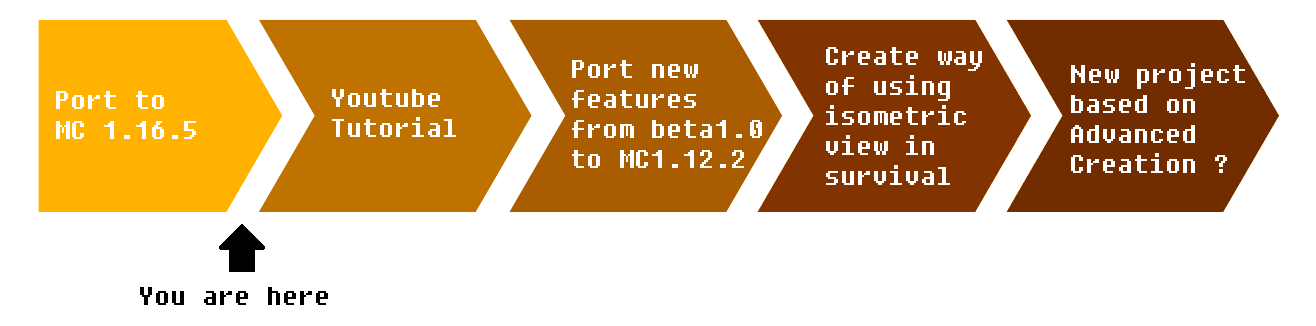
(Disclaimer: this is a rough idea of what I'm planning on doing right now. I might change the timeline at anytime and I cannot promise I will do things exactly as I've described here.) Posted on 27/10/2022
Want to know how the progress on the timeline is going? Follow me on twitter:
Twitter handle: GraphiteGames_C
Features
If the trailer has piqued your interest, then below you can find a more detailed overview of the features in this mod.
Isometric-Like Camera
Isometric-like camera that can zoom in and out, rotate around a focus point and move around with the normal move keys. It even has the option to show a cut-through of the world that allows you to look into buildings.
Ofcourse an isometric perspective necessitates a free mouse cursor. This in turn allows the HUD Overlay to have clickable buttons.
An expansive set of building tools
An array of flexible tools are available to build structures and edit the world with only a few clicks.
Current available tools are: Single block, Line, Rectangle, Curve, Circle, Pull, Copy, Move/Delete, FillGap, Paint Brush, PaintBucket, Place/Delete Plants
You can choose whether you want the rectangle and circle filled up or not.
Each tool gives a clear preview of the blocks that are added or deleted.
Additional settings give the ability to build vertically without relying on higher terrain.
Current available directional settings are: Free, build in vertical XY plane/ZY plane, build in horizontal XZ plane, follow ground mode.
These tools and settings are available via a quick-selection wheel menu, but also via toggle hotkeys.
Create, Place & Share templates
You can create templates of existing structures with an easy to use selection mechanism.
These templates can be placed into the world with additional settings such as a generated foundation.
You can share your own creation on my website or download other player's creations and load them immediately into your current game.
Edit terrain with easy-to-use tools
Since beta1.0, there are tools available in the EDIT mode that allow you to dig or raise the terrain as well as level entire areas to the desired height. To make more subtle changes to the existing terrain you can smooth it to make a traversable slope or sharpening a slope to make cliffs.
Additional features
Additional quality of life features are: Redo/Undo functionality and an integrated help screen with animated examples.
Known Mod Compatibility
Link to mod compatibility page on Advanced Creation website
Theses mods were not tested exhaustively. If you experience crashes or other bugs when using these mods you can send descriptions or/and crash reports to [email protected]
Thank you to Joe21 for testing out these mods. If anybody else has experience running advanced creation with other mods successfully. It would help a lot if you could mention them in a comment here or on Youtube, Discord or send it to my email: [email protected]
Advanced creation is a mod dedicated to making building easier, faster and more fun for both casual and hardcore minecraft players.
Find out more about this mod and share your templates on: https://www.advancedcreationmod.com
Do you think this is a cool idea but the implementation s*cks! Come say that to my face on Discord! I'm waiting every day to get scolded by you on how much my stuff s*cks. Please be gentle:
Discord: Official Advanced Creation Kingdom
Want to see what I'm working on and get the latest development updates? Follow me on twitter:
Twitter handle: GraphiteGames_C
Quick overview
Here is a little trailer that shows of some of the features quickly.
News
Public release of the MC 1.12.2 Beta1.2 version with the features from MC 1.16.5(posted on 26/07/2023)
After being Patreon only for 2 month it is now released to the public here.
Important features are the new terrain editing tools in the EDIT mode: LEVEL, DIG/RAISE, SMOOTH/SHARPEN. There's also the delete bucket in the template inventory screen and FPS optimization tool and more! It also has various bug and crash fixes, ofcourse.
I have my own discord server and twitter account now! (posted on 25/10/2022)
Join the server do be up to date with new developments, give me your opinion or feedback or just discuss the mod with me and others.
Or you can follow me on twitter to see what I'm working on and get the latest updates on the development.
Port to 1.16.5 is finally complete! (posted on 25/10/2022)
Besides all the features from MC 1.12.2, it also has shiny new features, such as the new DIG/RAISE, SMOOTH/SHARPEN and LEVEL tools in EDIT mode for terrain editing (see feature list below) but also some basic features and fixes that, honestly, needed to be in the mod from the beginning.
In the future these features will also be added to MC1.12.2.
Timeline

(Disclaimer: this is a rough idea of what I'm planning on doing right now. I might change the timeline at anytime and I cannot promise I will do things exactly as I've described here.) Posted on 27/10/2022
Want to know how the progress on the timeline is going? Follow me on twitter:
Twitter handle: GraphiteGames_C
Features
If the trailer has piqued your interest, then below you can find a more detailed overview of the features in this mod.
Isometric-Like Camera
Isometric-like camera that can zoom in and out, rotate around a focus point and move around with the normal move keys. It even has the option to show a cut-through of the world that allows you to look into buildings.
Ofcourse an isometric perspective necessitates a free mouse cursor. This in turn allows the HUD Overlay to have clickable buttons.
An expansive set of building tools
An array of flexible tools are available to build structures and edit the world with only a few clicks.
Current available tools are: Single block, Line, Rectangle, Curve, Circle, Pull, Copy, Move/Delete, FillGap, Paint Brush, PaintBucket, Place/Delete Plants
You can choose whether you want the rectangle and circle filled up or not.
Each tool gives a clear preview of the blocks that are added or deleted.
Additional settings give the ability to build vertically without relying on higher terrain.
Current available directional settings are: Free, build in vertical XY plane/ZY plane, build in horizontal XZ plane, follow ground mode.
These tools and settings are available via a quick-selection wheel menu, but also via toggle hotkeys.
Create, Place & Share templates
You can create templates of existing structures with an easy to use selection mechanism.
These templates can be placed into the world with additional settings such as a generated foundation.
You can share your own creation on my website or download other player's creations and load them immediately into your current game.
Edit terrain with easy-to-use tools
Since beta1.0, there are tools available in the EDIT mode that allow you to dig or raise the terrain as well as level entire areas to the desired height. To make more subtle changes to the existing terrain you can smooth it to make a traversable slope or sharpening a slope to make cliffs.
Additional features
Additional quality of life features are: Redo/Undo functionality and an integrated help screen with animated examples.
Known Mod Compatibility
1.12.2
Litematica : A Mod for placing schematics in the world
MaLiLib : Contains all the configuration options, keybind stuff, most of the GUI code and a bunch of other utility stuff for the mods that use it.
WorldEdit : Chat commands for world editing.
Llibrary : (as of alpha2.0) GUI framework and other features used in many mods.
Theses mods were not tested exhaustively. If you experience crashes or other bugs when using these mods you can send descriptions or/and crash reports to [email protected]
Thank you to Joe21 for testing out these mods. If anybody else has experience running advanced creation with other mods successfully. It would help a lot if you could mention them in a comment here or on Youtube, Discord or send it to my email: [email protected]
Screenshots
Gallery
Versions
Files
Relations
Project Relations
More like this
Similar Mods
Suggestions use data such as tags, dependencies, dependents, descriptions, titles, and more to rank how much they overlap with this mod.
On ModDex
Community snapshot
By the numbers
Statistics

Get it on
Available Platforms
On ModDex
Community snapshot
By the numbers
Statistics
Resources